





What are Claude skills? A practical guide to extending Claude's capabilities
Claude skills are reusable instruction packages that teach Claude repeatable workflows. Learn what they are, what comes pre-...





Most teams use Claude the same way they use a search engine: type a question, get an answer, start over the next day. That works for one-off tasks. It breaks the moment you need Claude to behave the same way twice. Someone has to re-explain the brand voice, re-brief the output format, and re-upload the style guide at the start of every conversation. That is prompt sprawl, and it costs real time while producing inconsistent results.
Claude skills fix that. A skill is a reusable instruction package that Claude reads automatically when the task calls for it. You build it once, and every person on your team gets the same consistent output without re-prompting. This guide covers what skills are, how they work, what comes pre-built, how to build your first one, and what your marketing or operations team can do with them today.
Claude skills are folders of instructions, scripts, and resources that Claude loads on demand to handle specific tasks. Think of a skill as a permanent onboarding document for Claude: you write it once, and Claude reads it automatically every time a relevant task comes up. Anthropic's official documentation describes each skill as a package of instructions, metadata, and optional resources that Claude uses automatically when relevant. The core file inside every skill is called SKILL.md.
Ready to grow your organic traffic?
Get a free SEO audit from the Launchcodex team.
Skills are not prompts. A prompt is something you type each session. A skill is something Claude already knows when a session starts because it was installed in advance. Skills are also not memory. Memory stores facts about you. Skills store procedures: the step-by-step knowledge Claude needs to complete a specific job your way.
The practical benefit is direct. Instead of re-explaining your workflow in every conversation, a skill encodes that process once. Anyone on your team can ask Claude to run it, and the output matches your standards every time.
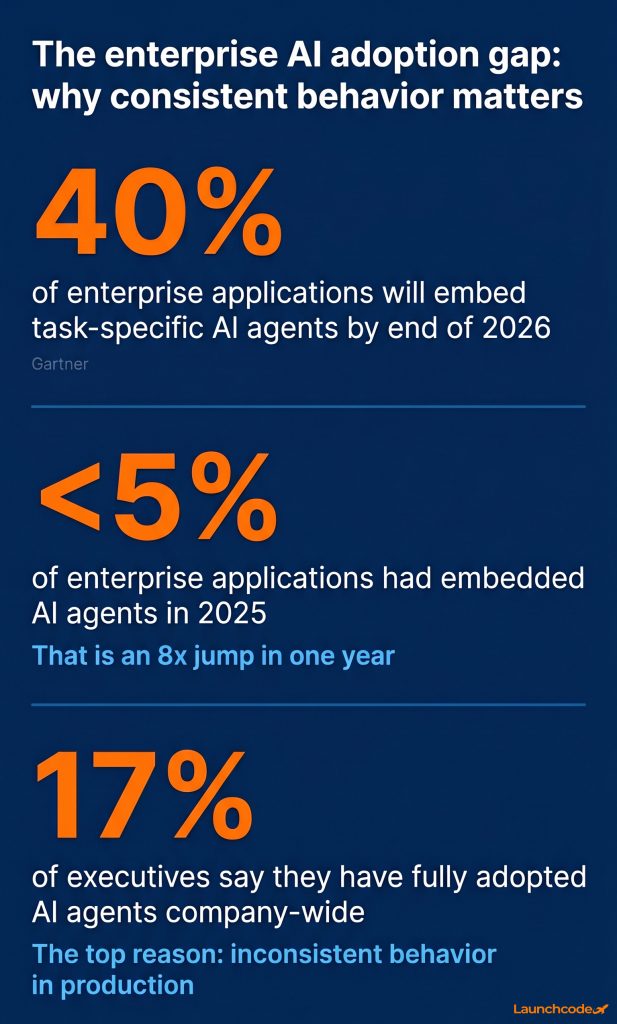
Only 17% of executives say they have fully adopted AI agents across their company. The most common reason is not capability, it is consistency. Agents that behave differently from session to session are hard to trust and harder to scale.
Anthropic launched skills on October 16, 2025, specifically to address inconsistent, ad hoc AI behavior in production environments. If the procedure is written into a skill, Claude follows it the same way every time.
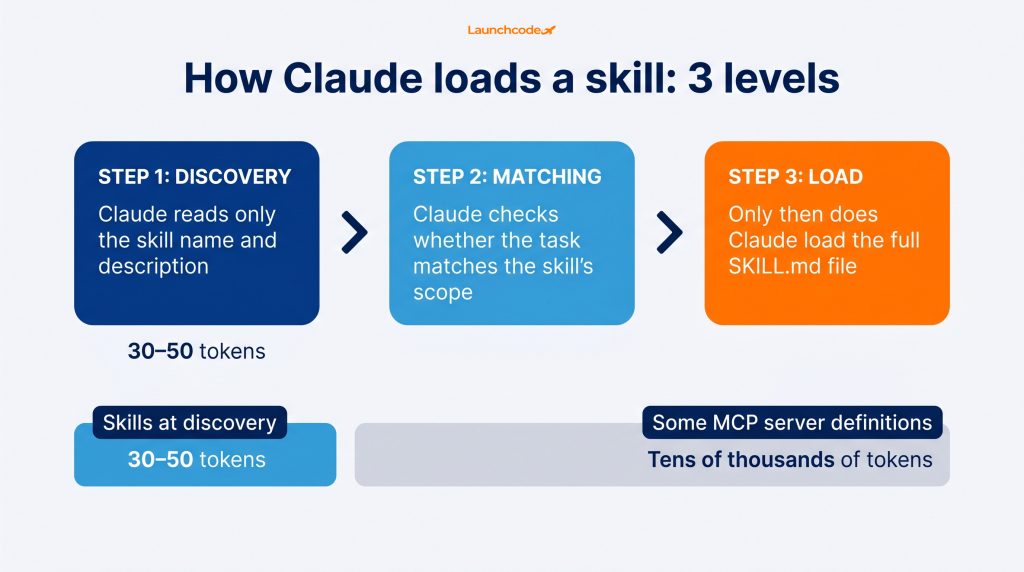
Claude reads skills using a three-level system called progressive disclosure. At startup, Claude sees only the name and description of every installed skill. It uses that information to decide which skills apply to the current task. Only then does it load the full SKILL.md file. This design keeps token use low and response speed high. Skills consume just 30 to 50 tokens at the discovery stage, compared to the tens of thousands of tokens some MCP server definitions require.
Every skill lives in a folder containing at minimum one file: SKILL.md. That file has two parts.
Here is what a minimal SKILL.md looks like for a brand writing workflow:
---
name: blog-style-enforcer
description: Applies brand writing rules to any blog draft the user submits
---

When the user submits a blog draft, apply the following rules:
- Use sentence case for all headings
- Remove em dashes and replace with commas or periods
- Use active voice throughout
- Flag any passive constructions for review
- Output the revised draft with a summary of changes madeClaude loads this file only when the task matches. A task about a blog draft triggers it. A task about a spreadsheet does not.
"Most people see SKILL.md and think it is just a fancy prompt. It is not. A well-built skill is closer to a trained process: explicit steps, defined outputs, and zero ambiguity about what Claude should do. That is what makes it reliable at scale." — Derick Do, Co-Founder and Chief Product Officer
Anthropic ships a built-in tool called the Skill Creator. It comes pre-installed in Claude Desktop and Claude Cowork. For Claude Code users, install it with /plugin install skill-creator@anthropic-agent-skills.
Once running, Skill Creator walks through an interactive Q&A. It asks what workflow you want to automate, who the audience is, what the output should look like, and what edge cases to handle. It then generates a complete skill folder with proper SKILL.md structure, frontmatter, and step-by-step instructions. No manual file writing or technical background required.
Anthropic ships four pre-built skills out of the box: docx for Word documents, pptx for PowerPoint presentations, xlsx for Excel spreadsheets, and pdf for PDF creation and form filling. These skills powered Claude's document creation features as early as September 2025, before the public launch, meaning millions of users were already relying on the Skills framework without knowing the system existed.
Pre-built skills are the fastest starting point. Enable Code Execution in your Claude settings, and these skills activate automatically when you ask Claude to create or edit the relevant document type. No installation, no configuration needed.
For teams that want to go further, Anthropic's Claude Directory lists partner-built skills from Atlassian, Figma, Canva, Stripe, Notion, Zapier, and others. The Directory includes over 200 connectors across three tabs: skills, connectors, and plugins.
Use pre-built skills when:
Build a custom skill when:
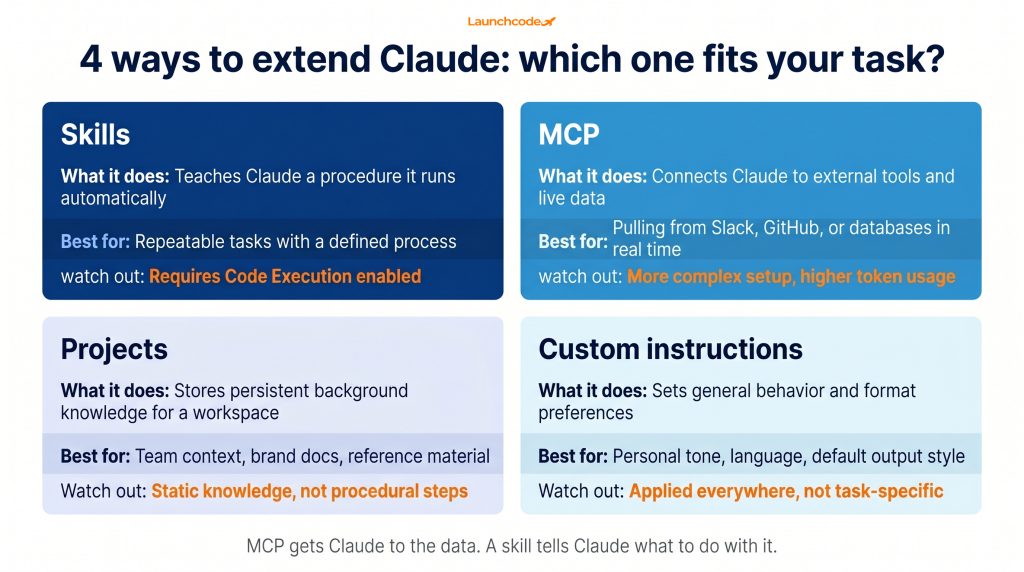
Claude offers four main ways to extend and customize its behavior. Each serves a different purpose. Skills handle repeatable procedures. MCP connects Claude to external tools and live data. Projects give Claude persistent background knowledge for a workspace. Custom instructions set general preferences for tone and format. Using the wrong tool for a task produces weaker results and wastes setup time.
| Feature | What it does | Best for | Watch out for |
|---|---|---|---|
| Skills | Teaches Claude a procedure it runs automatically | Repeatable tasks with a defined process | Requires Code Execution enabled |
| MCP | Connects Claude to external tools and live data | Pulling from Slack, GitHub, or databases in real time | More complex setup, higher token usage |
| Projects | Stores persistent background knowledge for a workspace | Team context, brand docs, reference material | Static knowledge, not procedural steps |
| Custom instructions | Sets general behavior and format preferences | Personal tone, language, default output style | Applied everywhere, not task-specific |
A useful mental model: MCP gets Claude to the data. A skill tells Claude what to do with it once it arrives. Projects give Claude the background to understand your context. Custom instructions set how Claude communicates by default.
These tools work well together. Connect Claude to your customer database via MCP, load your brand guide through a Project, and use a skill to run your monthly reporting workflow on that data in a consistent format.
Skills are available across all major Claude surfaces: claude.ai, Claude Code, and the Claude API. All plans can use skills, including the free plan. The pre-built document creation skills require Code Execution to be enabled. API users access skills via the skills container parameter in the Messages API, currently in beta.
Here is how access breaks down by surface:
For most business teams, claude.ai is the right starting surface. Claude Code is worth exploring for technical staff who manage AI workflows at scale or integrate Claude into engineering pipelines.
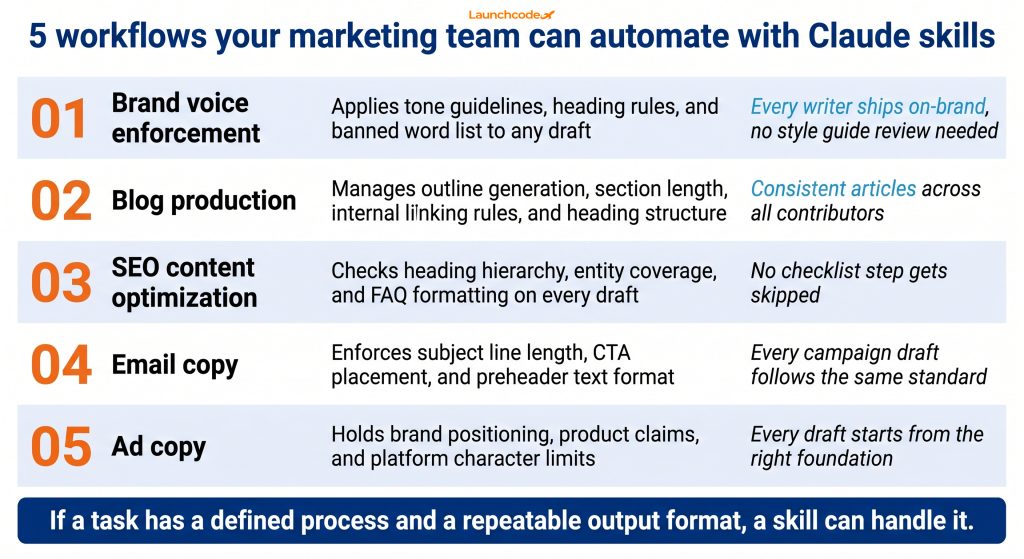
Skills translate directly into faster, more consistent marketing output. Brand voice enforcement, content pipeline automation, SEO content production, and email copy consistency are all strong candidates for skill-based workflows. If a task has a defined process and a repeatable output format, a skill can handle it without a human briefing Claude each session.
Concrete use cases for growth and marketing teams include:
At Launchcodex, we use a SKILL.md-based editorial workflow to produce client-ready blog content. The skill encodes a full checklist: sentence case headings, no em dashes, active voice, defined heading hierarchy, and internal linking rules. Every article runs through the same process without anyone re-explaining the standards.
"The first skill we built for content production cut our editorial review time in half. Writers stopped asking whether they had followed the style guide because the skill handled it automatically. That freed the team to focus on the actual thinking." — Tanner Medina, Co-Founder and Chief Growth Officer
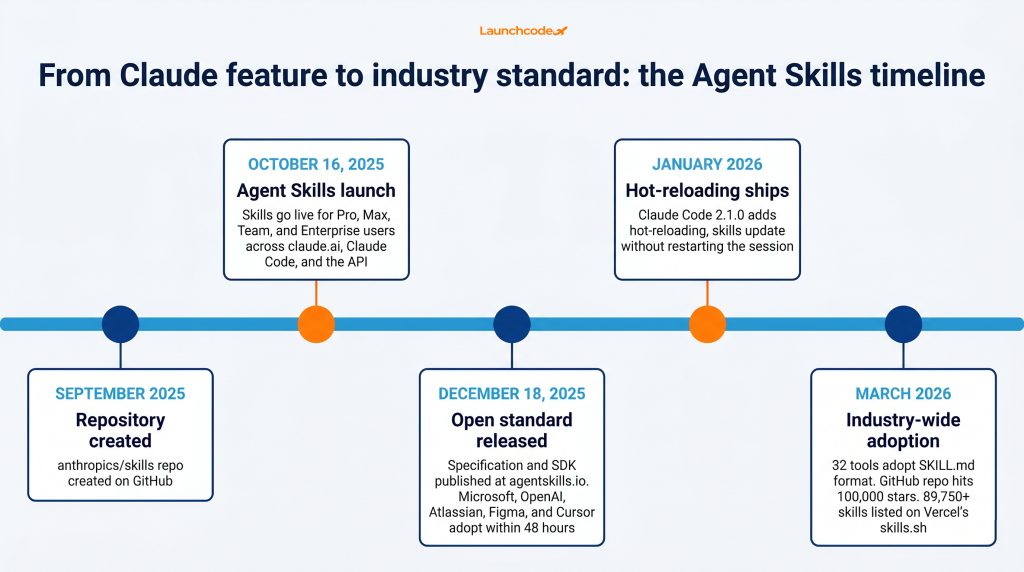
On December 18, 2025, Anthropic released the Agent Skills specification as an open standard at agentskills.io and donated governance to the Agentic AI Foundation (AAIF) under the Linux Foundation. Within 48 hours, Microsoft integrated it into VS Code via Copilot, and OpenAI added support to Codex CLI. By March 2026, 32 tools had adopted the SKILL.md format, including Google Gemini CLI, JetBrains Junie, AWS Kiro, Cursor, and GitHub Copilot.
The business implication is direct. A skill you build today for Claude is not locked into Claude. It travels across every tool that has adopted the standard.
Mahesh Murag, Anthropic's product manager who led the skills launch, told The New Stack the goal was to create skills that are shareable, portable, and accessible to any team regardless of which AI tools they use. Developer Simon Willison, who closely tracks AI tooling standards, called the specification a deliciously tiny spec that anyone can read in a few minutes. That simplicity drove fast adoption across competing platforms.
The Agent Skills open standard followed the same playbook Anthropic used with Model Context Protocol (MCP), which now has over 97 million monthly SDK downloads and 10,000+ active servers. The agentskills GitHub repository crossed 100,000 stars by March 2026. Vercel's skills.sh marketplace lists over 89,750 community-built skills as of the same period.
If your organization uses multiple AI tools, a shared skill library produces consistent behavior across all of them. Your brand voice skill runs the same way in Claude, Cursor, and GitHub Copilot. You write it once, update it in one place, and every tool benefits.
The open standard also reduces vendor risk. Your skills investment is portable. It does not disappear if your team moves to a different AI platform.
Skills represent a structural change in how teams work with AI. Ad hoc prompting produces ad hoc results. A team that stores workflows in a shared prompts doc is one personnel change away from losing its institutional AI knowledge entirely.
Skills make AI behavior repeatable, version-controlled, and shareable. They turn "how do we get Claude to do this again?" from a recurring question into a solved problem.
Gartner forecasts that 40% of enterprise applications will embed task-specific AI agents by the end of 2026, up from fewer than 5% in 2025. Skills are the operational layer that makes those agents consistent in production. João Moura, Founder and CEO of CrewAI, noted at the start of 2026 that enterprise adoption of agentic AI is accelerating faster than most anticipated. The teams pulling ahead are the ones who stop re-prompting and start building.
Start here. Find the workflow your team re-prompts most often. Write a skill for it using the Skill Creator. Enable it in Claude. Measure the time saved and the consistency gained over four weeks. That result tells you exactly where to build next.
A Claude skill is a folder containing a SKILL.md file with instructions that Claude loads automatically when a task matches the skill's description. Skills teach Claude how to handle specific, repeatable workflows without requiring re-prompting each session.
Anthropic launched Agent Skills on October 16, 2025. The Agent Skills open standard followed on December 18, 2025. Skills are now available on all Claude plans, including the free plan.
Skills package procedural knowledge: the step-by-step instructions for how to complete a task. MCP connects Claude to external tools and live data sources. Skills tell Claude what to do. MCP tells Claude where to get the data to do it. They are complementary tools, not competing ones.
No. Since December 2025, the Agent Skills specification has been an open standard. Skills built in the SKILL.md format work across more than 32 tools, including GitHub Copilot, Cursor, OpenAI Codex CLI, Google Gemini CLI, and VS Code.
No. Skills are available on all Claude plans, including free. The pre-built document creation skills for Word, Excel, PowerPoint, and PDF require Code Execution to be enabled, which is available across paid plans. Check your Claude settings to confirm what is active on your plan.
Use the Skill Creator, a pre-installed tool in Claude Desktop and Claude Cowork. Describe the workflow you want to automate, answer the interactive Q&A, and the Skill Creator generates a complete SKILL.md file. No coding required.
No. Skills teach Claude a procedure. Connectors give Claude OAuth-based access to third-party apps like Google Drive, Gmail, or Slack. Plugins bundle multiple skills, MCP configurations, and tools into a single installable package. All three live in the Claude Directory under separate tabs.




Claude skills are reusable instruction packages that teach Claude repeatable workflows. Learn what they are, what comes pre-...
Learn how to use Person, Article, Organization, and FAQPage schema to encode authorship, build entity authority, and improve...
Google's second broad core update of 2026 is rolling out now. Here is what it is, how to measure impact accurately in Search...