




Technical SEO audit: How to find and fix what is holding your site back
Learn how to run a technical SEO audit in 2026. Covers crawlability, Core Web Vitals, duplicate content, schema markup, AI c...





Your organic traffic does not always decline because of weak content or a thin backlink profile. More often, the problem is invisible. A noindex tag left on production after a site migration. A redirect chain slowly leaking authority. A robots.txt rule blocking the wrong folder. These are the failures a technical SEO audit is built to surface.
This guide covers every major category of a technical audit: what to check, which tools to use, how to prioritize what you find, and what a modern audit now includes that older guides miss, specifically AI crawler readiness, structured data for generative search, and a prioritization framework for teams with limited time and resources.
A technical SEO audit is a systematic check of the infrastructure that allows search engines to crawl, index, render, and understand your site. It does not examine content quality or backlinks. It focuses on the foundational layer that everything else depends on: whether the pages you want to rank can actually be found, loaded, and interpreted by search engines and AI systems.
Ready to grow your organic traffic?
Get a free SEO audit from the Launchcodex team.
According to the Semrush 2025 Website Health Benchmark Report, 72% of websites fail at least one critical technical SEO factor, directly impacting crawlability, indexation, and search visibility. That number makes technical problems the norm, not the exception.
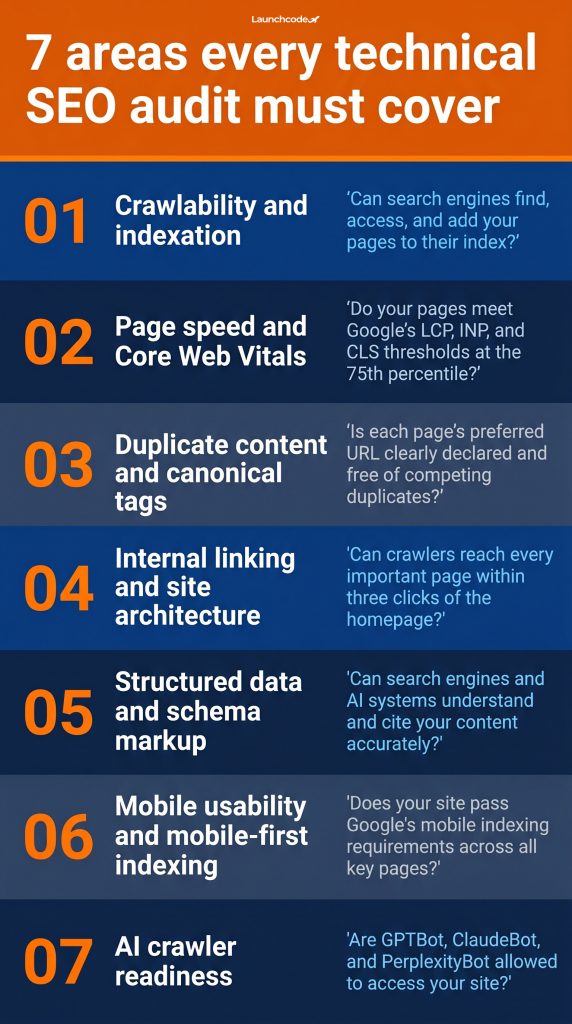
A full audit covers seven core areas:
Each area has its own failure modes and its own impact on rankings. The sections below walk through each one with the checks and fixes that matter most.
On-page SEO optimizes individual page content: keywords, headings, meta tags, and readability. Off-page SEO builds authority through backlinks and brand signals. Technical SEO handles the infrastructure beneath the surface: whether search engines can access, render, and interpret your pages in the first place.
All three layers matter. But technical problems sit at the bottom of the stack. A site with strong content and a solid backlink profile will underperform if its technical foundation has gaps. Fix the foundation first.
Sites change constantly. Pages get deleted. Redirects break. New templates ship without schema. A developer pushes a noindex tag to production by accident. A one-time audit captures a single moment. It does not protect the site from problems introduced after the audit closes.
Sites with frequent code changes or large page counts should crawl monthly. Smaller, stable sites can audit quarterly. Any major event, including a CMS migration, a redesign, or a significant URL restructure, should trigger an immediate full audit. Whatever the cadence, the audit needs an owner and a documented fix-and-verify cycle, not just a report that sits in a shared folder.
Crawlability is the foundation. If Googlebot cannot reach a page, no content quality or link building effort will make it rank. Start every audit by crawling the site with a dedicated tool and checking the indexation report in Google Search Console. Pages that are blocked, excluded, or returning errors are not optimization problems. They are visibility failures.
Google's Search Advocate John Mueller has stated: "Crawl budget is a finite resource and you need to use it wisely." For large sites with thousands of URLs, that constraint determines which pages rank and which remain invisible.
"Most sites we audit have at least one high-severity issue that was introduced silently during a routine site update. The crawl always finds it. The question is whether anyone was looking before rankings started dropping." Tanner Medina, Co-Founder & Chief Growth Officer
Compare the number of pages in your XML sitemap against the number Google has indexed. In Search Console, go to Sitemaps and note the submitted versus indexed count. A large gap signals one of three problems: pages are being blocked, pages are being devalued, or the sitemap includes URLs it should not.
Mueller has also noted that if a site is technically sound yet barely indexed, it often signals that Google is not convinced of the site's overall merit. A clean crawl path is necessary, but thin or low-quality pages can suppress indexation even when no technical blocks exist.
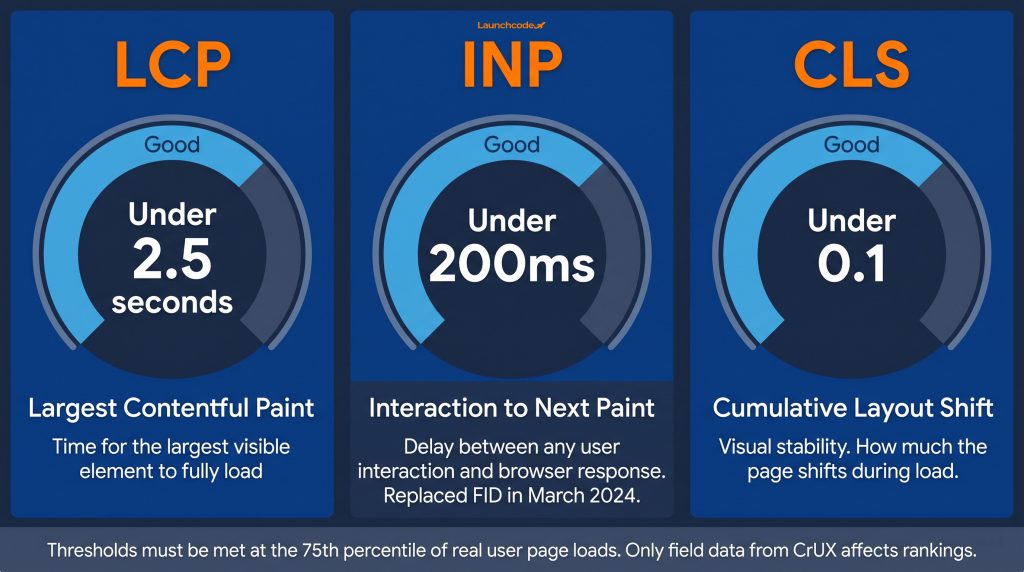
Core Web Vitals are Google's three user experience metrics: LCP (loading speed), INP (interactivity), and CLS (visual stability). They are confirmed ranking signals, accounting for approximately 10-15% of Google's ranking algorithm according to 2025 industry research. INP replaced First Input Delay in March 2024 and is more demanding than its predecessor. Sites that have not revisited their performance stack since 2023 may be failing the new interactivity threshold without knowing it.
Current "Good" thresholds for Core Web Vitals:
| Metric | What it measures | Good threshold |
|---|---|---|
| LCP | Time for the largest visible content element to load | Under 2.5 seconds |
| INP | Delay between any user interaction and browser response | Under 200 milliseconds |
| CLS | Visual stability during page load | Under 0.1 |
These thresholds must be met at the 75th percentile of real page loads, not in a lab environment.
Only field data from real users affects your rankings. Lighthouse scores and PageSpeed Insights lab data are useful for diagnosing specific issues, but Google uses the Chrome UX Report (CrUX) dataset for ranking signals. In PageSpeed Insights, scroll past the lab scores to the field data section. In Search Console, check the Core Web Vitals report. If the field data shows "Poor" or "Needs Improvement," that is the number affecting your position in search results.
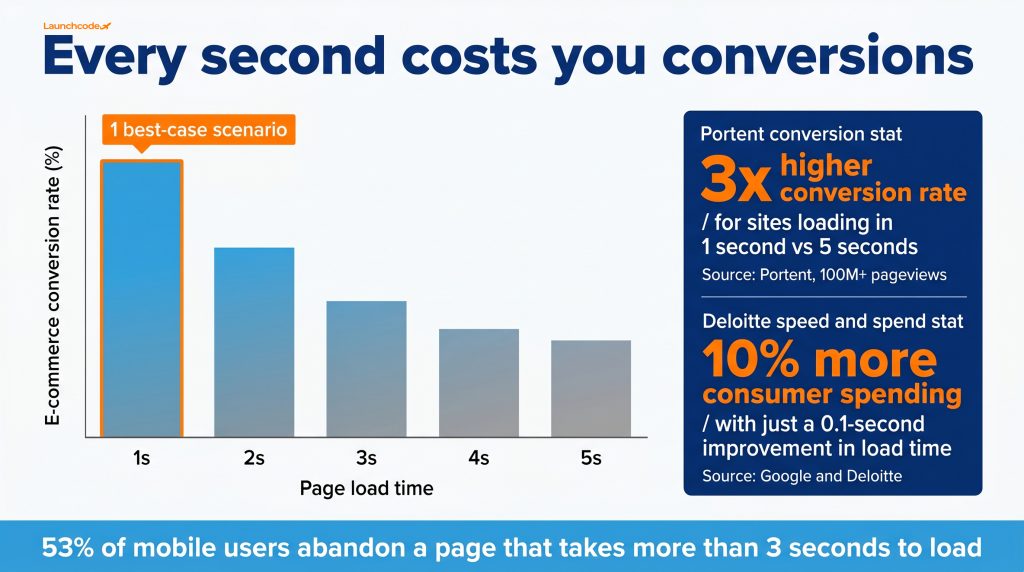
The Google and Deloitte "Milliseconds Make Millions" study found that a 0.1-second improvement in load time caused retail consumers to spend approximately 10% more. For lead generation sites, even a marginal improvement increased page engagement measurably.
Portent's analysis of over 100 million pageviews found that e-commerce sites loading in one second have conversion rates 3x higher than sites loading in five seconds. On mobile, 53% of users abandon a page that takes more than three seconds to load according to Google's mobile performance research. The gap between fast and slow is not a ranking technicality. It is a revenue problem.
LCP failures:
INP failures:
CLS failures:
Fix the highest-impact LCP and INP failures first. They carry the most ranking weight and have clearer remediation paths than CLS for most sites.
Duplicate content does not usually mean copied text. It most often means the same page is reachable at multiple URLs: with and without a trailing slash, over HTTP and HTTPS, with session parameters, or through faceted navigation variants. Google estimates 25-30% of all web content is duplicate, and most of it is accidental. When search engines cannot identify the preferred version, they split ranking signals across every duplicate, weakening all of them.
As of the 2026 Web Almanac, nearly 33% of pages across the web are still missing proper canonical tag implementation. That gap is a genuine competitive opportunity for any site that closes it.
A canonical tag sits in the <head> of a page and tells search engines which URL to treat as the preferred version. The format is:
<link rel="canonical" href="https://example.com/preferred-page" />
Self-referencing canonicals on every page are a baseline best practice. They prevent search engines from guessing the preferred variant when parameters or session IDs are appended to URLs.
Common canonical failures:
Sites with properly configured canonical tags see a 15-25% improvement in crawl efficiency according to Botify research. In documented cases, fixing canonical errors led to 30%+ increases in organic traffic within two to three months.
Screaming Frog and Ahrefs both surface duplicate page titles, duplicate meta descriptions, and near-duplicate body content. Filter first for pages with identical or very similar title tags. That is the fastest signal of a systemic canonicalization problem across page templates.
In Google Search Console, review the Pages report for entries labeled "Duplicate without user-selected canonical." That status means Google found duplicate pages but you have not told it which version to prefer.
E-commerce sites with filtering and sorting generate URL variants automatically. A product listing for "running shoes" can produce dozens of parameterized URLs: sorted by price, by size, by rating, by color. Each is technically a unique URL. Without canonical tags or parameter handling configured in Search Console, each becomes a potential duplicate competing with the original category page.
Canonicalize all filtered URL variants back to the root category page. For high-volume parameter scenarios, disallow parameter-only URLs in robots.txt to prevent them from consuming crawl budget on pages with no ranking value.
Internal links do two things: they route users to related content, and they distribute PageRank across the site. Pages with no internal links pointing to them are called orphan pages. They receive no authority from the rest of the site and are often missed by crawlers that follow links rather than relying solely on the sitemap. Every important page needs at least one internal link from a relevant, indexed page.
One audit documented over 300 orphan pages on a single site, including high-value service pages the client wondered why were not ranking. The pages had strong content and external backlinks. They had no internal links. That pattern comes up in nearly every crawl.
In Screaming Frog, crawl the site by following links, then compare the output against your XML sitemap. Any URL in the sitemap that did not appear in the link-follow crawl is an orphan candidate.
In Ahrefs Site Audit, the Orphan Pages report surfaces pages present in the sitemap but receiving zero internal links from crawled content.
Once you have the list:
Every important page should be reachable within three clicks of the homepage. Pages buried four or five levels deep receive less crawl priority and less PageRank flow, even when the content is strong.
Restructuring internal linking at CareerFoundry, surfacing high-value course pages closer to the homepage, improved crawl frequency for previously orphaned content within the first re-crawl cycle. Over four years, their organic traffic grew from 1.56 million to 6.89 million visits, partly driven by that architecture work.
Schema markup is machine-readable code that communicates the meaning of your content to search engines and AI systems. It powers rich results in traditional search and signals to AI systems whether your content is citable and authoritative. A page without schema forces search engines and AI crawlers to infer meaning from prose alone. That is a disadvantage in both channels.
Microsoft Bing's principal product manager Fabrice Canel confirmed in March 2025 that schema markup helps large language models understand content for Copilot. The Google Search team stated in April 2025 that structured data gives a search advantage. Machine-first web optimization consultant Slobodan Manic puts it clearly: schema markup used to be about rich results, and now it is also about whether AI systems can understand your content well enough to cite it.
| Schema type | What it signals | Who needs it |
|---|---|---|
| Article | Editorial content with author and date | Blogs, news, editorial pages |
| Organization | Brand identity, URL, logo, contact | Every website |
| LocalBusiness | Location, hours, services | Local and multi-location businesses |
| FAQPage | Q&A content for SERP expansion | Any page with a FAQ section |
| Product | Price, availability, rating | E-commerce product pages |
| BreadcrumbList | Site hierarchy for SERP URL display | Sites with category structure |
| Person | Author identity and credentials | Blogs with named contributors |
Use the Google Rich Results Test to validate schema on individual pages. For site-wide coverage, check the Enhancements report in Google Search Console. It shows which schema types Google has detected and flags errors by page type.
Common schema errors:
Research from Princeton, Georgia Tech, the Allen Institute for AI, and IIT Delhi, presented as the GEO paper at ACM KDD 2024, found that adding statistics to content improved AI search visibility by 41%. Structured data contributes directly to data density by giving AI systems machine-readable facts rather than requiring them to extract meaning from unstructured prose.
Treat schema as an AI readiness check, not only a rich result exercise. If it is missing or broken, your content is harder for AI systems to cite accurately.
Google uses the mobile version of your site for crawling, indexing, and ranking across all devices. That has been the default since 2019. A site that renders correctly on desktop but fails on mobile loses rankings everywhere, not just on phones. Mobile usability is the primary indexing environment.
Check Google Search Console under "Mobile Usability" for flagged issues. Common failures include:
Mobile devices are where Core Web Vitals failures tend to be most severe. Slower processors and variable network conditions amplify every performance issue. An LCP of 2.0 seconds on desktop may measure 4.5 seconds on a mid-range Android device on a mobile network.
Test Core Web Vitals using real field data segmented by device type in PageSpeed Insights. If desktop passes and mobile fails, the mobile score is the one affecting rankings. Fix mobile-specific performance issues before moving to desktop-only optimizations.
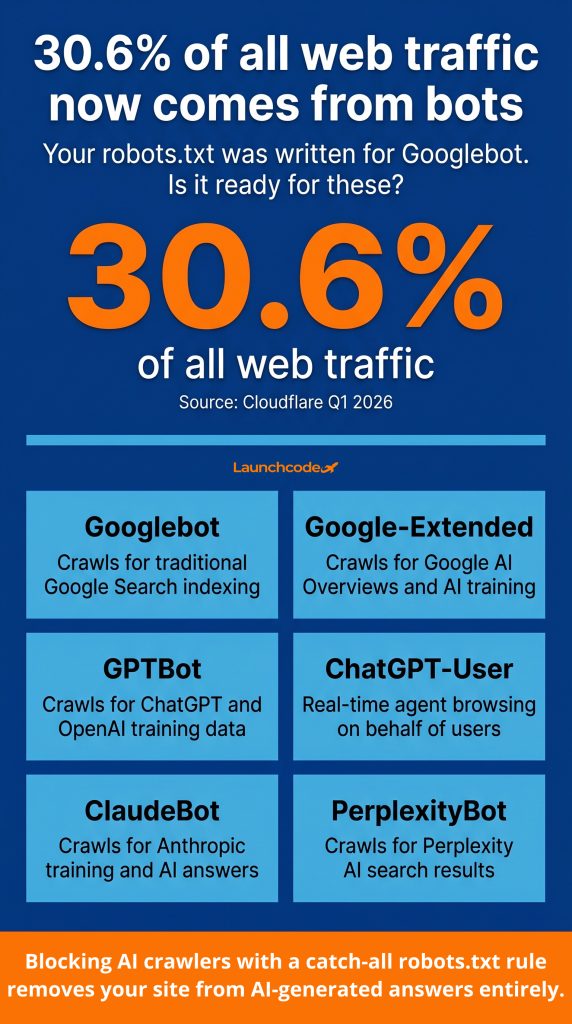
As of Q1 2026, 30.6% of all web traffic comes from bots according to Cloudflare's network analysis. AI crawlers and user-triggered agents make up a growing share of that traffic. GPTBot, ClaudeBot, PerplexityBot, Google-Extended, and agents that browse on behalf of real users now crawl sites separately from Googlebot. A technical audit that only checks Googlebot access is incomplete. Sites that accidentally block AI crawlers are invisible in AI-generated answers.
Most audit checklists published before 2026 do not address this. Most audit tools do not surface it yet.
"Robots.txt files written in 2020 were not written with GPTBot or PerplexityBot in mind. Most sites are blocking AI crawlers without realizing it. That is a visibility gap that compounds the longer it goes unfixed." Derick Do, Co-Founder & Chief Product Officer
Open your robots.txt file and review which user agents are disallowed. A common misconfiguration is a catch-all disallow rule aimed at blocking scrapers that also stops every AI crawler:
User-agent: * Disallow: /
That rule blocks everything, including every AI agent. Use specific directives instead:
User-agent: GPTBot Allow: /
User-agent: ClaudeBot Allow: /
User-agent: PerplexityBot Allow: /
User-agent: Google-Extended Allow: /If you have legitimate reasons to restrict a specific agent, such as content licensing or data agreement constraints, restrict that agent explicitly. Do not use a catch-all that inadvertently removes your content from AI search results.
Schema markup serves AI systems by providing structured, machine-readable facts about your content. An article with clear author markup, defined organization schema, and semantic entity relationships gives AI systems what they need to attribute and cite content accurately.
Without schema, an AI crawler reads your page as raw prose and makes its own inferences. Those inferences may not favor your content, especially on competitive topics where other sites provide cleaner structured signals.
This is central to how Launchcodex approaches GEO: technical infrastructure and content structure are treated as inseparable inputs to AI search visibility, not separate workstreams.
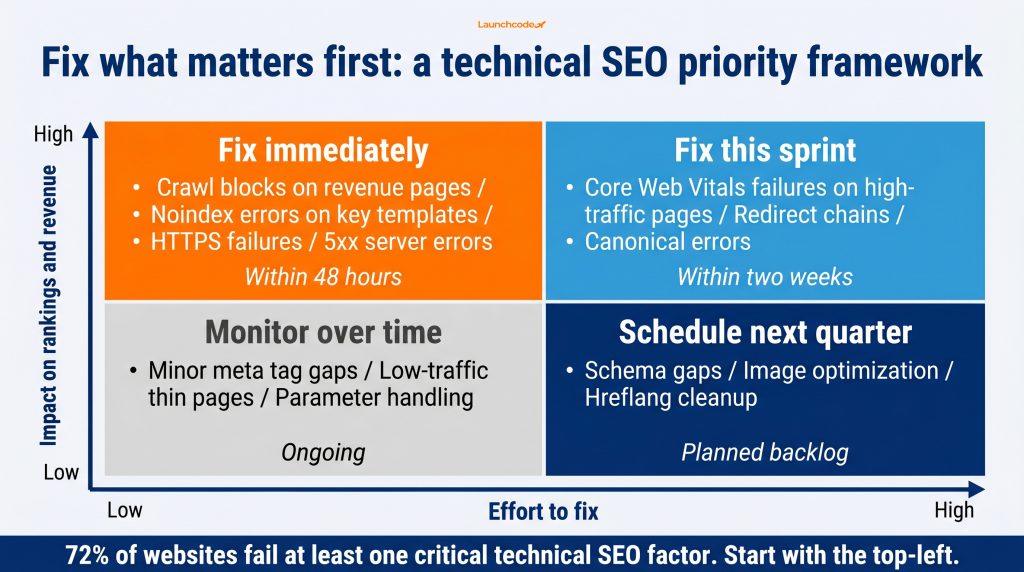
Not every technical issue carries the same weight. A crawl block on your top landing page requires immediate action. A missing meta description on a page with zero traffic does not. Prioritizing by business impact rather than issue count is what separates an audit that drives revenue from a report that keeps developers occupied without moving rankings.
Use a two-axis framework: impact on organic visibility against effort required to fix.
| Priority | Issue type | Timeline |
|---|---|---|
| Fix immediately | Crawl blocks, noindex errors on revenue pages, HTTPS failures, 5xx server errors | Within 48 hours |
| Fix this sprint | Core Web Vitals failures on high-traffic pages, redirect chains, canonical errors on key templates | Within two weeks |
| Schedule next quarter | Schema gaps, image optimization, CLS on secondary pages, hreflang cleanup | Planned backlog |
| Monitor over time | Minor meta tag gaps, low-traffic thin pages, parameter handling edge cases | Ongoing |
The key variable is page value. A Core Web Vitals failure on a page generating 15 leads per month outranks a broken internal link on a three-year-old blog post.
Fixing an issue without verifying the fix is a common failure mode in technical SEO work. After each batch of changes, re-crawl the affected URLs and recheck Search Console. Some fixes take two to four weeks to reflect in coverage data, especially for indexation changes. Set a calendar reminder to verify the Pages report four weeks after each fix batch closes.
Aleyda Solis, founder of the SEO consultancy Orainti, notes that to carry out recommendations that are actually impactful and make sense from a business standpoint, you need to understand the website's context beyond the technicalities the audit identifies. Prioritization requires knowing which pages drive revenue, which ones are in active development, and which platform constraints limit what can be fixed and when.
| Stage | Tool | Cost |
|---|---|---|
| Crawl and indexation | Google Search Console | Free |
| Link-follow crawl | Screaming Frog SEO Spider | Free up to 500 URLs, paid beyond |
| Performance data | PageSpeed Insights | Free |
| Comprehensive crawl | Ahrefs Site Audit or Semrush Site Audit | Paid |
| Schema validation | Google Rich Results Test | Free |
| Bot access review | Server logs or Cloudflare dashboard | Varies |
Most audits can begin with free tools. Google Search Console and PageSpeed Insights surface the highest-impact issues on most sites before any paid tool is required.
Running the audit is the beginning, not the outcome. The value comes from systematic fixes, verified over time, stacked across multiple issue types. A fitness platform called Future.co grew its ranking keywords from 887 to 2,802, a 216% increase, in eight months after a technical SEO audit. That result came from addressing multiple issue types in sequence, not a single fix.
Technical improvements compound. Cleaned-up canonical structure, combined with faster page load times and stronger internal linking, produces ranking gains that no individual fix would have achieved on its own.
If your organic performance has stalled and you suspect technical problems are the cause, the next step is a structured crawl followed by a prioritized fix plan. Most sites have at least one high-impact issue that can be resolved within two weeks. That is where measurable recovery begins.
A technical SEO audit is a systematic check of a website's infrastructure to find problems that prevent search engines from crawling, indexing, and ranking its pages. It covers crawlability, page speed, duplicate content, internal linking, structured data, mobile usability, and AI crawler access.
Sites with frequent code changes or large page counts should audit monthly. Smaller, stable sites can audit quarterly. Any major change, including a site migration, redesign, or CMS switch, should trigger an immediate audit.
Start with Google Search Console and PageSpeed Insights, both free. For a deeper crawl, Screaming Frog is the industry standard for sites up to 500 URLs at no cost. Ahrefs Site Audit and Semrush Site Audit provide scheduled crawls and issue tracking for larger sites.
Yes. Google confirmed Core Web Vitals as ranking signals as part of the Page Experience update. Industry research in 2025 estimates they account for 10-15% of ranking signals. Sites meeting all three thresholds, LCP, INP, and CLS, have a measurable advantage in competitive search results.
INP stands for Interaction to Next Paint. It replaced First Input Delay as Google's interactivity metric in March 2024. It measures how quickly a page visually responds to any user interaction, not just the first one. The good threshold is under 200 milliseconds. Sites optimized for FID may still fail INP because the two metrics measure different aspects of responsiveness.
In most cases, yes. Blocking GPTBot, ClaudeBot, and PerplexityBot removes your content from consideration for AI-generated answers. If you want visibility in ChatGPT, Perplexity, Google AI Overviews, and similar tools, your robots.txt should explicitly allow those agents.
A canonical tag tells search engines which URL is the preferred version of a page. It prevents duplicate content issues from URL variants created by parameters, session IDs, trailing slashes, or filtering systems. Nearly 33% of web pages still lack proper canonical implementation, making this one of the most impactful fixes available to most sites.




Learn how to run a technical SEO audit in 2026. Covers crawlability, Core Web Vitals, duplicate content, schema markup, AI c...
See how ChatGPT, Perplexity, Gemini, and Claude choose which pages to cite, backed by data from Pew, Ahrefs, and Princeton, ...
Google's new Search Console platform properties let you track how your TikTok, Instagram, X, and YouTube content performs in...