


Higher education lead generation: A complete guide to pay-per-lead strategies
Pay-per-lead costs $140 to $200 in higher ed and half of purchased leads never respond. Learn to vet vendors, meet TCPA requ...





Most small business owners hear that AI can save them money, but the advice they get is vague. They see lists of tools instead of clear steps, and it is hard to know where AI actually cuts costs rather than adding another subscription.
This article focuses on the practical side. You will see where AI creates real savings in a small business, how to pick first projects on a limited budget, how to measure the impact, and how to avoid common traps like tool sprawl. The goal is a simple, realistic plan you can execute in the next 90 days.
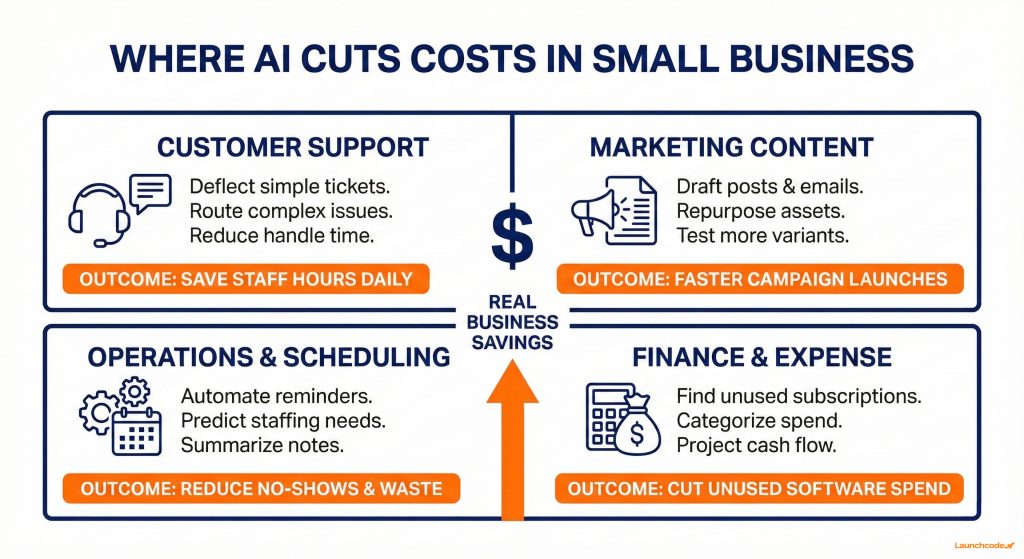
AI cuts costs fastest when it replaces repeat manual work in support, marketing, and back office tasks, and when it helps teams make better decisions with the same or smaller budget. The biggest savings come from deflecting simple customer questions, speeding up content and admin work, and catching waste in software and operations, not from cutting full roles on day one.
Ready to grow your organic traffic?
Get a free SEO audit from the Launchcodex team.
Most research points to the same pattern. Surveys from the U.S. Chamber of Commerce, OECD, and the U.S. Small Business Administration show that small firms use AI to improve employee performance, save on costs, and stay competitive, often without shrinking their workforce. Many owners spend around two thousand dollars a year on AI tools and report saving far more than that in time and direct expenses. The key is to focus AI on specific workflows instead of asking it to solve everything at once.
AI-powered chat and help desk tools can handle common questions about hours, policies, and order status, then route complex issues to humans.
For example, a local service business that receives 300 basic tickets per month could deflect even half of those to a chatbot and save several hours of staff time. Tools such as Tidio, Intercom, or AI agents connected to your CRM can support this. When paired with clear rules and escalation paths, you cut handling time without sacrificing customer experience.
Generative AI is now the most used type of AI among small and medium-sized firms and is often the first place they see savings.
A simple workflow is to use ChatGPT or Gemini for first drafts, then apply your brand voice and approvals. If you send a weekly newsletter and two campaigns per month, AI can reduce writing and formatting time by several hours per week. A structured process like the ones in Launchcodex AI content frameworks keeps quality high while reducing cost per asset. You can also connect AI content workflows to insights from guides like your local AI SEO playbook to align content with search demand.
AI can support scheduling, routing, and basic operations planning.
If a clinic, gym, or studio reduces no-show rates by a small percentage through better reminders and follow-ups, the revenue impact can be meaningful. AI-infused booking platforms and simple agents that read your calendar and send reminders are good starting points.
AI-supported finance tools help you catch waste you would normally ignore.
Xero and similar platforms highlight that small businesses using AI report saving tens of thousands of dollars annually in some cases. At a smaller scale, even finding two unused software subscriptions per year can pay for your AI spend.
The best first AI projects are low-risk workflows that already cost you time every week and do not touch sensitive data. Aim for one to three projects where you can save a clear number of hours per month or remove a visible cost, using tools that fit into your current stack.
Most owners do not need a custom AI platform in year one. They need a shortlist of use cases that align with their goals, a small budget, and a way to test quickly. Surveys show the median spend on AI tools among small businesses is about $1,800 per year, which can fund a handful of high-value tools if you avoid overlap.
“When we pick first AI projects, we start with work people already do every day and give them a faster path. Savings show up quickly when the tasks are real and easy to measure.”
Brittany Charles, SVP, Client Services
This aligns with how AI adoption spreads in research. Small firms that start with a few targeted use cases and clear metrics tend to invest more in AI later and report stronger performance gains.
Resources such as your own AI automation services page or a guide on AI workflows for scaling marketing can give you deeper examples across marketing and operations.
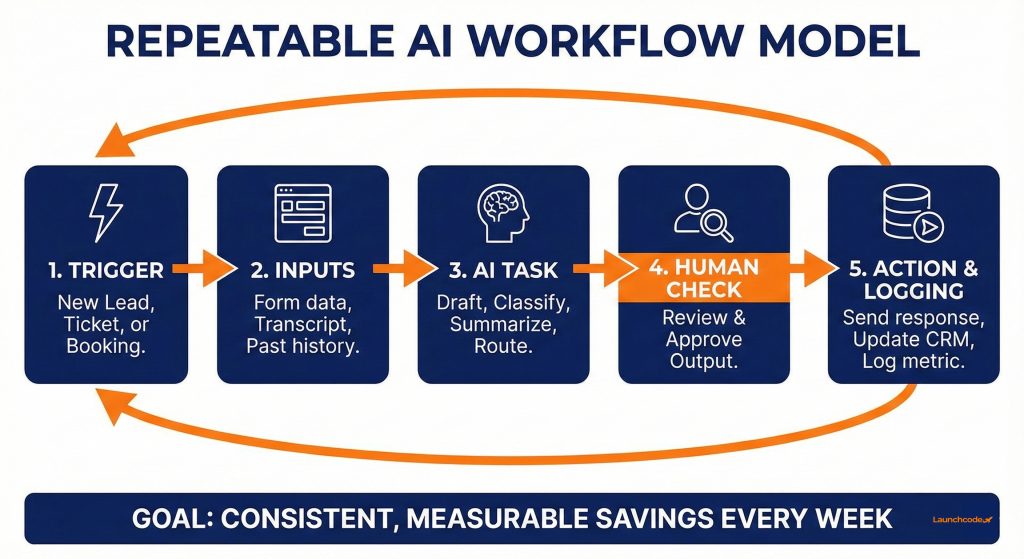
AI only delivers reliable cost savings when you wrap it in clear workflows and automations that run every week. Prompts alone can speed up tasks for individuals, but connected workflows using AI, triggers, and your tools are what cut measurable cost.
Many small businesses stall at the experiment stage. A few employees use AI chat for ad copy or documents, but nothing is formalised. That keeps learning informal and makes measurement difficult. You want to move from single prompts to structured workflows with triggers, steps, and outcomes.
“The wins compound when AI is part of the system. Once the workflow runs on its own, the savings repeat every week.”
Derick Do, Co Founder and Chief Product Officer
This structure works well across marketing, support, and operations. For instance, a ticket tagging workflow might trigger when a support email arrives, use AI to label the issue and detect sentiment, route to the right queue, and log metrics for future analysis.
You do not need a complex tech stack to start. You can use:
Teams with more ambition can layer AI agents into these flows. Launchcodex, for example, often connects AI agents to data sources and ticketing tools for clients so they can handle more of the process while humans focus on exceptions.
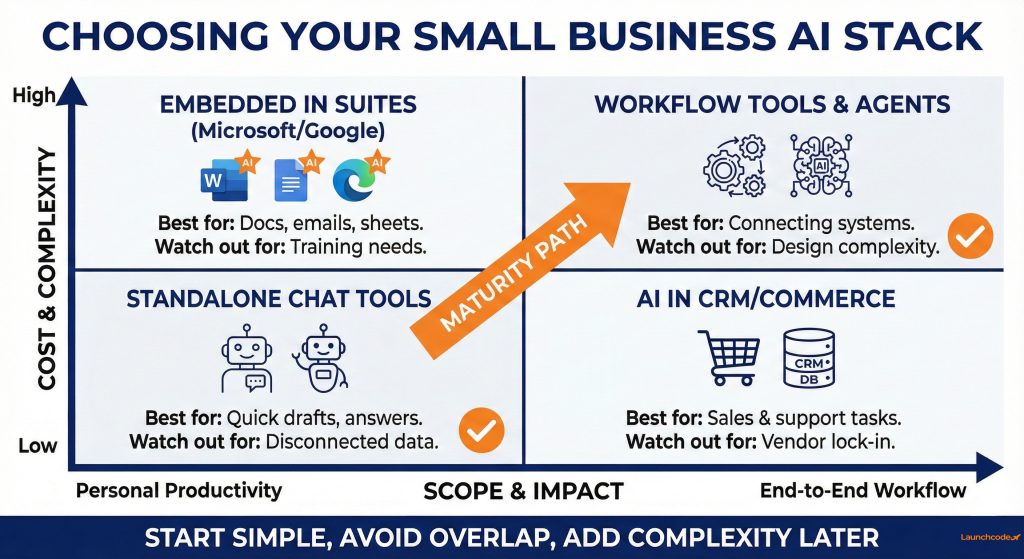
The right AI stack for a small business is a short list of tools that integrate with your existing systems and do not overlap in function. You want a clear core assistant, AI features in your primary platforms, and one or two workflow tools, not ten separate subscriptions that each solve a small problem.
Research shows that many small businesses already invest in multiple tools and risk paying for overlapping capabilities. To avoid this, map tools to functions, start with free or low-tier plans, and set a simple quarterly review schedule.
| Option | Who it fits | Cost impact | Watch out for |
|---|---|---|---|
| Standalone AI chat tools | Owners and small teams | Low entry cost, strong productivity lift | Harder to connect to data and workflows |
| Embedded AI in suites | Teams on Microsoft 365 or Google | Broad impact across email, docs, and sheets | Requires adoption and training |
| AI features in CRM or ecommerce | Sales, support, and ecommerce teams | Cuts time in campaigns, deals, and support | Vendor lock-in and limited flexibility |
| Workflow tools with AI | Growing teams with many tools | Biggest cost savings from end-to-end flows | Needs clear design and ongoing ownership |
| AI agents connected to systems | Ambitious teams with clear processes | Can reshape whole workflows and costs | Higher setup complexity and governance |
The best path is usually to start with AI you already pay for inside core tools, then add targeted solutions. For example, use Microsoft Copilot or Google Gemini for office work, AI features in your CRM for sales and support, and one workflow tool such as Zapier or Make to connect systems. When you reach the limit of those tools, you can explore more advanced agents or custom setups.
As you build this stack, you can learn from resources focused on AI automation for marketing teams and from comparisons of AI platforms such as Gemini gems versus custom GPTs. These help you align tool choices with your existing environment and risk profile.
You should measure AI cost savings with a simple scorecard that tracks time saved, spend reduced, and outcome impact for each workflow. Without measurement, it is difficult to know if a tool or automation is worth the subscription.
Many surveys highlight that leaders keep investing in AI when they can see clear profit impact. This starts with basic metrics that you can track in a spreadsheet or dashboard, not a complex data warehouse.
For each workflow, track:
You can then calculate:
Even conservative numbers matter. If AI cuts five hours per week of manual work and your blended hourly cost is modest, the annual savings can cover several subscriptions.
To keep measurements consistent, you can use a simple dashboard structure like the ones you might already use for SEO and GEO reporting or local AI SEO performance. The point is not perfect attribution. The point is a clear view of whether each AI workflow is paying for itself.
AI can increase costs if you buy tools without a plan, skip governance, or ignore training. The most common mistakes are tool sprawl, unmanaged data risk, and workflows that depend on one person who eventually leaves.
Research on small business AI adoption notes that fears around cybersecurity, bias, and skills gaps are major barriers. Addressing these up front keeps your program safe and avoids expensive rework later.
You do not need an enterprise-scale policy. A simple, clear set of rules is enough to start.
Frameworks such as the NIST AI Risk Management Framework can guide this at a high level, but you do not need to reference them directly in your day-to-day work. What matters is that someone owns AI adoption and safety.
A simple 90-day plan helps you move from reading about AI to running a few cost-saving workflows in production. Break the work into three sprints and treat this like any other business project.
This plan assumes limited budget and time, which is reality for most small businesses. You can adjust the scale based on your team size and urgency.
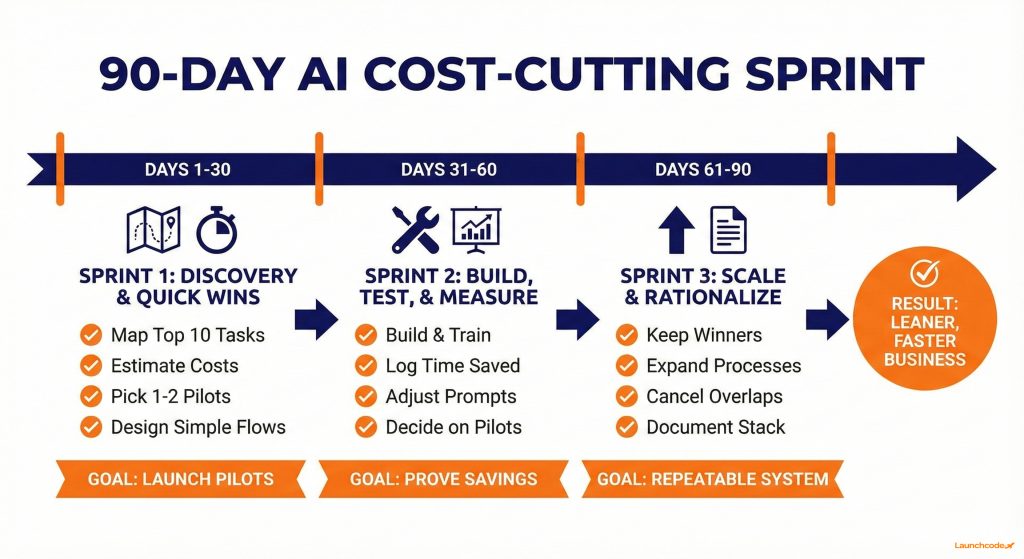
Focus on things like email drafting, support triage, or basic reporting. Use existing AI features inside your tools where possible.
This is where you can draw on external guidance and internal frameworks. For example, an agency like Launchcodex might use a repeatable AI audit structure to score workflows and refine them, and you can mirror that approach in a lightweight form.
By the end of 90 days, you should have a handful of AI-powered workflows that run reliably, a clearer picture of your AI stack, and a list of next bets. From there, you can decide whether to invest in deeper automation, such as AI agents connected to your CRM or help desk, or to stabilise and optimise what you already built.
AI should make your small business leaner. The fastest gains come from fixing specific workflows in support, marketing, operations, and finance, then turning those improvements into repeatable systems with clear owners and metrics. You do not need dozens of tools or a huge budget. You need a shortlist of high-impact use cases, a simple stack that fits your current systems, and a rhythm for building and reviewing workflows.
If you want outside support, look for partners who talk in terms of workflows, baselines, and outcomes, not only tools. An AI automation and systems design team should help you map your processes, choose a focused stack, and set up dashboards so you can see saved time, reduced spend, and improved outcomes in one place. Whether you build this alone or with a partner, the next step is to pick your first workflow and start the 90-day plan.
Start with one or two repetitive tasks that already cost you time every week, such as support replies or basic reporting. Use AI inside tools you already own, like your email platform or office suite, and set a simple goal such as saving a few hours per week. Keep a human review step in the process until you trust the outputs.
Many small businesses invest around 1,500 to 2,000 dollars per year in AI tools. You can start with less by using free tiers and built-in features inside platforms you already pay for. The key is to track hours and expenses saved so you can see when it makes sense to upgrade or add a new tool.
Yes. Most small firms that adopt AI report productivity and cost savings without shrinking their teams. AI handles low-value, repetitive work so people can focus on higher-value tasks such as sales, client service, and product improvement. You can measure this by tracking how staff time shifts from admin work to revenue-producing activities.
Create a short list of functions you care about, such as support, marketing, and finance, then pick one main tool for each. Document what each tool does and review your stack every quarter to cancel overlap. Whenever you consider a new tool, ask which subscription it could replace and how you will measure its impact.
Look for a partner who starts with your workflows and numbers, not only with tool recommendations. They should map your processes, build a simple AI roadmap, and help you design automations with clear metrics. Resources such as an AI automation service overview or performance-focused case studies can help you understand what good support looks like.



Pay-per-lead costs $140 to $200 in higher ed and half of purchased leads never respond. Learn to vet vendors, meet TCPA requ...
Google banned demographic targeting for finance campaigns. Meta made Special Ad Categories mandatory. Here is what still wor...
GEO, AEO, RAG, AI Overviews, zero-click search, this glossary defines 25 core AI SEO terms in plain English, with real data ...