

How to optimize your Google Business Profile for maximum visibility
Learn which Google Business Profile fields actually rank in 2026, which ones to skip, and how to win the map pack and AI sea...





Topical maps make your SEO program predictable. They show how queries, pages, and business outcomes connect across a subject, so you can ship the right pillars and spokes, fix internal links, and measure authority by cluster. You do not need new tools to build one. GA4 and Google Search Console have the data. This guide shows how to pull it, join it, and turn it into a working map in Google Sheets.
A topical map is a structured view of a subject, the pages that cover it, and the demand signals behind those pages. It links three things.
When you map topics at this level, you can prioritize work that grows authority, not just individual rankings. You also create a reliable input for GEO, since entity names and relationships become explicit.
Ready to grow your organic traffic?
Get a free SEO audit from the Launchcodex team.
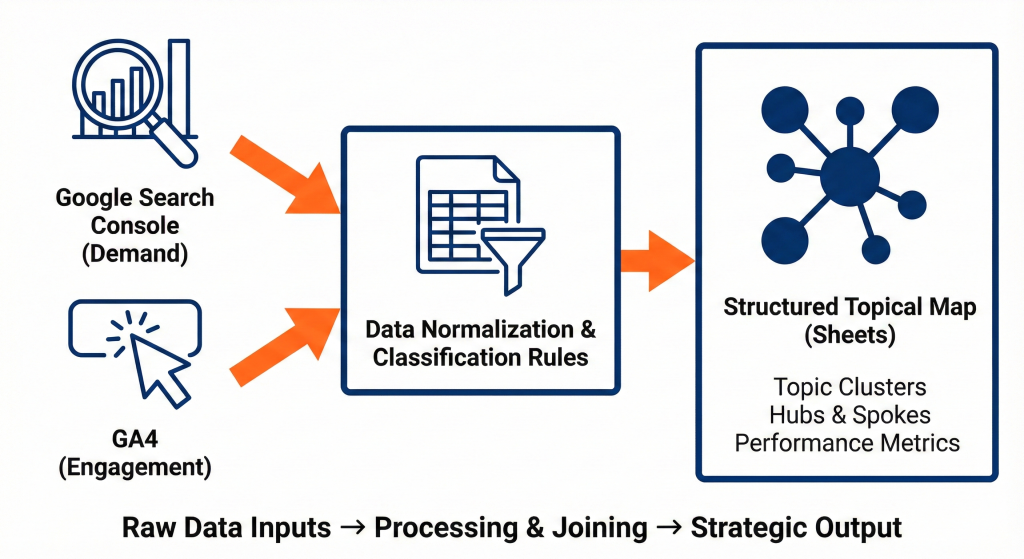
Goal, capture the demand side for the last 3 to 6 months.
Keep one tab for Queries by Page and another for Pages summary. You will use both.
Goal, capture engagement and conversion by landing page.
If you track multiple conversion events, add them as separate columns so you can compare intent by cluster.
Different tools represent the same URL differently. Normalize, then join on a clean key.
In your Sheets workbook, make a new tab called normalize.
=LOWER(REGEXREPLACE(A2,"\\?.*",""))
=IF(RIGHT(B2,1)="/",B2,B2&"/")
=REGEXEXTRACT(A2,"https?://[^/]+(/.*)")
=IFERROR(XLOOKUP([@[path]], GA4!$A:$A, GA4!$B:$B),"")
Replace ranges with your actual tabs and columns.
Make a simple rules tab, rules_topics. Two columns are enough.
Examples:
| Pattern | Topic |
| topical auth | topical authority |
| internal link | internal linking |
| schema | schema markup |
| faq | schema markup |
| programmatic | programmatic seo |
| entity | entity based seo |
| ai overview | ai seo and geo |
Keep patterns short and lowercase. You can refine over time.
Add two helper columns to your joined tab, topic_query and topic_page. Use REGEXMATCH against the rules.
For query classification:
=IFNA(
INDEX(rules_topics!$B$2:$B,
MATCH(TRUE,
REGEXMATCH(LOWER([@[query]]), rules_topics!$A$2:$A),0)
),
"unmapped")
For page classification, run the same formula on the normalized path or title.
Now every row has GSC demand, GA4 engagement, and a topic label. Unmapped rows become your gap hunting list.
Create a pivot table from joined.
Add two useful computed fields beside the pivot.
=ROUND( [@impressions] * (101 - [@avg_position]) / 100 , 0)
=IF([@impressions]=0,"",
ROUND( [@conversions] / [@impressions] * 1000 , 2)
)
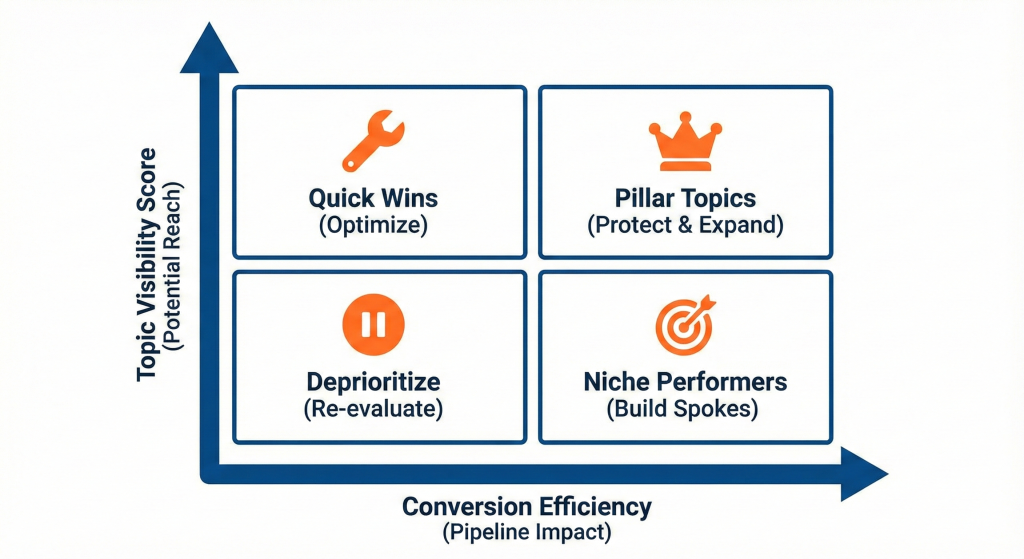
Interpretation, a higher visibility score means more potential reach. A higher conversion efficiency means the cluster turns demand into pipeline.
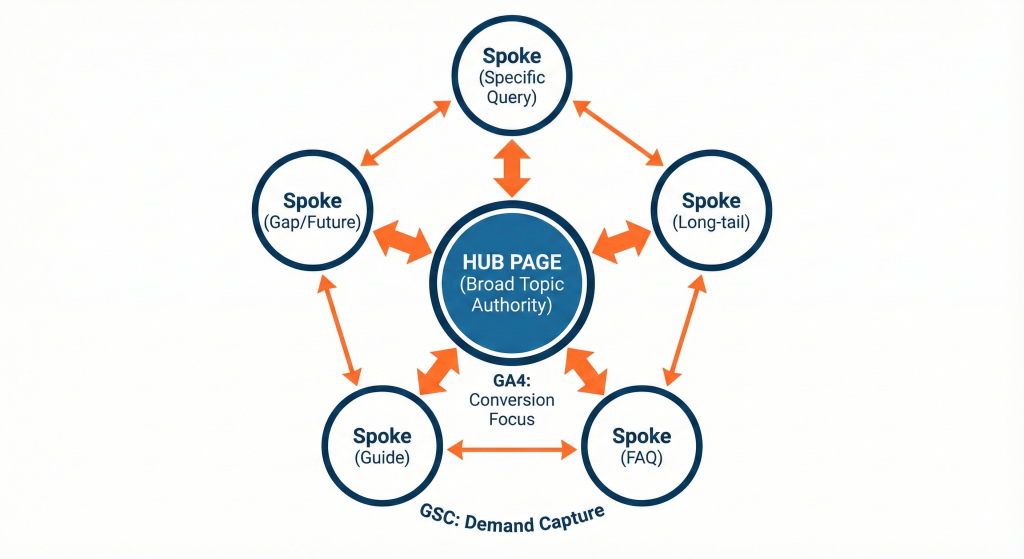
Open a new tab map. For each topic, designate a hub page and list the spokes and target gaps.
| Topic | Hub url | Current spokes | Missing spokes | Owner | Next action | Due |
| topical authority | /seo/topical-authority/ | /blog/internal-linking-guide/, /blog/schema-authorship/ | glossary, checklist, measurement guide | Chris | Brief and ship glossary | 2025-09-20 |
Rules to follow.
Use two short filters.
Quick wins, high impressions and low CTR
=FILTER(joined!A:Z, (joined!E:E>500) * (joined!G:G<2.0))
Adjust for your scale. These rows often need stronger titles, better meta descriptions, and clearer answers above the fold.
Real gaps, impressions exist but no landing page with sessions
Aggregate by query topic, then find topics where impressions are healthy but GA4 sessions are concentrated on a generic page. Create a brief for a specific spoke and link it into the cluster.
You can make this visual in Sheets in three quick blocks that look good in a screenshot.
These three panels become the single view you share with stakeholders so decisions focus on clusters, not isolated keywords.
Turn the map into a weekly rhythm.
Repeat this cycle across your top three topics until visibility and conversion efficiency improve, then expand.
Topical maps feed GEO when you make entities explicit. Add three simple columns to your map tab.
If you track AI overview presence manually, add a monthly count per topic for appearances and for cited answers. Trends here show which topics are breaking through in AI surfaces.
When these standards are visible, your map becomes a source of truth that guides both creation and refresh.
Do not guess at topics from a single keyword list. Let patterns in queries and landing pages point you to how the market talks. Do not keep two hubs that split authority. Do not let unmapped queries sit for months. Ship a thin spoke if needed, then strengthen it with sources and internal links. Do not overcomplicate the math. A simple visibility score and a conversion efficiency rate are enough to prioritize.
A strong topical map reads like a product catalog for knowledge. Each topic has a defined hub, a set of spokes that answer specific questions, and a clear line to revenue. Your quick wins queue is short because it gets cleared weekly. Your gaps queue is always full, which means you will never run out of meaningful work. Leaders can see which clusters are compounding and which need investment.
A topical map is a structured view of queries, pages, and performance for a subject. GA4 shows engagement and conversions by landing page. Search Console shows queries, impressions, clicks, and positions. Joined together, they reveal clusters that deserve hubs, spokes, and internal links.
Use six months to balance seasonality and recency. If your traffic is low, extend to twelve months. Keep GA4 and Search Console on the same window so comparisons are clean.
Normalize URLs. Lowercase, remove query strings, and standardize trailing slashes. Join on the path, not the full URL. Keep a helper column for canonical URL to catch duplicates.
Create a simple rules table with patterns and a topic label. Start broad, such as topical authority, internal linking, schema markup, then refine with entity names buyers actually use. Add an owner for each topic and a single hub URL.
Use impressions, clicks, and average position from Search Console. Use sessions, conversion rate, and conversions from GA4. Add two rollups, a visibility score that blends impressions and position, and a conversion efficiency rate that relates demand to outcomes.
Choose the page that defines the concept and can host links to every spoke. It should read like a reference, include methods and citations, and sit shallow in the site structure. Do not split a topic across two hubs.
Review monthly for new queries and decay. Recalculate scores and reprioritize spokes. Refresh pillars quarterly and high traffic spokes every 60 to 90 days.
Track branded and non branded separately. Branded demand helps forecast pipeline but can mask gaps in authority. Use non branded clusters to drive net new reach.
Yes. Add a small manual tracker by topic for AI overview appearances and cited answers. Record query, surface, appeared yes or no, and whether your page was cited. Plot monthly trends next to your SEO metrics.
Inconsistent URLs, mixed subdomains, parameter noise, and pages that rank for multiple topics. Fix with normalization rules, a canonical path list, and a single topic assignment per page unless there is a strong case for overlap.
It does. For ecommerce, include product and category pages in the join and track add to cart or revenue. For B2B, focus on demo requests, trials, or qualified leads and include resource pages that act as spokes.
Assign one owner for the entity inventory and the map. Give topic owners clear next actions and due dates. Meet weekly to clear quick wins, ship one new spoke, refresh one decayed asset, and update internal links.




Learn which Google Business Profile fields actually rank in 2026, which ones to skip, and how to win the map pack and AI sea...
Article 50 of the EU AI Act requires chatbot and AI content disclosure starting August 2026. Learn what it requires, who it ...
Local SEO is how nearby customers find you on Google and AI tools like ChatGPT. Learn how rankings work, how to optimize you...