
Share:

AI marketing & automation


Owners and leaders know they should be using AI chat tools. At the same time, the choice between ChatGPT, Claude, Gemini, Copilot, and others feels noisy, risky, and hard to connect to real numbers.
This article cuts through that noise. You will see where AI chat creates value, how the main options differ, and how to choose and roll out a stack that fits your business in a structured, low-risk way.
The right LLM is not magic. It is a reasoning engine that, when paired with your tools and data, can speed up content, decisions, and service by two to three times. Treat LLMs as a new layer in your tech stack that supports marketing, sales, operations, and support.
McKinsey’s 2024 AI survey found that 65 percent of organizations regularly use generative AI, nearly double the prior year. That level of adoption shows AI chat is part of daily work for many teams. The real question is how to implement it with clear guardrails and measurable outcomes.
At a practical level, an LLM-powered chat tool can help you:
Data from the US Chamber of Commerce and the Small Business Digital Alliance shows that about half of small and midsize businesses now use AI in customer and marketing workflows. That usage shows up as faster response times and more consistent follow-up.
Most coverage focuses on leaderboard scores. Those tests measure narrow tasks. They do not reflect your environment.
Your business cares about:
A model that ranks second on a benchmark can still outperform in your company if it integrates deeply into tools your team already uses, like Gmail, Docs, Sheets, Outlook, or Excel.
AI chat pays off where work is repetitive, language-heavy, and measurable. The biggest gains show up in cycle time, consistency, task coverage, and cost to test new ideas.
Studies show generative AI value clusters in customer operations, marketing and sales, software engineering, and research. For small and midsize firms, that often becomes marketing, service, and owner time.
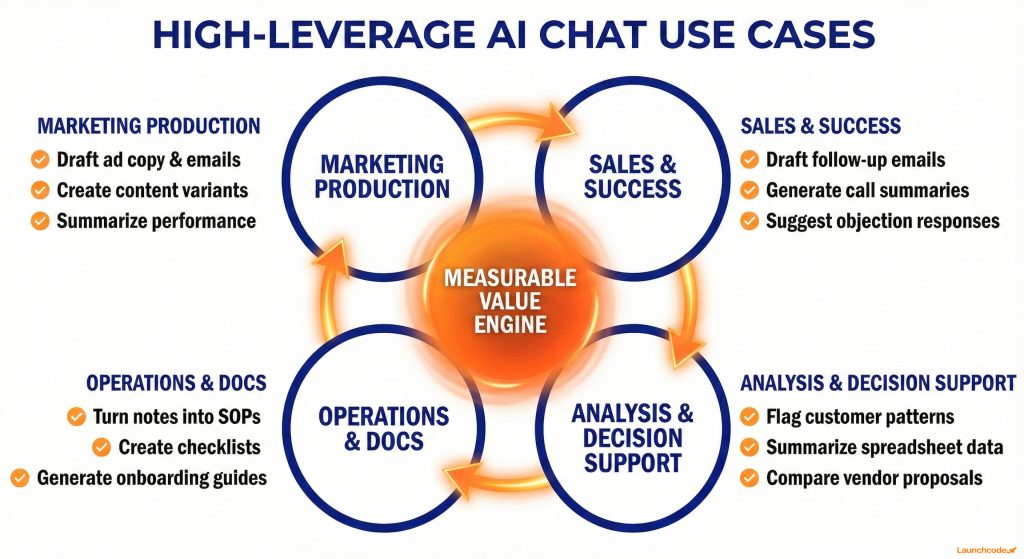
For most business owners, the highest leverage use cases look like this:
These workflows are where ChatGPT, Claude, Gemini, and Copilot show immediate value, especially when paired with automation and analytics tools.
Select first wave use cases with a clear before and after.
You can:
Gartner reports that about 30 percent of generative AI projects are abandoned after proof of concept when data, risk, or value are unclear. A basic measurement plan prevents that outcome.
“The teams that win with AI do not chase shiny features. They standardize a few repeatable workflows and measure them every week.”
Tanner Medina, Co-Founder and Chief Growth Officer
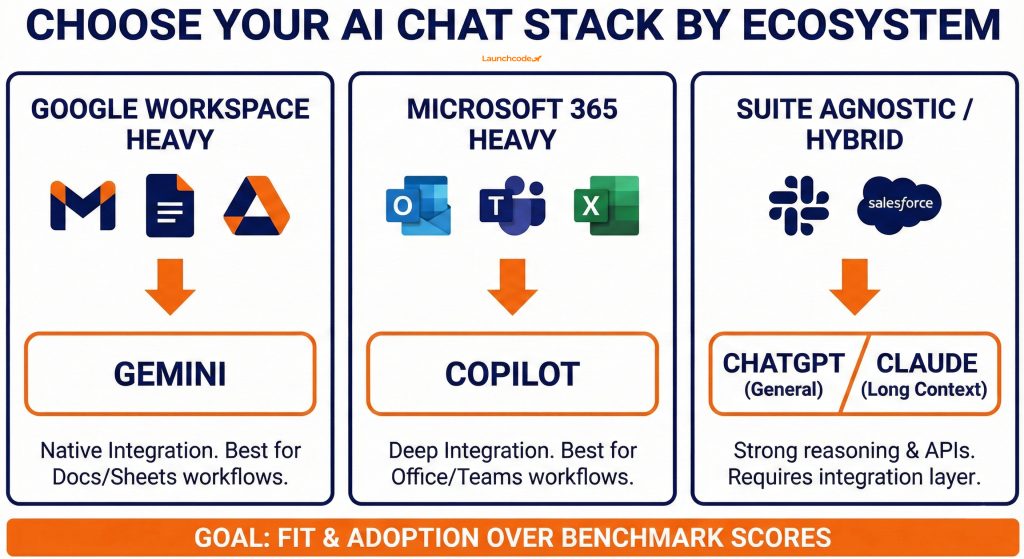
Most business owners should shortlist four options. ChatGPT as the general-purpose default. Claude for long context and safety-sensitive work. Gemini for teams in Google Workspace. Copilot for organizations built on Microsoft 365. Perplexity and open source models play focused roles.
Vendor lists are long. In practice, serious businesses pick a primary stack, then layer automations and custom workflows on top.
| Option | Who it fits | Key strength | Watch out for |
|---|---|---|---|
| ChatGPT | General business users across tools | Strong general reasoning, large ecosystem, clear APIs | Overuse without governance can create risk |
| Claude | Teams with long documents and safety needs | Long context and careful tone | Enterprise features vary by region |
| Gemini | Teams deep in Google Workspace | Native in Gmail, Docs, Sheets, Slides, and Meet | Works best when you standardize on Google tools |
| Copilot | Teams deep in Microsoft 365 and Windows | Tight integration with Office apps and Teams | Licensing can feel complex across products |
| Perplexity | Research and competitive analysis | Live web retrieval and citations | Not built for full internal workflow coverage |
| Open source stack (Ollama etc.) | Firms with strong IT and strict data rules | Data control and tuning options | Higher setup cost and maintenance overhead |
Gemini’s inclusion in Workspace pricing makes it attractive for Google native teams. ChatGPT and Claude continue to improve reasoning and safety features. Copilot expands coverage across Microsoft apps and Windows.
When you choose between tools, focus on three categories.
A tool that fits these entities will see faster adoption and clearer returns.
You can choose an LLM stack in one week. Anchor on your core suite, top use cases, risk level, and budget. Shortlist two tools, test them on real tasks, then standardize on one primary chat tool and one backup.
You do not need a long RFP. You need a clear process and a short evaluation sprint.
Use this five-step process.
Testing tools in your real environment is more predictive than reading feature tables.
Use these patterns to simplify choices.
A partner who understands AI, SEO, automation, and data can help design a stack that scales as usage grows.
The biggest reasons AI pilots fail are unclear data rules and vague security decisions. Decide what data can go into prompts, which plans meet compliance, and how you will monitor usage. This reduces legal risk and builds team confidence.
Many vendors publish security pages and hold SOC 2 and ISO certifications. Treat those as inputs, not final answers.
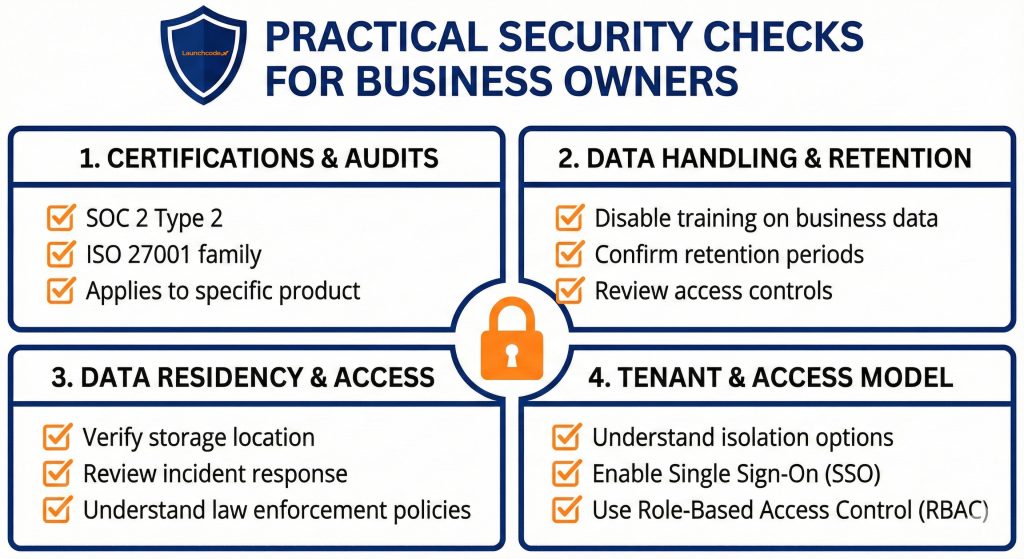
You can ask effective security questions without being an engineer.
Focus on:
These points help you choose between consumer plans and business or enterprise plans with stronger controls.
Once you select a tool, write a one-page AI use policy.
Include:
Publishing this inside your internal wiki helps every new hire start with the same rules.
“Strong AI rollouts combine security checklists with practical training. Teams adopt faster when they know what is allowed and why.”
Derick Do, Co-Founder and Chief Product Officer
Rolling out AI chat works best in phases. Start with guided experiments, move to shared templates, then embed AI in automated workflows. Each phase should include training, guardrails, and metrics.
Generative AI is widely used among small and medium enterprises because access is simple. Without a plan, simple access can become fragmented usage.
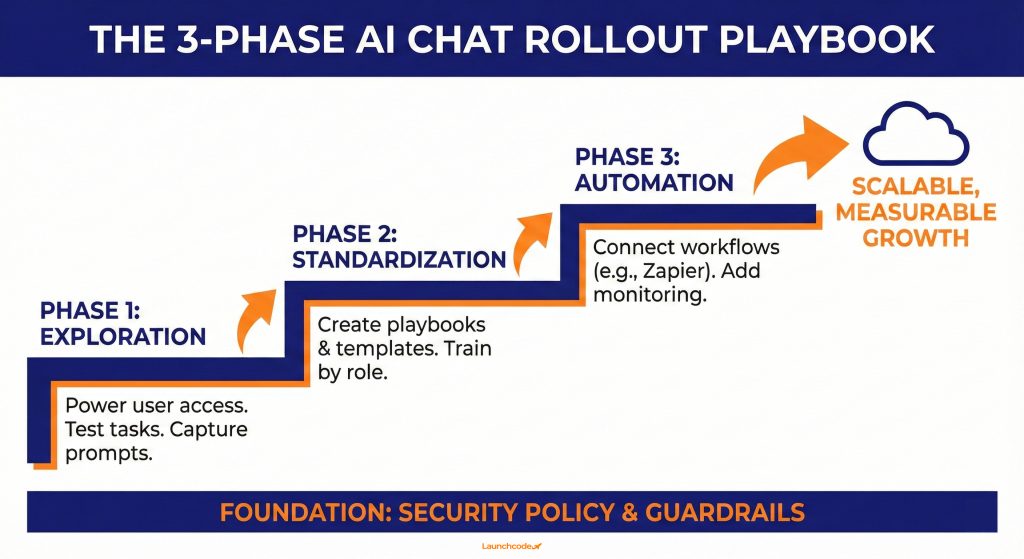
Use this approach.
Each step produces learning you can reapply in the next phase.
Watch for these traps.
Done well, AI feels like adding capable assistants across teams, not another dashboard.
The real upside is not isolated time savings. It is building systems around SEO, content, campaigns, and reporting. When AI chat connects to your website, analytics, and CRM, you can scale execution while keeping visibility into data and outcomes.
Generative AI already drives value in marketing and customer operations. Once you choose a stack, wire it into core workflows.
Use AI chat inside your funnel.
Linking to related guides, services, and case studies helps readers move from ideas to execution when they are ready. Launchcodex often connects these AI workflows to measurement systems so leaders see the impact in GA4 and Looker Studio.
Consider outside help when:
At that stage, a partner with AI, automation, and data experience can help design a durable system instead of disconnected experiments.
Pick two tools, test them on real tasks, then standardize your workflows. Set simple data rules, train your team, and iterate every quarter. Your goal is not perfection. Your goal is a reliable AI layer that saves time, improves quality, and supports measurable growth.
If you run a structured pilot, you will know which AI chat tool fits your stack, where it helps, and how to scale it safely. A clear plan beats chasing features. When you are ready to connect AI to broader marketing and operations systems, a partner like Launchcodex can help you design a stack that supports governance and growth.
Most small businesses can start with the AI assistant that fits their existing suite. If you are on Google Workspace, Gemini is a natural first choice. If you are on Microsoft 365, Copilot fits well. You can then add ChatGPT or Claude for deeper reasoning and development work.
You can standardize on one primary tool for most workflows and one backup for edge cases. For example, use Gemini or Copilot as the default inside your office suite and use ChatGPT or Claude for complex analysis, long documents, or technical tasks. Limit tools so training and governance stay manageable.
You should never paste sensitive data into consumer-grade tools without clear policies. Use business or enterprise plans that let you control training, logging, and retention. Define what data is allowed in prompts, avoid regulated information, and ensure that humans review outputs before sending anything to customers.
For many firms, it is enough to start with five to twenty paid seats across key roles, such as marketing, sales, operations, and leadership. Track usage and outcomes over a quarter, then expand where value is proven. Avoid buying company-wide licenses before you know which workflows matter most.
Self-hosting models like Llama usually fits larger organizations with strict data residency requirements and strong engineering teams. It rarely makes sense as a first move. Start with hosted tools to learn what works, then explore private or open source models once you have clear, stable workflows and a reason to control every layer.


Real stories from the people we’ve partnered with to modernize and grow their marketing.