
Share:

AI marketing & automation


If you are trying to standardize AI across your team, choosing the wrong platform creates friction. It changes how people work every day, how client data is handled, and how quickly you can deploy working systems instead of experiments that never scale.
In this guide, you will see how Gemini Gems and custom GPTs compare on integrations, knowledge handling, governance, cost, and long-term planning. By the end, you will know when to choose each platform, when to combine them, and how to align the decision to revenue and operations goals.
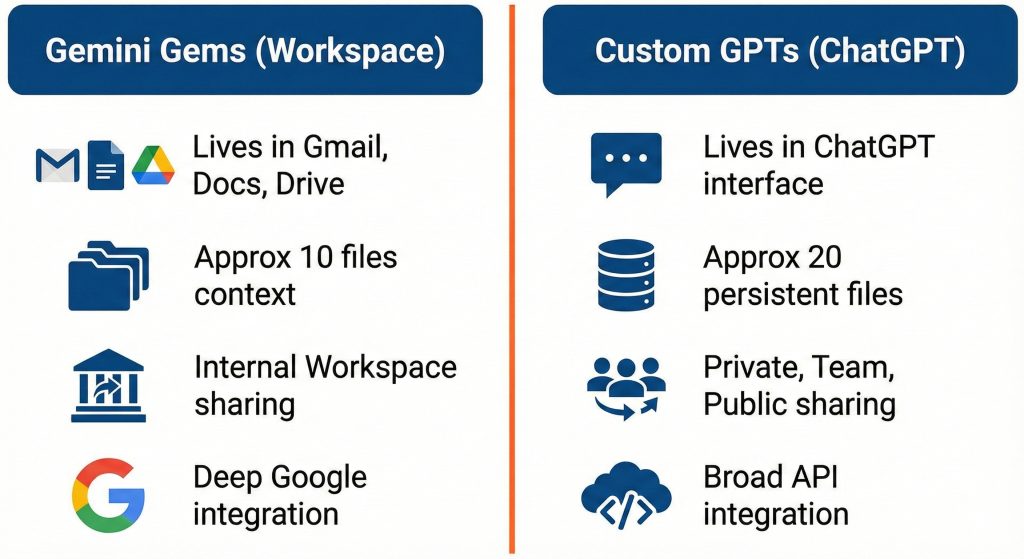
Gemini Gems and custom GPTs are both ways to create your own AI assistants, but they live in different ecosystems and follow different rules for files, sharing, and integrations. Gems sit inside Google Workspace. Custom GPTs sit inside ChatGPT with broader connection options.
Gems live inside the Gemini app and Google Workspace. You give them a name, write instructions, and attach reference files from Google Drive. Google Workspace updates note that users can attach up to 10 files when creating a Gem, and Gemini Apps support common file types with similar limits per prompt.
Custom GPTs live inside ChatGPT. OpenAI defines GPTs as tailored versions of ChatGPT that combine instructions, knowledge, and tools through a builder interface. You can attach around 20 persistent knowledge files per GPT, which remain available across sessions.
For teams, location matters. Gems stay close to email, docs, and meetings. Custom GPTs sit closer to APIs, plugins, and automation tools such as the Assistants API, Zapier, Make, and n8n.
“Choose the platform that fits where your team already works every day. That decision alone prevents most adoption issues.”
Tanner Medina, Co-Founder & Chief Growth Officer
The main differences are ecosystem fit, sharing controls, and integration patterns. Gems emphasize Workspace convenience. Custom GPTs emphasize flexibility, sharing models, and cross-tool workflows.
Here is a high-level comparison.
| Dimension | Gemini Gems | Custom GPTs (ChatGPT) |
|---|---|---|
| Where they live | Gemini app, Gmail, Docs, Sheets, Slides, Drive | ChatGPT interface, GPT Store, API backed apps |
| Knowledge files | About 10 files per Gem and per prompt, tied to Drive | Around 20 persistent knowledge files, plus per prompt uploads |
| Sharing | Personal and workspace contexts, limited public sharing | Private, link based, team, and public GPT Store |
| Ecosystem integration | Deep with Google Workspace | Broader via APIs and middleware |
| Governance options | Workspace access and admin controls | Team and Enterprise workspaces with policies and private stores |
| Automation pattern | Strong in Workspace surfaces | Strong with automation tools and Assistants API |
| Pricing and access | Included with Gemini Advanced, Business, Enterprise | Requires paid ChatGPT plans for creation |
Limits change often, so treat this as directional guidance. Google notes Gems are available across Gemini Advanced, Business, and Enterprise in more than 150 countries. OpenAI’s GPT Store announcement explains that Team customers get a private store area with admin controls.
Most teams are not selecting a single champion. You are selecting the backbone, then deciding how the other tool supports it.
Gems fit best inside Google-first workflows such as Docs editing, email review, and internal reporting. Custom GPTs fit repeatable, shared workflows that connect across tools such as SEO production, CRM support, and analytics reporting.
Think about where your work begins and ends.
If you write in Docs, collaborate in Slides, and communicate in Gmail, Gems provide fast improvements. You can create a Gem that reviews a Google Doc against your content guidelines or summarizes client threads. Workspace announcements confirm you can attach Drive files to give Gems context.
Custom GPTs thrive in standardized, multi-tool workflows such as:
OpenAI explains that GPTs can retain around 20 files as knowledge. That is enough to embed frameworks, checklists, and templates. For larger libraries, teams connect GPTs to retrieval systems or APIs.
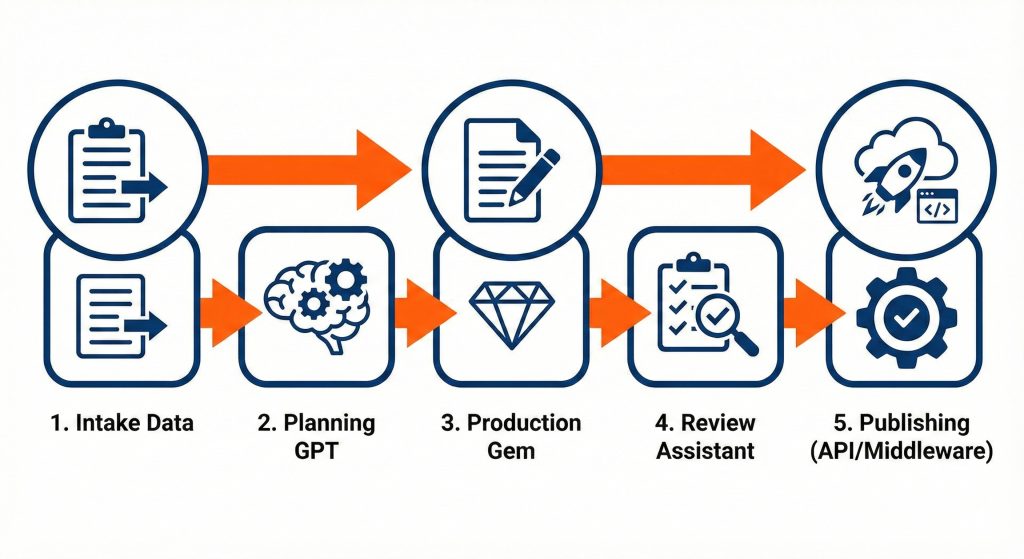
You will likely end up using both. Gems improve everyday writing and review. GPTs codify repeatable processes that move across departments.
Both platforms support enterprise controls, but they manage risk differently. Gems stay more contained within Workspace. Custom GPTs give broader sharing choices, which increases responsibility around governance and data exposure.
Independent training providers report that Gems cannot currently be shared publicly like GPTs. They live inside accounts or workspaces and support around 10 files per Gem. That naturally reduces accidental exposure.
Custom GPTs can be private, workspace only, link based, or public in the GPT Store. OpenAI explains that Team customers have a private store for internal use. This flexibility is helpful, but it also means admins must define rules for publishing and file usage.
Google’s help content outlines file limits and retention policies in Gemini Apps. OpenAI states that GPT knowledge files remain stored until removed. Both details matter when you manage client data.
Practical governance steps:
“Treat assistants like any other software asset. Give them owners, scope, and clear approval steps.”
Derick Do, Co-Founder & Chief Product Officer
Gems are appealing when you already license Gemini tiers, because creation is included. Custom GPTs require paid ChatGPT plans for creators, and deeper integrations often introduce additional tool costs. Total cost depends on scale and automation depth.
Gems roll out across Gemini Advanced, Business, and Enterprise plans. Some personal accounts can create Gems, but advanced features require paid tiers.
With OpenAI:
A technical comparison notes that GPT-centered stacks often rely on Zapier, Make, or n8n. Each integration layer adds subscription costs and maintenance work.
Plan costs by asking:
The most affordable path is usually not one platform everywhere. It is assigning the right tool to each workflow.
Gems work well for automation that happens inside Workspace. Custom GPTs connect best when your workflows span multiple tools and APIs. The choice depends on your systems and your comfort with automation platforms.
Gems benefit from proximity to Gmail, Docs, Sheets, Slides, and Drive. Google describes Gems as custom AI experts that can operate across these tools. That makes tasks like doc review, email drafting, and context gathering fast.
Custom GPTs connect through the Assistants API and automation platforms. Independent analysts point out that Gems focus on Google integration, while GPTs support broader inputs and sharing. In practice, GPTs orchestrate multiple systems, but they should sit beside automation tools, not replace them.
A simple content workflow:
Launchcodex usually connects assistants to tools like n8n. That keeps the stack flexible and easier to maintain.
Use Gems when your team works primarily in Google Workspace. Use custom GPTs when workflows need structure, sharing, and cross-tool automation. Use both when you want flexibility, resilience, and future switching options.
Here is a practical decision view.
| Scenario | Better default choice | Why it fits | Watch out for |
|---|---|---|---|
| Team lives in Gmail, Docs, and Sheets | Gemini Gems | Direct Workspace integration | Smaller knowledge limits and limited public sharing |
| Agency with multi client workflows | Custom GPTs | Private stores, sharing controls, richer knowledge | Requires governance and paid plans |
| Heavy automation across CRM and analytics | Custom GPTs plus middleware | Easier API orchestration | Extra subscriptions and maintenance |
| Internal reporting and doc review | Gemini Gems | Works in Docs with Drive context | Requires clean file hygiene |
| Strict compliance needs | Either, with governance | Both offer enterprise controls | Requires strong policies and approvals |
| Long term platform risk | Hybrid | Easier to adapt over time | Needs upfront architecture thinking |
Some publications argue GPTs lead on creation and sharing. Others argue Gems have advantages because they reduce integration overhead. Both can be right, depending on your stack.
Launchcodex typically recommends a hybrid approach. Standardize critical workflows where they fit best, then layer the other platform on top where it adds leverage.
Launchcodex builds AI stacks around workflows, data, and governance. We map your systems, classify assistant types, and place Gems and GPTs where they create measurable value without creating risk.
Our process:
We aim to avoid vendor lock-in and keep optionality open across Gemini, GPT, and local models.
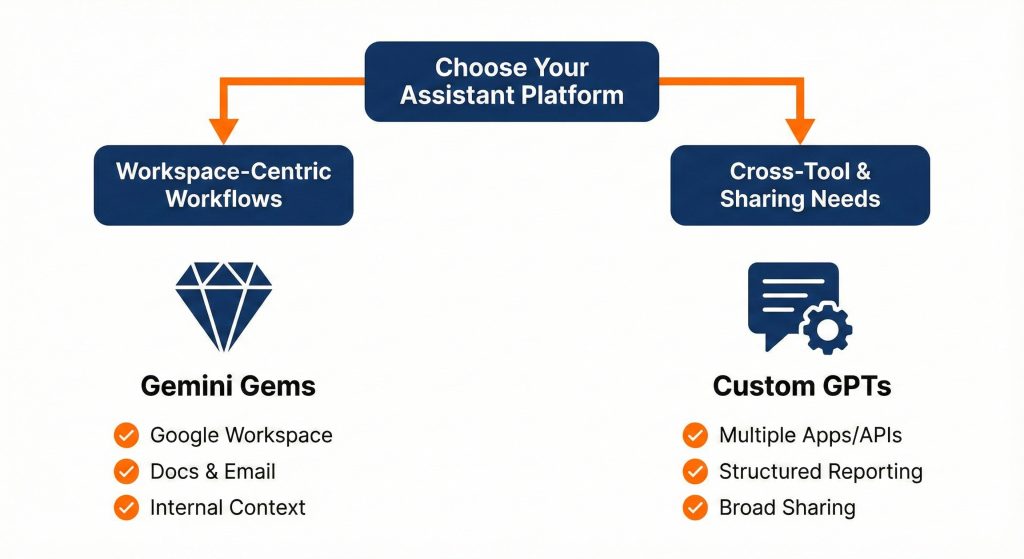
Gemini Gems and custom GPTs push teams toward customized assistants that match real work. Gems excel inside Google Workspace. Custom GPTs excel when workflows need structure, sharing, and integrations across tools.
Your real decision is not which tool “wins.” It is how to design an AI stack that supports growth targets, protects data, and stays flexible. Pick the primary platform that fits your core workflows. Then place the other where it adds leverage, supported by automation and governance.
If you want support, start with a short workshop. We map your workflows, identify three high impact assistants, and define clear rules for how AI interacts with client data and internal systems.
Not always. Many teams use Gems for Workspace tasks and GPTs for cross-tool workflows, connected through automation tools like n8n.
Custom GPTs usually fit better because of sharing models and private stores. Gems still help internally when teams live in Workspace.
Gems allow around 10 files per Gem. Custom GPTs allow around 20 persistent knowledge files. Larger libraries benefit from retrieval systems and APIs.
Both Google and OpenAI offer enterprise controls and admin tools. Define policies early, control knowledge files, and start with non sensitive pilots.


Real stories from the people we’ve partnered with to modernize and grow their marketing.