The complete Google Display Network breakdown: Where your ads actually show up
Find out exactly where Google Display Network ads appear, which campaign types auto-enroll in GDN, how to audit your placeme...





Most advertisers know Google Display Network ads appear on websites. Very few know which websites, apps, or Google-owned surfaces those ads are landing on at any given moment. Default campaign settings push spend across a massive inventory universe with minimal guardrails, and many advertisers only discover the scope of the problem when they pull the Where Ads Showed report for the first time.
This article maps every surface where GDN ads can appear, explains which campaign types enroll in the network automatically, and gives you a clear process for auditing and controlling your placements. By the end, you will know how to see exactly where your budget is going and how to stop it going somewhere it should not.
The Google Display Network is a collection of over 2 million websites, mobile apps, and Google-owned properties where advertisers can serve image, video, and responsive ads. It is separate from the Google Search network. Search ads appear in response to a user typing a query. Display ads appear while users browse content, check email, watch videos, or use apps. The network reaches over 90% of internet users worldwide, including up to 94% of all US internet users.
Ready to grow your organic traffic?
Get a free SEO audit from the Launchcodex team.
That scale is what makes the GDN attractive and risky at the same time. You are not targeting people who are actively looking for what you sell. You are reaching them during something else entirely. Erin Sagin of WordStream described it clearly: when users are on the GDN, they are going about their daily internet activities, catching up on news, reading blog posts, watching videos. They are not in shopping mode.
That intent gap between Search and Display explains almost every performance difference between the two networks. It also explains why placement selection matters so much on GDN. On Search, a bad keyword wastes a click. On GDN, a bad placement can waste thousands of impressions before you notice.
| Factor | Google Search network | Google Display Network |
|---|---|---|
| User state | Active intent, searching | Passive, consuming content |
| Trigger | Keyword query | Audience signal or page content |
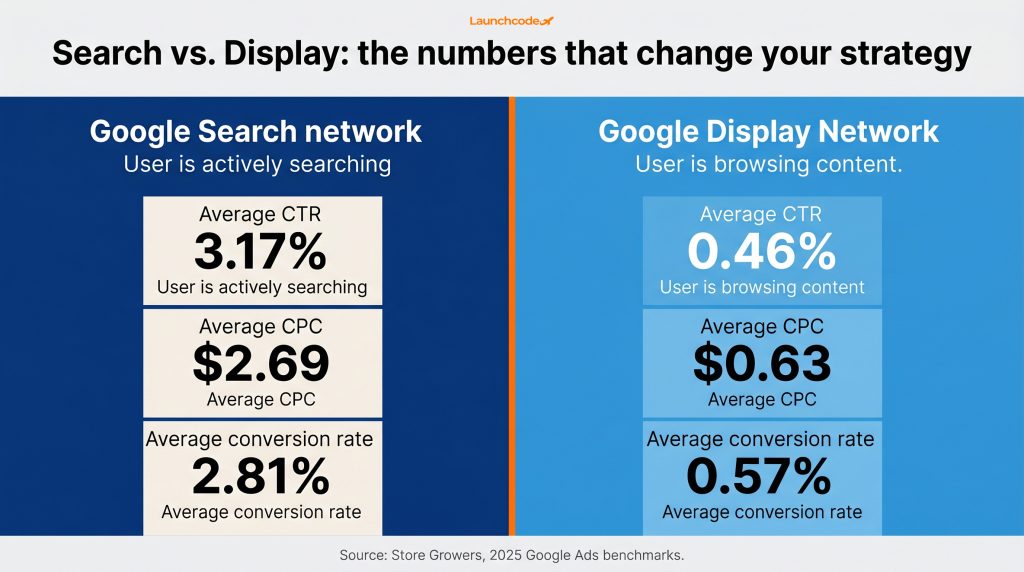
| Average CTR | 3.17% | 0.46% |
| Average CPC | $2.69 | $0.63 |
| Average conversion rate | 2.81% | 0.57% |
| Primary use case | Demand capture | Demand generation and remarketing |
Source: Store Growers 2025 Google Ads benchmarks.
The low CPC on Display looks attractive until you account for the conversion rate. At 0.57%, you need a high volume of relevant traffic to see meaningful return. That only works if the placements you are paying for are actually reaching your target audience.
GDN placement inventory spans six main surface types: third-party publisher websites, mobile apps, Gmail, YouTube and Video Partners, Google-owned properties, and since 2024, X (formerly Twitter). Each surface carries different audience intent, creative requirements, and performance characteristics. Treating GDN as a single undifferentiated channel is one of the most common planning mistakes advertisers make.
Understanding each surface separately is the starting point for a placement strategy that holds up under scrutiny.
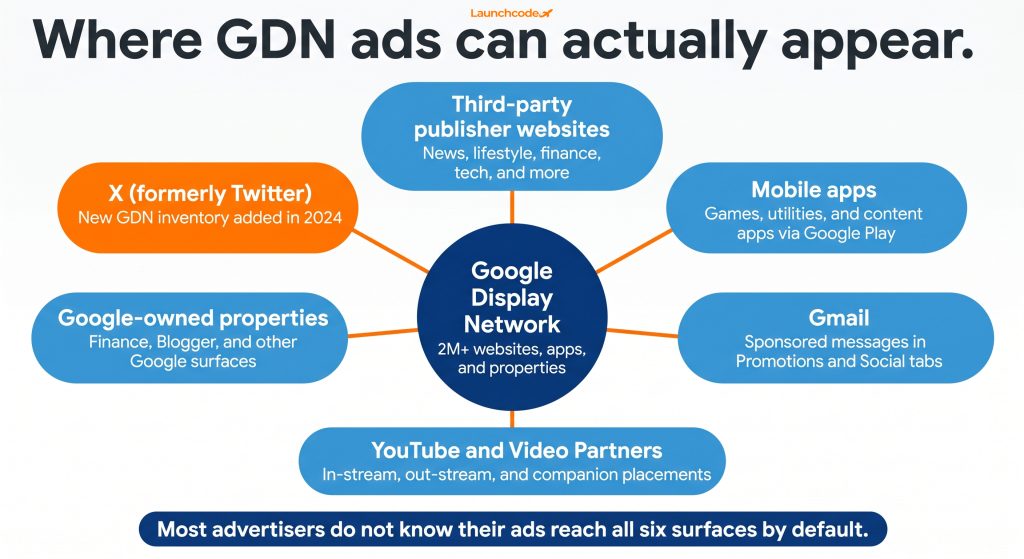
This is the core of GDN inventory. Publisher sites across news, entertainment, lifestyle, finance, and technology have opted into Google's ad network to monetize their content. Your ads can appear as banners, leaderboards, rectangles, or responsive units embedded in article pages, sidebars, and in-content positions.
The quality of this inventory varies widely. High-authority publishers sit alongside low-quality content farms and clickbait sites. A 2024 Adalytics estimate found that approximately 15% of GDN placements fall into low-quality or unsafe categories, draining budget without returning meaningful engagement. That is the core argument for active placement management over default settings.
GDN inventory extends into mobile apps, including games, utilities, and content apps distributed through Google Play. App placements can drive high impression volume because users spend a significant share of mobile time inside apps rather than browsers. The risk is accidental tap rates, where users click ads unintentionally while navigating an app interface. In the Where Ads Showed report, the signal to watch for is unusually high CTR with near-zero conversions. That pattern almost always points to app inventory.
Gmail ads appear as sponsored messages in the Promotions and Social tabs of Gmail inboxes. They expand when clicked, functioning more like a landing experience than a standard banner. Gmail placements tend to perform well for lead generation and offer-driven campaigns because the inbox context primes users to evaluate messages. They are part of the broader GDN ecosystem and are accessible through Display campaigns.
YouTube is the most prominent Google-owned property in the GDN ecosystem. Video ads can serve as in-stream placements before or during YouTube content, out-stream placements on partner sites, and companion banner ads alongside videos. Video Partners is a GDN subset covering third-party websites and apps that host video inventory outside of YouTube.
If your campaign includes video assets and you have not explicitly opted out of Video Partners, your ads may serve across this broader video inventory by default. The brand context of third-party video placements varies significantly from YouTube, so this setting is worth reviewing before any video creative goes live.
In 2024, Google expanded GDN inventory to include ad placements on X, formerly Twitter. Advertisers running Display campaigns in Google Ads can now reach X users without a separate X Ads account. The expansion is available in all countries and regions for Display campaigns and Display and Video 360. For brands whose audience is active on X, this is a reach extension that requires no additional campaign setup.
Display, Performance Max, and App campaigns run on GDN by default, and you cannot opt Display campaigns out of the network entirely. Search campaigns also enable GDN by default through the search partner expansion settings, unless you manually disable them. Demand Gen expanded to include GDN image inventory in April 2025. Only Shopping campaigns are incompatible with GDN.
This section is what most advertisers need to read carefully. Many accounts are funding GDN spend through Search campaigns without realizing it. The default opt-in is easy to miss during setup, and the budget impact only becomes visible when you segment campaign performance by network.
| Campaign type | GDN enrollment | Can you opt out? |
|---|---|---|
| Display | Default, core inventory | No |
| Performance Max | Default, all Google inventory | No |
| App | Default | No |
| Search | Default via search partner expansion | Yes, manual disable required |
| Demand Gen | Optional, expanded to GDN image inventory April 2025 | Yes |
| Video | Optional via Video Partners | Yes |
| Shopping | Not compatible | N/A |
Sources: Google Ads Help, Demand Gen GDN expansion; Search Engine Land GDN campaign type breakdown.
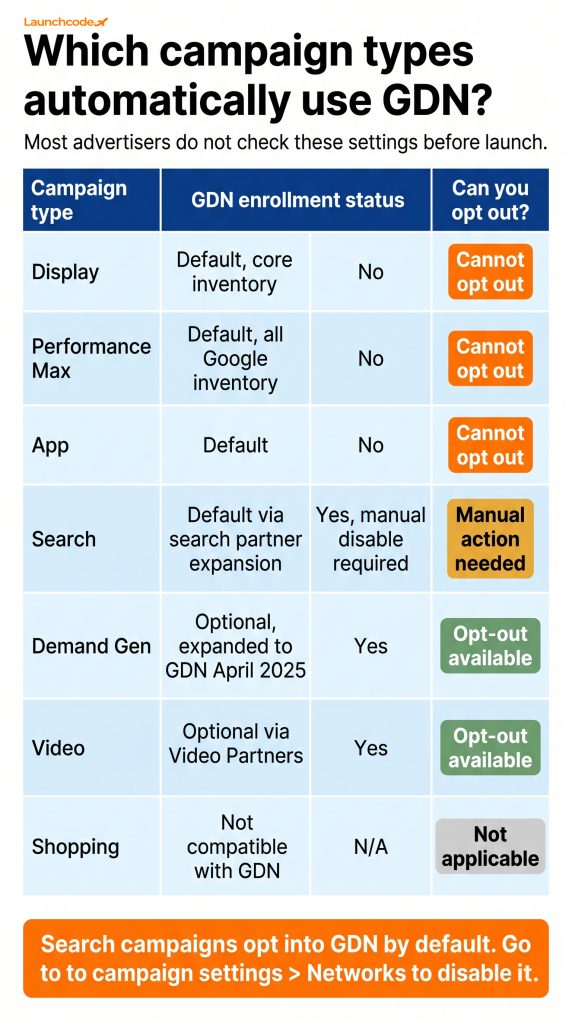
Search campaigns opting into GDN by default is one of the most persistent budget problems in Google Ads accounts. The intent on Search and Display is fundamentally different. Mixing them in a single campaign means Google allocates budget across both networks with no way to control the split, which makes performance data harder to read and optimization unreliable.
If you are running Search campaigns, go to campaign settings and check whether the Display Network expansion is enabled. Disabling it gives you a cleaner performance signal and prevents unintentional Display spend from skewing your Search data.
"The first thing we look at when auditing a new Google Ads account is whether Search campaigns are opted into the Display Network. It is almost always on, and it is almost always a problem."
Derick Do, Co-Founder and Chief Product Officer, Launchcodex
Automatic placements let Google's algorithm select surfaces based on your targeting signals, bids, and creative. Managed placements let you specify exact websites, apps, or YouTube channels. Most campaigns default to automatic placements, which gives Google broad latitude to serve ads across high and low quality inventory alike. Managed placements give you control but reduce reach.
Neither approach is right in every situation. The correct choice depends on your campaign objective, budget, and how much data you have about where your audience actually spends time.
With automatic placements, Google uses your audience selections, contextual keywords, topic settings, and bidding strategy to decide where your ads serve. The optimized targeting setting takes this further by expanding beyond your manually chosen audiences to find additional users likely to convert, using privacy-safe signals.
This works well for remarketing campaigns where your audience definition is tight and your conversion data gives Google clear feedback. It tends to underperform for brand awareness campaigns or accounts that have not built enough conversion history for the algorithm to learn from.
Managed placements are worth using when you have strong evidence that a specific website, app, or YouTube channel reaches your target audience. The best way to build that evidence is to use referral data from Google Analytics 4 to identify which sites already send you converting traffic, then cross-reference those URLs with GDN inventory. Sites that already convert your audience at the referral level are strong candidates for managed placement targeting.
The trade-off is scale. A managed placement list limits your reach to the exact sites you choose. If those sites have limited inventory or high competition, your CPMs will rise and your impression volume will fall.
The Where Ads Showed report is the only source of truth for GDN placement performance. It lists every website, app, and YouTube channel where your ads ran, along with impression, click, cost, and conversion data at the placement level. Most advertisers never open it. Running this report weekly is one of the highest-leverage actions in any Display account.
Here is the process to run a meaningful placement audit.
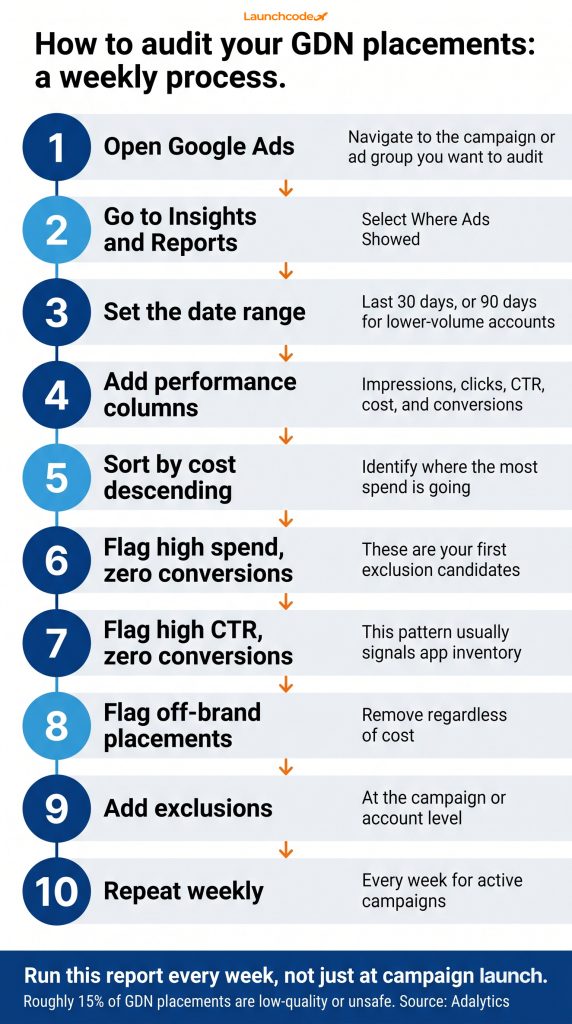
App-based placements frequently appear in the high-spend, low-conversion category for advertisers who have not actively excluded them. Gaming apps in particular generate high impression volume and accidental clicks. If you see app placements consuming budget without returning conversions, add a mobile app category exclusion through the Content Suitability Center.
For website placements, focus on domains that recur across multiple weeks with spend but no engagement. Repeat offenders are a higher priority than sites that appeared once with minimal impressions.
"When we onboard a new client running Display, the placement report is always the first stop. Within 30 days, we can usually identify a handful of repeat placements responsible for a significant share of wasted spend. Fixing those before scaling is non-negotiable."
Brittany Charles, SVP Client Services, Launchcodex
As of March 2024, Google expanded account-level placement exclusions to cover the Search Partner Network, creating a single exclusion list that applies across Display, YouTube, Performance Max, Demand Gen, and Search partners at the same time. Before this update, advertisers managed exclusions separately for each campaign type, which left consistent gaps in brand safety coverage.
The strategic shift here is significant. As ALM Corp's analysis put it, account-level placement exclusions move advertisers from a reactive position, where you discover a problem in the placements report and exclude it after the fact, to a proactive one, where you set brand safety boundaries before ads ever serve.
The official Google Ads placement exclusion documentation covers the full setup process and explains the hierarchy of account, campaign, and ad group level exclusions.
Beyond individual URL exclusions, the Content Suitability Center lets you block entire content categories from serving your ads. This covers sensitive categories like violent content, sexually suggestive material, and profanity, as well as lower-quality inventory types. In 2024, Integral Ad Science expanded its brand safety measurement to cover Performance Max and Demand Gen campaigns, giving advertisers a third-party verification layer on top of Google's native controls.
If your brand has strict adjacency requirements, using the Content Suitability Center alongside Integral Ad Science measurement gives you the most complete coverage available in the current Google Ads ecosystem.
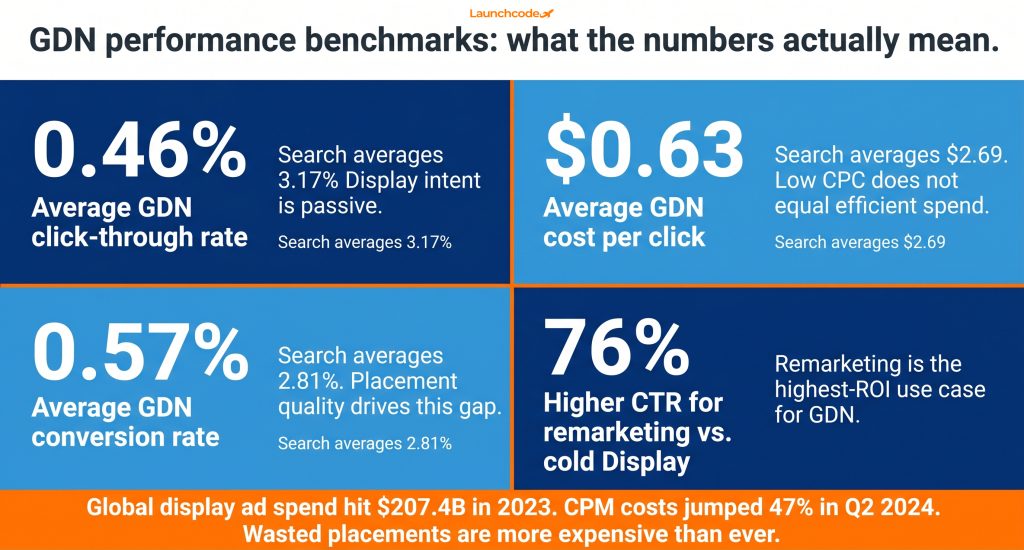
The average CTR for Google Display ads is 0.46% across all industries, compared to 3.17% for Search. The average CPC is $0.63 versus $2.69 for Search. These numbers make Display look affordable. They also mean that every impression on a low-quality placement is burning real budget with almost no realistic chance of engagement or conversion. Low cost per click is not the same as efficient spend.
Understanding where these benchmarks come from helps you interpret your own account data more accurately.
Global display ad spend reached $207.4 billion in 2023, making it the top digital ad format by total investment. That figure is projected to reach $266.6 billion by 2026. CPM costs jumped 47% in Q2 2024 year over year, according to Keywords Everywhere's display advertising data. Costs are rising, which means the tolerance for wasted placements is shrinking along with it.
Despite relatively low direct conversion rates, Display does produce measurable downstream impact on Search performance. Research cited by WordStream's display advertising analysis shows 27% of consumers search for a business after seeing a display ad, and there is a 59% lift in conversions when users conduct a search related to a display ad they previously saw. That downstream value is real, but it requires healthy placement quality to materialize.
Remarketing campaigns on GDN consistently outperform cold prospecting. Remarketing ads deliver 76% higher click-through rates compared to standard display ads targeting new audiences. For accounts with limited budgets, allocating GDN spend primarily to remarketing audiences and keeping prospecting tightly controlled through managed placements or strong audience exclusions tends to produce the most predictable return.
Most GDN problems come from the same source: advertisers set up campaigns, set a budget, and assume Google's algorithm will find the best placements. The algorithm optimizes for the goal you set. It does not optimize for brand safety, placement quality, or long-term audience trust. Those are your responsibility.
The GDN reach data from WordStream confirms the network's scale: over 2 trillion ad impressions per month to more than 2.5 billion users. That scale is a resource to manage, not a problem to avoid. The advertisers who get consistent value from GDN treat placement management as an ongoing process, not a one-time launch decision.
Here is what that process looks like.
For teams managing multiple campaign types, the 2024 account-level placement exclusion update is the most important control available. One exclusion list now covers every campaign type in your account. Use it from the start.
The GDN includes over 2 million websites, mobile apps, and Google-owned properties. This covers third-party publisher sites across virtually every content category, mobile apps, Gmail, YouTube, Video Partner sites, and X (formerly Twitter), which joined the GDN in 2024. The exact inventory your ads access depends on your campaign type and targeting settings.
Yes. Managed placements let you enter specific URLs, app bundle IDs, or YouTube channels where you want your ads to appear. You can set these at the ad group or campaign level. The site or app must be part of the GDN to be eligible. Not every website on the internet accepts Google ads.
Use placement exclusions. Add specific URLs at the ad group, campaign, or account level. Account-level exclusions now apply across all campaign types since the March 2024 update. The Content Suitability Center lets you exclude entire content categories. Run the Where Ads Showed report weekly to identify new exclusion candidates before they consume more budget.
Yes. Performance Max campaigns serve across all of Google's inventory by default, including the GDN. You cannot opt Performance Max out of GDN entirely. Account-level placement exclusions are your main control for keeping PMax ads off specific sites or apps.
It is the placement-level performance report in Google Ads that lists every website, app, and YouTube channel where your ads actually ran. Find it under Insights and Reports, then Where Ads Showed. It includes impression, click, cost, and conversion data per placement, making it the primary tool for identifying wasted spend and building exclusion lists.
Yes, and remarketing is one of the strongest use cases for GDN. Remarketing ads deliver 76% higher CTRs than standard display ads targeting cold audiences. Pairing remarketing audiences with smart bidding strategies like Target CPA gives the algorithm the signal it needs to optimize toward users most likely to return and convert.
When you create or edit a Search campaign, Google enables a setting that expands your reach to the Display Network by default. Go to your Search campaign settings and check the networks section. If the Display Network box is checked, disable it to keep your Search budget on Search inventory only.




Find out exactly where Google Display Network ads appear, which campaign types auto-enroll in GDN, how to audit your placeme...
Learn a 4-step workflow for using ChatGPT to write responsive search ad copy that meets Google Ads character limits, support...
Facebook delivers a 10.63% B2B conversion rate and CPCs 50-70% below LinkedIn. Learn the five-part framework to turn Faceboo...