
Share:

AI marketing & automation


Most marketing teams do not have a reporting problem. They have a systems problem. Every platform produces its own export, every stakeholder wants a different format, and the person responsible for pulling it together spends half their week moving data instead of acting on it.
This guide walks through exactly how to build a complete AI reporting workflow, from connecting your data sources to automating delivery of finished, insight-ready reports. You will walk away with a clear 4-layer architecture, a practical prompt template for AI-generated narratives, and a formula to calculate the hours and dollars your team can recover.
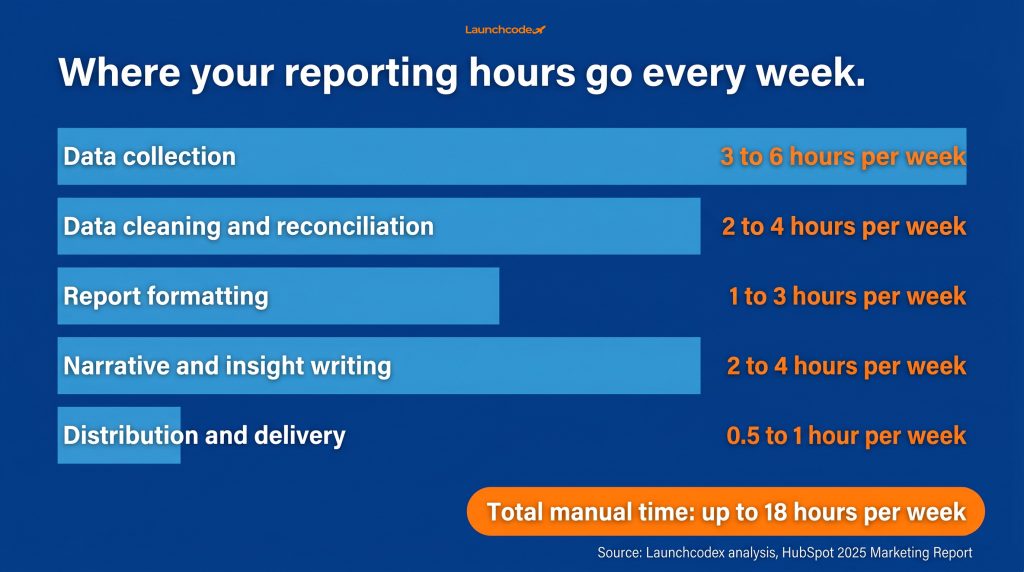
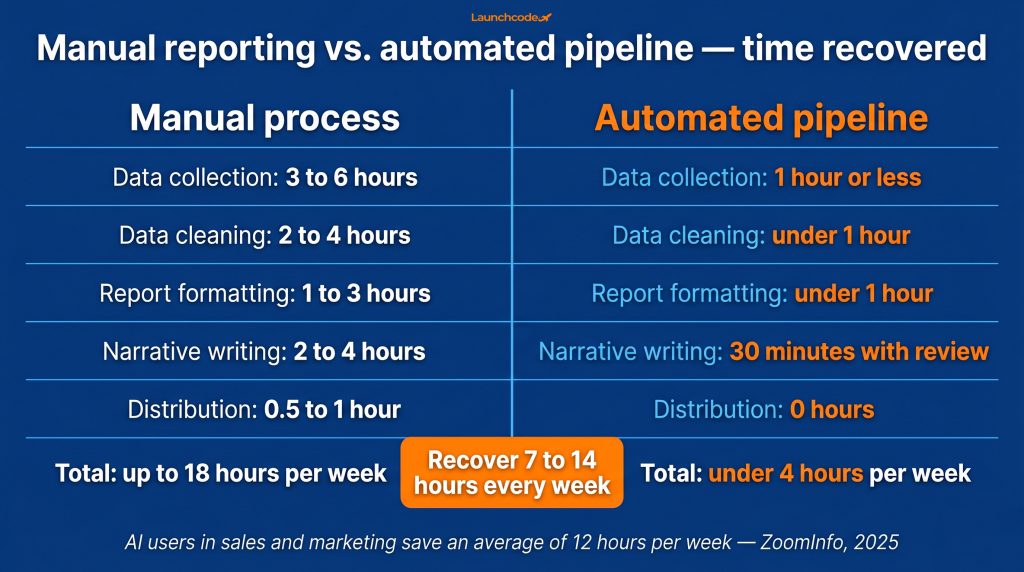
Manual reporting is not a minor time sink. It is a measurable capacity drain that compounds across every person on your team who touches data. According to HubSpot’s 2025 Marketing Report, marketers spend an average of 3.55 hours per week just compiling and formatting reports. Add time for data cleaning, platform-switching, and distribution, and the real total reaches 10 to 15 hours per week for most marketing leads.
That number sounds high until you account for every step involved.
Most people underestimate their reporting time because the work is fragmented across the week rather than consolidated into one session. Here is where the time goes:
If your team manages 10 platforms and spends just 30 minutes per platform per day accessing and reconciling data, that adds up to 25 hours per week lost to data management alone. More than 65% of marketing leaders report using six or more platforms to manage their campaigns. Every additional platform multiplies the manual work.
Time is the visible cost. The invisible costs are harder to measure but equally damaging.
A single data entry error costs between $50 and $150 on average, depending on how far the mistake travels before it is caught. In a weekly reporting cycle with hundreds of data points in play, a 1% error rate can result in thousands of dollars in misallocated budget and hours of rework. A team managing $100,000 per month in ad spend that misattributes just 5% of that budget due to platform lag or format mismatch loses $60,000 in preventable waste per year.
There is also the analyst problem. According to CaliberMind, marketing teams often spend up to two weeks per month manually cleaning and integrating data from CSV files and spreadsheets. MIT Sloan research shows employees waste 50% of their time on mundane data quality tasks. That is your analyst’s most valuable capacity going to work that software should handle.
The result: 56% of marketers say they do not have enough time to analyze their data properly, even though the average rows per query has doubled since 2020. More data, less capacity to act on it.
Start with workflow design, not tool selection. 42% of companies abandoned most of their AI initiatives in 2024 due to poor execution and integration difficulties, even as 78% of enterprises were already using AI in at least one business function. The failure was not the tools. It was the absence of a clear system before those tools were introduced. Map your current reporting process end to end before you open a single product page.
Teams that skip this step buy tools that do not connect, automate steps that should not exist, and rebuild the same manual process inside a new platform.
Work through these steps before evaluating any tool:
High-frequency, high-volume reports are the best starting point. A weekly performance report that takes four hours to build manually and goes to ten clients is a better first automation target than a one-off quarterly deck.
“We mapped our own reporting process before recommending automation to any client. The exercise revealed two people duplicating the same data pull every Monday, which alone saved three hours a week before we touched a single tool.” Jasmine Morales, VP, Agency Operations
These questions determine which layer of your stack needs which type of solution:
Answering these before looking at tools prevents the most expensive mistake in reporting automation: buying a solution that solves one layer but ignores the others.
A well-built AI reporting workflow has four connected layers: data sources, a pipeline that moves and transforms data, an AI layer that generates insight summaries, and a delivery layer that distributes finished reports on a schedule. Each layer must work independently and hand off cleanly to the next without human intervention. If any layer requires a manual step, the workflow is incomplete.
At Launchcodex, this is the framework used when structuring reporting automation for agency, B2B SaaS, and multi-location brand clients. The four layers apply regardless of which tools you use to fill them.
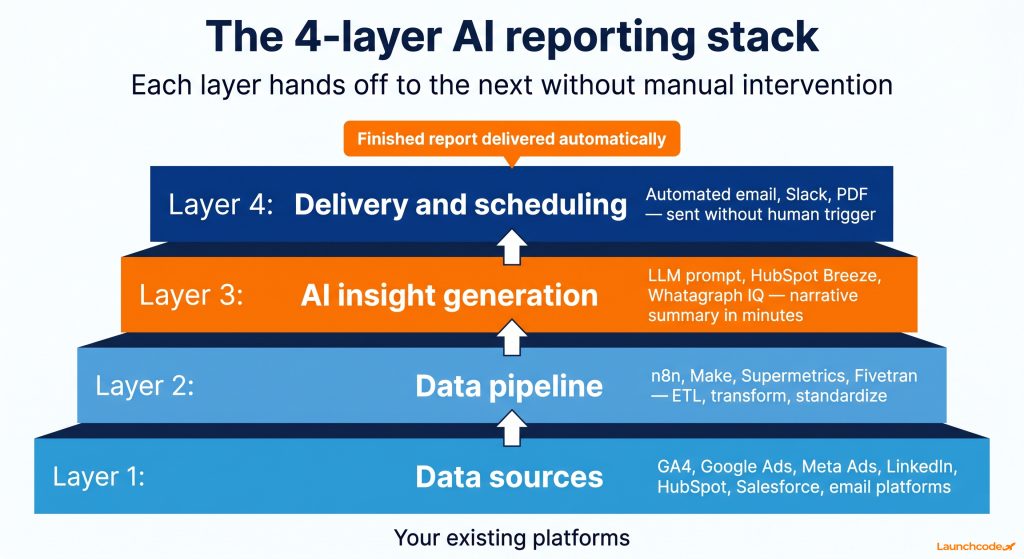
Your data sources are every platform that holds performance data: Google Analytics 4, Google Ads, Meta Ads, LinkedIn Ads, Search Console, HubSpot, Salesforce, email platforms, and any others your team uses actively.
The goal at layer 1 is not to change your platforms. It is to audit what you have, confirm API access exists for each source, and rank sources by how often they feed your highest-priority reports. Platforms with no native API require a workaround connector or a manual export step, which introduces a gap into what should be a closed loop.
Start with the five data sources that appear most frequently in your highest-priority reports. Automate those first. Add sources incrementally once the core pipeline is stable.
The pipeline layer pulls data from each source, cleans and standardizes it, and loads it into a central destination. That destination could be BigQuery, Google Sheets, a Postgres database, or directly into a BI tool like Looker Studio.
This layer is where tools like n8n, Make, Zapier, Supermetrics, and Fivetran live. n8n builds automated workflows that pull from Google Ads, HubSpot, and LinkedIn APIs, transform the data by standardizing campaign names and removing duplicates, and push clean records to a destination on a set schedule. Teams using this approach report reducing manual reporting by up to 80%.
The critical step in this layer is metric definition. Before data flows anywhere, define your core KPIs once in a shared semantic layer or a governed data model. If revenue is calculated differently in HubSpot than it is in your GA4 setup, every downstream report inherits that inconsistency. Define once, use everywhere.
Layer 3 is where the largest visible time savings appear. Once your data flows automatically into a central destination, an AI model can read that data and write the narrative summary that used to take a human one to three hours per report.
Tools like HubSpot Breeze, Whatagraph IQ, and AgencyAnalytics offer built-in AI summary generation. For teams that want more control over output quality, feeding structured data exports directly into a large language model using a prompt template produces strong, consistent results.
“The AI layer only works as well as the pipeline feeding it. If your data is inconsistent at layer 2, the AI will generate confident-sounding summaries of wrong numbers. Spend the extra time cleaning your pipeline before you add the AI step.” Derick Do, Co-Founder and CPO
Here is a practical prompt template you can use or adapt immediately:
You are a senior marketing analyst. Below is weekly performance data for [client name] covering the period [start date] to [end date]. Using only the data provided:
Identify the top two performing channels by conversion volume and explain what likely drove the results
Flag any metric that changed by more than 15% week over week and provide a plain-language explanation
Call out one area where performance is below target and recommend one specific next action
Write a summary under 150 words written for a marketing director, not a data scientist
Data: [paste structured data here]
Do not speculate beyond what the data shows. If a trend is unclear, say so.This template grounds the AI output in specific parameters, reduces the risk of fabricated insights, and produces commentary that a reviewer can validate in under five minutes. Adjust the percentage threshold and word count to match your reporting standards and client expectations.
The delivery layer distributes finished reports to the right people in the right format at the right time, without a human pressing send.
Tools like Whatagraph, AgencyAnalytics, and Looker Studio all support scheduled email delivery. For Slack-based teams, n8n or Make can push report summaries as formatted messages at a set time each week. For agencies producing client-facing PDF reports, platforms like Whatagraph generate branded, templated outputs from a single layout applied across all accounts.
Set your delivery cadence based on stakeholder need, not habit. If your team sends weekly reports that stakeholders only check monthly, you are creating work without creating value. A quick audit of which reports get opened and acted on often reveals that a third of what teams send could be consolidated or eliminated entirely.
No single tool covers all four layers of an AI reporting stack. The right combination depends on your team’s technical capacity, budget, and existing data infrastructure. Most marketing teams need at minimum a data connector, a central data destination, a visualization layer, and an AI narrative tool. The table below maps the common options to the layer they serve best.
| Tool | Layer | Best for | Key strength | Watch out for |
|---|---|---|---|---|
| n8n | Pipeline | Technical teams | Flexible, self-hostable, strong API support | Requires technical setup |
| Make | Pipeline | Non-technical teams | Visual builder, low learning curve | Less flexible for complex data transforms |
| Zapier | Pipeline | Simple linear workflows | Huge integration library, fast to configure | Limited for multi-step data transforms |
| Supermetrics | Pipeline | Marketing data movement | Pre-built connectors for ad and analytics platforms | Cost scales with data volume |
| Fivetran | Pipeline | Enterprise data teams | Managed ETL, strong governance | Higher cost, overkill for small stacks |
| Looker Studio | Visualization | Most marketing teams | Free, strong GA4 and Google Ads integration | Limited for non-Google data without added connectors |
| Whatagraph | AI and delivery | Agencies with multiple clients | AI summaries, 60-plus connectors, branded reports | Per-client cost adds up at scale |
| AgencyAnalytics | AI and delivery | Marketing agencies | AI summary widget, 85-plus integrations | Less flexible for custom data models |
| HubSpot Breeze | AI and reporting | HubSpot users | Native CRM data, natural language queries | Limited to data inside the HubSpot ecosystem |
| BigQuery | Data warehouse | Teams needing scale | Handles large datasets, strong governance | Requires data engineering knowledge |
A typical mid-market stack looks like this: Supermetrics to pull data from ad and analytics platforms, Google Sheets or BigQuery as the central destination, Looker Studio for visualization, and either Whatagraph or a direct LLM prompt for AI narrative generation, with scheduled email delivery to close the loop. Start simple and add layers as volume and complexity grow.
Fully automated reporting fails when there is no human review before distribution. AI models generate plausible narratives, but they cannot know that a campaign was paused mid-week, that a tracking pixel stopped firing, or that a client rebranded and historical data is no longer comparable. Build a structured review step into every workflow before reports reach clients or executives.
This is not optional. It is the step that separates teams that trust their automation from teams that get burned by it once and revert to spreadsheets.
Keep the review lightweight. A 10 to 15 minute pass is enough for most reports when the workflow is well-built. Here is a repeatable process:
Not every report needs the same level of scrutiny. Match your review process to the risk level of each report type.
| Report type | Review cadence | Who reviews | Risk if an error goes out |
|---|---|---|---|
| Internal operational dashboard | Monthly spot check | Analytics lead | Low: internal audience only |
| Executive summary | Before every send | Senior manager | Medium: affects decisions |
| Client-facing performance report | Before every send | Account manager | High: client trust and retention |
| Public or regulatory reports | Before every send with legal review | Manager and legal | Very high: compliance exposure |
Glean’s research on agency AI reporting confirms that AI improves efficiency, but expert involvement remains essential. AI-generated reports must be reviewed to meet quality standards and align with strategic goals that only humans can fully contextualize.
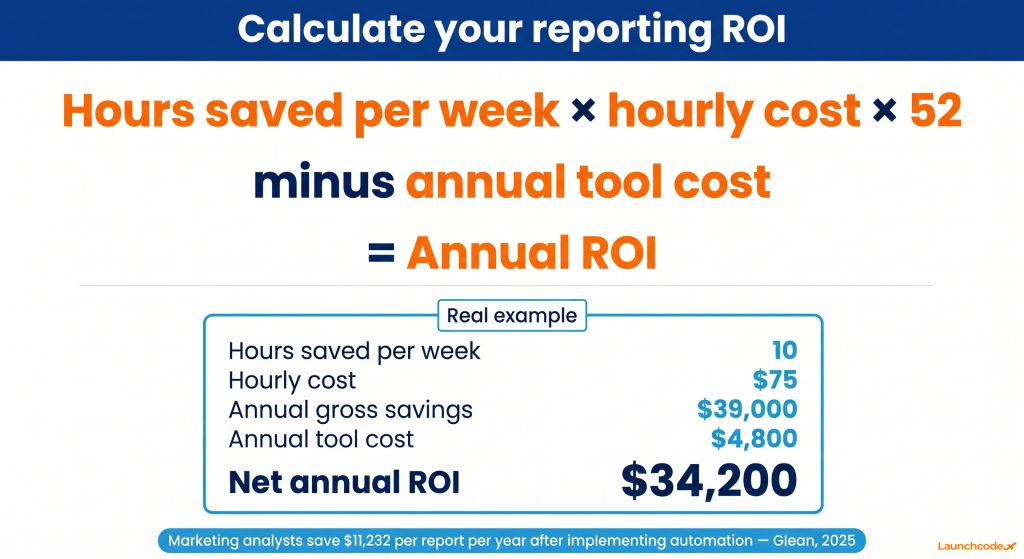
Quantify your reporting ROI before you build, and again after the first 30 days. Take the total weekly hours your team spends on manual reporting tasks, multiply by your fully-loaded hourly cost, annualize it, and subtract the cost of your automation tools. Glean’s 2025 research on AI agent reporting found that marketing analysts save approximately $11,232 per report per year after implementing automation.
Use this formula to build a business case before your first tool purchase:
(Hours per week saved x hourly cost x 52 weeks) minus annual tool cost = annual ROI
Example: A marketing team recovers 10 hours per week across two account managers and one analyst. At a blended rate of $75 per hour, that equals $39,000 in recovered capacity per year. If the tool stack costs $4,800 per year, the net annual ROI is $34,200, and that does not count the revenue impact of the additional strategic work those hours enable.
These ranges reflect what well-built pipelines produce for teams managing four or more reporting accounts or stakeholder groups.
| Workflow layer | Manual hours per week | Hours recovered after automation |
|---|---|---|
| Data collection across platforms | 3 to 6 hours | 2 to 5 hours |
| Data cleaning and reconciliation | 2 to 4 hours | 2 to 3 hours |
| Report formatting | 1 to 3 hours | 1 to 2 hours |
| Narrative and insight writing | 2 to 4 hours | 1.5 to 3.5 hours |
| Distribution and delivery | 0.5 to 1 hour | 0.5 to 1 hour |
| Total | 8.5 to 18 hours | 7 to 14.5 hours |
According to ZoomInfo’s State of AI in Sales and Marketing 2025, AI users in marketing and sales report saving an average of 12 hours per week through task automation, and 79% of frequent AI users say automation made their teams more profitable. The 10-hour target is achievable in the first 60 days for most teams. The return is higher for agencies managing large client rosters.
Most reporting automation projects do not fail because of the wrong tools. They fail because of three predictable process errors made before or during setup. Identifying these in advance saves significant rework time and prevents the frustration that causes teams to shelve a working system and go back to spreadsheets.
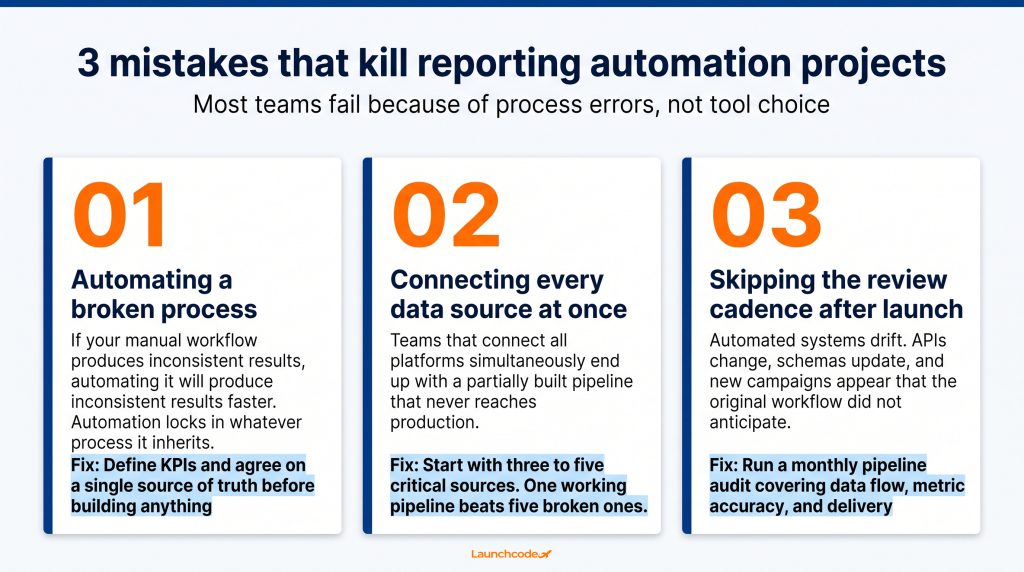
If your current reporting workflow produces inconsistent results manually, automating it will produce inconsistent results faster. Before building anything, fix your metric definitions, standardize naming conventions, and agree on a single source of truth for each KPI. Automation locks in whatever process it inherits. Clean the process first, then automate it.
Teams that try to connect all platforms simultaneously end up with a partially built pipeline that never reaches production. Start with your three to five most critical data sources, build a stable pipeline for those, and validate that data flows correctly before adding more. One working, reliable pipeline is worth more than five incomplete ones.
Automated systems drift over time. APIs change, platforms update their data schemas, and new campaign structures appear that the original workflow did not anticipate. Schedule a monthly audit of your pipeline: check that data is flowing, metrics are calculating correctly, and delivery is landing in the right inboxes. HubSpot’s guidance on reporting automation recommends a 30 to 60 day feedback loop to refine dashboards after launch. That same cadence applies to the full pipeline, not just the visualization layer.
When the reporting workflow runs on its own, the work does not disappear. It moves. Account managers stop spending Tuesday mornings exporting CSV files and start spending them advising clients on what the data means. Analysts stop cleaning spreadsheets and start identifying the patterns that actually drive revenue decisions.
Marketing teams that implement AI automation report bringing campaigns to market up to 75% faster and reallocating up to 30% of their working time from repetitive execution toward strategy and creative work. Agencies that automate client reporting save an average of 137 billable hours per month, according to Glean, which represents $20,000 to $30,000 in monthly capacity redirected toward revenue-generating activity.
The compounding effect matters most for agencies and teams managing multiple accounts. One well-built reporting workflow does not serve one client. It scales across every account using the same architecture. Ten clients with manual reporting means ten separate reporting cycles consuming different people every week. Ten clients with an automated stack means one system running all ten on a schedule, with each account receiving a branded, insight-led report without additional labor.
If you want to go deeper on the data infrastructure that makes this kind of system reliable at scale, Launchcodex’s data infrastructure service covers the architecture, pipeline setup, and governance work behind long-term reporting automation.
The 10 hours per week is the floor. Build the system well, and the return grows with every client you add.
A basic stack has four components: a data connector such as Supermetrics, Fivetran, or n8n, a central data destination like BigQuery or Google Sheets, a visualization layer such as Looker Studio or Whatagraph, and an AI layer for narrative generation. No-code teams can start with Make and Whatagraph. Technical teams get more flexibility and scale with n8n and BigQuery.
A simple single-platform workflow can be running in a day. A full multi-platform pipeline with AI narrative generation and scheduled delivery typically takes two to four weeks to build, validate, and stabilize. Most teams see meaningful ROI within the first 30 days when they start with their highest-frequency report.
Yes, with the right setup and a structured prompt template. AI models generate useful insight summaries when given specific data, clear instructions, and defined thresholds for what to flag and how to frame findings. Every AI-generated narrative should pass through a human review step before it reaches clients or executives.
Not necessarily. Tools like Make, Zapier, Supermetrics, and Whatagraph are designed for non-technical marketing teams. For more complex stacks involving BigQuery, custom API integrations, or multi-client pipelines at scale, some technical support significantly reduces setup time and error rates. Start with no-code tools and bring in engineering resources when the workflow outgrows them.
It is safe when a human review step is built into the workflow before delivery. Build a 24-hour review window before each scheduled send, train reviewers to check AI narrative against raw data, and flag any report where an anomaly appears. As the system proves reliable over time, you can reduce review intensity for lower-risk internal reports while maintaining full review for client-facing outputs.
Start with reports that run on a fixed schedule, pull from sources with existing API access, and currently take the most manual time to produce. High-frequency, high-volume reports deliver the fastest ROI and create the clearest before-and-after comparison for calculating time savings.


Real stories from the people we’ve partnered with to modernize and grow their marketing.