
Share:

AI marketing & automation


Most businesses have leads. They came in through content downloads, demo requests, form fills, or paid campaigns. The problem is that most of those leads receive one follow-up email, or none at all, and then go cold. No process exists to move them forward, so they drift toward competitors who do have one.
A nurture flow fixes that. It runs automatically, reaches contacts at the right moment, and delivers relevant content at each stage of the buying journey. This guide walks through how to build your first one, covering prerequisites, trigger selection, email structure, content frameworks, segmentation, and the metrics that tell you the flow is working.
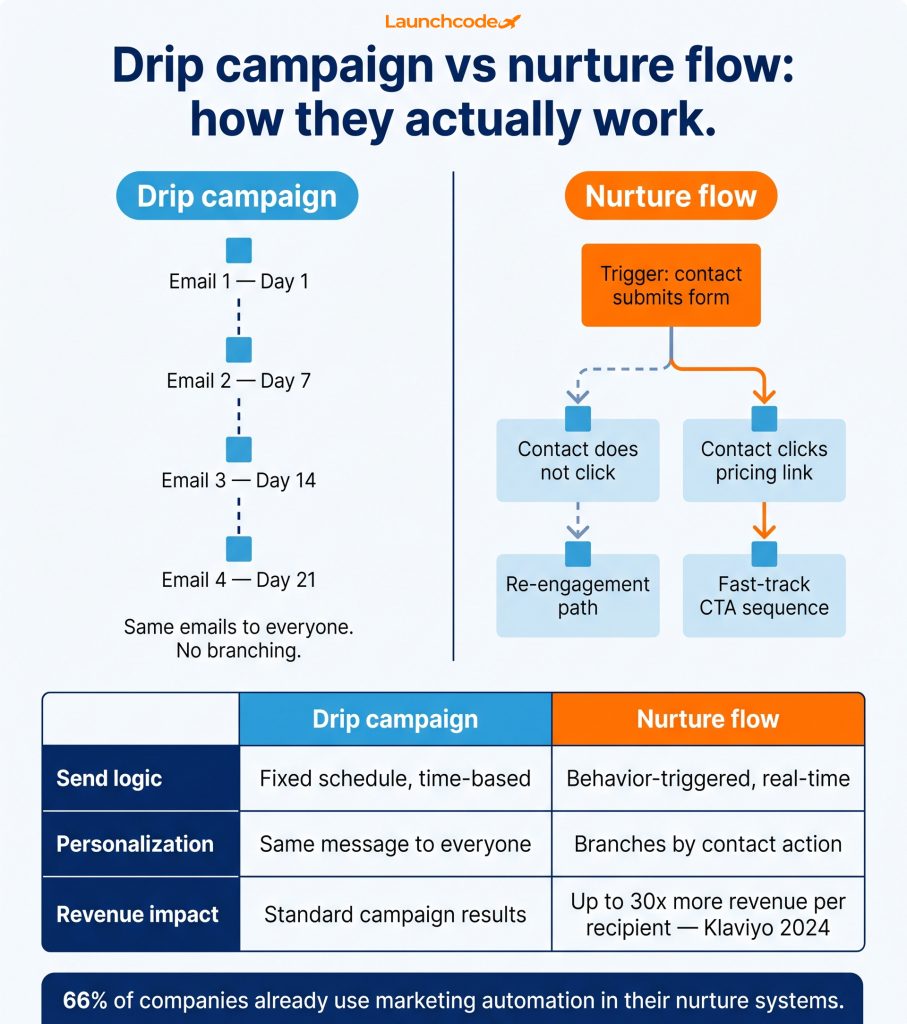
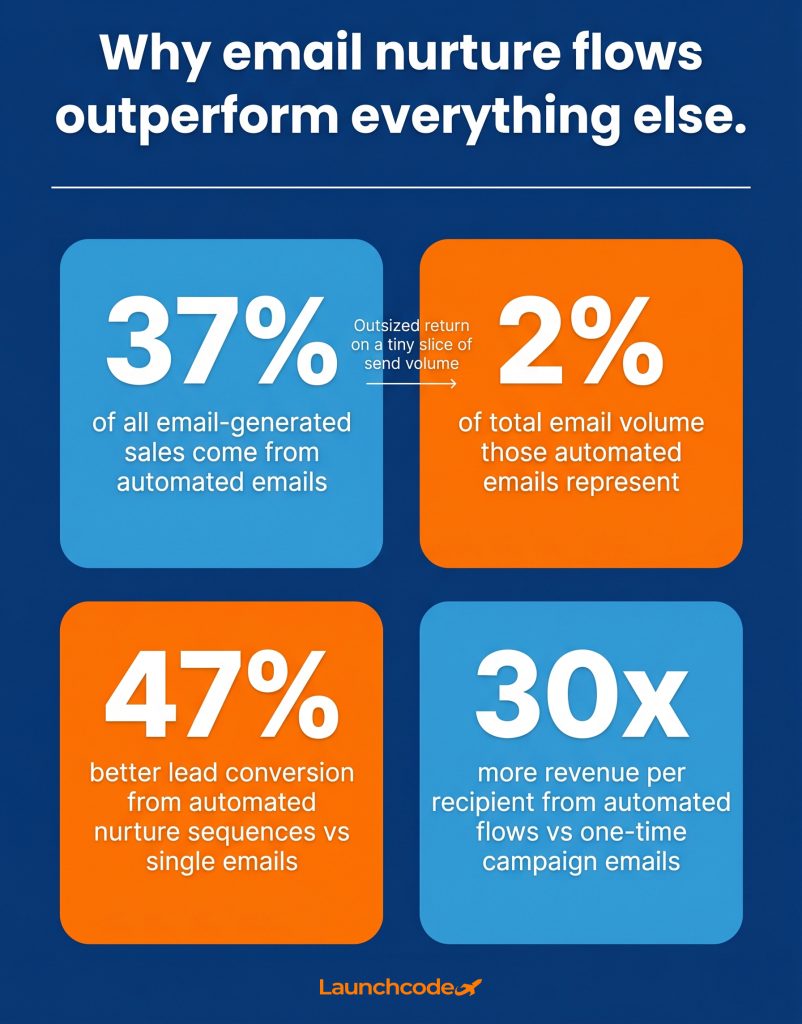
A nurture flow is a behavior-triggered sequence of automated emails designed to guide a lead through their buying journey at their pace. A drip campaign sends emails on a fixed calendar regardless of what the contact does. The distinction matters because behavior-triggered flows are far more effective. Klaviyo’s 2024 email benchmark data shows automated flows generate up to 30x more revenue per recipient than one-time campaign emails, largely due to their timing and targeting precision.
Drip campaigns are straightforward: send email 1 on day 1, email 2 on day 7, and so on. The contact’s actions do not change what they receive or when. Nurture flows work differently. A contact who clicks a pricing page link can receive a different follow-up than one who opens the email and does nothing. This branching logic is what makes nurture flows more effective, particularly in B2B and SaaS environments with longer sales cycles.
Forrester Research found that companies that excel at lead nurturing generate 50% more sales-ready leads at 33% lower cost per lead. That gap comes from relevance. A nurture flow sends the right message based on what a contact has already shown interest in. A drip campaign sends the same message to everyone.
B2B buying takes time. Prospeo’s lead nurturing research shows that 40% of B2B buyers take 6 to 12 months to reach a purchase decision, and nearly half consume more than seven pieces of content before they are ready to talk to sales. Salesforce puts the number of marketing-driven touches needed to produce a viable sales lead at 6 to 8.
A single email cannot do that work. A structured, multi-touch nurture flow can.
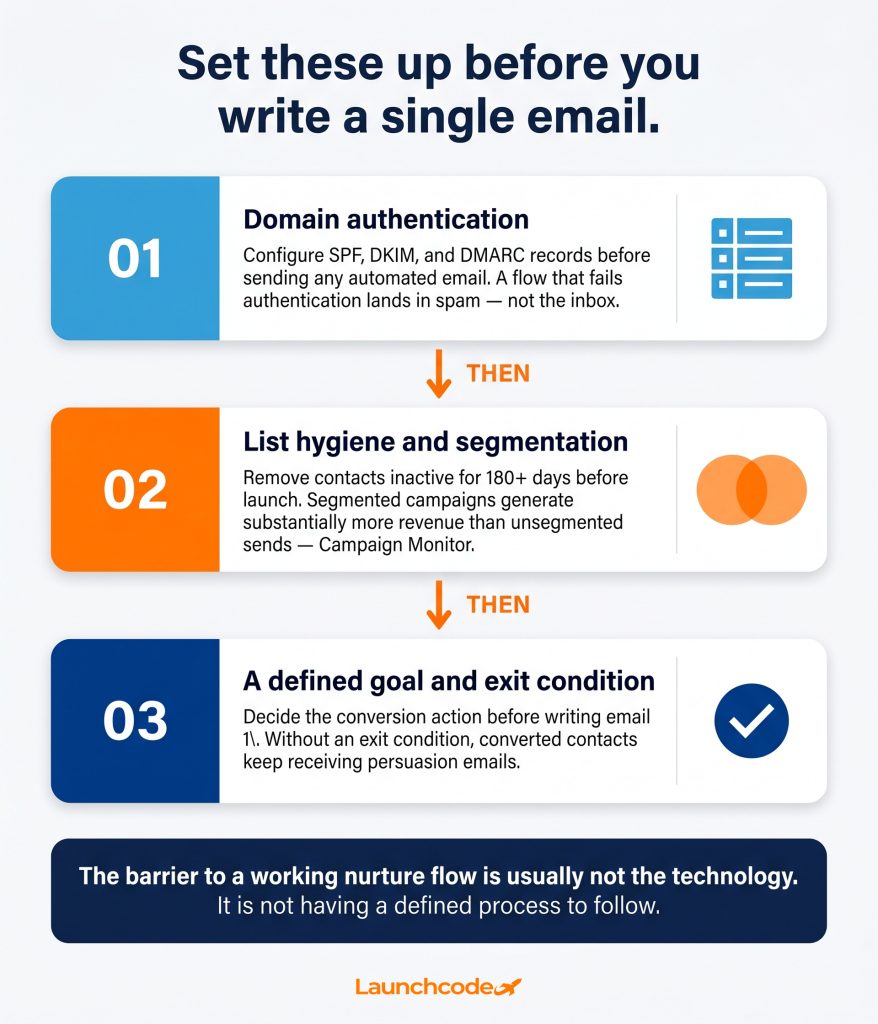
Before touching your email platform, set up three things: domain authentication, a clean and segmented list, and a defined goal with an exit condition. Skipping any of these creates problems that no email copy can fix. Poor deliverability means contacts never see the emails. An unsegmented list means irrelevant messages go to everyone. No defined goal means no way to measure whether the flow is producing results.
SPF, DKIM, and DMARC records are not optional. These DNS settings verify that your sending domain is legitimate and protect your sender reputation with inbox providers like Gmail and Outlook. A well-structured nurture flow that fails authentication will land in spam. Set these records up before sending any automated email.
Most ESPs, including HubSpot, ActiveCampaign, and GoHighLevel, provide step-by-step instructions for configuring these records. The setup takes less than an hour and protects every email you send from that domain going forward.
Remove unengaged contacts before the flow launches, not after deliverability issues appear. Contacts who have not opened any email in 180 days or more damage your sender score and skew your performance data. Move them to a re-engagement flow or suppress them entirely before going live.
Campaign Monitor’s benchmark data links segmented campaigns to substantially higher revenue than unsegmented sends. Even basic segmentation by lead source, industry, or content interest produces measurable improvement in open and conversion rates.
Every flow needs a clear objective. Is the goal to book a discovery call? Start a trial? Download a resource? The goal shapes the CTA in the final email and the exit condition that removes a contact from the flow when they convert.
“In almost every client onboarding, the first question we ask is: what should happen when a contact converts? Most teams haven’t defined it. That gap is usually why their previous attempts at automation didn’t stick.” Brittany Charles, SVP Client Services
Without an exit condition, a contact who has already booked a call keeps receiving persuasion emails, which feels disconnected and erodes trust. Set at minimum two exit conditions before launch: goal action completed, and contact unsubscribed.
For a first nurture flow, use a form submission as the trigger. It is simple, reliable, and maps cleanly to a defined contact action. A contact downloads a guide, fills a contact form, or registers for a webinar, and the flow starts automatically. More complex behavioral triggers, such as pricing page visits or email link clicks, are worth adding later once the baseline flow is live and measured.
| Trigger type | Best for | Notes |
|---|---|---|
| Form submission | First flows, lead magnet downloads, demo requests | Simple to configure in any ESP, clear intent signal |
| List join | Newsletter subscribers, event registrants | Good for broad welcome sequences |
| Link click | Contacts who clicked a specific resource or page | Requires link tracking in your ESP, enables useful branching |
| Pricing page visit | High-intent leads | Requires website tracking integration, very effective for B2B |
| Product action | Trial starts, feature use, purchase | Best for SaaS onboarding or post-sale flows |
For most teams building their first flow, form submission is the right starting point. The contact has already signaled interest. The trigger logic is clean. The setup works in every major ESP without additional integrations.
Your trigger fires whenever the condition is met, but enrollment criteria filter who actually enters the flow. You might trigger on form submission but only enroll contacts who submitted a specific form, provided a business email address, or are not already active in another flow. Setting these criteria correctly prevents duplicate enrollments and keeps contact list quality high from day one.
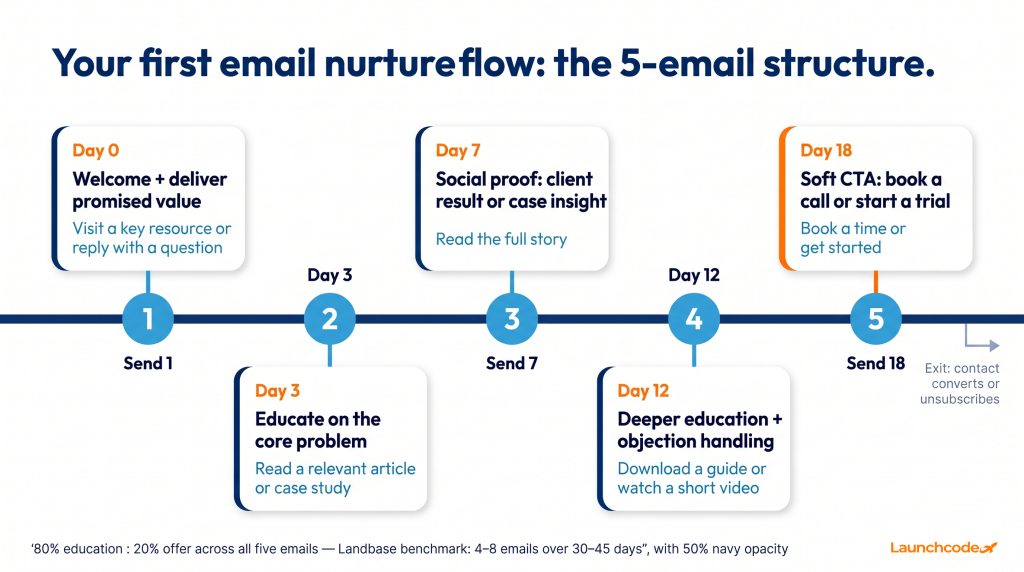
Start with five emails over 30 days. Research from Landbase puts the effective range at 4 to 8 emails over 30 to 45 days for most nurture goals. Five emails is a practical middle point that gives enough touches to build trust without burning the list. Send the first email immediately on the day of the trigger, then space the remaining four at roughly four to six day intervals.
| Timing | Purpose | CTA | |
|---|---|---|---|
| 1 | Day 0 | Welcome, deliver the value promised at signup | Visit a key resource or reply with a question |
| 2 | Day 3 | Educate on the core problem your service solves | Read a relevant article or case study |
| 3 | Day 7 | Social proof: client result, testimonial, or case insight | Read the full story |
| 4 | Day 12 | Deeper solution positioning, address a common objection | Download a guide or watch a short video |
| 5 | Day 18 | Soft CTA: book a call, start a trial, or request a demo | Book a time or get started |
This is a starting structure. B2B sequences with longer sales cycles often extend to 8 to 10 emails over 60 days. The content ratio across all five emails should follow the 80/20 rule: 80% education and value, 20% offer or CTA.
Set at least two exit conditions before the flow goes live:
A useful third condition: contact fails to open any email in the sequence and moves to a re-engagement flow. This protects sender reputation and removes unresponsive contacts from active nurture before they damage deliverability metrics.
Each email in the flow has one job. Lead with the value relevant to where the contact sits in the journey, name the specific problem or outcome you are addressing, and close with one clear action to take. Keep emails between 200 and 350 words. Longer emails lose readers before they reach the CTA, which is the only thing that moves them forward.
This email goes out immediately on the day of the trigger. Three things it must do:
Do not pitch anything. The contact just arrived. Your job is to confirm their decision was a good one and give them something worth opening.
This email addresses the core problem your product or service solves, without mentioning your product or service directly. Teach something useful. Share a data point that reframes how the contact thinks about the problem. Link to a blog post, a video, or a resource that adds genuine value.
The Annuitas Group’s research shows that automated nurture sequences convert leads 47% better than single emails. The difference is sustained, relevant contact over time. Email 2 is where that relevance starts, and where most generic sequences fail by pivoting to sales too soon.
Introduce a real result. A client story, a case study excerpt, or a specific before-and-after outcome. Keep it brief and concrete. One specific number. One specific outcome. One link to the full story. This email builds credibility without making a direct sales argument, which matters because most B2B buyers are still in research mode at this stage.
By email 4, contacts who are still opening are showing genuine interest. Use this email to address the most common objection your sales team hears. Frame it around the contact’s problem, not your solution. A detailed guide, a short walkthrough video, or an FAQ-style breakdown all work well here.
This is where you make the ask, but keep the friction low. “Book a 20-minute call” outperforms “Buy now” at this stage by a significant margin. The contact has received four emails of genuine value. They are warm. A specific, low-commitment ask converts far better than a hard sales pitch at the end of a sequence.
Running one nurture flow for all leads treats a first-time blog reader the same as someone who attended a product demo. They are not at the same stage and should not receive the same emails. Even basic segmentation by lead source, job title, or content interest produces significant gains. Campaign Monitor’s benchmark data links segmented campaigns to substantially higher revenue than unsegmented sends, reflecting the direct impact of sending more relevant messages to better-defined groups.
A contact who found you through a paid search ad has different intent than one who downloaded a long-form strategy guide. The ad contact may need more education on the problem. The guide downloader has already shown research intent and can move faster through the sequence. Build separate flows or, at minimum, separate email variants for each source.
If your business covers multiple service areas, segment by what the contact engaged with. Someone who downloaded an SEO guide should enter a different flow than someone who signed up from a CRM integration landing page. This is straightforward to implement using tags or list membership in platforms like HubSpot, ActiveCampaign, and GoHighLevel.
For B2B teams, a founder at a 10-person agency and a VP of Marketing at a 500-person SaaS company have different needs, budgets, and decision timelines. Most ESPs let you capture company size or job title as contact properties and use them as flow filters without building separate automation from scratch.
You do not need perfect segmentation to launch. Start with one clearly defined segment, build the flow, measure it, and add complexity once you have data to guide those decisions.
AI adds the most value in three specific areas of a nurture flow: send-time optimization, subject line testing, and behavioral branching. These are not experimental features. Platforms like ActiveCampaign, HubSpot, and Klaviyo already include AI-driven send-time prediction and engagement scoring in standard plans. Using them does not require a data team or technical setup beyond your existing ESP.
Instead of sending all emails at 9 AM on Tuesday, AI-driven send-time tools deliver each email at the time each individual contact is most likely to open it, based on their own past behavior. ActiveCampaign’s predictive sending feature does this automatically. It is one of the fastest ways to improve open rates without changing a word of copy.
Most ESPs support A/B testing on subject lines across a percentage of the list before sending to the remainder. AI-assisted tools go further, suggesting variants based on engagement patterns from past sends. The testing approach is straightforward: change one element at a time, subject line first, then preview text, then send time. Compound improvements add up across a sequence’s lifetime without requiring major creative changes.
The most effective nurture flows use if/then logic to branch based on what a contact does inside the sequence. If a contact clicks the pricing link in email 3, they can move to a faster-paced track with a direct CTA sooner. If they open every email but never click, they move to a re-engagement path. HubSpot’s workflow builder and ActiveCampaign’s automation map both support this without complex configuration.
“The teams getting the best results from automation aren’t running more complex flows. They’re running simpler ones with tighter behavioral logic. One good branching rule tied to a high-intent action outperforms five extra emails.” Derick Do, Co-Founder and Chief Product Officer
MarketOne’s 2025 analysis describes this shift toward what they call intelligent engagement: systems that respond to intent signals in real time rather than waiting for leads to progress through a fixed schedule. Even a basic version of this, branching off a single link click, produces measurable conversion improvements over a static sequence.
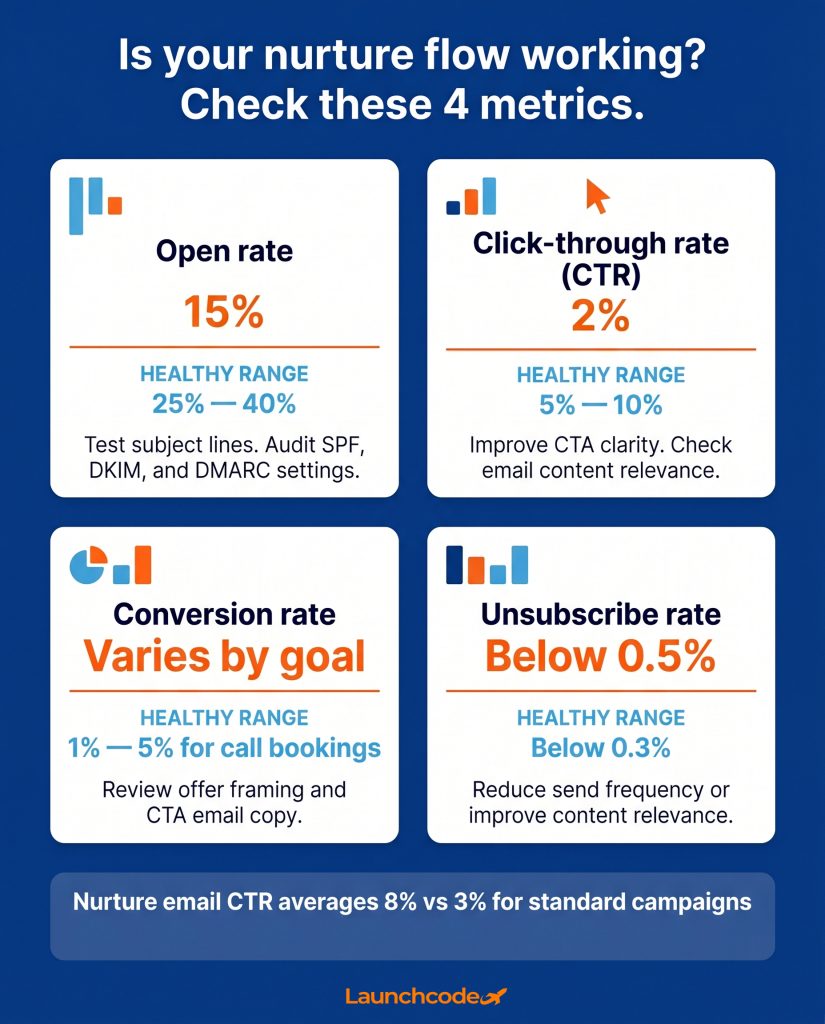
Check four numbers after the first 30 days of live data: open rate, click-through rate, conversion rate, and unsubscribe rate. If open rate falls below 15% or CTR falls below 2%, the flow needs revision. Nurture email CTR benchmarks around 8%, compared to roughly 3% for standard campaign emails, reflecting the direct impact of behavioral relevance on engagement.
| Metric | Minimum threshold | Healthy range | Action if below threshold |
|---|---|---|---|
| Open rate | 15% | 25% to 40% | Test subject lines, audit deliverability settings |
| Click-through rate | 2% | 5% to 10% | Improve CTA clarity, check email content relevance |
| Conversion rate | Varies by goal | 1% to 5% for call bookings | Review offer framing and CTA email copy |
| Unsubscribe rate | Below 0.5% | Below 0.3% | Reduce frequency or improve content relevance |
These thresholds come from Landbase’s email sequence benchmark data and Litmus’s automated email research. Industry-specific benchmarks vary, so compare your numbers against data for your particular sector and audience type.
Make one change at a time. Test it for two to four weeks before changing anything else. Every strong nurture flow was built this way, not perfectly from the first send, but systematically improved based on real data.
The right platform depends on your team size, CRM setup, and how much flow complexity you need. For most teams building a first nurture flow, ActiveCampaign, HubSpot, or Mailchimp cover all the core requirements. GoHighLevel and Launch Portal are worth evaluating for agencies and service businesses that need email automation, pipeline management, and SMS in one system without additional integrations.
| Platform | Best for | Key strength | Watch out for |
|---|---|---|---|
| HubSpot | B2B teams with CRM needs | Deep workflow logic, lead scoring, native CRM | Cost increases as contact count grows |
| ActiveCampaign | SMBs and agencies | Visual automation builder, AI send-time, strong onboarding | Learning curve on advanced branching features |
| Klaviyo | E-commerce brands | Revenue-focused flows, rich behavioral data | Less suited for pure B2B service businesses |
| Mailchimp | Teams just getting started | Easy setup, strong template library | Behavioral branching limited in lower-tier plans |
| GoHighLevel | Agencies and service businesses | All-in-one CRM, email, SMS, pipeline | Interface takes time to learn fully |
| Launch Portal | Teams that want a fully managed, agency-built system | All-in-one CRM, email, SMS, pipeline, and automations with expert setup and onboarding included | Built for Launchcodex clients; not a standalone self-service tool |
Adam Sakry, Digital Marketing Specialist at the YMCA, described the shift after implementing structured automation in ActiveCampaign: before automation was in place, every email had to be built manually. After setup, any team member could create a consistent, on-brand email in minutes. That kind of operational efficiency compounds as your flow library grows.
Your first nurture flow is a foundation, not the final product. Once it is live and producing consistent results, you have the data and the process to build the next layer: a re-engagement flow for inactive contacts, a post-sale onboarding sequence, and eventually separate flows segmented by product interest, company size, or buyer stage. Each flow you add compounds the total system’s output.
Litmus’s research shows automated emails drive 37% of all email-generated sales while accounting for only 2% of total email volume. Most of that 37% comes from teams running multiple coordinated flows, not a single welcome sequence. But every one of those teams started with one trigger, one defined goal, and five emails.
Run your flow for 30 days. Review the four metrics. Fix the weakest point. Then build the next flow.
If your lead list is sitting idle while contacts go cold, Launchcodex helps growth-focused teams design email marketing systems that connect automation, segmentation, and data infrastructure into a working engine. The system is simpler to build than most teams expect. The barrier is usually not the technology. It is not having a defined process to follow.
Start with the trigger. Everything else follows.
A drip campaign sends emails on a fixed schedule regardless of what a contact does. A nurture flow is triggered by a contact’s behavior and can branch based on their actions inside the sequence. Nurture flows produce higher engagement and conversion rates because they are more relevant to each contact’s actual stage in the buying journey.
Start with five emails spaced over 30 days. This gives enough touches to build trust without overwhelming contacts or burning the list. For B2B audiences with longer buying cycles, extending to 8 to 10 emails over 60 days is common.
Use a form submission as your trigger. It is a clear intent signal, easy to configure in any ESP, and maps cleanly to a specific contact action. Add more complex behavioral triggers like pricing page visits or link clicks once the baseline flow is live and measured.
A healthy nurture flow open rate falls between 25% and 40%. If your rate drops below 15%, check subject lines first, then audit your SPF, DKIM, and DMARC authentication settings. Deliverability issues often look like engagement problems.
No. A flow built on a form trigger, five emails, and a clear exit condition will outperform sending nothing by a significant margin. AI tools like send-time optimization and behavioral branching improve results meaningfully, but they are worth adding after the baseline flow is running and producing measurable data.
Review the flow at 30 days of live data. If open rate is below 15%, CTR is below 2%, or unsubscribes are above 0.5%, revise starting with the worst-performing email. Change one element at a time and measure the result before changing anything else.
Yes. The CAN-SPAM Act requires a clear unsubscribe mechanism in every commercial email sent to US recipients. GDPR applies additional requirements for contacts in the European Union, including explicit consent to receive marketing emails. Include a working unsubscribe link in every email in the sequence and honor opt-outs promptly.



Real stories from the people we’ve partnered with to modernize and grow their marketing.