
Share:

AI marketing & automation


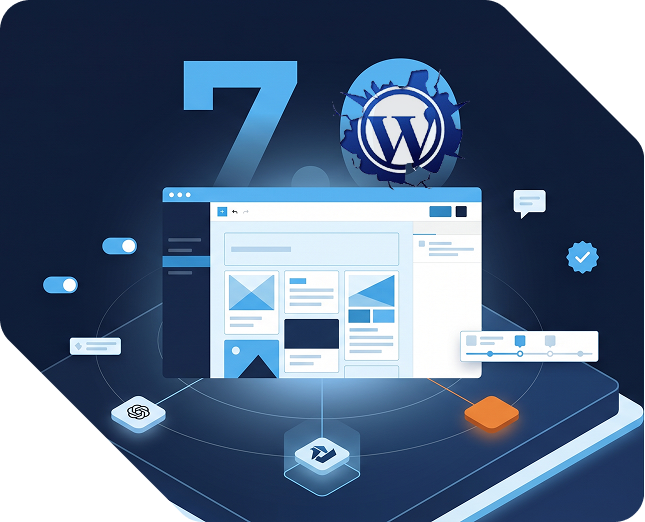
WordPress 7.0 is the most anticipated release in years and, for many readers, the most confusing. Pre-release coverage led with real-time collaboration as the headline feature. That feature did not ship. What did ship is quieter but more durable: a foundational AI layer, a rebuilt admin, improved editorial tools, and a platform that is meaningfully better to manage and build on.
This guide covers every major change in WordPress 7.0, explains the business impact for site owners, marketers, and content teams, and gives you a practical framework for deciding when and how to upgrade. If you run a WordPress site and want to know what this release means for your business, read this first.
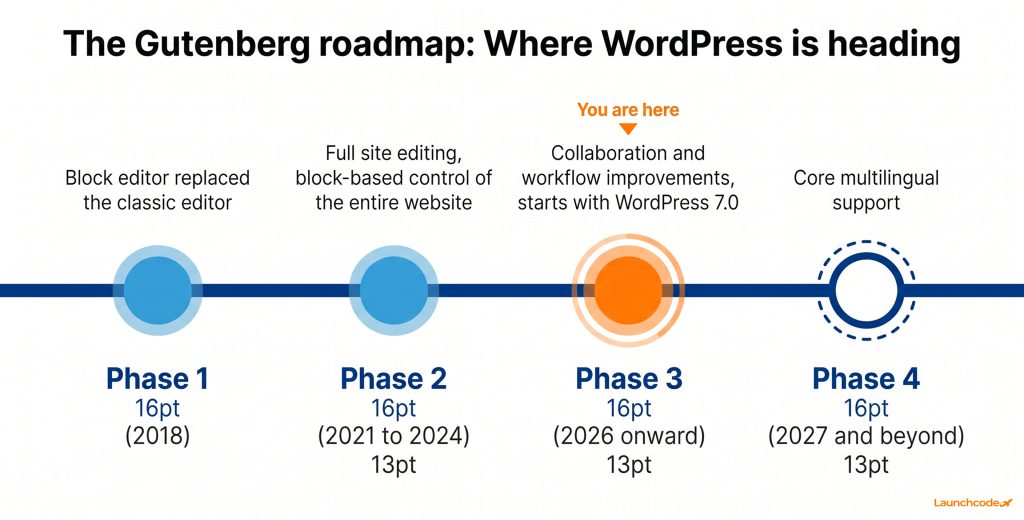
WordPress 7.0 is the largest structural upgrade to the platform since the block editor launched in 2018. It officially marks the beginning of Gutenberg Phase 3, the collaboration and workflow phase of the four-phase WordPress development roadmap. Released on May 20, 2026, it arrives after a turbulent 2025 that compressed the annual release schedule from three major versions to two. The result is a release built for durability.
To understand the significance, it helps to know what interrupted the normal pace of development. In late 2024, Automattic and WP Engine entered a highly public legal dispute. During that period, Automattic’s weekly contribution to WordPress.org dropped from roughly 3,988 hours to just 45 hours. Since Automattic employs the majority of core contributors, that gap forced the community to prioritize quality over speed. Only WordPress 6.8 (April 2025) and 6.9 (December 2025) shipped that year.
WordPress 6.9 acted as a stabilization release, clearing technical debt and laying the groundwork for 7.0. That discipline is visible in the final product. WordPress 7.0 does not rush to impress. It builds infrastructure.
The four phases of the Gutenberg project show where WordPress is heading:
WordPress 7.0 opens Phase 3. It does not complete it. The features in this release are the foundation for collaboration tools, AI workflows, and team-based publishing that will roll out over the next several years.
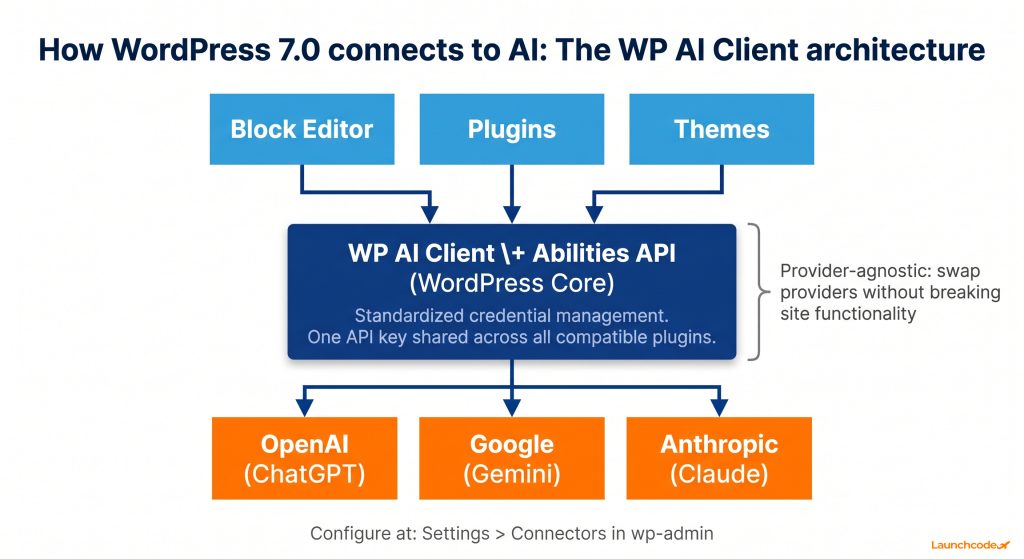
WordPress 7.0 does not ship a built-in AI writer. What it ships is a standardized AI layer that lets any plugin or theme connect to AI providers through one shared system. The WP AI Client and Abilities API mean that AI features across different plugins now work consistently, share credentials, and avoid the performance and security problems that fragmented third-party integrations create.
Before 7.0, every AI plugin for WordPress had to build its own connection to OpenAI, Gemini, or other providers. Each plugin stored its own API keys, handled its own requests, and introduced its own potential vulnerabilities. That approach produced bloated plugin stacks, inconsistent behavior, and significant overhead.
The WP AI Client and Abilities API replace that approach with a provider-agnostic framework built directly into core. Developers can now request standardized AI capabilities, such as text summarization, tone adjustment, image generation, or code completion, without building their own integration layer. WordPress handles the connection and credential management.
After updating, a new screen appears at Settings > Connectors in wp-admin. It lists three default AI providers: OpenAI (ChatGPT), Google (Gemini), and Anthropic (Claude). You can search and connect other providers as well.
To activate a provider, install the corresponding connector plugin and enter your API key. That key is then shared across all compatible plugins on the site, so you manage one credential instead of ten.
For content teams running active publishing programs, 7.0’s AI layer enables a new class of editor-integrated tools. The WP AI Client exposes capabilities directly in the block editor: adjusting text tone, auto-generating SEO meta descriptions, creating alt text for images, and building complex block patterns from plain language prompts.
None of this replaces a content strategy. It reduces time spent on production tasks, which compounds across high-volume publishing. WordPress agency founder Ivan Popov, writing in his April 2026 analysis of the 7.0 cycle, described the Abilities API as giving WordPress a credible, extensible AI architecture that addresses the workflow gaps driving editorial teams toward external tools.
“Once WordPress standardizes the AI connection layer, the plugin ecosystem catches up fast. We’ve seen this pattern with every major core API addition. The Abilities API gives plugin developers a stable target to build against, which means better AI tooling for everyone within 12 months.” Derick Do, Co-Founder and Chief Product Officer, Launchcodex
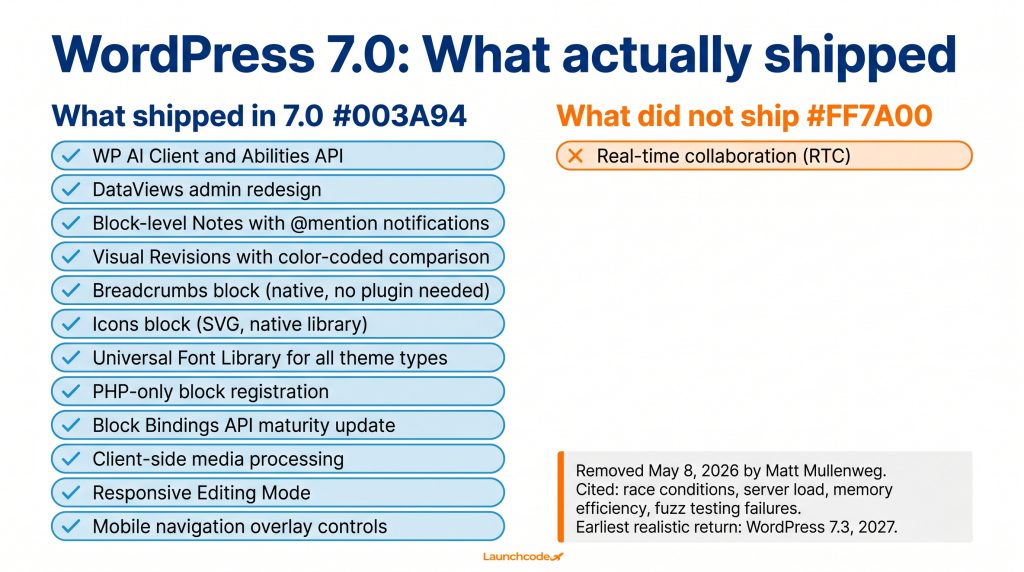
WordPress 7.0 ships across six categories of improvement: AI infrastructure, admin redesign, editorial workflows, design and blocks, developer tooling, and performance. The list below covers every confirmed change in the release. Use it as a quick reference before diving into the detailed breakdowns in the sections below.
The WordPress admin dashboard received its first meaningful visual overhaul since 2013. The centerpiece is DataViews, a React-based content management interface that replaces the old server-rendered list tables. Where the legacy tables required a full page reload to sort or filter content, DataViews loads instantly, supports grid and list layouts, and handles bulk editing without leaving the screen.
For site owners managing dozens of posts, pages, or users, this is a practical time saver. Filtering by status, author, category, or date now happens in milliseconds on the client side. You can create custom views tailored to specific workflows: a grid layout for image-heavy portfolio entries, a filtered list for pending editorial drafts, or a focused view for posts assigned to one author.
The dashboard redesign also brings updated typography, a cleaner color scheme, a new dedicated Fonts screen under Appearance > Fonts, and refreshed dashboard widgets. The changes are part of a larger WordPress Design System being rolled out to standardize form elements, buttons, and UI patterns across the admin area.
For teams managing large content libraries, the legacy list tables were a bottleneck. Bulk operations were slow. Filtering required page reloads. Custom views were impossible without plugins. DataViews removes all three problems natively.
There is also a direct plugin reduction benefit. Several popular admin enhancement plugins exist solely because the legacy tables were too rigid. With DataViews in core, some of those plugins become redundant. Fewer active plugins means faster admin load times, fewer update maintenance tasks, and a smaller attack surface.
WordPress 7.0 ships two features that improve team-based publishing without requiring simultaneous editing. Block-level Notes let editors leave contextual feedback directly attached to specific content blocks, with @mention notifications built in. Visual Revisions replace the old HTML-based comparison screen with a color-coded view that shows content exactly as it appears in the editor.
These features matter most for teams currently passing feedback across Google Docs, email threads, or Slack. Block-level Notes bring that communication into the editor, directly attached to the content being discussed.
Select any block in the editor and click Add Note to attach a comment to that content element. You can @mention teammates, which triggers system notifications without requiring anyone to leave the dashboard. Notes are tied to the specific block, so feedback stays precisely contextual.
For an editorial team reviewing a long article, this replaces vague comments like “the third paragraph under the second subhead” with a note attached to exactly that paragraph. Revisions move faster. Feedback gets lost less often.
The original WordPress revision system saved post history but displayed comparisons as raw HTML diffs. For anyone without developer fluency, comparing two versions of a post was frustrating and often useless.
WordPress 7.0 replaces that with a single-column visual comparison that renders content as it actually appears in the editor. Changes are color-coded: yellow for modified content, red for deletions, green for additions. A sidebar lets you navigate between each change in sequence, then restore any previous version with one click.
For non-technical team members, this is a significant quality-of-life improvement. Accidentally deleting a call-to-action button or reformatting a layout no longer requires hunting through HTML to identify what changed.
On May 8, 2026, WordPress co-founder Matt Mullenweg made the decision to remove real-time collaboration from WordPress 7.0. The feature had been the centerpiece of pre-release coverage for months. The official reason, documented on Make WordPress Core, cited concerns around race conditions, server load, memory efficiency, surface area, and recurring bugs found during fuzz testing. Pulling the feature was the right call.
The official Make WordPress Core post from Anne McCarthy, published May 8, 2026, is the authoritative record. Fuzz testing, which throws random and malformed input at a system to expose failure cases, surfaced too many unstable edge cases in the synchronization layer. The team could not confidently ship a feature at this scale with those issues unresolved.
Not soon. Analysis from SmartWP puts the realistic timeline at WordPress 7.3 or later, which means 2027 at the earliest. Both WordPress 7.1 (scheduled for August 2026) and 7.2 (December 2026) are considered too close for the structural rework the feature requires.
The most likely path forward is an extended testing period inside the Gutenberg plugin, which has historically served as the proving ground for ambitious features before they enter core. Full site editing followed exactly this pattern. Teams that need true simultaneous editing today should evaluate Multicollab, the most established third-party plugin currently offering Google Docs-style collaboration for the Gutenberg editor.
Ivan Popov, writing in his April 2026 analysis, framed it clearly: choosing not to ship something rather than shipping it prematurely is one of the most encouraging signals from the 7.0 cycle. After the turbulence of 2025, the project is operating with renewed discipline.
The WordPress community has lived through rushed releases that caused widespread plugin breakage and hosting issues. A core team willing to pull a marquee feature rather than compromise stability is a team worth trusting with the next several years of platform development.
WordPress 7.0 adds two new native blocks (Breadcrumbs and Icons) and extends the Font Library to work with all theme types. It also introduces responsive editing controls, improved Grid and Gallery blocks, a mobile navigation overlay panel, and client-side media processing. Each of these targets a plugin or workaround that many sites currently rely on.
The case for native features over plugins is straightforward: fewer plugins mean faster load times, fewer security vulnerabilities, fewer update tasks, and less risk of conflicts during future WordPress upgrades.
The Breadcrumbs block generates a hierarchical navigation trail automatically based on your site’s structure. It requires no configuration and inherits your existing theme styles. For content-heavy sites where page hierarchy matters for SEO and user orientation, this is a direct improvement.
The Icons block lets you insert scalable SVG icons from a curated native library, with controls for size, color, and alignment. For sites that currently load Font Awesome or similar icon libraries via a third-party script, switching to the native block removes an external performance dependency.
Before 7.0, the Font Library was only available to sites using block themes. WordPress 7.0 opens it to all theme types, including classic PHP-based themes. Administrators can now install, manage, and activate local fonts or Google Fonts directly from the dashboard without custom code or typography plugins.
The Font Library serves fonts locally, which matters for GDPR compliance. Sites loading Google Fonts directly from Google’s servers have faced privacy regulatory scrutiny in several European jurisdictions. Local font hosting resolves that exposure at the core level.
Before 7.0, uploading a high-resolution image meant your web server handled the resizing and compression. On shared hosting plans, that created server timeouts and high CPU usage during bulk uploads.
WordPress 7.0 moves that work to the user’s browser using modern web APIs. Images are resized and compressed on the client device before the upload begins. For sites on budget or shared hosting, this reduces upload errors and speeds up large media workflows without any server configuration.
A new Responsive Editing Mode lets you preview and adjust block settings for tablet and mobile breakpoints directly inside the Site Editor, without resizing your browser window or switching to a front-end preview.
The Navigation block gains a dedicated Overlay settings panel for the mobile menu. You can now independently style the hamburger icon, background color, typography, and dropdown layout without writing CSS media queries.
WordPress 7.0 introduces two significant developer improvements. PHP-only block registration allows developers to build simple custom blocks using only PHP, removing the requirement for a Node.js and Webpack build pipeline. The Block Bindings API reaches a new maturity level, connecting block attributes directly to custom fields, post metadata, or external data sources without custom JavaScript.
Before 7.0, building a custom Gutenberg block required a full JavaScript development environment: Node.js, Webpack, React, and JSX compilation. For PHP-native developers, that setup represented a real learning curve and ongoing maintenance burden.
PHP-only block registration provides a native path using only PHP files, leveraging WordPress’s existing server-side rendering architecture. Simple custom blocks, custom field displays, and data-driven templates can now be built without touching a JavaScript build pipeline. For agencies building client sites with custom functionality, this reduces time and complexity on common deliverables.
The official WordPress Developer Blog’s May 2026 roundup confirms this as one of the most impactful developer-facing changes in the release.
The Block Bindings API connects native block attributes directly to custom fields, post metadata, or external data sources. A Paragraph block can pull content from an ACF field. An Image block URL can bind to a post meta value. No custom React block required.
Pattern Overrides extend this by allowing synced block patterns to lock layout globally while permitting content changes on a per-post basis. For agencies building client sites, this combination means design consistency enforced at the pattern level with content flexibility maintained at the post level. It significantly reduces the need for custom block development across common client site use cases.
WordPress 7.0 drops support for PHP 7.2 and 7.3. The minimum is now PHP 7.4. PHP 8.3 or higher is the recommended version for performance and security. Both PHP 7.2 and 7.3 reached official end of life years ago, making this change reasonable and overdue. Sites on older PHP versions must upgrade before applying the WordPress 7.0 update.
WordPress 7.0 ships several performance optimizations that activate after the update with no configuration required. Faster block rendering, improved database queries, client-side media processing, and refined lazy loading all contribute to faster page delivery and lower server load. For most sites, these improvements are measurable in tools like Google PageSpeed Insights and GTmetrix.
The key performance wins:
None of these require plugin configuration or theme changes. They apply at the core level across all WordPress 7.0 sites.
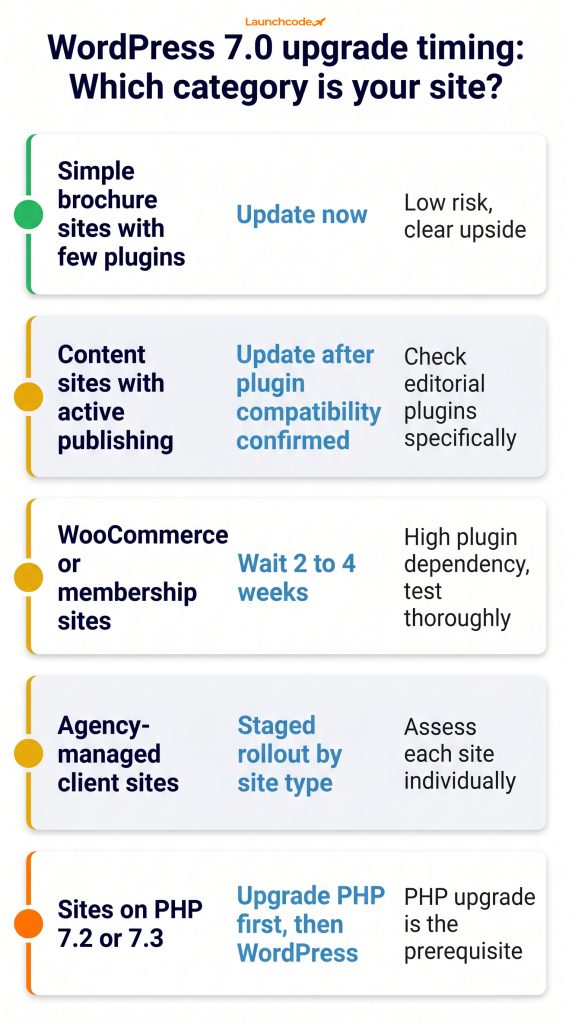
Do not update a live WordPress site to a major version without completing four steps first: create a full backup, test on a staging environment, verify PHP version compatibility, and confirm that your active theme and critical plugins have released 7.0-compatible versions. Skipping any of these steps is where upgrade problems start.
“Every major WordPress release creates a window where prepared sites pull ahead. The teams that test on staging, clear their plugin debt, and update cleanly are the ones that do not lose traffic to a broken deployment.” Tanner Medina, Co-Founder and Chief Growth Officer, Launchcodex
| Site type | Upgrade timing | Key consideration |
|---|---|---|
| Simple brochure sites with few plugins | Update now | Low risk, clear upside |
| Content sites with active publishing | Update after plugin compatibility confirmed | Check editorial plugins specifically |
| WooCommerce or membership sites | Wait 2 to 4 weeks | High plugin dependency, test thoroughly |
| Agency-managed client sites | Staged rollout by site type | Assess each site individually |
| Sites on PHP 7.2 or 7.3 | Upgrade PHP first, then WordPress | PHP upgrade is the prerequisite |
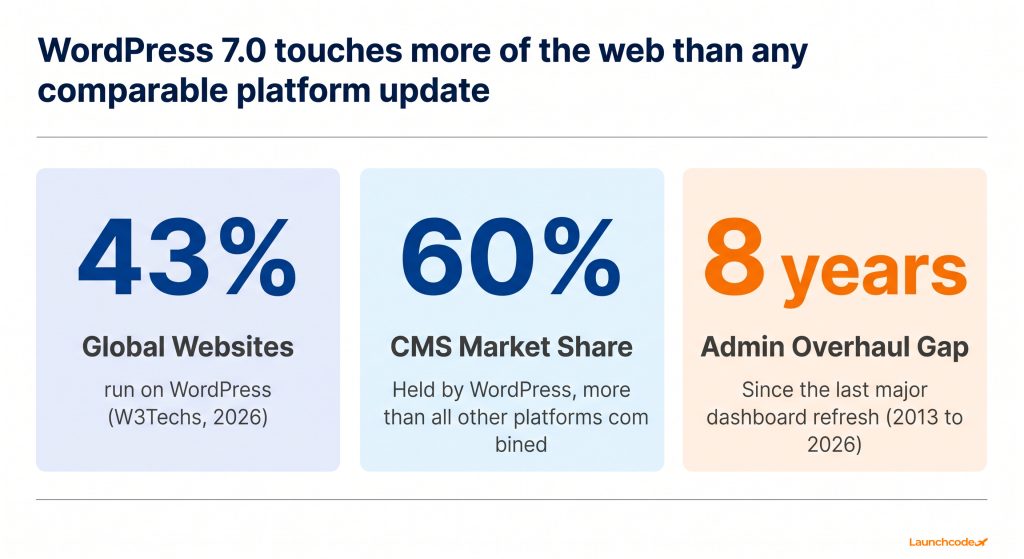
WordPress powers approximately 43% of all websites globally and holds roughly 60% of the CMS market. A release at this scale affects more web infrastructure than any comparable platform update. Understanding what actually shipped, and what it means for your specific setup, is how you stay ahead of it.
WordPress 7.0 is a foundational release. The most talked-about feature did not ship. What did ship matters more for the long term: a native AI layer that will become the standard connection point for every AI plugin on the platform, a rebuilt admin that is faster to use day to day, editorial tools that reduce friction for publishing teams, and a cleaner architecture that makes the next several years of WordPress development more coherent.
If you manage a WordPress site for your business or your clients, the right response to 7.0 is preparation. Check your PHP version, verify plugin compatibility, run the update on staging, and upgrade on a schedule that fits your site’s risk profile.
For teams with complex WordPress environments, heavier plugin dependencies, or sites running active WooCommerce or membership infrastructure, working with a partner who understands both the technical and business dimensions of major WordPress upgrades reduces the risk of disruption and ensures you capture the performance and workflow improvements 7.0 delivers.
WordPress 7.0 was officially released on May 20, 2026. It was originally scheduled for April 9, 2026, but the release was extended by approximately six weeks. Real-time collaboration was removed from the release before launch.
Matt Mullenweg made the decision to remove the feature on May 8, 2026. The official Make WordPress Core announcement cited concerns around race conditions, server load, memory efficiency, surface area, and recurring bugs found during fuzz testing. The current implementation was not stable enough to ship at scale.
Yes. Block-level Notes let editors leave contextual feedback directly attached to specific blocks, with @mention notifications built in. Visual Revisions provide a color-coded comparison view that shows exactly what changed between saved versions. Both features improve asynchronous editorial workflows without requiring simultaneous editing.
Yes. The built-in Connectors system requires an account with an AI provider (OpenAI, Google, or Anthropic) and you pay for usage based on that provider’s pricing. The Abilities API and WP AI Client handle the connection once you enter your key at Settings > Connectors.
DataViews is a React-based replacement for the legacy PHP-rendered admin list tables. It loads instantly without page reloads, supports grid and list layouts, and allows instant client-side filtering, sorting, and bulk editing. It is the most visible change in the wp-admin experience after updating.
The minimum is PHP 7.4. WordPress 7.0 drops official support for PHP 7.2 and 7.3. For best performance and security, PHP 8.3 or higher is recommended. Upgrade your PHP version on a staging environment and test before applying the change to your live site.
For simple sites with a small plugin stack, yes, after completing a backup and verifying plugin compatibility. For sites running WooCommerce, membership platforms, or complex page builders, wait two to four weeks for the ecosystem to release compatibility updates, then test on staging before touching production.
Two new core blocks ship with 7.0: the Breadcrumbs block, which generates a hierarchical navigation trail automatically, and the Icons block, which lets you insert scalable SVG graphics from a native library. Both previously required third-party plugins.
The most realistic timeline is WordPress 7.3 or a future release in 2027. Both WordPress 7.1 (August 2026) and 7.2 (December 2026) are considered too close for the structural rework the feature requires. Teams that need simultaneous editing today should evaluate Multicollab as a bridge solution.
Yes, as of WordPress 7.0. The release introduces native AI infrastructure directly into core through the WP AI Client and Abilities API. This is not a built-in AI writer. It is a standardized connection layer that lets WordPress communicate with external AI providers including OpenAI (ChatGPT), Google (Gemini), and Anthropic (Claude) through a single shared system. Once you connect a provider at Settings > Connectors in wp-admin and enter your API key, AI capabilities become available across compatible plugins and directly inside the block editor. Practical uses include adjusting text tone, generating SEO meta descriptions, creating image alt text, and building block patterns from plain language prompts. Before 7.0, every AI plugin had to build its own separate connection to AI providers. WordPress 7.0 replaces that fragmented approach with one centralized, provider-agnostic framework built into the platform itself.


Real stories from the people we’ve partnered with to modernize and grow their marketing.