

CRM automation with AI: What to automate and what to keep human
Learn which CRM tasks to automate and which to keep human. A three-tier framework for faster lead follow-up, smarter scoring...




Most businesses using a CRM are running it at half capacity. They automate the obvious things or nothing at all, and they lose leads because no one responded fast enough, followed up consistently, or caught the signals buried in their pipeline data. Teams that over-automate create a different problem: customers feel like they are talking to a machine, and 50% of them will switch to a competitor after a single bad experience.
This article gives you a working framework for AI and CRM automation. You will learn exactly which tasks AI should own, which tasks require human judgment, and how to draw the line between the two in a way that protects both your conversion rate and your customer relationships.
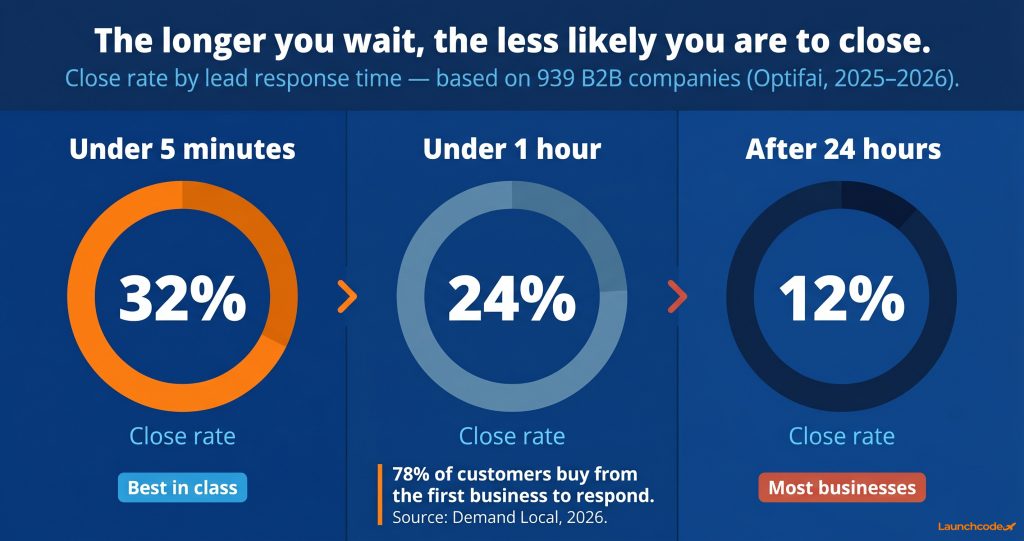
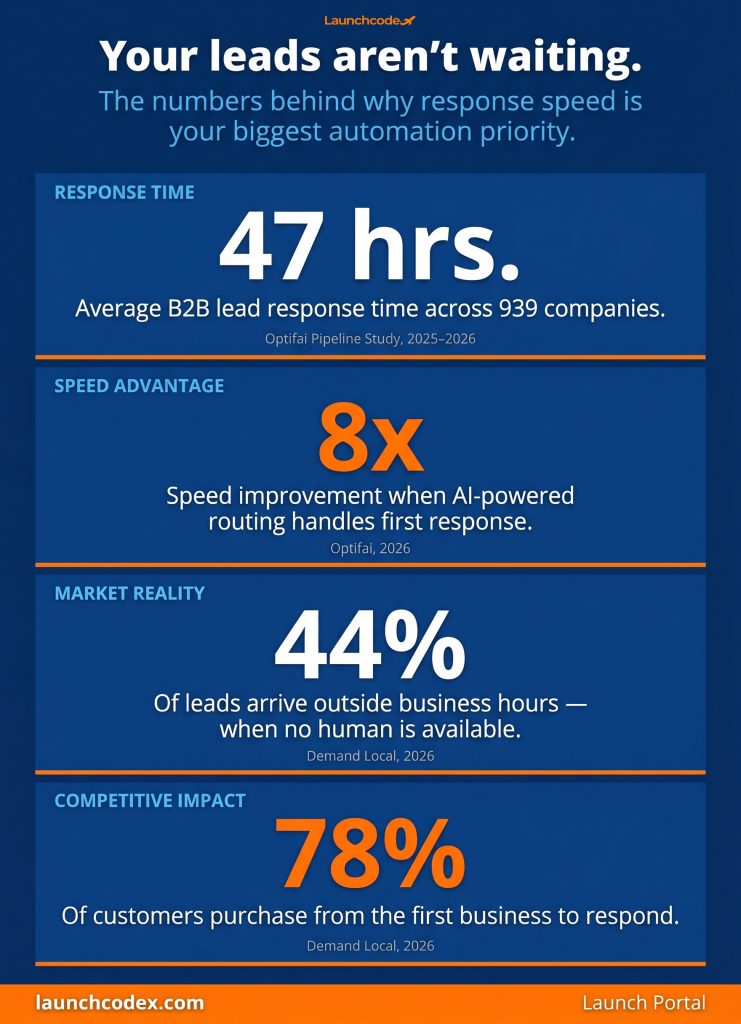
If your team responds to inbound leads manually, you are losing deals before the conversation starts. An Optifai analysis of 939 B2B companies found the average lead response time is 47 hours. Only 23% of companies respond within 5 minutes. Leads contacted within 5 minutes achieve a 32% close rate. Leads contacted after 24 hours close at 12%. That gap is a systems problem, not a sales problem.
Ready to grow your organic traffic?
Get a free SEO audit from the Launchcodex team.
A rep on a call, in a meeting, or away from their desk cannot reply to a new web form submission in under a minute. Automation can. Forty-four percent of leads arrive outside business hours, which means no human is available to respond without a system in place.
Demand Local research found that 78% of customers purchase from the business that responds first. That is not about pitch quality. It is about who shows up first. Automation is the only way to guarantee you always do.
A prospect submits a contact form at 9:47 PM. Within 60 seconds, your CRM sends a personalized text confirming receipt, sets the lead status to active, assigns the contact to the right rep based on territory or service type, and adds them to a follow-up sequence starting the next morning. No one on your team touched anything.
That sequence, first response plus routing plus follow-up scheduling, is one of the clearest automation wins available. It is fast, consistent, and removes the human error of missed follow-ups entirely.
The tasks worth automating share one characteristic: they are rule-based, repetitive, and have a defined correct outcome. AI does not need judgment to send a follow-up reminder or log a call. It needs the trigger and the instruction. The mistake most teams make is treating these tasks as too simple to configure or too risky to trust. Neither is true.
According to the LinkedIn State of Sales Report, 40% of sales professionals still update their CRM systems by hand. That is hours per week spent on data entry instead of actual selling.
"The teams that get the most from CRM automation are the ones who define the handoff point before they build the sequence. Automation should carry the lead to the right moment. A person should carry them across the line." Derick Do, Co-Founder and Chief Product Officer
Every call, email, and meeting should log automatically. AI-powered CRMs detect patterns in customer interactions and update contact records in real time. This eliminates duplicate entries, outdated information, and the slowdown caused by manual logging. When records are accurate, your pipeline reflects reality and your forecasting improves.
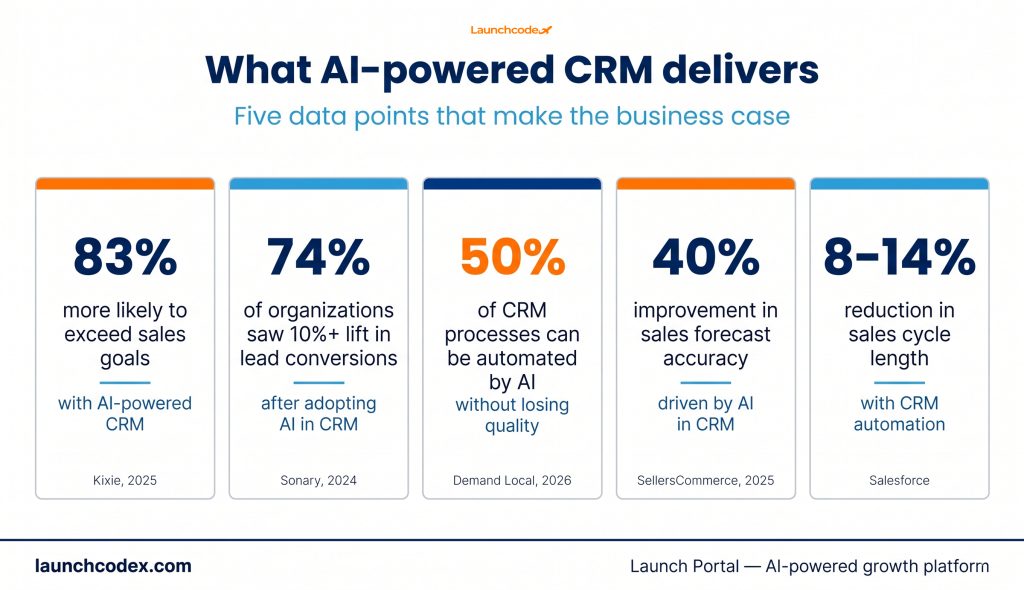
Salesforce data shows that CRM automation reduces sales cycles by 8% to 14% by giving reps a complete, accurate view of each customer before every interaction.
Manual lead scoring asks a rep to assess every contact and decide who deserves attention today. AI does this continuously, scoring leads based on behavior, engagement history, and demographic signals. Reps start each day with a ranked list rather than a pile of undifferentiated contacts.
Organizations using AI in CRM report a 10%+ increase in lead conversion rates in 74% of cases. AI lead scoring is a primary driver of that result.
Multi-step SMS and email sequences triggered by lead behavior are among the highest-ROI automation applications in any CRM. A lead who downloads a guide, visits your pricing page, and goes quiet is a clear signal. Your CRM can identify that pattern and trigger a targeted message without a rep lifting a finger.
The sequence does not need to be long. A three-step follow-up on day one, day three, and day seven captures most leads who were not ready to respond immediately.
No-shows cost time and revenue. Automated reminders sent via SMS and email 24 hours and one hour before a booked appointment reduce no-show rates without any manual effort. Booking itself can be automated by embedding calendar links in follow-up messages so leads self-schedule on their own time.
Deals should move through your pipeline based on real events, not on whether a rep remembered to update a field. Automation triggers stage changes based on activity: a signed proposal moves a deal to closed-won, an unanswered follow-up at day 14 flags the deal for review. Reporting dashboards pull from live data so leadership always has an accurate view.
| Task | Why automate | Risk if left manual |
|---|---|---|
| First response to inbound leads | Speed is the primary conversion driver | Slow response loses deals to faster competitors |
| Data entry and record updates | Consistency and accuracy | Duplicate records, stale data, bad forecasts |
| Lead scoring | Continuous, data-driven prioritization | Reps waste time on low-intent contacts |
| Follow-up sequences | Consistent multi-touch outreach | Leads go cold from inconsistent follow-through |
| Appointment reminders | Reduces no-shows without manual effort | Wasted sales time and scheduling gaps |
| Pipeline stage updates | Real-time, accurate pipeline visibility | Leadership decisions based on outdated data |
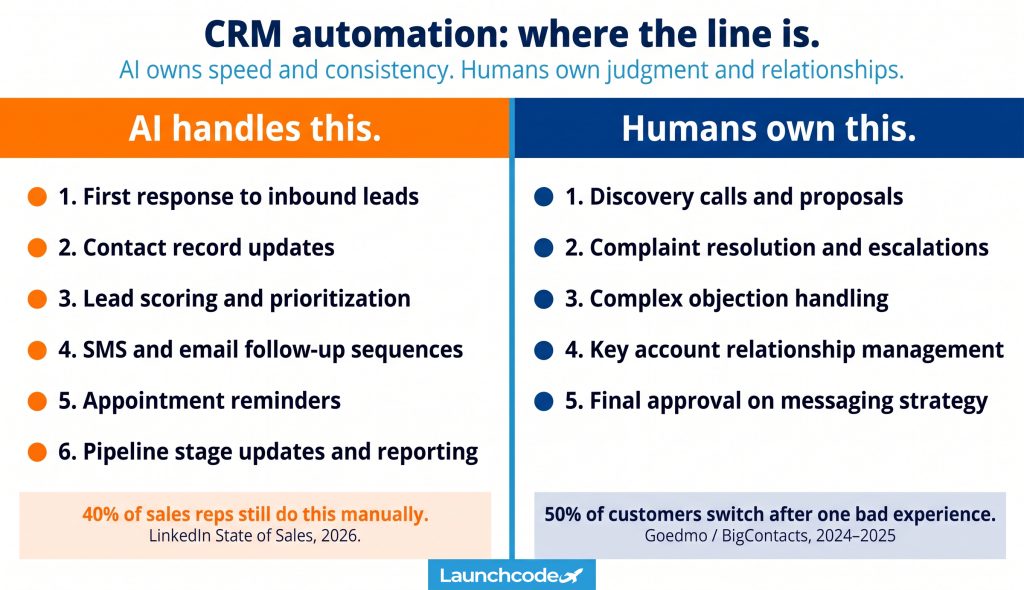
Automation cannot replicate empathy, judgment, or the ability to read a situation and adapt in the moment. Fifty percent of customers will switch brands after a single poor experience. The risk of over-automating is real, and it shows up most clearly when a customer reaches out with a complaint, a complex question, or a decision that needs a real conversation.
Andrei Petrik, CEO of NetHunt CRM, is direct about the risk: "Be careful not to over-automate your processes. The point is that CRM helps you to manage your customer relationships. You don't want to lose that human touch."
Discovery calls, proposals, and negotiations require a human. AI can prepare your rep with a full contact history, suggested talking points, and recent engagement signals. The conversation itself needs someone who can listen, adjust, and respond in the moment. A prospect who feels run through a script will disengage. A rep who treats them as an individual will close the deal.
When a customer is frustrated, another automated message is the worst response. AI-powered chatbots handle FAQs and routine queries well. They are not equipped for a customer upset about a billing issue, a missed delivery, or a service that fell short. These moments require a human who can acknowledge the problem, take ownership, and find a real solution.
"The fastest way to damage a client relationship is to automate a moment that needed a real person. We spend more time designing the handoff than the sequence itself." Brittany Charles, SVP of Client Services
A lead with specific technical questions, budget concerns, or objections rooted in a past bad experience needs a conversation, not a drip sequence. Automation can flag that the lead needs direct outreach. The outreach itself must be human.
Your highest-value accounts expect to hear from a person, not a workflow. Automated check-ins and renewal reminders have a place. Strategic account reviews, growth conversations, and moments of account risk require direct, personal contact from someone who knows the client's history.
AI can draft email sequences, suggest send times, and optimize subject lines based on historical data. A human should review and approve the strategy before it goes live. The messages your business sends to thousands of contacts reflect your brand. That decision should not be fully delegated.
Not every CRM task fits cleanly into "always automate" or "never automate." Many tasks sit in the middle, where automation does the heavy lifting and a human stays in the loop. A three-tier model gives your team a clear decision rule for every task in your workflow.
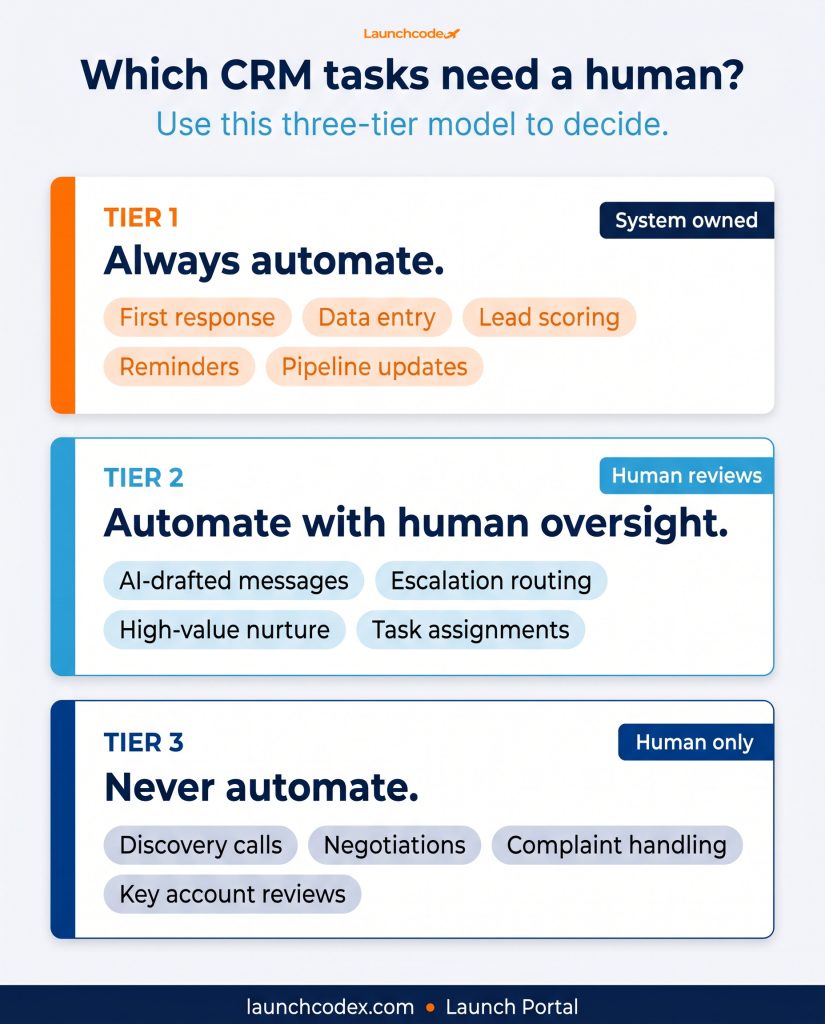
These are rule-based, high-frequency tasks where speed and consistency matter more than judgment. First response, data logging, lead scoring, appointment reminders, pipeline updates, and routine follow-up sequences belong here. Configure them once and let the system run.
These are tasks where automation improves efficiency and human review protects quality. AI-drafted outreach messages, automated escalation routing, nurture sequences for high-value leads, and workflow-triggered task assignments belong here. The automation does the work. A human reviews the output before it reaches the customer or approves the action before it fires.
These are judgment-heavy, relationship-critical, or emotionally complex interactions. Discovery calls, negotiations, complaint resolution, key account reviews, and final messaging strategy belong here. Automation can prepare, brief, and follow up. It cannot replace the human doing the work.
| Tier | Examples | Who owns it |
|---|---|---|
| Always automate | First response, data entry, lead scoring, reminders, pipeline updates | System |
| Automate with human oversight | AI-drafted messages, escalation routing, high-value nurture | Human reviews or approves |
| Never automate | Discovery calls, negotiations, complaint handling, key account conversations | Human only |
Most CRM platforms give you the tools to build automation. Launch Portal, implemented by Launchcodex, installs the system for you, configured around this exact decision model. It is built for small and mid-sized businesses that need the speed and consistency of automation without the complexity of managing a fragmented tech stack.
The platform combines CRM, two-way SMS and email, missed-call text-back, automated follow-up sequences, booking calendars, a unified inbox, reputation management, and reporting in a single system. Instead of connecting five separate tools through Zapier or Make, every interaction runs through one platform with automation built into the core.
When a lead submits a form, calls and hangs up, or messages through any connected channel, Launch Portal fires an automated first response within seconds. The missed-call text-back feature ensures that a missed call does not become a lost lead. The contact is created, scored, assigned, and added to a follow-up sequence automatically.
Multi-step SMS and email sequences are configured per lead source or service type. Each sequence has a defined handoff point where the system flags the rep for direct outreach. The automation runs the nurture. The rep steps in when the lead is warm enough for a real conversation.
The centralized inbox brings every call, text, email, and social message into one place. When a rep picks up the conversation at the handoff point, they have full context. Every prior automated touchpoint, every reply, and every engagement signal is visible in a single view. The human conversation starts informed, not blind.
Chris Sorensen, CEO of PhoneBurner, describes the effect well: "The beautiful thing about a unified platform is that automation stops feeling robotic and starts feeling personal."
You can explore Launch Portal and request a demo to see how the system gets configured for your workflow.
The failure mode for CRM automation is strategic, not technical. Teams automate the wrong things, skip the setup work, or build workflows no one monitors. Each mistake erodes the value of the system and can damage customer relationships at scale.
Automation is only as good as the data feeding it. Duplicate records, missing fields, and stale contact information produce bad outputs. Run a data audit before building any workflow. Gartner estimates that poor data quality costs organizations nearly $15 million annually. Automation scales the problem if the underlying data is not clean.
A marketing-qualified lead from an organic blog post needs a different sequence than a lead who booked a demo from a paid ad. Segment leads by source and intent before assigning sequences. Generic follow-ups produce generic results.
Quarterly reviews of active sequences are not optional. Check open rates, reply rates, and unsubscribe rates. If a sequence produces no engagement after 90 days, the message or the timing is wrong. Automation runs the process. A human must decide whether the process is working.
Many teams automate the entire nurture sequence and then expect the lead to raise their hand when ready. Design a specific trigger that tells your rep when to step in. A lead who opens three emails in one day, visits your pricing page, and clicks a case study is ready. Build that signal into your workflow and route the task to a rep rather than fire another automated message.
Automated SMS and email sequences fall under GDPR and CCPA. Every contact receiving automated outreach must have opted in appropriately. Include unsubscribe mechanisms in every sequence and review consent records before scaling any campaign. Compliance applies regardless of how the message was sent.
AI in CRM is a set of decisions about where your business needs speed and consistency, and where it needs judgment and presence. Businesses using AI in their CRM are 83% more likely to exceed their sales goals. The gap between that result and the average comes down to how deliberately the system is built.
Use the three-tier framework here as your starting point. Always automate first response, data management, lead scoring, follow-up sequences, and pipeline hygiene. Apply human oversight to any automation that produces customer-facing output. Keep discovery, negotiation, and relationship-critical conversations with a real person.
The AI in CRM market is projected to grow from $11.04 billion in 2025 to $48.4 billion by 2033. The businesses capturing that value are the ones with the right automation, configured precisely, with humans in the right seats. Build it that way and the results follow.
Start with first response to inbound leads, data entry, and follow-up sequences. These are the highest-frequency, highest-impact automation wins and require the least setup complexity. Speed of first response is the single biggest driver of lead conversion, so automating that touchpoint produces measurable results quickly.
A three-step automated sequence covering day one, day three, and day seven works well for most businesses. If a lead engages with two or more messages, visits a pricing page, or replies to any automated touchpoint, assign the contact to a rep for direct outreach.
It can, if applied incorrectly. Automating complaint resolution, negotiation, or key account conversations creates a poor experience. Automating first response, reminders, and routine follow-up improves the experience by making your business faster and more consistent. The three-tier framework in this article tells you which side each task belongs on.
A missed-call text-back is an automated message sent to anyone who called your business and did not reach a live person. It captures the lead immediately rather than letting them move on to a competitor. Because 44% of leads arrive outside business hours, this feature is critical for any business that cannot staff a phone line around the clock.
AI lead scoring analyzes behavioral signals including email opens, page visits, form submissions, and response history, to assign each lead a priority score. Reps see a ranked list rather than an undifferentiated contact database, which directs their time toward leads most likely to convert.
No. Automation provides the most value to small teams because it multiplies what each person can do. A three-person sales team that automates first response, data entry, and follow-up sequences operates with the output of a team twice its size. The setup investment is minimal compared to the time recovered each week.




Learn which CRM tasks to automate and which to keep human. A three-tier framework for faster lead follow-up, smarter scoring...
A format-by-format breakdown of all nine ChatGPT ad formats, from confirmed live placements to emerging types. Includes crea...
ChatGPT launched ads on February 9, 2026. This guide covers how they work, who sees them, what they cost, how to track perfo...