
Share:

AI marketing & automation


Every email platform looks affordable on the pricing page. Then your list grows past 500 contacts, features lock behind higher tiers, and the monthly bill doubles. Most buyers pick a tool from a feature checklist, then find the real differences in pricing structure, deliverability support, and automation depth.
This guide gives you a decision framework instead of a 15-tool ranking. You will learn how the three pricing models behave at scale, how to judge deliverability in 2026, which automation features drive revenue, how to measure performance now that open rates are broken, and how to plan for the switching cost. By the end, you can match a platform to your business with confidence.
The best email marketing platform fits your use case, list size, and growth stage. An ecommerce store on Shopify needs different tools than a B2B team running nurture sequences or a newsletter creator monetizing an audience. Define your use case first, then judge platforms against it. This single step prevents most expensive mistakes.
Email still earns about 36 dollars for every dollar spent, the highest return of any common channel, according to Litmus State of Email research. That return only holds if the tool matches how you work. A feature you never use adds cost, not value.
Answer these before you look at any pricing page:
Your answers point to a category. Shopify and WooCommerce stores lean toward Klaviyo or Omnisend. Small teams that want speed lean toward Mailchimp or MailerLite. B2B teams that need sales and marketing in one system lean toward HubSpot. Automation-heavy programs lean toward ActiveCampaign.
The common failure is buying for the demo, not the daily job. A founder picks an enterprise suite for a 2,000-contact list, pays for modules nobody touches, and still sends plain broadcasts. At Launchcodex, the selection framework we use with clients starts with the use case and growth curve, because a tool that fits today but breaks at 25,000 contacts costs more than it saves. Plan for where your list will be in a year, not where it sits this month.
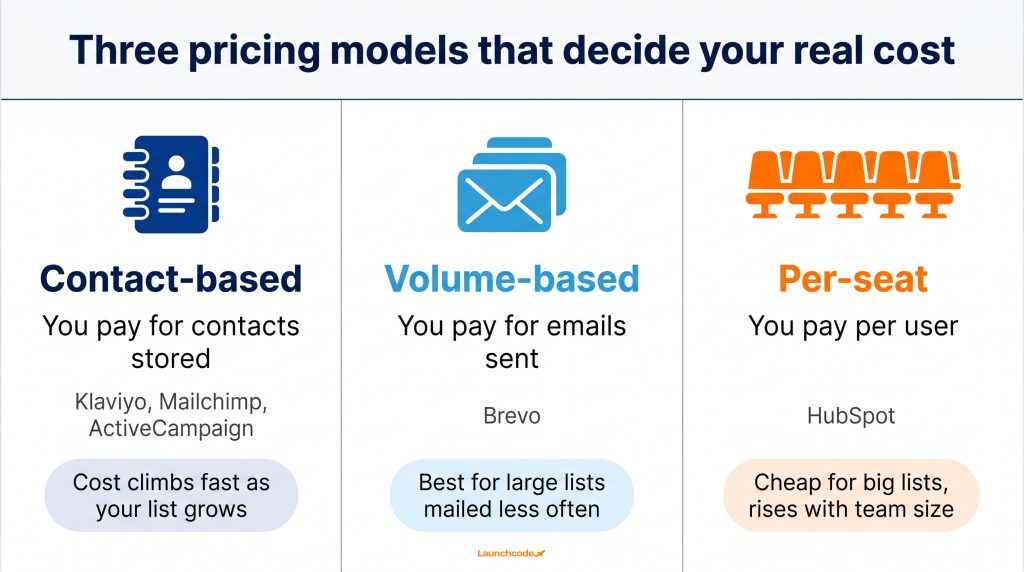
Three pricing models drive almost every email platform: contact-based, volume-based, and per-seat. Contact-based pricing climbs fast as your list grows. Volume-based pricing favors large lists you mail less often. Per-seat pricing stays cheap for big lists but rises with team size. The model matters more than the headline price.
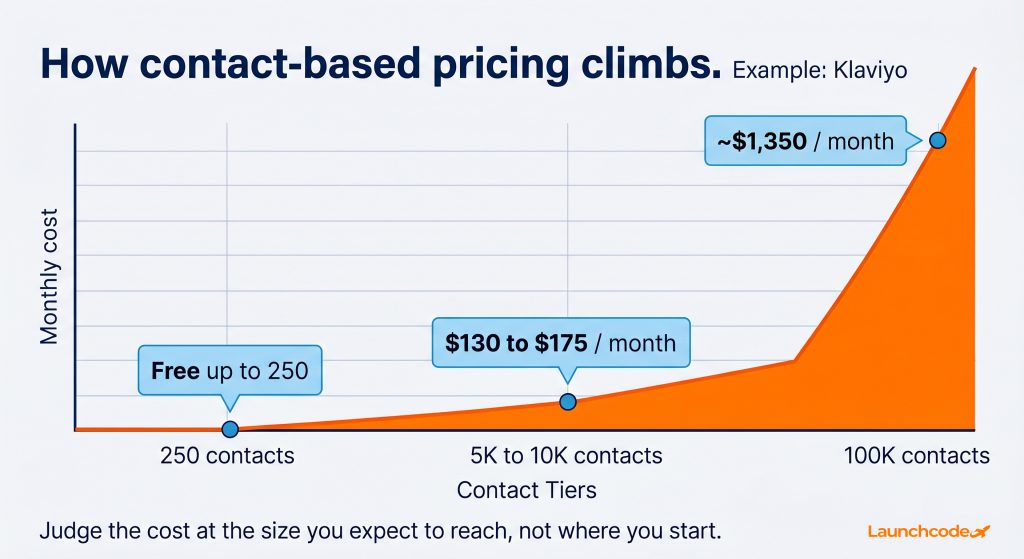
Pricing pages show the cheapest tier with the smallest list. The number changes fast once you pass 500 subscribers, so judge the cost at the size you expect to reach, not where you start.
The sticker price hides the real bill. These details decide what you actually pay, per a breakdown of email marketing pricing from SoftwareInspect:
Klaviyo shows how steep the curve gets. It starts free up to 250 contacts, runs near 130 to 175 dollars a month at 5,000 to 10,000 contacts, and reaches roughly 1,350 dollars a month at 100,000 contacts, based on Klaviyo pricing analysis from Automation Atlas. A store with strong revenue justifies that climb through purchase data and attribution. A 2,000-contact service business on the same curve overpays for features it cannot use.
“We map every client’s contact count out 12 months before picking a tool. A list moving from 5,000 to 50,000 contacts can turn a 130 dollar plan into a 790 dollar one.” Tanner Medina, Co-Founder and Chief Growth Officer
Run your projected contact count through each calculator before you choose.
No platform wins every category. Klaviyo leads ecommerce. Mailchimp suits general small business email. HubSpot fits B2B teams that want CRM and email together. Brevo favors large lists mailed less often. ActiveCampaign leads on automation depth. MailerLite serves cost-conscious small teams. Match the strength to your use case from the fit test above.
The table below maps each leading platform to who it fits, its pricing model, its core strength, and what to watch.
| Platform | Best fit | Pricing model | Key strength | Watch out for |
|---|---|---|---|---|
| Klaviyo | Shopify and WooCommerce stores | Contact-based, active profiles | Deep ecommerce flows and revenue attribution | Steep cost curve as the list grows |
| Mailchimp | General small business email | Contact-based | Easy setup and broad integrations | Counts unsubscribed contacts toward the limit |
| HubSpot | B2B teams needing CRM plus email | Per-seat plus marketing contacts | Sales and marketing in one system | Onboarding fees and stacked costs |
| Brevo | Large lists mailed infrequently | Volume-based | Predictable cost for high-frequency sends | Lighter ecommerce depth |
| ActiveCampaign | Automation-heavy programs | Contact-based | Deep visual automation and integrations | Learning curve, feature gating |
| MailerLite | Solo operators and small teams | Contact-based | Clean interface and low cost | Fewer advanced features |
Use the table as a shortlist tool, not a verdict. Pick the two platforms whose best fit matches your use case, then run both pricing calculators at your projected list size. The email software market keeps growing, from about 12.33 billion dollars in 2024 toward a projected 17.9 billion by 2027, per the Statista Digital Market Outlook figures compiled by SaaSUltra, so vendors keep shifting plans. Verify current pricing on each vendor page before you decide.
Deliverability depends more on your list quality, authentication, and sending habits than on which platform you pick. Major platforms land in the 92 to 96 percent inbox placement range for authenticated senders. The brand on the dashboard does not get you to the inbox on its own. Your practices do.
Reaching the inbox decides whether email pays back at all. Global inbox placement sits at roughly 83.5 percent, which means about one in six marketing emails never reaches the inbox, according to Validity benchmark data reported by Omnisend. A high delivery number on your dashboard can still hide a placement problem.
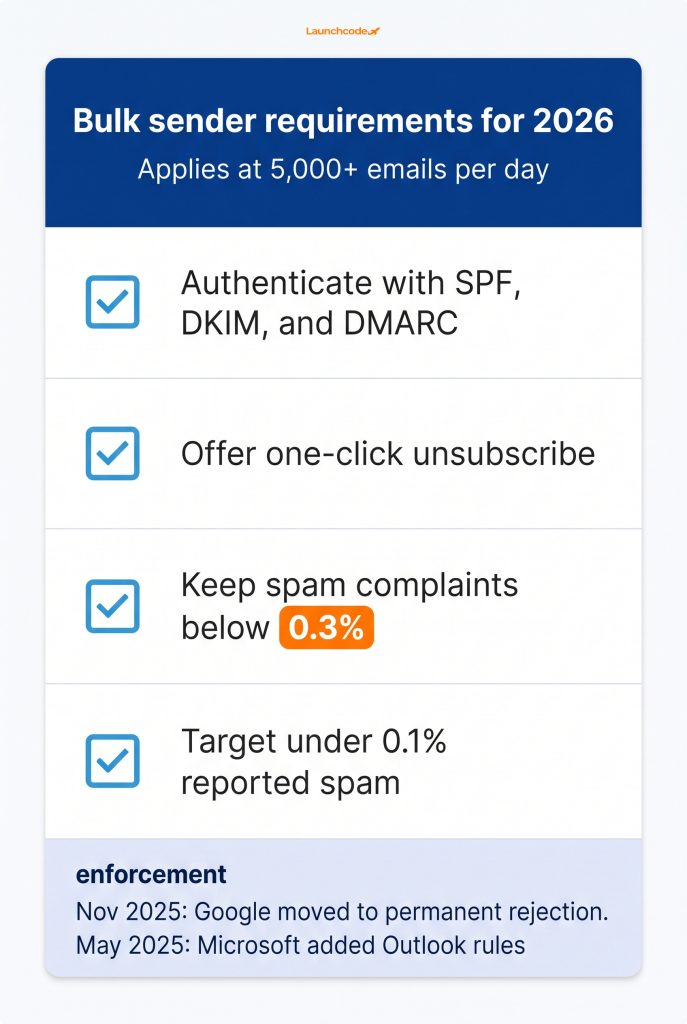
Gmail and Yahoo now require bulk senders, those sending 5,000 or more messages a day, to authenticate with SPF, DKIM, and DMARC, offer one-click unsubscribe, and keep spam complaints below 0.3 percent. The dmarcian guide to the Google and Yahoo requirements lays out the full baseline. Google’s guidance asks senders to stay under 0.1 percent reported spam and never reach 0.3 percent. These rules now carry real consequences. Google moved from temporary delays to permanent rejection of non-compliant bulk mail in November 2025, and Microsoft added similar Outlook rules in May 2025, per enforcement updates from EmailWarmup.
Authentication is the minimum requirement, not a guarantee of placement. Alison Gootee, a deliverability specialist at Sinch Mailgun, calls meeting the authentication standard a bare minimum that does not guarantee placement, in the Mailgun State of Email Deliverability report. Al Iverson of Valimail explains the pressure plainly in MarTech coverage of deliverability, noting that mailbox providers are increasingly frustrated by spam. Setting authentication correctly is one place where the team at Launchcodex does hands-on work, because a misconfigured DMARC record undermines even the best platform.
“We set DMARC to quarantine or reject and confirm SPF and DKIM alignment before the first send. A clean authentication setup does more for placement than switching platforms.” Derick Do, Co-Founder and Chief Product Officer
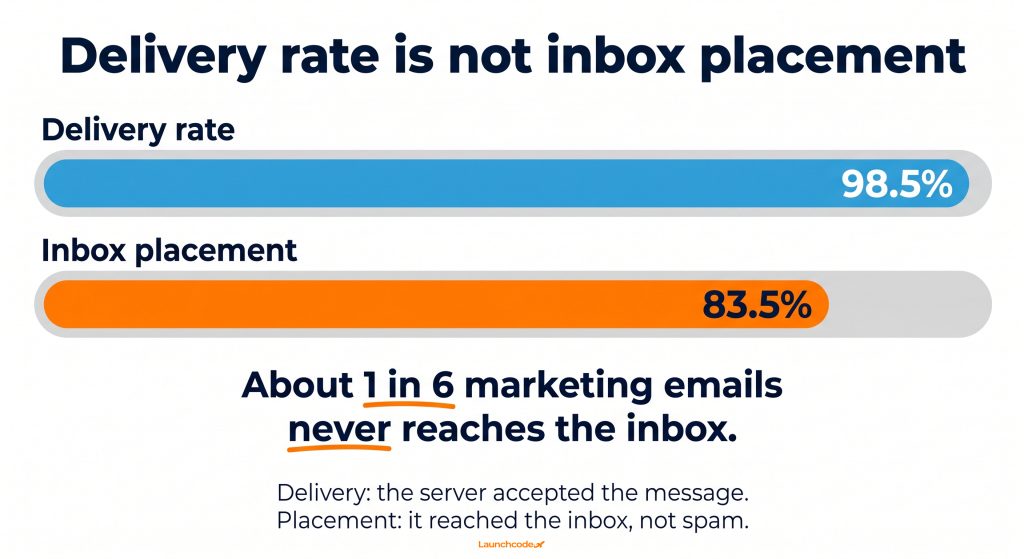
These are not the same number. Delivery means the receiving server accepted the message. Placement means it reached the inbox instead of spam. Track placement, not just delivery, and confirm your platform reports both.
Automation drives most email revenue, so weigh it heavily. Automated emails generate around 37 percent of email revenue while making up only about 2 percent of total sends. Pick a platform whose automation matches the flows you actually need, from a simple welcome series to behavioral cart and post-purchase sequences.
Automation is where platforms separate most. Two tools can both claim automation, then deliver very different depth in practice. The revenue case is clear in email statistics compiled by Originality.AI, which show automated flows driving far more revenue than their share of sends suggests.
A solo newsletter needs a welcome flow and clean broadcasts, so MailerLite or Mailchimp covers it. A Shopify store wants pre-built, store-aware flows wired to purchase events, which Klaviyo is built for. A B2B team running multi-step nurtures with sales handoff benefits from ActiveCampaign’s visual builder or HubSpot’s CRM-linked workflows.
“When we build flows, we wire triggers to clicks and purchase events, not opens. Abandoned cart and post-purchase sequences are where most of that automated revenue shows up.” Derick Do, Co-Founder and Chief Product Officer
Buy the automation depth your flows require, not the deepest builder on the market. If you also need broader systems, our work on marketing automation and systems design shows how flows connect to the wider stack.
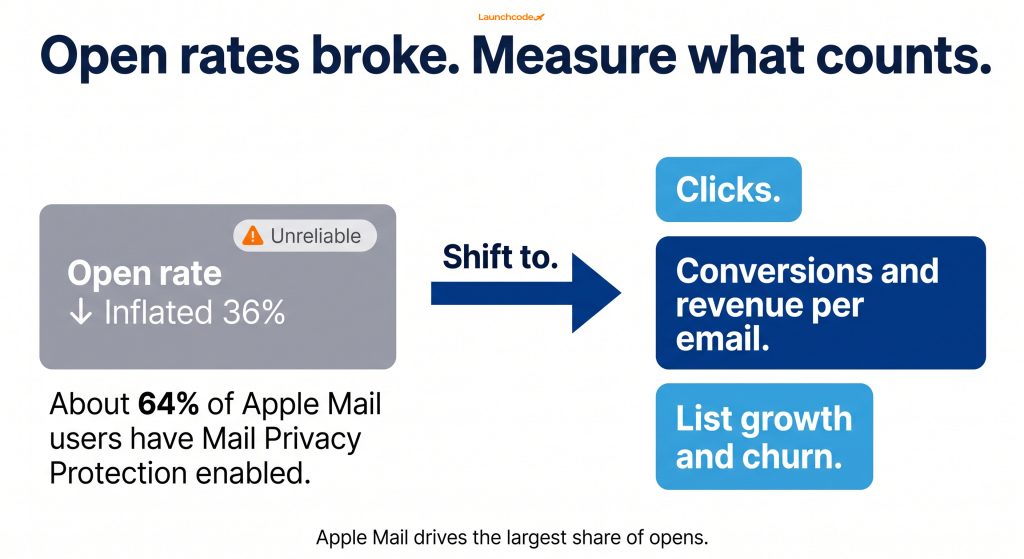
Stop trusting open rates as your main metric. Around 64 percent of Apple Mail users have Mail Privacy Protection enabled, which pre-loads images and inflates opens. Apple Mail also drives the largest share of opens. Pick a platform that reports clicks, conversions, and revenue, then judge campaigns on those signals.
Open rate used to be the default comparison metric. Privacy changes broke it. Mail Privacy Protection pre-loads email content, so opens fire whether or not anyone reads the message, per open rate analysis from Genesys Growth. The effect hits a large slice of most lists, since Apple Mail accounted for about 49 percent of all email opens in early 2025, the largest of any client, according to EmailToolTester data on Apple MPP.
Beth O’Malley, an email and CRM specialist, argues for moving past open rates toward impact metrics tied to revenue, in a Litmus State of Email recap. The platform should make that shift easy.
“We stopped reporting open rate as a headline metric in 2024. Clicks and revenue per email tell us what a campaign actually did.” Tanner Medina, Co-Founder and Chief Growth Officer
Confirm the tool reports click rate and revenue clearly, filters or flags inflated Apple opens, and lets you trigger automations on clicks rather than opens. A platform that still leads with raw open rate as a headline metric reports a number you can no longer trust.
Switching platforms is harder than it looks, so choose carefully the first time. Contact lists move easily through import tools, but automations rarely map one-to-one between platforms. Plan two to four weeks for a clean migration with parallel sending. The friction of switching is exactly why the first decision matters.
Email reaches more people than any social platform, with about 4.7 billion users worldwide in 2026 on a path toward 4.9 billion by 2028, per Radicati Group figures via 99firms. That reach makes a stable, well-chosen platform a long-term asset, not a quick swap.
If you do switch, follow a structured path:
A connected data layer makes this far smoother. See how a clean tracking and data infrastructure setup keeps attribution intact through a platform change.
The right email marketing platform fits your use case, scales with your list at a price you can predict, supports strong deliverability, runs the automation flows you need, and reports the metrics that matter. Run your shortlist through this checklist before you buy:
Pick the two platforms that fit your use case, test both with your own numbers, and choose the one that holds up at scale. For deeper help mapping tools to outcomes, our email marketing services team builds and runs programs end-to-end.
There is no single best platform. The right choice depends on your use case and growth stage. Klaviyo leads ecommerce, Mailchimp suits general small business email, HubSpot fits B2B teams, and ActiveCampaign leads on automation depth.
Cost depends on the pricing model and your list size. Entry plans start near 13 to 20 dollars a month, but contact-based tools like Klaviyo can reach roughly 1,350 dollars a month at 100,000 contacts. Always run your projected list size through each calculator.
Mostly no. Major platforms land in the 92 to 96 percent placement range for authenticated senders. Your list quality, authentication, and sending habits matter more than the brand. Set up SPF, DKIM, and DMARC, and keep your list clean.
Apple Mail Privacy Protection pre-loads images and triggers opens whether or not anyone reads the email. Around 64 percent of Apple Mail users have it enabled, which inflates open rates. Use clicks, conversions, and revenue as your primary metrics instead.
Lists import easily, but automations usually need a full rebuild and your sender reputation resets. Plan two to four weeks for a clean migration with parallel sending. This switching cost is why a careful first choice pays off.
Track click rate, conversions, revenue per email, and list growth and churn. These reflect real engagement and business outcomes. Treat open rate as directional at best, since privacy changes have made it unreliable.


Real stories from the people we’ve partnered with to modernize and grow their marketing.