
Share:

AI marketing & automation


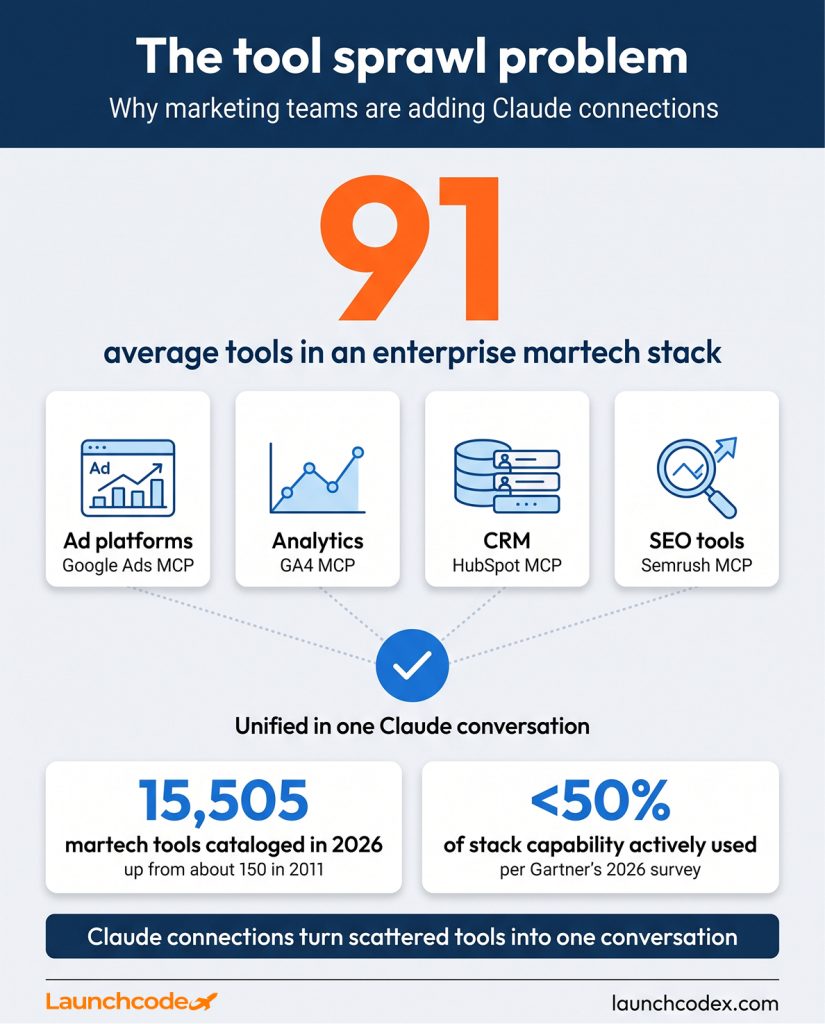
Most marketing teams run their week across a stack of dashboards that rarely talk to each other. The average enterprise martech stack held 91 tools in 2026, and marketers actively use less than half of what they pay for, according to Gartner’s Marketing Technology Survey. A Monday report still means logging into Google Ads, then Meta, then GA4, then Search Console, exporting a CSV from each, and pasting them into a spreadsheet before the actual analysis starts.
This guide covers what a Claude MCP connection actually is, which ones matter most for marketing work, how read-only and read-write access differ, and how to set one up in a few minutes. It also covers what changed in 2026, including the Salesforce partnership and a spec update most guides missed, and how a team or agency should roll this out without overexposing a client’s data.
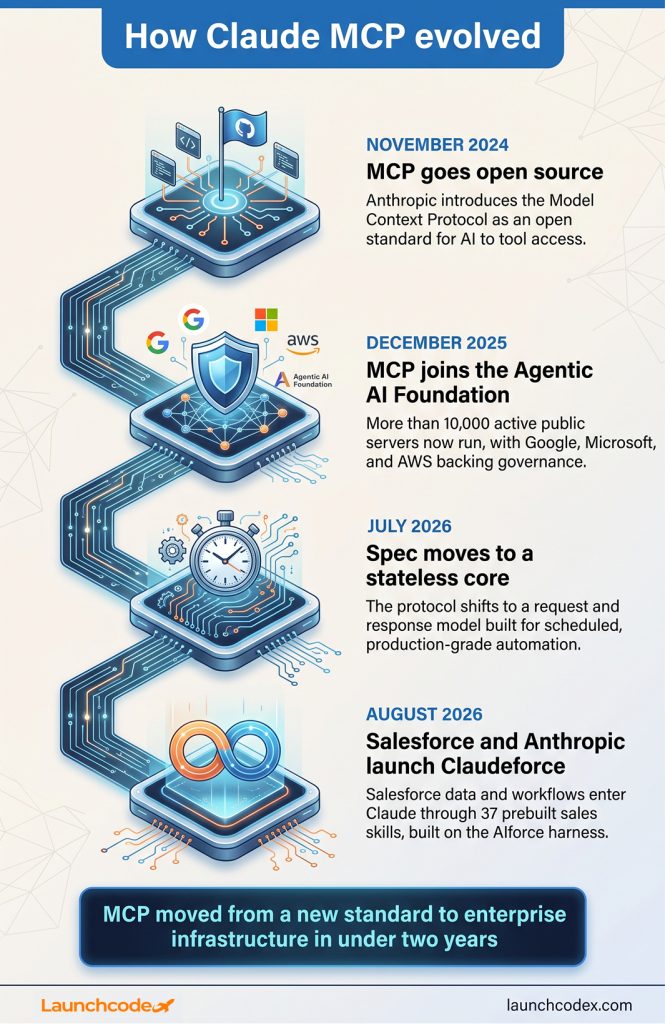
A Claude MCP connection is a secure link between Claude and an outside tool, built on the Model Context Protocol, an open standard Anthropic introduced in November 2024. Once connected, Claude reads live data from that tool, or takes action in it, without you exporting a file or copying a single number by hand.
The protocol itself is not a Claude-only feature. Anthropic built the Model Context Protocol as a shared, open standard so any AI assistant could reach into any tool the same way. Within a year, the ecosystem had grown to include ChatGPT, Cursor, Gemini, Microsoft Copilot, and Visual Studio Code alongside Claude, all speaking the same connection language.
That matters for a practical reason. The connectors marketing teams add to Claude are not locked to one AI vendor. A tool vendor that builds an MCP server once can, in principle, support every major AI assistant through the same code.
Marketing carries some of the heaviest tool sprawl in the business. chiefmartec’s annual martech census counted 15,505 marketing technology products in 2026, up from roughly 150 in 2011. Every one of those tools holds a slice of the data, and almost none of them share it with each other by default.
A marketer without connectors asks Claude a question and gets a guess based on training data or whatever they pasted in. A marketer with connectors asks the same question and gets an answer pulled from the actual account. Ask “which campaign wasted the most budget last month” and Claude with a Google Ads connection queries the real spend and conversion numbers instead of describing what a typical wasted-budget campaign might look like.
Three terms get used loosely, so it helps to separate them:
You will see all three terms used interchangeably across vendor documentation, so treat “connector” as the marketing-friendly word for the same underlying MCP server.
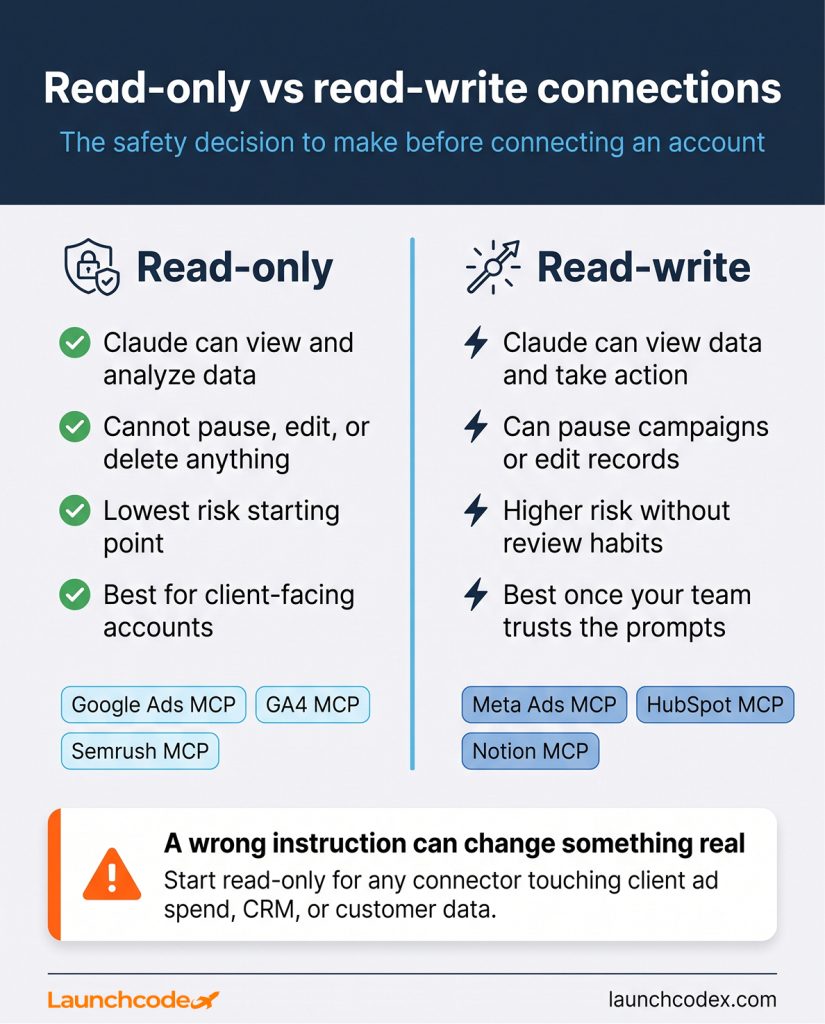
A read-only connection lets Claude see data but never change it. A read-write connection lets Claude take action, such as pausing a campaign, updating a CRM record, or publishing a post. Every marketing team should decide this setting deliberately for each connector, especially any connector touching a client’s ad account or CRM.
The difference sounds small until you connect a live ad account. A read-only Google Ads connection can tell you which campaign is overspending against its target. A read-write connection can also pause that campaign on your instruction. That capability comes with real risk. A wrong instruction, or a manipulated one, can change something real.
Independent researcher Simon Willison documented the security problems that come from combining tool access with untrusted content early in MCP’s history. He named the pattern a lethal trifecta: access to private data, exposure to content you did not write yourself, and the ability to communicate externally. Put those three together in one Claude session, for example a connector that can read your CRM, browse a webpage, and send an email, and a hidden instruction buried in that webpage could in theory trick Claude into acting on it.
The fix is not to avoid connectors. It is to know which of your connections have all three ingredients at once and to keep at least one of them locked down, usually by keeping sensitive-data connectors read-only.
For any connector touching a client’s ad spend, CRM, or customer data, start read-only. Upgrade to read-write only after your team has run it for a few weeks and trusts the prompts people are actually sending.
“We default every client-facing connector to read-only for the first few weeks, then decide together as a team whether write access earns its place.” Derick Do, Co-Founder and Chief Product Officer
Keep write access behind a habit of review, not a setting turned on once and forgotten.
The strongest 2026 lineup covers seven categories: ad platforms, web analytics, CRM, SEO, content and docs, creative, and automation. Google Ads MCP and Meta Ads MCP cover paid media, GA4 MCP covers analytics, HubSpot MCP and Salesforce in Claude cover CRM, Semrush MCP and Ahrefs MCP cover SEO, and Notion handles content while Zapier and Slack handle automation and distribution.
Here is how the category leaders compare on access type and best use case.
| Category | Connector | Access type | Best for |
|---|---|---|---|
| Ad platforms | Google Ads MCP | Read-only, official | Keyword and campaign performance queries |
| Ad platforms | Meta Ads MCP | Read-write, official | Facebook and Instagram campaign management |
| Analytics | Google Analytics (GA4) MCP | Read-only, official | Traffic and conversion analysis |
| CRM | HubSpot MCP | Read-write, official | Contacts, deals, and pipeline reporting |
| CRM | Salesforce in Claude | Read-write, governed | Enterprise CRM and sales workflow |
| SEO | Semrush MCP | Read-only, official | Competitive and keyword research |
| SEO | Ahrefs MCP | Read-only, official | Backlink and content gap analysis |
| Content and docs | Notion MCP | Read-write, official | Briefs, calendars, and campaign docs |
| Content and docs | Google Drive and Sheets | Read-write | Plans, exports, and shared reporting |
| Creative | Canva | Read-write, action | Turning insight into on-brand assets |
| Email and lifecycle | Klaviyo MCP | Read-write, configurable | Email and SMS campaign data |
| Automation | Zapier MCP | Action | Bridging tools without a native connector |
| Distribution | Slack MCP | Read-write, action | Posting reports and pulling team context |
Google’s official Ads MCP server is read-only by design, so Claude can analyze spend, keywords, and account structure but cannot touch a live campaign. Meta’s Ads MCP server entered open beta in 2026 with 29 tools spanning Facebook and Instagram campaigns, ad sets, audiences, and creative, and it is read-write, so anything Claude creates or edits applies to the live account. Pair either with the GA4 MCP server, and a prompt like “compare last week’s Google Ads spend to GA4 conversions by campaign” turns a ten-minute export chore into a single question.
HubSpot’s MCP server gives Claude read-write access to contacts, deals, companies, and tickets, connecting ad spend directly to pipeline outcomes. Ask which lead source produced the most closed deals last quarter, and Claude traces it through the CRM instead of guessing from click data alone.
Salesforce expanded this category in August 2026. Salesforce and Anthropic announced Claudeforce, bringing Salesforce data and workflows into Claude through a plugin with 37 prebuilt sales skills, built on Salesforce’s AIforce infrastructure. Dario Amodei, Anthropic’s CEO, tied the move to making sure frontier intelligence should be safe, trusted, and deeply capable as it takes on real business data. For teams already running Salesforce, this is the connector to evaluate before building a custom one.
Semrush and Ahrefs both ship official, read-only MCP servers, so a competitive research prompt like “which keywords does this competitor outrank us on” runs against live data rather than a stale export.
“Pulling Semrush data straight into Claude turns a competitor keyword gap analysis that used to take an hour into a five-minute conversation.” Tanner Medina, Co-Founder and Chief Growth Officer
Notion MCP handles the brief and calendar side, reading and writing pages so Claude can draft a content plan straight into your team’s existing workspace. Zapier and Slack fill the remaining gaps, triggering an action in a tool without its own connector, or posting a finished report straight into your team channel.
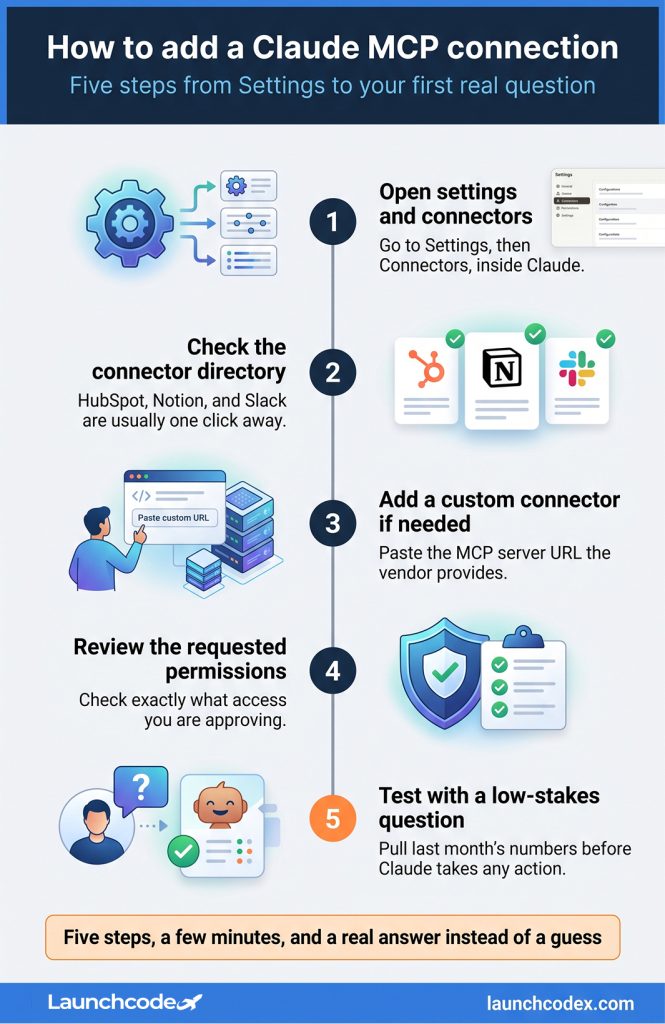
Adding a connector takes a few minutes. Open Settings and Connectors in Claude, choose a directory connector for a one-click option or a custom connector for anything requiring a server URL, approve the permissions requested, and test it with a real question before relying on it for client work.
A directory connector is listed inside Claude and added with one click and an OAuth login. A custom connector is added by pasting a server URL yourself, which is how most marketing-data platforms and newer vendor tools get connected. Both are equally secure. The custom route just means you supply the address instead of picking it from a list.
Two 2026 developments reshaped what marketing teams can do with Claude connections. Claudeforce, announced in August, brought governed Salesforce access into Claude. A July specification update moved MCP to a stateless, request and response core built for production-grade automation, not just one-off chat questions.
The July 2026 specification update changes more than the version number suggests. Moving from a stateful, always-connected design to a stateless request and response model makes MCP servers easier to run reliably at scale, which is exactly what a marketing team needs if it plans to schedule recurring reports rather than run everything by hand each time.
“The stateless spec update is what let us finally schedule weekly Claude reports instead of running them by hand every Monday.” Derick Do, Co-Founder and Chief Product Officer
A team evaluating HubSpot MCP against Salesforce in Claude in late 2026 is choosing between two systems built on the newer, more production-ready version of the protocol. That was not true a year earlier. If your team is mid-migration between CRMs, or weighing a first CRM connector at all, this is a better moment to start than it was even six months ago.
A single marketer connecting their own accounts is a different risk profile than an agency connecting several clients’ ad accounts and CRMs through one Claude workspace. Standardize on read-only for any client-facing connector, use a paid plan’s org-wide connector management for shared tools, and set one person as the owner who reviews new connectors before anyone adds them.
Agencies carry a specific version of this problem that a single in-house marketer does not. At Launchcodex, managing connectors across multiple client accounts means treating every new connection as a client-data decision first and a productivity win second, not the other way around.
“One team member’s test prompt can update a live deal in a shared CRM before anyone notices, so we assign one connector owner per client account.” Tanner Medina, Co-Founder and Chief Growth Officer
This is the exact planning conversation Launchcodex has with a new client before any automation work begins, since a connector rollout only works once the ownership and access rules are set first.
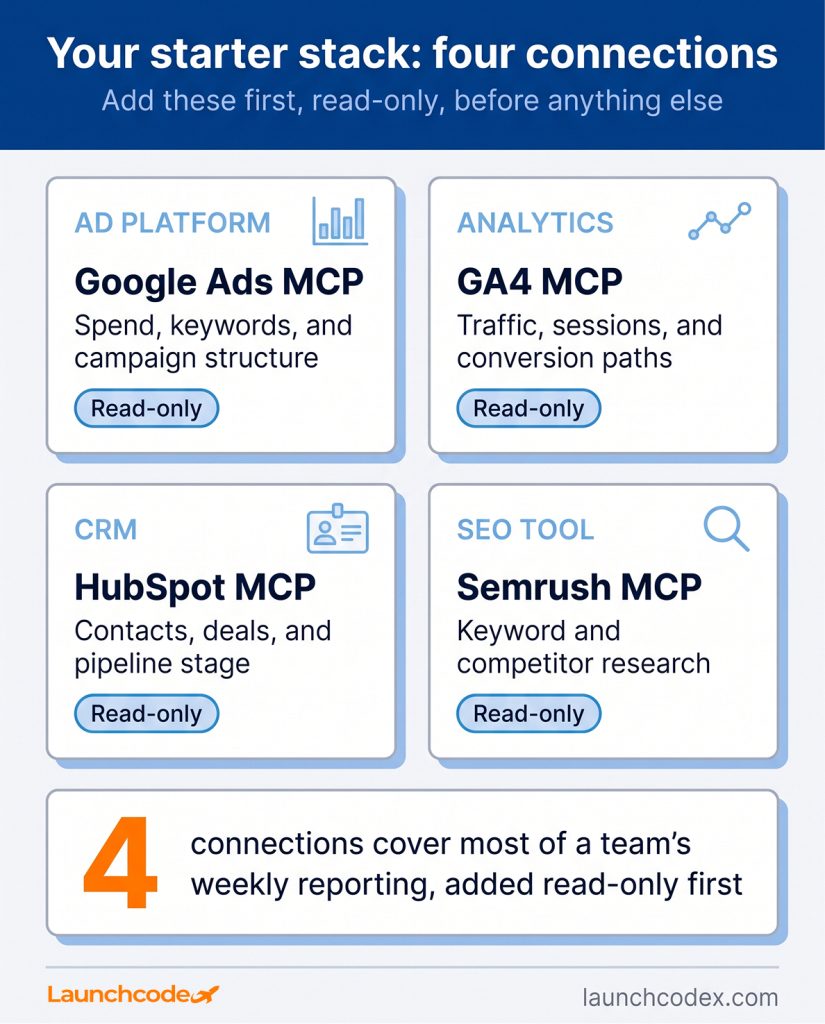
Most marketing teams get the bulk of the value from four connections: one ad platform, GA4, the CRM, and one SEO tool, all added read-only at first. Test each with a real reporting question before trusting it with anything else.
Start small. Once that four-connection stack proves itself for a few weeks, decide deliberately which connections, if any, deserve write access. Revisit the list again after the next MCP spec update, since this is still a fast-moving standard, and what counts as a safe default today may change within a year.
They are the same thing described two ways. The MCP server is the technical piece a vendor builds. A connector is what Claude calls that same server once you add it in Settings.
Google’s official Ads MCP server is read-only, so Claude can analyze your account but cannot pause campaigns or change bids. That makes it one of the lower-risk connections to start with.
Most marketing connectors work through Settings and Connectors in the regular Claude app or Claude Desktop. Claude Code adds more configuration options, but it is not required for standard marketing use cases like HubSpot, Google Ads, or Notion.
On paid plans, Team and Enterprise admins can add connectors centrally so the whole org uses the same one. On the Free plan, each connector is typically limited to one person and one connection slot.
Claudeforce is the August 2026 partnership between Salesforce and Anthropic that brings Salesforce data into Claude through prebuilt skills. It does not replace HubSpot’s connector. Which one matters depends entirely on which CRM your team already runs.


Real stories from the people we’ve partnered with to modernize and grow their marketing.