949.822.9583
support@launchcodex.com

The human side of AI adoption: Managing cultural resistance

Last Date Updated:
January 13, 2026
Time to read clock
11 minute read
Cultural resistance to AI usually comes from unclear rules, weak training, and zero workflow change. People avoid AI when it feels risky, vague, or likely to create more work. You reduce resistance by setting guardrails, training teams on role-based workflows, and shipping small wins that managers model publicly, then tracking usage, quality, and cycle time.
The human side of AI adoption
Table of Contents
Primary Item (H2)
Build-operate-transferCo-buildJoint ventureVenture sprint
Ready for a free checkup?
Get a free business audit with actionable takeaways.
Start my free audit
Key takeaways (TL;DR)
Resistance drops when AI use feels safe, useful, and normal inside real workflows.
Role-based training beats generic “AI literacy,” especially when teams lack clear enablement.
Adoption sticks when you run a 30-day sprint, ship visible wins, and measure workflow impact.

Most AI rollouts stall because the tool shows up, but the workflow stays the same. When people do not know what is allowed, what “good use” looks like, or how to avoid mistakes, they either stop using AI or use it quietly.

This guide shows you how to diagnose cultural resistance, build trust with practical guardrails, and run an adoption plan that improves cycle time, quality, and measurable outcomes like speed-to-lead and production efficiency.

Why cultural resistance happens in AI adoption

Cultural resistance shows up when AI threatens identity, increases risk, or adds effort without a clear personal win. People worry about looking inexperienced, leaking data, or getting blamed for low-quality output. Others assume AI is a leadership initiative that will be measured against them, not a tool that helps them deliver faster.

Resistance is usually a mix of:
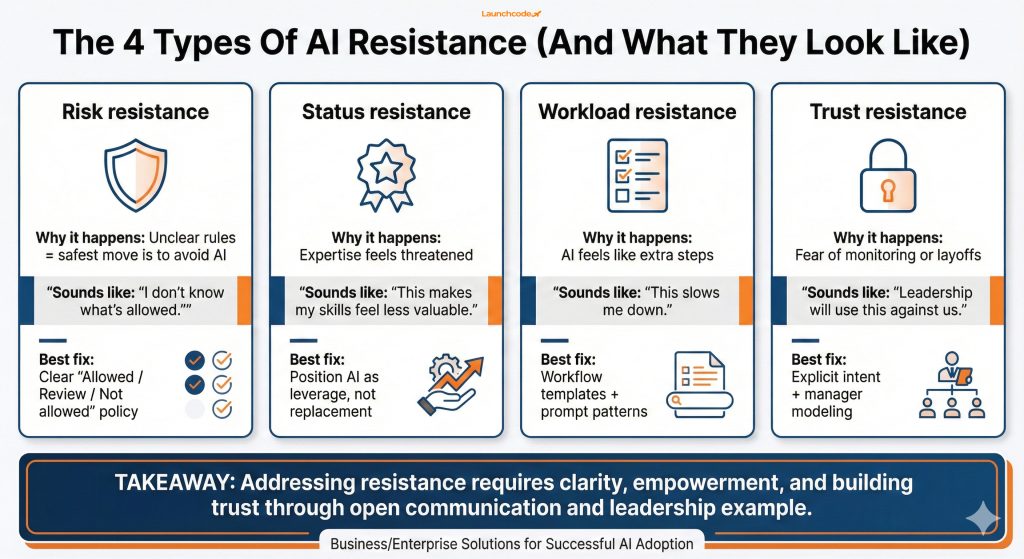
  • Risk resistance: “I do not know what is allowed, so I will not touch it.”
  • Status resistance: “This makes my expertise feel less valuable.”
  • Workload resistance: “This adds steps and slows me down.”
  • Trust resistance: “Leadership will use this to cut headcount or monitor me.”
The 4 Types Of AI Resistance

What the data says about the real blockers

AI adoption is already happening, but enablement and norms lag. Gallup reports that 47% of employees who use AI say their organization has not offered training on how to use it in their job, which makes “do nothing” the safest choice when policies are unclear. Read Gallup’s analysis in Your AI strategy will fail without a culture that supports it.

Microsoft research points to the same gap at scale. In the Microsoft Work Trend Index 2024, Microsoft reports 75% of global knowledge workers use generative AI at work, while only 39% of users report receiving company-provided AI training (as summarized in Microsoft’s Work Trend Index announcement).

A more useful way to frame resistance

Treat resistance like a system problem, not a personality problem:

  • If people hide AI use, your rules and tools do not feel safe.
  • If usage is inconsistent, your workflows and training are not specific enough.
  • If managers discourage AI, incentives and accountability are misaligned.

That framing removes blame and makes action possible.

How to diagnose cultural resistance before you fix it

You diagnose resistance by watching behavior, not listening for complaints. Look for leading indicators like hidden usage, low repeat usage, manager pushback, and quality issues tied to untrained use. Change adoption tends to fail in the “people layer,” and Gartner notes that only 32% of leaders globally get employees to adopt changes in a healthy way, which makes early diagnosis a real advantage. See Gartner’s article on adopting change in the workplace.

Start with three checks:

  1. Usage reality: Who uses AI weekly, and for which tasks?
  2. Safety reality: Do people know what is allowed with tools and data?
  3. Value reality: Do people see a clear personal win in their workflow?

Signals that you have trust issues, not tool issues

Trust friction has patterns:

  • People paste work into public tools “because it is faster.”
  • Staff say “I do not want to get it wrong,” then avoid experimenting.
  • Output quality swings wildly, reviewers cannot tell what AI touched.
  • Managers block usage because they fear compliance, brand risk, or blame.

A global study from KPMG and the University of Melbourne found that 48% of employees have uploaded company information into public AI tools, and 57% admit using AI in non-transparent ways. That points to fear and governance gaps, not a lack of interest. See the PDF report: Trust, attitudes and use of AI: A global study 2025.

A one-page resistance map for week one

Build a one-page “resistance map” by function:

  • Task hotspots: top repetitive tasks (briefs, emails, SOP drafts, ticket triage)
  • Risk hotspots: where sensitive data lives (customer data, HR, finance, legal)
  • Social hotspots: teams where norms spread fast (sales pods, creative teams, ops teams)

Use this to select pilots that feel helpful and safe, without triggering high-risk fear.

How to build trust and psychological safety without creating chaos

Trust grows when AI use feels safe, visible, and supported, with simple guardrails that reduce risk. Psychological safety matters because adoption requires people to try new behaviors in public. Amy Edmondson’s research links psychological safety to learning behavior in teams, which is exactly what AI adoption needs. See Edmondson’s paper: Psychological safety and learning behavior in work teams (PDF).

Here is what trust looks like in practice:

  • Leaders explain AI in business terms, like cycle time and output quality.
  • Teams get clear “allowed / allowed with review / not allowed” rules.
  • Managers model usage and share examples publicly.

“Culture shifts when you remove fear and replace it with clear permissions and repeatable habits.”

Elijah Moore, Director of People & Culture

A communication model that reduces fear quickly

Use one consistent message across leadership and managers:

  • What AI is for: reduce repetitive work, increase speed, improve baseline quality.
  • What AI is not for: bypass data policies, remove accountability, replace judgment.
  • What good looks like: human-in-the-loop, documented prompts, review for high-risk work.

Tie this to outcomes people care about:

  • Fewer revisions and rework
  • Faster approval cycles
  • Faster lead response time
  • Higher consistency in deliverables

Guardrails that make adoption easier, not harder

Keep guardrails short and concrete:

  • Approved tools list
  • Data handling rules (what cannot be pasted, examples included)
  • Review rules by risk level (low / medium / high)
  • Disclosure norm for internal work (simple and non-judgmental)

When policies are unclear, people either avoid AI or use it secretly. Both outcomes increase risk.

Role-based training that changes behavior

Role-based training works when you teach three workflows per role, not “how AI works.” Employees adopt when training matches daily tasks. When training is generic, people test AI once, get inconsistent results, then stop. Microsoft’s Work Trend Index also highlights the enablement gap, which is one reason adoption becomes uneven even in AI-forward teams.

Build role training around real workflows:

  • Marketing: content brief drafting, variant generation, QA and compliance checks
  • Sales: account research, call prep, follow-up sequences with review rules
  • Operations: SOP drafts, ticket triage drafts, vendor comparisons
  • Support: response drafts, knowledge base updates, escalation summaries

The “three workflows per role” training plan

Teach three workflows per role end-to-end:

  1. Input standard: what to include, what to avoid, what sources to use
  2. Prompt pattern: a reusable template that reduces variance
  3. Review checklist: what humans must verify before shipping

Run training as practice, not lecture:

  • 30 minutes instruction
  • 30 minutes live practice on real work
  • 10 minutes share-out with examples

Tool choices that reduce fear

Tool choice affects adoption because it affects safety. Common enterprise options include:

  • Microsoft Copilot or Copilot Studio for Microsoft 365 environments
  • Gemini for Workspace for Google-centric teams
  • Secure enterprise LLM offerings like ChatGPT Enterprise or Claude for Work

The goal is not “best model.” The goal is safe access, clear policies, and workflows that reduce mistakes. If people trust the setup, they use AI openly.

If you want a practical evaluation framework for tool fit by workflow and risk, see The best LLM for business owners: which AI chat should you use?.
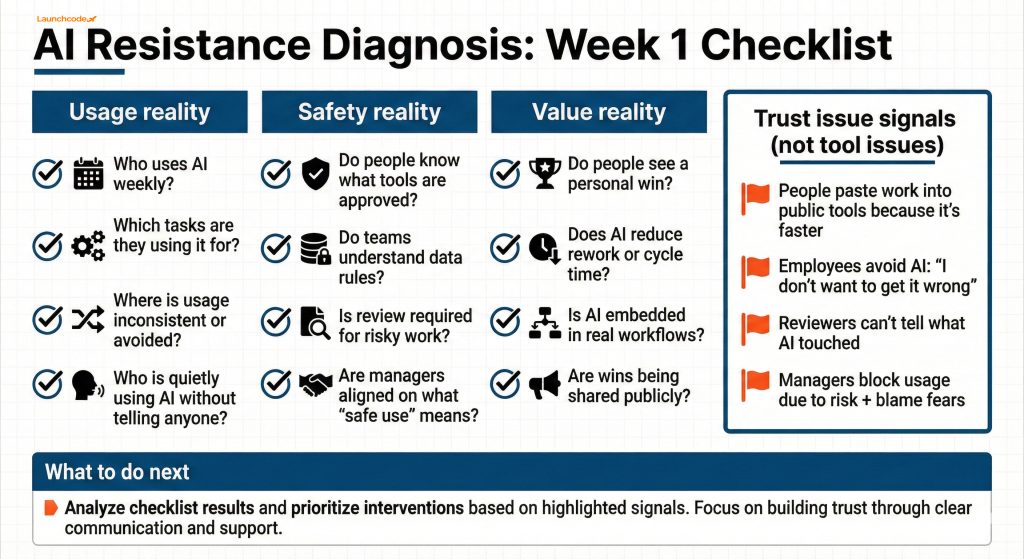
Cultural Resistance Diagnostic Map

A 30-day adoption sprint that breaks resistance and ships wins

A 30-day adoption sprint works because it creates social proof and measurable value, while keeping risk controlled. You reduce resistance faster by shipping 3 to 5 workflow wins than by running one large “AI transformation” announcement. McKinsey reports that 88% of respondents say their organizations use AI in at least one business function, which means the difference now is not access. The difference is workflow change and operating discipline. See McKinsey’s State of AI.

Week-by-week sprint plan

  1. Week 1: Guardrails and workflow selection
    • Publish the one-page AI policy and tool list
    • Choose 3 to 5 workflows with clear time or quality impact
    • Assign one owner per workflow
  2. Week 2: Train, practice, ship first wins
    • Run role-based training for selected workflows
    • Ship one “before vs after” example per workflow
    • Create a shared prompt library and review checklist
  3. Week 3: Manager modeling and peer sharing
    • Managers share how they used AI for a real task
    • Teams present one win and one lesson learned
    • Fix friction points (access, templates, approval bottlenecks)
  4. Week 4: Scale what works
    • Expand to adjacent roles and similar tasks
    • Standardize QA and approvals
    • Publish sprint results, then choose next workflows

Adoption sprint scorecard

Track adoption and business impact together:

Metric typeWhat to measureWhy it matters
Adoptionweekly active users, repeat usage rate, workflow completion rateshows if AI use is becoming normal
Qualityrevision rate, error rate, compliance issues caught in reviewprevents “fast but sloppy” output
Efficiencycycle time, turnaround time, tickets closed per weekshows real workflow value
Revenue impactspeed-to-lead, demo set rate, content-to-lead conversionties adoption to business outcomes

This prevents “AI activity” from becoming a vanity metric.
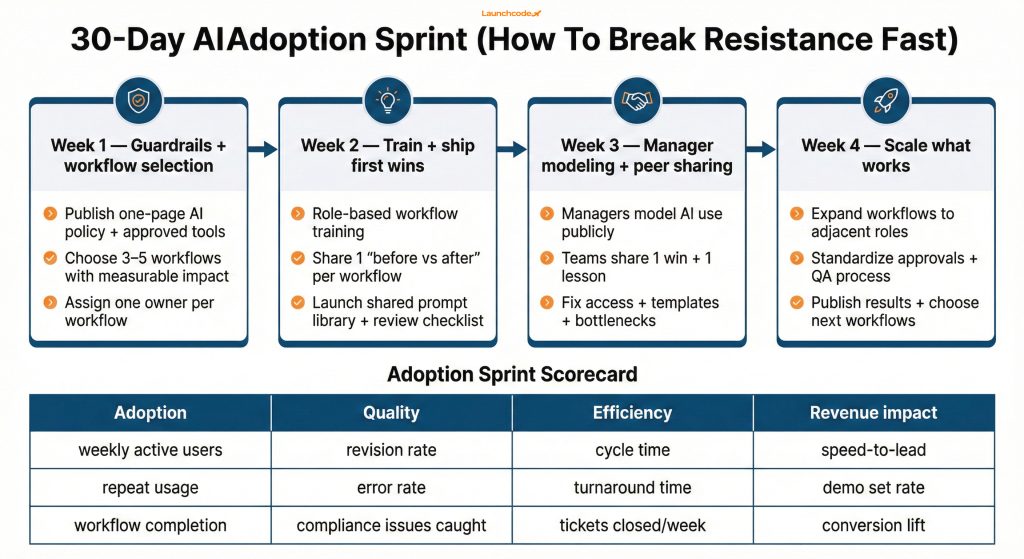
The 30-Day AI Adoption Sprint

How to stop shadow AI without punishing your team

You stop shadow AI by removing the reasons people hide usage: unclear rules, unsafe tools, and fear of judgment. If you punish behavior without fixing the system, you drive AI usage underground and increase privacy and quality risk.

The KPMG and University of Melbourne study reports that 66% of employees rely on AI output without critically evaluating it, which makes hidden usage especially risky without verification habits and review standards.

“Adoption scales when AI sits inside the workflow, with guardrails and measurement that managers can actually run.”

Derick Do, Co-Founder & Chief Product Officer

A safer alternative to “do not use AI”

Replace bans with controlled use:

  1. Provide approved tools that handle data safely
  2. Normalize internal disclosure (simple and non-judgmental)
  3. Require review for high-risk work (legal, financial, HR, regulated content)
  4. Teach verification habits: source checks, sampling, and peer review

Shadow AI pitfalls to prevent

  1. Pitfall: Copying customer or employee data into public tools
    • Fix: Approved tools and explicit “do not paste” examples
  2. Pitfall: Shipping AI-written work without review
    • Fix: Human-in-the-loop review checklist per workflow
  3. Pitfall: Over-trusting outputs
    • Fix: Verification norms and required citations for factual claims
  4. Pitfall: Managers discouraging AI because they fear blame
    • Fix: A manager playbook, plus time allocation for coaching and sharing wins

How to measure cultural adoption and business impact together

You measure culture by tracking leading indicators that show whether AI is safe, normal, and useful. “Number of users” does not tell you if AI is changing work. It only tells you who clicked a button.

Use a measurement ladder:

  1. Level 1: Access and basic usage (who can use tools, who tries them)
  2. Level 2: Repeat usage (weekly active users, workflow-level adoption)
  3. Level 3: Workflow impact (cycle time, rework, QA outcomes)
  4. Level 4: Business impact (pipeline velocity, CAC support, retention support)

Metrics that predict resistance is shrinking

Look for these each week:

  1. Repeat usage rises (not just first-time experimentation)
  2. Managers share examples without embarrassment
  3. “What is allowed?” questions drop
  4. Review outcomes improve due to training and checklists

If you want a structured way to link AI initiatives to measurable value, see The ROI of AI in 2026, where leaders capture value and how to start.

The next step plan for adoption that sticks

If you want resistance to drop, stop treating AI as a tool rollout and treat it as a workflow change program with trust built in. Start with guardrails, train role-based workflows, run a 30-day sprint, and measure repeat usage and business impact together.

Use this next step checklist:

  1. Publish a one-page AI policy and approved tools list.
  2. Pick 3 to 5 workflows with clear time and quality impact.
  3. Train teams on three workflows per role, with review checklists.
  4. Run a 30-day sprint with weekly sharing and manager modeling.
  5. Track repeat usage, quality, cycle time, then expand.

If you need help operationalizing this in marketing, Launchcodex builds adoption sprints alongside workflow automation so AI becomes part of daily execution. Explore AI-powered marketing automation if your goal is measurable workflow lift, not just tool access.

FAQ

What is cultural resistance to AI at work?

Cultural resistance is when norms, fear, incentives, and trust issues block AI adoption. It shows up as avoidance, hidden usage, manager pushback, or inconsistent quality, even when tools are available.

How do I get managers to support AI adoption?

Give managers a short playbook with workflows to model, safe language to use, and a clear definition of “good use.” Tie AI to team outcomes like cycle time and quality, then allocate time for coaching and sharing wins.

What is shadow AI and why does it matter?

Shadow AI is when employees use AI tools without disclosure, often in public tools, because they fear punishment or lack approved options. It increases privacy risk and blocks learning because you cannot improve what you cannot see.

What training works best for AI adoption?

Role-based training works best. Teach three workflows per role, provide prompt templates, and require review checklists for outputs that carry brand, legal, or customer risk.

How do I measure AI adoption beyond “number of users”?

Track repeat usage and workflow-level adoption, then tie it to cycle time, rework, QA outcomes, and business metrics like speed-to-lead and pipeline velocity.

Launchcodex author image - Elijah Moore
— About the author
Elijah Moore
- Director of People & Culture
Elijah develops programs that strengthen team performance and culture. He focuses on communication and leadership development. His work helps people thrive as the company scales.
Launchcodex blog spaceship

Join the Launchcodex newsletter

Practical, AI-first marketing tactics, playbooks, and case lessons in one short weekly email.

Weekly newsletter only. No spam, unsubscribe at any time.
Envelopes

Explore more insights

Real stories from the people we’ve partnered with to modernize and grow their marketing.
View all blogs

Move the numbers that matter

Bring your challenge, we will map quick wins for traffic, conversion, pipeline, and ROI.

Get your free audit today

Marketing
Dev
AI & data
Creative
Let's talk
Full Service Digital and AI Agency
We are a digital agency that blends strategy, digital marketing, creative, development, and AI to help brands grow smarter and faster.
Contact Us
Launchcodex
3857 Birch St #3384 Newport Beach, CA 92660
(949) 822 9583
support@launchcodex.com
Follow Us
© 2026 Launchcodex All Rights Reserved
crossmenuarrow-right linkedin facebook pinterest youtube rss twitter instagram facebook-blank rss-blank linkedin-blank pinterest youtube twitter instagram