
Share:

AI marketing & automation


WordPress runs a large share of the web, and SEO on it now means two jobs at once. You still need to rank in classic Google results, and you also need to get pulled into AI answers from Google AI Overviews, ChatGPT, and Perplexity. Doing both by hand across every page does not scale.
This guide ranks 10 SEO plugins with real AI automation. You will learn what each one automates, what it costs, how to combine them into a stack that fits your site, and how to automate without triggering a quality problem. Every recommendation ties back to a real outcome, not a feature list.
Built-in AI automation means the plugin analyzes your site and acts on it. Real automation studies your content against live search results, maps internal links, builds structured data, and flags what to fix. A single button that writes one meta description is a text generator with an SEO label. It fills one field, and it does not save hours across a large site.
Almost every plugin now claims AI, so you need a filter. The useful question is simple. Does the tool do work you would otherwise repeat hundreds of times, or does it just draft one field.
Real automation shows up in four places: content analysis against ranking pages, metadata generation at scale, schema markup, and internal link suggestions across your whole library. A generator only fills a box. As Google Search Central puts it, creators should “focus on accuracy, quality, and relevance, especially when automatically generating the content,” and that includes titles, meta descriptions, structured data, and image alt text.
Run only one full suite plugin at a time. WP Mayor warns that running two creates conflicts, duplicate schema, and a messy dashboard. Pick a single suite for the foundation, then add specialists that are built to run alongside it.
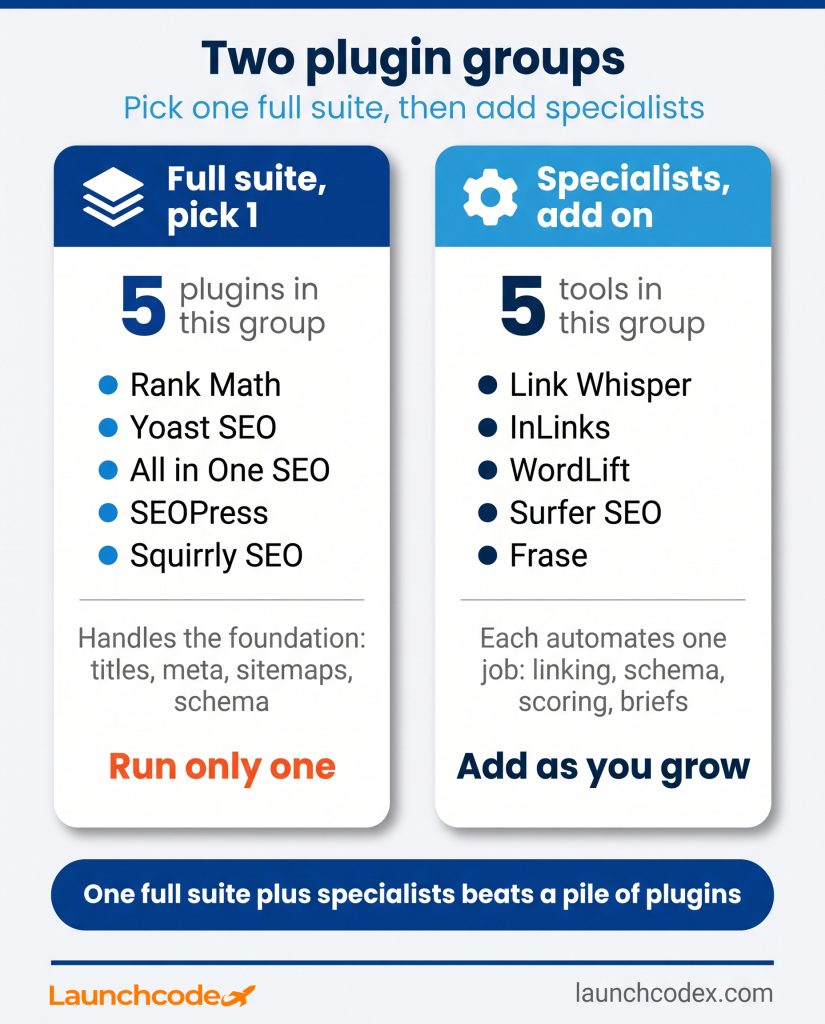
The strongest options split into two groups. Five full suite plugins handle the technical foundation and on page optimization: Rank Math, Yoast SEO, All in One SEO, SEOPress, and Squirrly SEO. Five specialists automate one hard job well: Link Whisper and InLinks for linking, WordLift for schema, Surfer SEO for content scoring, and Frase for briefs. Choose one suite, then add specialists as your library grows.
The table below compares all ten by what their AI actually automates, the cost model, and who each fits.
| Plugin | Type | What its AI automates | Cost model | Best for |
|---|---|---|---|---|
| Rank Math | Full suite | Content scoring, titles, meta, schema | Free AI credits, low cost Pro | Sites wanting the most free AI |
| Yoast SEO | Full suite | Titles, meta, optimize, summaries | AI in Premium only | Teams that value simplicity |
| All in One SEO | Full suite | TruSEO scoring, AI meta, link assistant | Freemium, annual license | Beginners and WooCommerce |
| SEOPress | Full suite | Meta and alt text across five AI models | Flat annual pricing | Performance focused sites |
| Squirrly SEO | Full suite | GEO and AEO audits, live guidance | Freemium, cloud tools | AI search visibility |
| Link Whisper | Specialist | Internal link suggestions, orphan fixes | License plus AI credits | Libraries with 50 plus posts |
| InLinks | Specialist | Entity mapping, linking, schema | Subscription by pages | Entity and topic authority |
| WordLift | Specialist | JSON-LD schema, knowledge graph | Subscription from mid tier | Structured data at scale |
| Surfer SEO | Specialist | Content Editor scoring, AI tracking | Monthly subscription | Content teams producing volume |
| Frase | Specialist | AI briefs, answer optimization | Monthly subscription | Brief driven writing workflows |

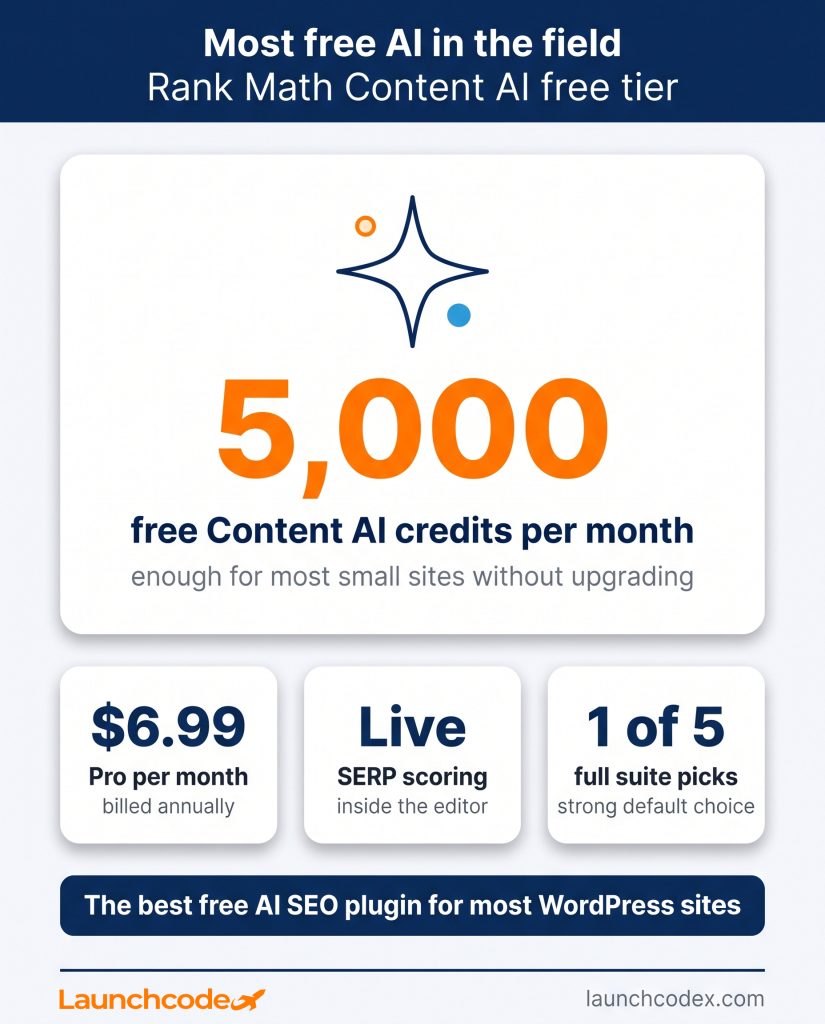
Full suite plugin. Best for sites that want the most capable free AI tier. Its Content AI scores drafts against live search results inside the editor, and it also handles titles, meta, schema, and redirects. According to wpseoai testing, Content AI includes 5,000 credits per month free, with Pro starting near 6.99 dollars per month billed annually.
Pros:
Cons:
Full suite plugin. Best for teams that value a calm, guided interface. Its help documentation confirms the AI features, AI Generate, AI Optimize, and AI Summarize, sit in Yoast SEO Premium rather than the free plugin.
Pros:
Cons:

Full suite plugin. Best for beginners and WooCommerce stores that want guided setup. Its TruSEO score, AI title and meta generation, and Link Assistant suit small business sites that need structure without complexity.
Pros:
Cons:
Full suite plugin. Best for performance focused sites that want a light footprint. Per wpseoai, it connects to five AI providers, including GPT-5 and DeepSeek, for titles, meta descriptions, and alt text.
Pros:
Cons:

Full suite plugin. Best for sites that treat AI search as a priority. Its GEO plugin runs GEO and AEO audits, gives live on page guidance in your editor, and can generate an llms.txt file to guide AI crawlers.
Pros:
Cons:

Specialist tool for internal linking. Best for content libraries with 50 or more posts. Built by Spencer Haws, it scans your library, suggests contextual internal links as you write, detects orphan pages, and adds links in bulk.
Pros:
Cons:

Specialist tool for entities and linking. Best for sites building topical authority. InLinks maps your content to real world entities, then builds internal links and structured data around those entities.
Pros:
Cons:
Specialist tool for schema at scale. Best for publishers and stores that need structured data across many pages. WordLift generates JSON-LD schema and a knowledge graph so engines understand your topics.
Pros:
Cons:

Specialist tool for content scoring and AI tracking. Best for teams producing volume. It scores content against ranking pages and now tracks whether AI engines cite you. One honest caveat: Surfer reports its Content Score has a 0.28 correlation with rankings, per eesel, so treat scores as a guide, not a guarantee.
Pros:
Cons:
Specialist tool for content briefs. Best for brief driven writing workflows. Frase builds AI content briefs and answer focused optimization so writers start from a clear, research backed outline.
Pros:
Cons:
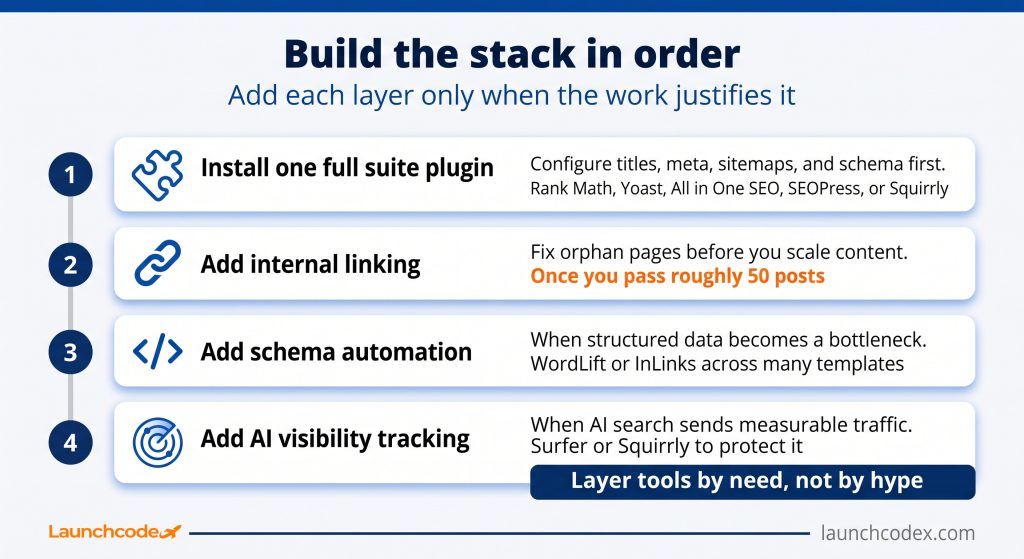
Match the stack to your site. A new site needs one full suite plugin and nothing else. A growing content library adds an internal linking tool. A publisher or ecommerce site adds schema automation and AI visibility tracking. This build order avoids plugin bloat, keeps costs sensible, and prevents the conflicts that come from stacking overlapping tools.
At Launchcodex, we build client stacks the same way, starting with one suite and adding a specialist only when the work volume justifies it.
If you want this mapped to your goals, a scoped SEO and GEO strategy engagement can size the stack around outcomes, not tool counts.
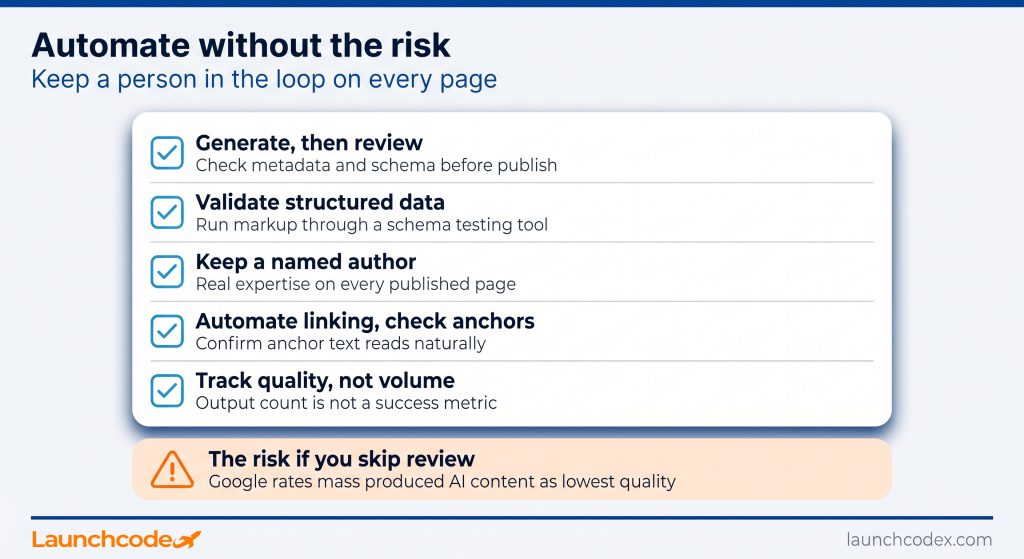
AI automation works best on repetitive, structured tasks: metadata, schema, alt text, and internal links. It fails when you let it write and publish full content unchecked. Google directs quality raters to rate pages lowest when the main content is AI generated with little effort, originality, or value. Use AI to speed up an editor, not to replace one.
The distinction matters because the penalty is real. The January 2026 update to the quality rater guidelines flags content made with “little to no effort, little to no originality, and little to no added value.” Yoast frames its own AI the right way, noting that “the final decision always remains in your hands,” in its AI feature notes.
“We generate metadata and schema for clients, then a person reviews every field before publish. On a 400 page site, that single rule kept the pages out of the low quality bucket.” Derick Do, Co-Founder and Chief Product Officer.
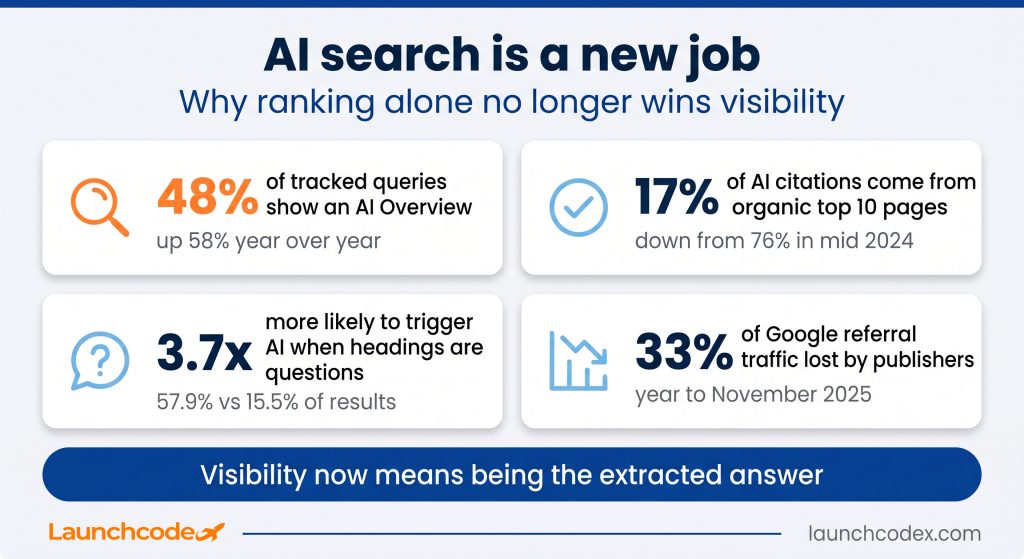
AI search is now a separate task from classic ranking. Only 17 percent of AI Overview citations come from pages in the organic top 10, down from 76 percent in mid 2024. A page can rank well and still get ignored by AI, or get cited without ranking. You need tools and structure built for both surfaces.
AI Overviews appear on close to 48 percent of tracked queries, and question phrased content is about 3.7 times more likely to trigger one. With 17 percent of citations now coming from top 10 pages, and Press Gazette analysis reporting publishers lost roughly a third of Google referral traffic in the year to November 2025, visibility means being the extracted answer.
“We track AI citations apart from rankings. On one client, pages that never reached the top 10 still showed up in AI Overviews, so we fixed structure instead of chasing position.” Tanner Medina, Co-Founder and Chief Growth Officer.
No plugin guarantees an AI citation. As Stackmatix explains, Google uses the same index and structured data that rank organically, with no special AI markup. Squirrly and Surfer help you track and structure for AI, but the quality of the answer still decides the outcome. Strong web development practice treats schema and headings as core, not extras.
Start with one full suite plugin that matches your comfort level. Choose Rank Math for the most free AI, Yoast for simplicity, All in One SEO for beginners, SEOPress for speed, or Squirrly for AI search. Add Link Whisper, WordLift, or Surfer only when your content volume makes the manual version painful. Keep a human editor on every published page.
The right approach uses two or three plugins with judgment, not a long list. Automate the repetitive work, protect quality with review, and measure both classic rankings and AI citations. If you want a stack tuned to your traffic goals and content pace, our AI automation team can build and ship it with you.
Rank Math offers the most generous free AI tier, with 5,000 Content AI credits per month. It covers scoring, titles, meta, and schema without an upgrade for most small sites.
Avoid running two full suite plugins together, since they cause conflicts and duplicate schema. You can safely run one full suite plugin plus a specialist tool like Link Whisper.
Unedited, mass produced AI content can hurt you, since Google rates low effort AI pages as lowest quality. AI helps when a person reviews, edits, and adds real expertise before publishing.
Squirrly SEO and Surfer SEO focus on AI search. Squirrly runs GEO and AEO audits, and Surfer tracks whether AI engines cite your content, so you can structure pages to be extracted.
Yes. Full suite plugins like Rank Math and All in One SEO add core schema, while WordLift and InLinks automate deeper structured data. Always validate the markup after generation.


Real stories from the people we’ve partnered with to modernize and grow their marketing.