
Share:

AI marketing & automation


Most pages fail before anyone reads them. They get published without optimized title tags, missing meta descriptions, thin heading structures, and no schema markup. The writing might be solid, but the signals Google and AI systems read are weak, so the page never earns a position on page one.
This guide covers every major on-page SEO element in one place. You will learn what to optimize, why it matters, how to apply it correctly, and how to turn it into a repeatable system across your entire site.
On-page SEO is the set of signals you add directly to a web page to tell search engines and AI systems what it covers, who wrote it, and why it deserves to rank. It includes your content, HTML tags, headings, internal links, page speed, and structured data. Off-page signals like backlinks matter too, but Google cannot fully evaluate authority without clear on-page signals first.
Most teams treat on-page optimization as a one-time task. It is not. John Mueller of Google stated clearly in 2025 that “consistency is the biggest technical SEO factor.” Inconsistent title tags, mismatched schema, and weak heading structures confuse crawlers and produce unstable rankings. On-page signals need to be consistent across every page on the site, not just the ones you prioritize this week.
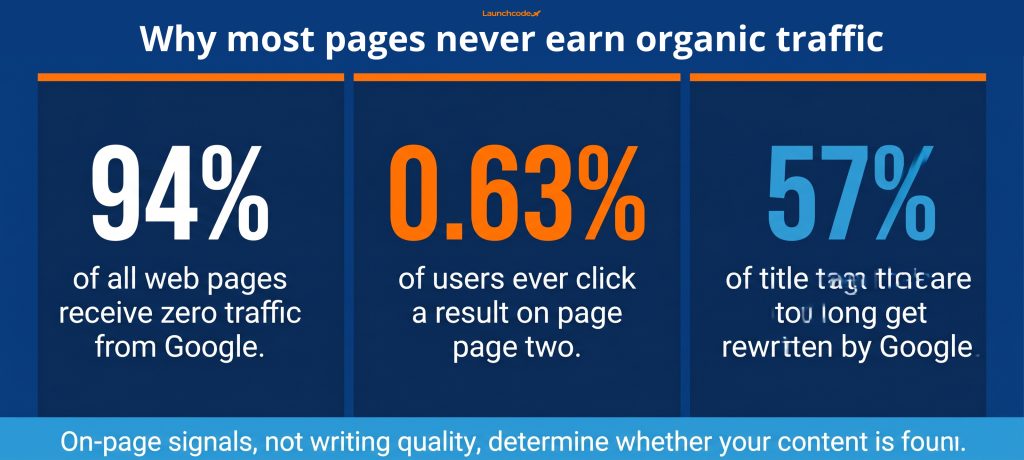
SE Ranking data shows approximately 94% of all web pages receive no traffic from Google. The writing is rarely the problem. The failure point is usually the on-page signal layer: unclear title tags, no schema, poor heading hierarchy, and no internal links to help Google understand where the page fits on the site.
Writing great content is necessary. Optimizing every signal around that content is what makes it visible.
These are the primary elements this guide covers:
The title tag is the first on-page element both Google and searchers evaluate. It should include your primary keyword near the start, stay under 60 characters, and make a specific promise to the searcher. The meta description does not affect rankings directly, but a well-written one improves click-through rate by framing the value of your page before anyone clicks.
Title tags that run too long get rewritten. Research compiled by Link-Assistant shows meta titles that exceed character limits are 57% more likely to be rewritten by Google. When Google rewrites your title, you lose control of how your page appears in search results. The same analysis found that 25% of the highest-ranking pages on Google lack a meta description entirely, which means Google generates one from body content. That generated version rarely matches what you would write yourself.
Follow this formula for most pages:
A useful test: read your title tag as if you are a potential customer. Does it answer “why should I click this over every other result?” If not, rewrite it.
Write meta descriptions to:
Use one H1 per page. It should closely match your title tag and describe the page’s primary topic. H2s organize major sections and should align with the real questions your reader has. H3s break sections into specific components. A clear heading hierarchy makes it easier for Google to parse your content and easier for AI systems to extract direct answers.
Your H1 is not your title tag, even though they often use similar language. The title tag lives in the HTML head and appears in search results. The H1 appears on the page itself. Both should signal the same topic, but they serve two audiences: the title tag for searchers deciding whether to click, and the H1 for readers who have already arrived.
Microsoft’s guidance on AI search notes that the H1 tag is used by Bing’s AI-powered experiences to interpret a page’s purpose and scope. A missing or vague H1 is a missed signal for both traditional search and AI extraction.
| Element | Where it appears | Who sees it first | Character guidance |
|---|---|---|---|
| Title tag | Search results, browser tab | Searcher before clicking | Under 60 characters |
| H1 | Top of the page content | Reader after arriving | No hard limit, but concise |
Structure your H2s around the questions your reader is actually asking. Each H2 should produce a clear, standalone answer that could be read and understood without the rest of the article.
Use H3s to:
Avoid creating heading levels that mirror each other in language. If your H2 is “How to optimize your title tag” and your H3 is “Optimizing title tags,” you have added a heading without adding new information.
A URL slug is the end portion of your page address. Keep it short, lowercase, keyword-rich, and hyphenated. Drop function words like “a,” “the,” and “and.” Research shows including a keyword in the URL can improve click-through rate by up to 45%. Once a URL is published and has traffic, avoid changing it. If you must change it, implement a 301 redirect immediately.
URL structure matters for two reasons. First, it signals relevance to both users and search engines. A URL like /services/seo-for-saas-companies communicates the page topic before anyone clicks. Second, URL slugs appear in search results, and descriptive slugs improve the perceived quality of the listing.
Rules to follow:
Changing a URL that already has traffic or backlinks is risky. If you must update a slug, for example to remove a year that has become outdated, follow these steps:
Internal links are hyperlinks from one page on your site to another. They help Google discover and understand your pages, and they distribute link authority across your site. A Semrush case study from August 2025 found that a startup with a well-organized internal linking strategy earned over four times the monthly organic traffic of a competitor with a similar domain authority score.
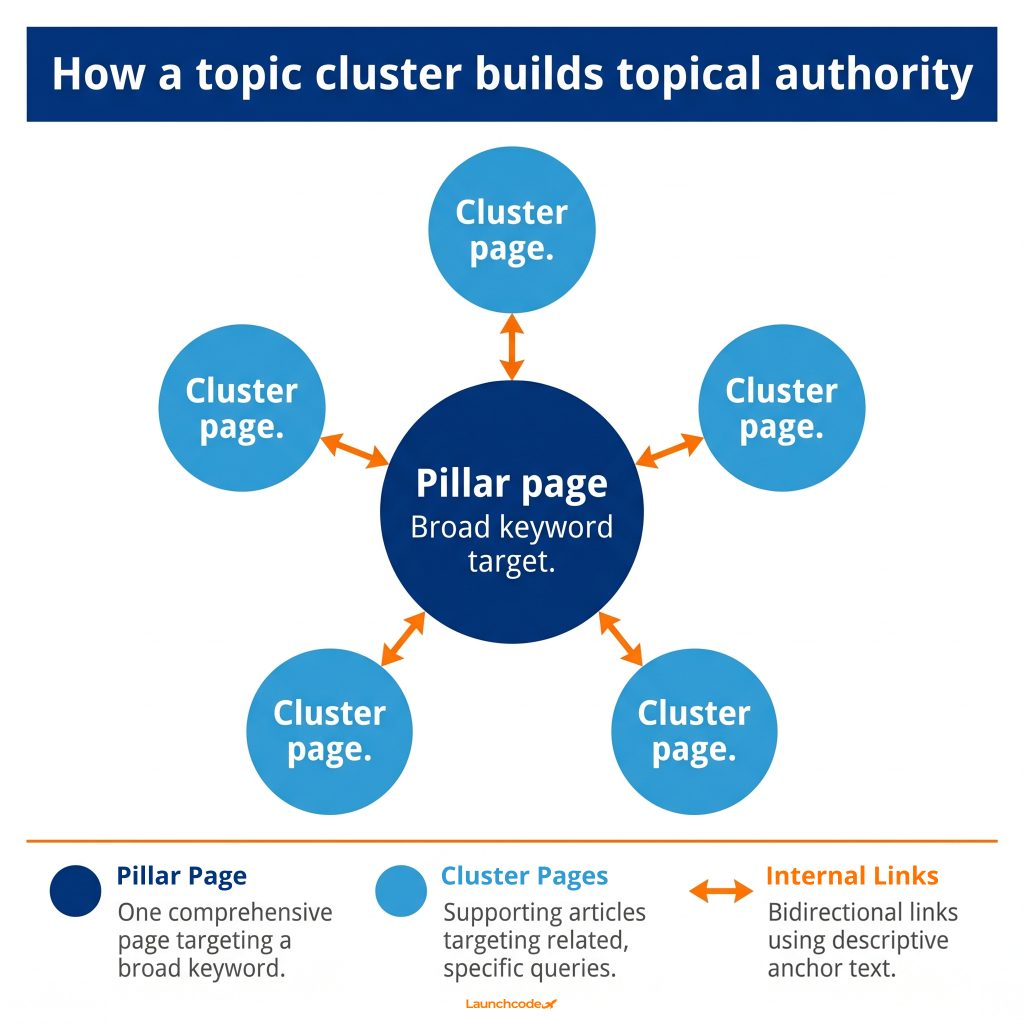
Internal links are also the primary way you signal topical expertise to Google. When your SEO service page links to blog posts about keyword research, and those posts link back to the service page, you build a content cluster. Clusters help Google understand that your site covers a topic in depth, not just in isolation.
A topic cluster has three components:
Every new page you publish should link to at least one pillar page. Every existing pillar page should link to new cluster content. This creates a self-reinforcing structure that signals expertise across the whole site.
Anchor text is the clickable text in a hyperlink. Google reads it to understand what the linked page covers.
Rules:
Example: if you are linking to a page about technical SEO, use anchor text like “technical SEO audit process” or “how to fix crawl errors” rather than the same phrase every time.
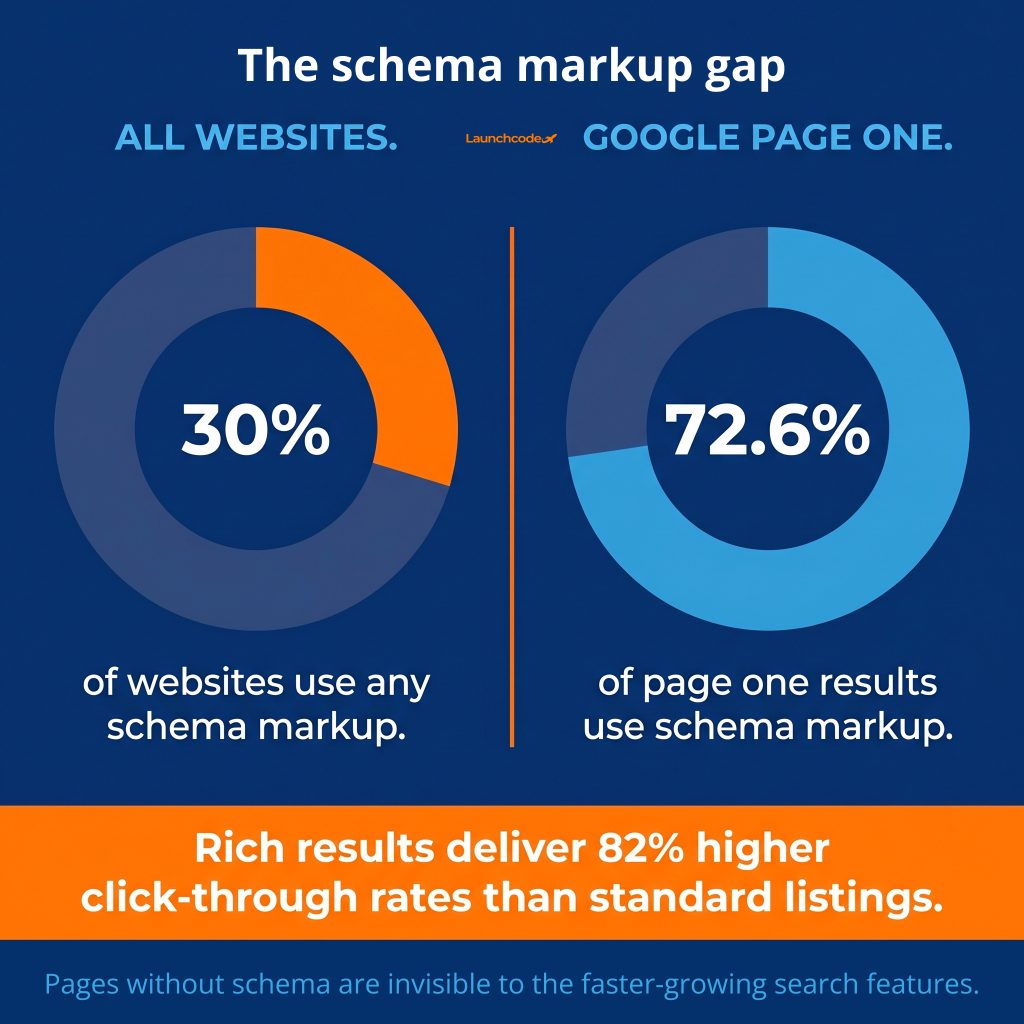
Schema markup is structured data code you add to a page’s HTML to tell search engines exactly what your content is. It enables rich results in search, such as star ratings, FAQ dropdowns, and author cards. Pages that appear as rich results earn an 82% higher click-through rate than standard listings, according to a Nestle and Google case study. Schema is also how AI systems identify and cite your content in generated responses.
Despite this, schema remains underused. Only about 30% of all websites implement any structured data. Yet Backlinko data shows 72.6% of pages on the first page of Google use schema markup. If your competitors on page one have schema and you do not, you are giving up click-through rate before the ranking competition even starts.
Fabrice Canel, Principal Product Manager at Microsoft Bing, confirmed at SMX Munich in March 2025 that schema markup directly helps Microsoft’s AI systems understand page content. This applies to Google’s AI Overviews and other generative answer engines as well.
| Schema type | Best for | Key benefit |
|---|---|---|
| Article / BlogPosting | Blog posts and editorial content | Author attribution, publish date, article type |
| FAQPage | Pages with question-and-answer sections | FAQ rich results in search |
| Organization | Homepage and about pages | Brand entity recognition |
| LocalBusiness | Location-based service pages | Map pack eligibility |
| Product | E-commerce and product pages | Price, availability, and review stars |
Use JSON-LD format for all schema. Google, Bing, and Schema.org all recommend it. Place the script in the page head or at the end of the body.
As of early 2026, Google AI Overviews appear on 50 to 60% of US searches. AI systems read structured data as a primary signal when deciding which content to cite. A 2025 Search Engine Land experiment found that only the page with well-implemented schema appeared in an AI Overview when matched against an otherwise identical page with no schema.
For blog posts, implement at minimum: Article or BlogPosting schema with author name, publish date, headline, and URL. For pages with FAQ sections, add FAQPage schema for each question-and-answer pair visible on the page.
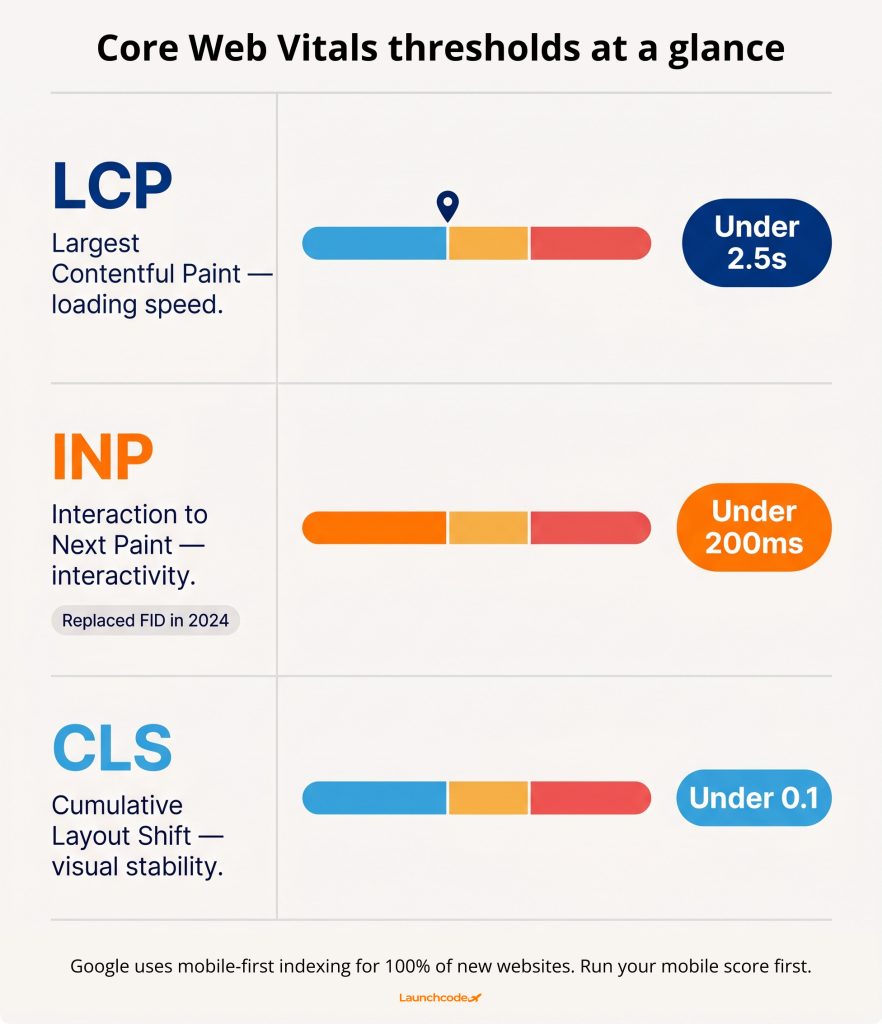
Core Web Vitals are Google’s standardized page experience metrics and confirmed ranking signals. The three metrics are LCP (Largest Contentful Paint), INP (Interaction to Next Paint), and CLS (Cumulative Layout Shift). Google updated this standard in 2024, replacing First Input Delay with INP. Teams that have not updated their benchmarks are measuring the wrong thing.
Google uses mobile-first indexing for 100% of new websites. This means Google crawls and ranks your mobile version, not your desktop version. Poor Core Web Vitals on mobile hurt rankings even if your desktop experience performs well.
| Metric | What it measures | Target threshold |
|---|---|---|
| LCP (Largest Contentful Paint) | How fast the main content loads | Under 2.5 seconds |
| INP (Interaction to Next Paint) | How quickly the page responds to all user interactions | Under 200 milliseconds |
| CLS (Cumulative Layout Shift) | How stable the layout is during load | Under 0.1 |
INP is the metric most teams overlook. Unlike First Input Delay, which measured only the first interaction, INP tracks every interaction: clicks, taps, keyboard inputs. Heavy JavaScript execution on the main thread is the most common cause of poor INP scores.
Use Google PageSpeed Insights to get a current score and a prioritized list of fixes. Run the mobile score first.
The content of the page must match what the searcher actually wants, not just include the target keyword. Google evaluates whether a page satisfies the intent behind a query. A page about “SEO audit tools” that lists tools and explains how to use them satisfies informational and commercial intent. A page that only defines what an audit is does not. Alignment with intent is not optional.
Brian Dean of Backlinko puts it directly: most content is written by people who have never done the thing they are writing about, and good content starts from real-world experience. This aligns with Google’s EEAT framework, which stands for Experience, Expertise, Authoritativeness, and Trustworthiness.
| Intent type | What the searcher wants | Content format that works |
|---|---|---|
| Informational | To learn something | Guides, explanations, definitions |
| Navigational | To find a specific page or brand | Brand or product pages |
| Commercial | To compare options before deciding | Comparison articles, reviews, use cases |
| Transactional | To take an action or buy | Landing pages with clear CTAs |
Most blog content targets informational intent. But many informational articles miss the mark by explaining theory without actionable guidance. The reader wants to know what to do, not just what something is.
EEAT signals Google looks for in the page itself:
Lily Ray, VP of SEO Strategy at Amsive, put it plainly at a Clearscope AMA panel in 2024: “You’ll see success with making better content that’s maintained over time.” Updating existing articles with new data, corrected information, and improved structure is as valuable as publishing something new.
“The best-performing articles we produce don’t just include the right keywords. They answer the exact question the reader typed, in plain language, backed by specific data. That combination is what earns rankings and keeps them.”
Tanner Medina, Co-Founder and Chief Growth Officer
AI search engines like Google AI Overviews, Perplexity, and Bing Copilot extract answers from web pages and present them without always sending users to click. To appear in these answers, your content must be structured so AI systems can read, extract, and cite it. The same on-page practices that improve traditional rankings, including clear headings, direct answers, and schema markup, also drive AI citation rates.
AI-referred sessions grew 527% year-over-year in the first five months of 2025, according to Previsible’s AI Traffic Report. The teams capturing this traffic are not doing something entirely new. They are applying on-page SEO principles in a more structured, answer-oriented way.
One key finding from practitioner work in Q1 2025: pages restructured with answer-first formatting and structured lists appeared in Google AI Overviews at three times the rate of pages using standard narrative prose. The investment required was content restructuring, not full rewrites.
Traditional narrative format:
“On-page SEO has many components. In this article, we will walk you through all the steps. First, let’s talk about keywords…”
Answer-first format:
“On-page SEO is the process of optimizing every element on a web page so search engines and AI systems can understand, trust, and rank it. The core elements are title tags, headings, content, internal links, schema markup, and page speed.”
The second version gives AI systems an extractable, citable answer in the first two sentences. The first version buries the answer in setup language.
Apply this pattern to every major section:
GEO is not a separate channel. It is an extension of on-page SEO. The same structure that helps Google index your content also helps AI systems cite it.
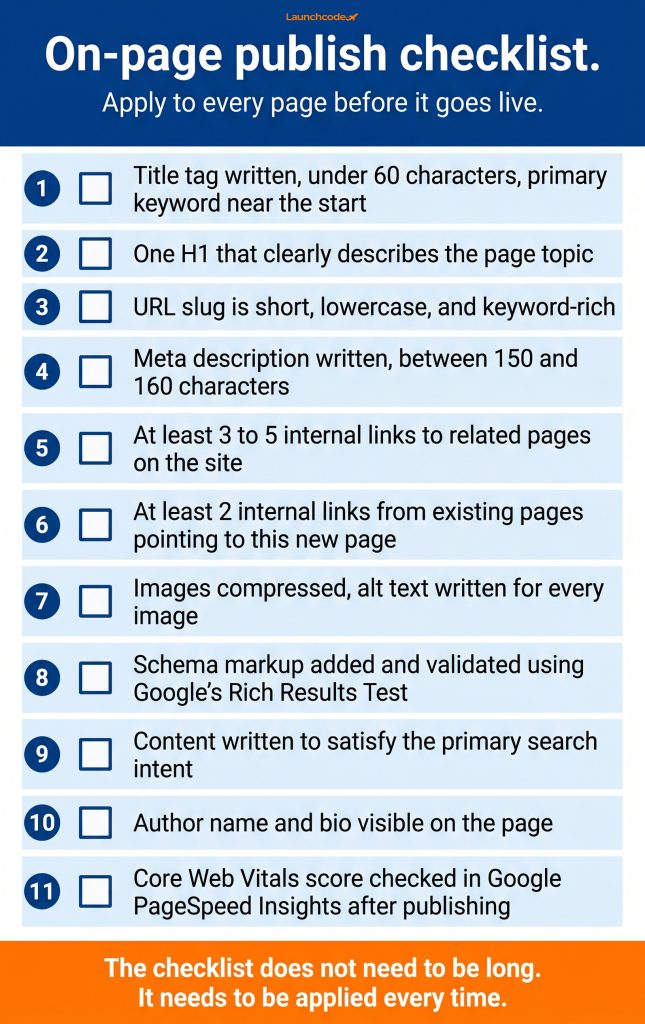
Most on-page SEO problems come from inconsistency, not ignorance. Teams know what a title tag is. They skip writing a good one because there is no system requiring them to do it at publish time. A repeatable pre-publish checklist solves this. Apply it to every page before it goes live and you eliminate the most common on-page errors at scale.
The checklist does not need to be long. It needs to be applied every time.
If you are working through an existing site or operating with limited bandwidth, prioritize in this order:
“Every page we deliver goes through the same pre-publish review. It takes about ten minutes. That ten minutes is the difference between a page that gets indexed and ranked quickly and one that sits invisible for months.”
Brittany Charles, SVP, Client Services
Before publishing any new page, confirm:
Apply this checklist to every page, every time. The compounding effect of consistent on-page optimization is what separates sites that grow steadily from sites that plateau after an early traffic spike.
On-page SEO is the practice of optimizing elements directly on a web page so search engines and AI systems can understand, rank, and cite it. It includes title tags, heading structure, content, URL slugs, internal links, schema markup, and page speed. Off-page signals like backlinks matter too, but they build on your on-page foundation.
Keep title tags under 60 characters. Titles that exceed this limit are 57% more likely to be rewritten by Google, which removes your control over how the page appears in search results. Place your primary keyword as close to the start of the title as possible.
Meta descriptions are not a direct ranking factor. Google often generates its own description from the page content. A well-written meta description improves click-through rate by giving searchers a clear reason to choose your result. Write a unique one for every page.
INP stands for Interaction to Next Paint. Google replaced First Input Delay with INP as a Core Web Vitals metric in 2024. INP measures how quickly a page responds to all user interactions, including clicks, taps, and keyboard inputs. The target is under 200 milliseconds. Heavy JavaScript is the most common cause of poor INP scores.
At minimum, add Article or BlogPosting schema with your author name, publish date, headline, and URL. If the post contains a question-and-answer section, add FAQPage schema for each question-and-answer pair. Both types improve your eligibility for rich results and help AI systems identify and cite your content.
Aim for at least three to five contextual internal links per page, pointing to related service pages, blog posts, or pillar content. More important than quantity is relevance. Link to pages that genuinely help the reader go deeper on the topic.
GEO stands for Generative Engine Optimization. It is the practice of structuring content so AI answer engines like Google AI Overviews, ChatGPT, and Perplexity can extract and cite it. GEO is not separate from on-page SEO. The same practices that improve traditional rankings, including clear headings, direct answers, and schema markup, also improve AI citation rates.


Real stories from the people we’ve partnered with to modernize and grow their marketing.