

Share:

AI marketing & automation


Component-driven web development helps you ship faster by reusing blocks like heroes, navigation, product cards, and forms. It also makes SEO performance easier to manage because you can enforce the same indexability and speed standards across hundreds of URLs.
This guide shows how to pick a rendering strategy, build SEO safe components, and govern Core Web Vitals with measurable targets. You will also get checklists and rollout steps you can apply across WordPress, headless CMS builds, and frameworks like Next.js, Nuxt, Astro, and SvelteKit.
Component-driven development improves SEO when you standardize what search engines and users get on every template, including initial HTML content, metadata, internal linking patterns, and performance defaults. The tradeoff is scale risk. One slow hero, one layout shifting embed, or one heavy form script can degrade hundreds of URLs at once. Treat components as SEO and revenue infrastructure.
Components control repeated SEO inputs such as headings, schema fields, canonical tags, and internal links. They also shape Core Web Vitals, including LCP, INP, and CLS. Google documents thresholds for good experiences, including LCP within 2.5 seconds, INP under 200 milliseconds, and CLS under 0.1.
The HTTP Archive Web Almanac reports a median JavaScript payload of 558 KB on mobile and 613 KB on desktop in 2024. That same report shows the median page requested 22 JS files on mobile and 24 on desktop. Those numbers explain why component libraries need guardrails.

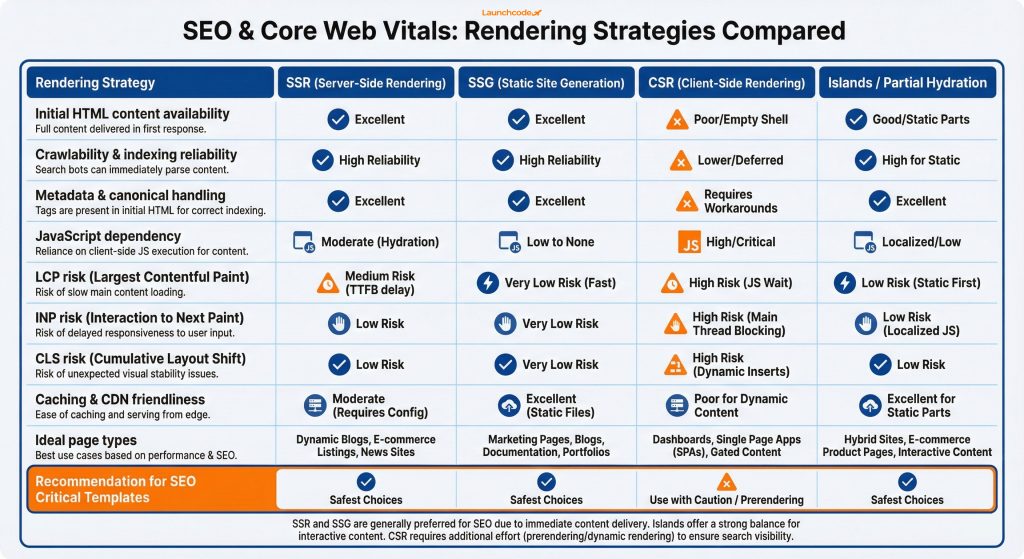
For SEO critical pages, server rendering or pre-rendering is the safest baseline because it delivers indexable HTML fast and reduces reliance on client JavaScript for content and metadata. Google’s JavaScript SEO guidance explicitly calls out server-side rendering and pre-rendering as a great idea, and notes that not all bots run JavaScript. Use client rendering mainly for app-like experiences where ranking is not the goal.
Your first decision is what must exist in initial HTML. This list is non-negotiable on pages you want to rank:
| Option | Who it fits | Key strength | Watch out for |
|---|---|---|---|
| SSR (server-side rendering) | Marketing sites, ecommerce, content heavy sites | Indexable HTML per request, metadata stays correct | Caching strategy and backend load |
| SSG (static site generation) | Content sites, docs, landing pages with stable content | Very fast delivery via CDN, predictable performance | Build times, preview workflow, cache invalidation |
| CSR (client-side rendering) | Logged in apps, dashboards, internal tools | Rich interactivity and client state | SEO risk if content, links, or metadata depend on JS |
| Islands or partial hydration | Teams who want components with minimal JS | HTML first output, hydrate only interactive pieces | Requires discipline about what becomes interactive |
A common hybrid model works well:
“Render the content and metadata in the first response, then add interactivity in layers. That one rule prevents most SEO regressions we see in modern stacks.”
Eric Bledsoe, VP, Engineering
For Launchcodex style site rebuilds, we map rendering choices to the information architecture and the pages that drive pipeline.
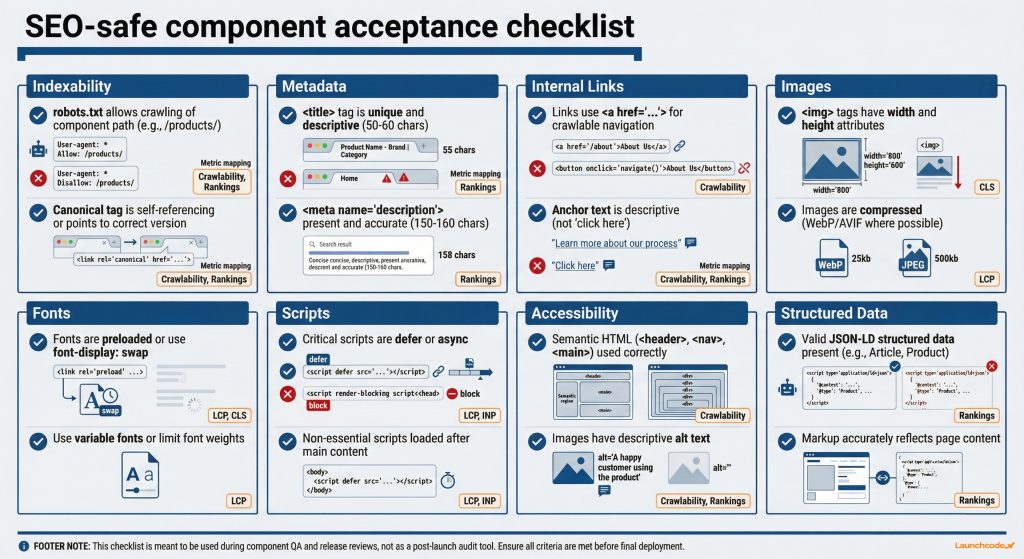
An SEO-safe component library defines what every component must do for indexability, metadata, internal links, accessibility, and performance before it ships. A simple checklist turns SEO into a release gate instead of a post-launch audit. When you enforce it at the component level, you prevent regressions that quietly reduce crawlability, slow pages, and lower conversions across many URLs.
Components output HTML, load resources, and trigger third-party scripts. That makes them a shared contract between SEO, engineering, and marketing.
| Checklist area | Pass criteria | Why it matters for SEO and revenue |
|---|---|---|
| Indexable content | Primary copy and headings render in initial HTML | Crawlers and users get the content without waiting on JS |
| Metadata | Title, meta description, canonical, Open Graph are correct per route | Prevents duplication, improves CTR, reduces misindexing |
| Internal links | Component outputs crawlable links with descriptive anchor text | Improves discovery, strengthens topical clusters |
| Images | Responsive images, width and height set, lazy load below the fold | Protects LCP and prevents CLS |
| Fonts | font-display set, limited variants, preload only when justified | Reduces render blocking and layout shifts |
| Scripts | Load only what is needed, defer non critical scripts, no heavy scripts above the fold | Lowers main thread work and improves INP |
| Accessibility | Semantic HTML, labels, focus states, keyboard support | Improves UX and conversion reliability |
| Structured data | JSON-LD is valid and matches visible content | Supports rich results and AI extraction |
If you run WordPress, treat blocks as components and apply the same checklist. If you run a headless CMS like Contentful, Sanity, or Strapi, enforce the contract in both the content model and the front-end renderer.
Core Web Vitals governance stops performance drift in component libraries. Set template level targets for LCP, INP, and CLS, then enforce budgets for JavaScript, images, fonts, and third-party scripts. INP replaced FID as a Core Web Vital on March 12, 2024, which makes long tasks and main thread work a top priority for every interactive component.
Most teams audit only after rankings or conversion drop. Governance flips the timing. You catch regressions during build and QA.
PageSpeed Insights reports the 75th percentile for field metrics. That percentile reflects the rougher end of real user experience, which is the right place to manage risk.
If you need one engineering rule to start with, reduce main thread work on the most used interactive components first. That usually means forms, navigation, filters, and search.
Third-party scripts commonly break SEO performance because they add network requests, CPU work, and layout instability outside your codebase. In a component system, treat scripts as dependencies with owners, budgets, and loading rules. Load scripts only when they are needed, delay non-essential tools, and measure their effect on INP and LCP using field data.
Tag managers make it easy to add tools and hard to see the cost. Script governance keeps you honest.
If your form loads validation, spam protection, analytics, and a scheduling widget on page load, it can hurt INP across every page that reuses it. A safer pattern:
“Treat third-party scripts like production code. If you cannot measure the value, you should not ship the cost.”
Derick Do, Co-Founder & Chief Product Officer
If your team needs help building this into a repeatable process, Launchcodex typically runs a template-first audit and component refactor plan, then validates results in Search Console and RUM.

Fix base templates and high-impact components first, then scale the improvement across every URL that uses them. Measure with field data, including Search Console Core Web Vitals reporting, CrUX, and production RUM. Use lab tools like Lighthouse and Chrome DevTools to catch regressions early, then judge success with real user metrics and organic outcomes.
A template-first rollout makes effort predictable and results easier to explain to leadership.
web.dev case studies like Rakuten and T-Mobile document measurable business improvements tied to Core Web Vitals work, which makes component refactors easier to fund.
Pick one template that matters, like your primary service page template or blog post template. Apply a rendering strategy that delivers indexable HTML, enforce the component acceptance checklist, and set a performance budget tied to Core Web Vitals.
Then scale the same patterns across the rest of the site. Components make it possible to ship improvements quickly. Governance keeps those improvements from regressing.
If you want a fast first step, audit a single template, fix the hero and script loading first, and validate improvements in Search Console and PageSpeed Insights before expanding the rollout.
Yes. It helps when components output indexable HTML, consistent metadata, crawlable links, and stable performance defaults. It can also hurt when one slow component spreads across many templates, so you need budgets and QA gates.
They can when key content, links, or metadata appear only after client JavaScript runs. SSR, SSG, or pre rendering solves this for SEO critical pages. Keep heavy interactivity isolated with selective hydration or islands.
Most marketing sites do best with SSR or SSG for pages that need to rank, plus islands for selective interactivity. Use CSR mainly for logged in experiences where SEO is not a priority.
Reduce main thread work by shipping less JavaScript, limiting event listeners, avoiding heavy components above the fold, and controlling third party scripts. Measure INP with field data at the 75th percentile, not only with lab tests.
Fix the hero component. Use properly sized responsive images, reserve layout space, preload only the true LCP image, and avoid client code that blocks rendering near the top of the page.


Real stories from the people we’ve partnered with to modernize and grow their marketing.