
Share:

AI marketing & automation


If you have used Google’s free reporting tool at any point in the last decade, you have watched its name change more than once. Google Data Studio launched in 2016. In 2022, it became Looker Studio. In April 2026, it became Data Studio again. For marketers and agencies who built reporting workflows around this tool, keeping up with the naming has been a genuine operational headache.
This article explains what changed, why Google reversed course, what the product actually does now, and how to decide whether the free tier still meets your needs or whether Data Studio Pro makes sense for your team.
Google reversed the Looker Studio rebrand because the naming created real market confusion. When the free tool shared the Looker name with Google’s $2.6 billion enterprise BI acquisition, buyers could not tell the products apart. Enterprise procurement teams asked whether they could skip the paid platform and use the free one instead. Google’s fix: restore the original name and draw a hard line between the two products.
Google acquired Looker in 2020 for $2.6 billion. Looker was built on a proprietary modeling language called LookML, which defines governed business metrics and ensures that every team in an organization pulls from the same source of truth. That is enterprise data infrastructure, not a dashboarding tool.
In October 2022, Google unified its BI products under the Looker brand at Google Cloud Next. Data Studio became Looker Studio. The logic made sense on paper. In practice, it muddied two products that serve fundamentally different audiences.
Practitioners who had built expertise around Looker and LookML found themselves explaining to clients that the enterprise platform had nothing to do with the free tool their marketing team already used. One Looker solution partner writing on Unwind Data put it directly: “The Looker vs Data Studio distinction is now official product strategy, not practitioner tribal knowledge.”

The April 2026 reversal is not just a naming fix. As noted by DataClare, the core problem was that users did not need a unified brand name. They needed clarity about which tool to use. By separating the names, Google gives both products room to stand on their own merits.
Looker stays as the enterprise platform with governed data, semantic modeling, and agentic AI capabilities for organizations that need LookML-level control. Data Studio returns as the fast, flexible option for personal analysis, ad hoc reporting, and lightweight dashboards. The line is now clear.
“The Looker vs Data Studio confusion came up constantly in discovery calls. Clients would reference Data Studio reports and we would end up clarifying three different products in the same conversation. A clean separation makes the strategy conversation faster.” Tanner Medina, Co-Founder & Chief Growth Officer
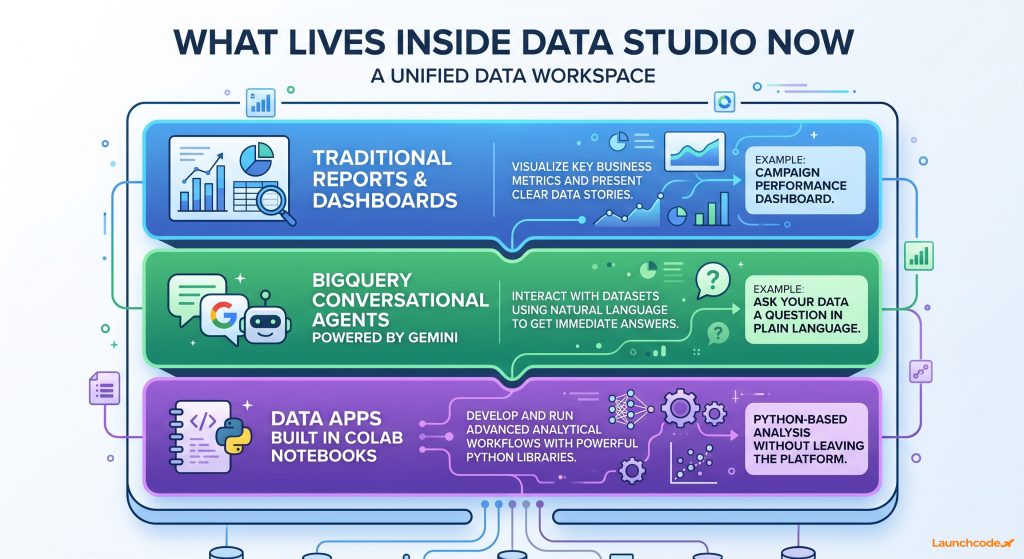
Data Studio in 2026 is not the same product it was in 2022. Beyond the name, Google expanded the platform to include three types of assets in one place: traditional dashboard reports, BigQuery conversational AI agents, and data apps built in Colab notebooks. The free tier remains available at no cost for individual analysis. A paid Data Studio Pro tier adds AI capabilities, enterprise security, and compliance controls.
The most important change for power users is scope. Data Studio is no longer a dashboard builder that connects to Google Sheets and Ads. According to the Google Cloud Blog announcement, the platform now serves as a single place to browse and interact with reports, BigQuery conversational agents, and Colab-built data apps. These three asset types live side by side in the same environment.
For marketing teams, this matters because it reduces tool-switching. Instead of moving between a reporting tool, a data warehouse interface, and a notebook environment, the starting point is one workspace.
Google has been building Gemini-powered capabilities into this product since at least September 2024, when Conversational Analytics entered public preview for Pro users. That feature lets users ask data questions in plain language and receive chart-based answers, without writing SQL.
In July 2025, Google added a Code Interpreter to Conversational Analytics. This translates natural language questions into executable Python code, enabling more complex analysis than standard SQL queries allow. That feature requires a Data Studio Pro subscription. As of April 2026, the Conversational Analytics interface also includes a “Show reasoning” toggle that surfaces a plain-text audit trail of how a query was interpreted. For agencies sharing AI-generated analysis with clients, that audit trail matters.
| Tier | Who it fits | Key features | Watch out for |
|---|---|---|---|
| Data Studio (free) | Individuals, small teams, agencies doing standard client reporting | Reports, dashboards, Google ecosystem connectors, BigQuery and Sheets integration | No AI features beyond basic, no enterprise security controls |
| Data Studio Pro | Growing teams, agencies managing multiple clients, organizations with compliance needs | Conversational Analytics, Code Interpreter, enterprise security, compliance controls, Google Cloud and Workspace admin management | Requires a paid subscription, some AI features still in preview |
Data Studio Pro is purchased through the Google Cloud or Workspace admin consoles, making it straightforward for teams already in the Google Cloud ecosystem.
Nothing breaks. Google confirmed that all existing reports, data sources, permissions, and shared links carry over automatically. No action is required from users. The transition is a naming and interface change, not a platform migration. If you have a Looker Studio dashboard running today, it will continue to run as a Data Studio report.
This was the most urgent question for agencies and marketing teams when the announcement dropped. The Search Engine Land coverage confirmed the seamless transition directly from Google’s announcement.
“When the rename dropped, the first thing we checked was whether client reports were still loading. They were. But we still audited every client deliverable referencing Looker Studio to update the naming before the next check-in call.” Brittany Charles, SVP, Client Services
The reports themselves are unaffected. A few practical items are worth reviewing:
None of these are urgent. They are worth handling during a slow week to avoid confusion six months from now when a client opens a report and sees a name that does not match the documentation you sent them.
Data Studio is for personal exploration, ad hoc reporting, and building dashboards from Google data sources like BigQuery, Ads, and Sheets. Looker is for enterprise organizations that need a governed semantic layer, consistent metric definitions across departments, and data infrastructure that AI agents can query reliably. Most marketing teams and agencies need Data Studio. Organizations with complex, multi-team data governance requirements should evaluate Looker separately.
Data Studio fits teams that need to:
The free tier handles most of these use cases at no cost. Data Studio Pro becomes relevant when you need the Conversational Analytics features, stronger compliance controls, or centralized management across a large team.
Looker is a different product at a different price point. It is the right choice when:
A mid-size SaaS company where the finance team and the marketing team define “monthly recurring revenue” differently is a classic Looker use case. The LookML model enforces one definition everywhere. That level of governance is not what Data Studio is designed to deliver, and that distinction is now clear by design.

Google is not renaming this product for nostalgia. The timing connects directly to the agentic AI era. AI agents need governed, trusted data to operate reliably. By separating Looker’s semantic layer from Data Studio’s lightweight reporting environment, Google is clarifying which product belongs in an AI-powered data stack and which belongs in a marketer’s browser tab.
LookML, the modeling language that powers Looker, does something specific: it defines what business terms mean at the data level. What counts as an active customer? What is the company’s definition of a conversion? These definitions need to be consistent and machine-readable for AI agents to operate reliably on business data.
As the Unwind Data analysis noted, the separation of Looker and Data Studio validates a long-held position among data practitioners: the modeling layer is not a feature of a dashboarding tool. It is data infrastructure. Keeping the Looker name attached to a free reporting product obscured that distinction at exactly the moment when the distinction matters most.
“The reason this rebrand matters for AI builders is simple. You cannot pipe unreliable data into an agent and expect consistent outputs. The Looker and Data Studio split finally maps to how we think about this in practice: governed data for systems, exploratory data for people.”
Derick Do, Co-Founder & Chief Product Officer
For marketing and agency teams, the practical implication is straightforward. Data Studio gives you a faster, more connected reporting environment that now includes Gemini-powered analysis. That is useful. But if your organization is building AI workflows that depend on reliable, governed data outputs, the conversation about Looker and a proper semantic layer belongs on a separate track.
The right question is not which dashboarding tool you use. It is whether your business logic is defined, governed, and accessible to the AI systems you are building on top of it.
Upgrade to Data Studio Pro if you need Conversational Analytics, the Code Interpreter, or enterprise-grade security and compliance controls. Stay on the free tier if your work is primarily building dashboards from standard Google data sources and sharing them with clients or stakeholders. The free tier is capable and has no time limit or feature degradation for core reporting tasks.
The free Data Studio tier is one of the most capable no-cost BI tools available. It connects natively to Google Ads, GA4, Google Sheets, BigQuery, Search Console, and dozens of third-party sources via community connectors. For agencies producing performance dashboards for clients, the free tier handles the core workflow without friction.
If your primary use case is building and sharing reports, there is no compelling reason to pay.
Data Studio Pro makes sense when:
The Pro tier is purchased through the Google Cloud or Workspace admin console. Exact pricing was not included in the April 2026 announcement. Google indicated that more details will follow at Google Cloud Next ’26 later this month.
One practical note: several AI features in Data Studio Pro are currently in preview. That means they are functional but may not yet be stable enough for client-facing workflows where consistency matters. Test before committing to a billing cycle.
Google Data Studio launched in 2016 as part of the Google Analytics 360 Suite. It became Looker Studio in October 2022 following Google’s $2.6 billion acquisition of Looker. On April 11, 2026, it reverted to Data Studio with an expanded product scope and a clearer separation from the enterprise Looker platform. The full cycle covers about a decade and three names.
The PPC Land coverage of the announcement provides the most detailed product timeline available, including the full AI feature rollout history.
The WebProNews analysis raised a fair concern about platform trust: every time a product changes its name, practitioners have to re-explain it to clients. That erodes confidence in the tool’s long-term stability.
There is no guarantee Google will not rename it again. But the April 2026 reversal comes with a clearer strategic rationale than the 2022 unification attempt. Separating the names reflects how the products actually work and who they serve. That structural logic is more durable than a branding exercise.
Data Studio is back, and it is a more capable product than when it left. The free tier still covers most agency and marketing team reporting needs. The Pro tier opens up AI-powered analysis for teams ready to use it. Looker is now clearly its own product for organizations with enterprise data governance requirements.
Three practical steps to take this week:
More details on pricing, AI feature availability, and the broader Google data platform strategy are expected from Google Cloud Next ’26. This article will be updated as that information becomes available.
No. All existing reports, data sources, permissions, and shared links carry over automatically. No action is required from users.
Data Studio is for individual and team reporting, ad hoc analysis, and dashboards using Google data sources. Looker is Google’s enterprise BI platform for organizations that need governed data, consistent metric definitions, and a semantic layer for AI and analytics at scale.
Data Studio Pro adds Conversational Analytics, the Code Interpreter for Python-based queries, enterprise security and compliance controls, and centralized management through Google Cloud and Workspace admin consoles.
No. The Code Interpreter requires a Data Studio Pro subscription and is currently available in preview.
If your work is primarily building and sharing performance dashboards from Google data sources, the free tier is likely sufficient. Upgrade to Pro if you want AI-powered data querying, need compliance controls, or manage a large team that requires centralized administration.
The paid tier previously called Looker Studio Pro is now called Data Studio Pro. The features carry over under the new name.



Real stories from the people we’ve partnered with to modernize and grow their marketing.