
Share:

AI marketing & automation


Marketing teams lose visibility into what is actually working every time a tracking request sits in a developer’s backlog. A new landing page launches without conversion tracking. A form submission goes unrecorded for three weeks. By the time someone notices, the data gap has already skewed a budget decision.
Google Tag Manager closes that gap. It puts tag deployment, testing, and publishing into a single dashboard you can run without editing a line of website code. This guide walks through setup, the GA4 and Google Ads tracking that matters most, the consent mode change that reshaped Google Ads data collection in 2026, and the honest limits of what you can do without developer help.
Google Tag Manager replaces the process of asking a developer to hand-code every tracking script into a website. It centralizes tags for tools like GA4, Google Ads, and Meta Pixel inside one interface, so you can add, edit, or remove tracking without a code deployment. This single change is why the tool became close to universal on the modern web.
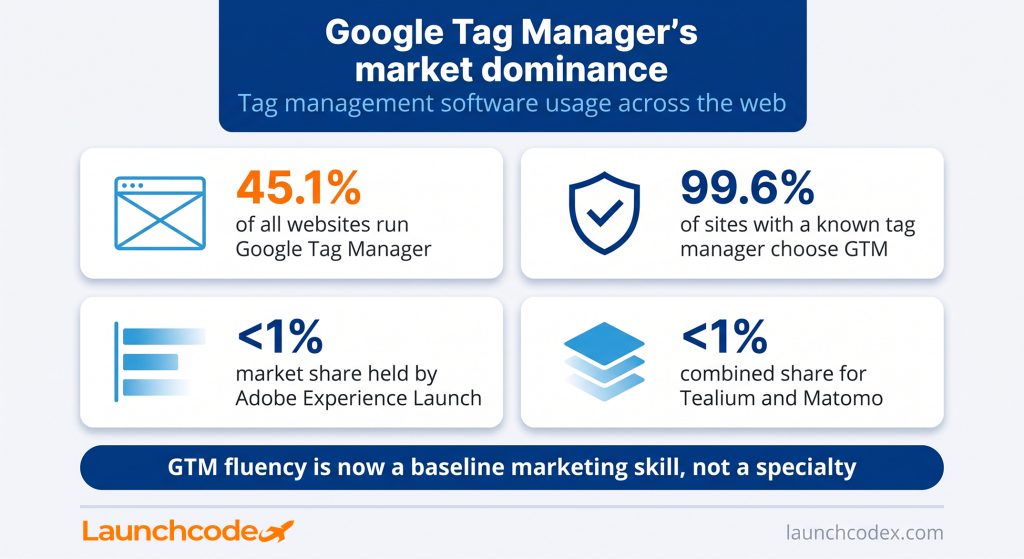
Google Tag Manager now runs on 99.6 percent of all websites whose tag manager is identifiable, which works out to 45.1 percent of all websites tracked. Its nearest tag management competitors barely register by comparison, with Adobe Experience Platform Launch, Tealium, and Matomo Tag Manager each holding well under 1 percent of the category. Learning this one tool covers almost every tracking situation you will run into.
Everything inside Google Tag Manager reduces to three pieces:
A tag without a trigger never fires. A trigger without a variable often cannot tell one page or click from another. Once these three pieces click, the rest of Google Tag Manager is mostly repetition.
Understanding tags, triggers, and variables lets you plan a full tracking setup on paper before you touch the interface. That planning step separates a clean container from a messy one, and it is the single habit that saves the most time later.
“I tell every team the same thing before they open Google Tag Manager. Map out the events you actually need on paper first, then build. Skipping that step is why containers turn into junk drawers within six months.” Derick Do, Co-Founder and Chief Product Officer
Installation takes two code snippets and roughly ten minutes, but most tracking failures trace back to a skipped verification step rather than the install itself. Getting this part right the first time prevents weeks of decisions made on incomplete data.
Google Tag Manager gives you two snippets after you create a container: one for the page head, one for right after the opening body tag. The head snippet loads the container as early as possible so tags can fire before a visitor leaves the page. The body snippet is a fallback for the small share of visitors with JavaScript disabled.
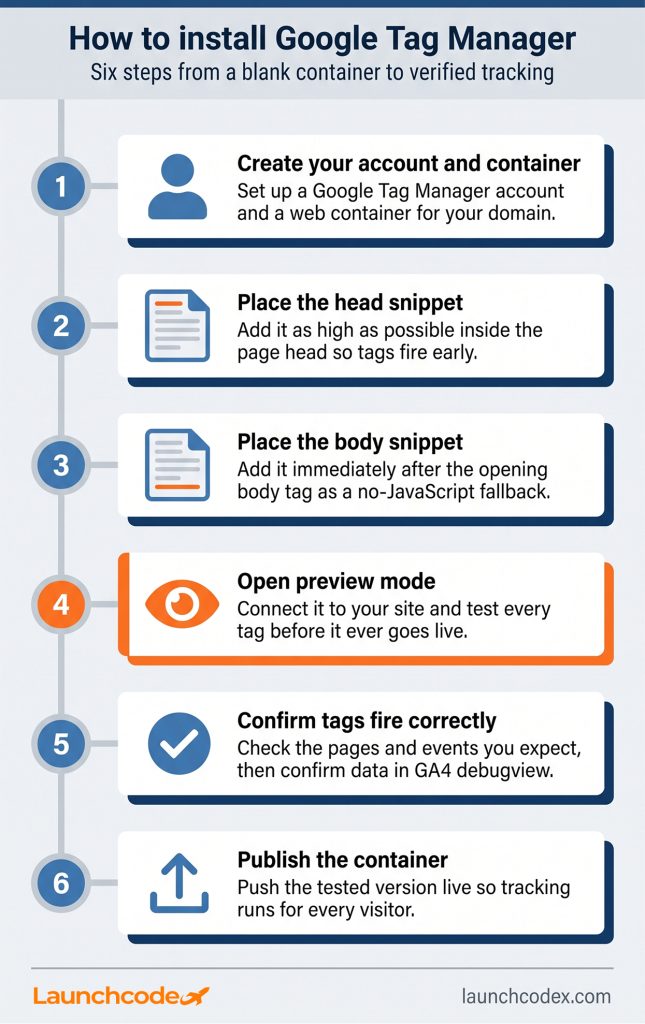
Preview mode shows exactly which tags fired on a given page and which ones did not, along with the reason a tag failed to fire. Pair it with GA4 debugview to confirm data actually lands in your Google Analytics property, not just that a tag ran in the browser. A tag firing successfully in preview mode and data appearing in debugview are two separate checks, and both matter.
Most marketers open Google Tag Manager for one reason. They need GA4 and Google Ads to see the actions that actually matter, like a form submission or a completed purchase. The setup follows the same tag, trigger, variable pattern every time, which makes it repeatable once you have done it correctly once.
Start with the base GA4 tag, sometimes called the Google tag. It sends page views and opens the data stream that every later event tag depends on. Attach it to the built in initialization trigger so it fires on every page. From there, event-specific tags, like a form submission or a purchase, reuse that same base configuration and only need their own trigger and event name.
Mark the event as a key event inside GA4 once you can see it landing correctly, since an event only shows up in conversion reporting after that step. If you also run Google Ads, import the same key event so it can inform Smart Bidding and remarketing audiences.
Google Ads data collection now runs entirely through Consent Mode, and the Google Signals setting that used to help control it no longer plays any role in that decision. This is the most consequential Google Tag Manager related change of the year, and most marketers have not yet confirmed whether their own setup survived it.
Before June 15, 2026, two separate settings jointly controlled whether Google Ads could collect advertising cookies and identifiers through a linked GA4 property, the Google Signals toggle inside GA4 and the ad_storage parameter inside Consent Mode. Google’s own Analytics Help Center confirms that Google Analytics transitioned to using Consent Mode within Google Ads as the single control for that data starting June 15, 2026. Google Signals now only affects whether Analytics data gets tied to a signed-in user for behavioral reporting inside GA4 itself.
This did not appear out of nowhere. Consent Mode requirements for advertisers in the European Economic Area trace back to the Digital Markets Act, after the EU designated Google as a gatekeeper in late 2023. The stakes are not abstract either. Regulators enforcing GDPR can issue fines up to 20 million euros or 4 percent of a company’s global annual turnover for non-compliance, which makes a broken or missing consent signal a financial risk, not only a data quality one.
“We saw client remarketing audiences shrink within days of June 15 and nobody connected it to the consent mode change at first. It looked like a targeting problem until we traced it back to ad_storage.” Tanner Medina, Co-Founder and Chief Growth Officer
If this checklist turns up a gap, treat it the way you would any other broken tag. Verify the fix in preview mode before you publish.
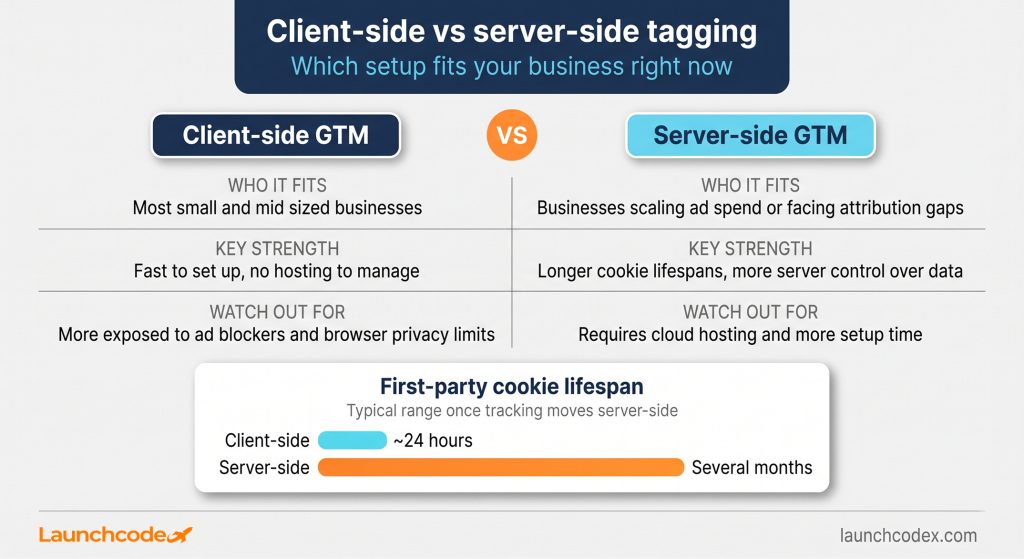
Client-side Google Tag Manager, the standard setup covered so far, is enough for most businesses. Server-side tagging is worth the extra work once ad blockers, browser privacy limits, or attribution accuracy start costing you real data. It is a deliberate upgrade, not a requirement for every reader of this guide.
Server-side tagging moves cookie handling from the visitor’s browser to a server container you control. Instead of a dozen scripts talking directly to Google, Meta, and every other vendor, the browser sends one clean data stream to your own server, which then forwards it on. Tom Wilkinson, senior marketing consultant at Usercentrics, describes it plainly: server-side tagging is the process of collecting user behavior data on a company’s own server rather than relying entirely on client-side tracking methods like JavaScript cookies or pixel tags. He also points to a practical benefit that shows up directly in reporting. Server-side tagging typically extends first-party cookie lifespans from around 24 hours to several months, which improves attribution on longer customer journeys, according to Cometly’s breakdown of the setup.
| Option | Who it fits | Key strength | Watch out for |
|---|---|---|---|
| Client-side GTM | Most small and mid sized businesses | Fast to set up, no hosting to manage | More exposed to ad blockers and browser privacy limits |
| Server-side GTM | Businesses scaling ad spend or facing attribution gaps | Longer cookie lifespans, more control over what data leaves your server | Requires cloud hosting and more setup time |
Server-side Google Tag Manager runs as a standard Docker image, deployable on common cloud infrastructure like Google Cloud Run, so it does not require exotic hosting. Wilkinson also frames the decision the right way for a business owner weighing the switch, noting that companies need to determine their technical capacity, internal expertise, and scaling reliance on data before making the move.
Google Tag Manager removes most tracking bottlenecks, but not all of them. Anything that depends on data your website does not already expose, like a logged-in user’s plan tier or a backend order ID, still needs a developer to push that information into the data layer before Google Tag Manager can use it.
Tasks that genuinely still require developer involvement include building or expanding a custom data layer, fixing a site wide performance issue caused by years of accumulated tags, and setting up the initial hosting for server-side tagging. Everything else, from a basic GA4 install to most conversion tracking and event tracking, sits comfortably inside what you can do alone. Simo Ahava, an independent Google Tag Manager consultant who has worked with Google Tag Manager since its beta launch in 2012 and taught thousands of students, is a useful benchmark here. The depth of that ecosystem exists because the tool rewards marketers who invest real time in learning it properly.
A container with forty untested tags and no naming pattern is harder to trust than a container with five well documented ones. Adopt a simple format early, such as tool, type, and detail, for example “GA4 – Event – Demo Request” or “Ads – Conversion – Checkout Complete.” Add a short description to every published version explaining what changed and why. This single habit is what makes a container safe to hand off to the next person who touches it, whether that is a new hire or, when the setup outgrows what your team can maintain alone, a partner like Launchcodex’s data infrastructure work.
“A container without a naming convention is a system nobody can maintain except the person who built it. That is the opposite of what we want when we hand tracking off to a client team.” Derick Do, Co-Founder and Chief Product Officer
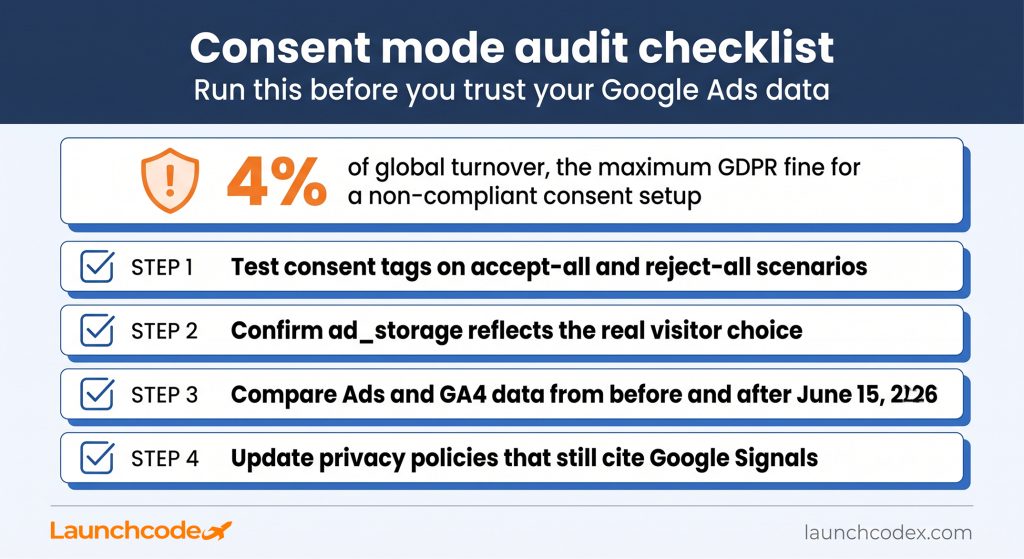
Google Tag Manager gives you real independence from developer queues, but that independence depends on doing the fundamentals right. A clean install, a verified consent setup, and a container that someone else could understand without asking you questions. Start with the audit checklist above if you run linked GA4 and Google Ads accounts, since the June 2026 consent mode change is the most likely place your tracking has quietly broken. From there, build out GA4 and Google Ads conversion tracking, and only move to server-side tagging once you have a concrete reason to.
“Tracking is a revenue conversation, not just a technical one. Every gap in GA4 or Google Ads data is a gap in the pipeline number leadership is looking at.” Tanner Medina, Co-Founder and Chief Growth Officer
No. Most tag types come as ready made templates where you fill in an ID and choose a trigger. Basic HTML, CSS, and JavaScript knowledge helps for advanced custom tracking, but it is not required to get real value from the tool.
Yes. Google Tag Manager has a free tier that covers the needs of almost every small and mid sized business. A paid Google Tag Manager 360 option exists for large enterprises with higher support and reliability requirements.
Google Analytics collects and reports on visitor data. Google Tag Manager is the delivery system that sends data to Google Analytics, Google Ads, and other tools. They work together, but neither replaces the other.
Not directly. Google Tag Manager still deploys and manages tags the same way. The change affected how Google Ads decides whether it can use the advertising data those tags collect, based on Consent Mode rather than the old Google Signals setting.
A basic install with GA4 tracking usually takes under an hour, including verification in preview mode. Adding conversion tracking for a handful of key actions typically adds another hour or two, depending on how many events you plan to track.


Real stories from the people we’ve partnered with to modernize and grow their marketing.