
Share:

AI marketing & automation


Organic search still drives roughly 53% of all website traffic. That makes it the single largest source of visitors for most businesses. Your website builder sits underneath all of that traffic. Choose the wrong one and you inherit slow page speeds, rigid URL structures, and missing technical controls that quietly limit your rankings for years.
This guide compares the five best website builders for SEO in 2026, based on technical SEO control, Core Web Vitals performance, AI search readiness, and real-world scalability. You will learn what each platform handles out of the box, where it falls short, and which one fits your specific business needs.
Your website builder controls the technical foundation that search engines evaluate before they ever look at your content. It determines your site speed, URL structure, schema support, mobile performance, and code quality. A builder with weak SEO infrastructure creates a ceiling on your organic visibility that no amount of quality content can break through.
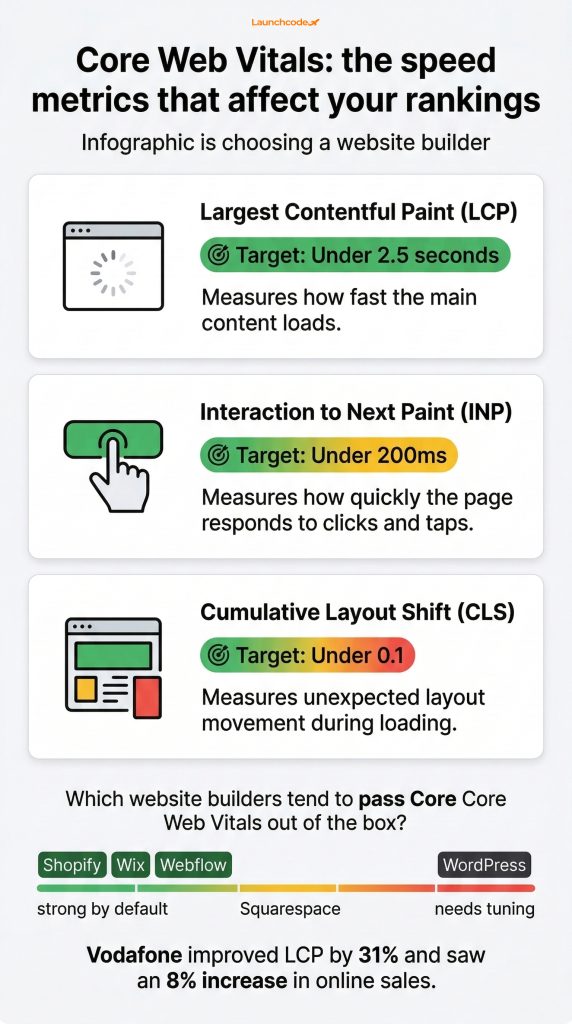
Google uses Core Web Vitals as ranking signals. These three metrics, Largest Contentful Paint (LCP), Interaction to Next Paint (INP), and Cumulative Layout Shift (CLS), measure how fast your site loads, how quickly it responds, and how stable it looks during loading. Different builders produce very different scores on these metrics right out of the box.
Site speed is not a technical checkbox. It is a revenue lever. Vodafone improved its LCP by 31% and saw an 8% increase in online sales as a direct result. When your builder produces bloated code or relies on heavy scripts, every visitor gets a slower experience, and your conversion rate drops with it.
As of July 2025, the Core Web Vitals Technology Report shows that Shopify and Wix compete for the top spot in mobile CWV pass rates, while WordPress lags behind both. That does not mean WordPress is a bad choice for SEO. It means WordPress requires more optimization work to match the out-of-the-box speed of hosted platforms.
In 2025, 60% of Google searches ended without a click to any website. That number was 58% in 2024. When fewer searches result in clicks, every ranking position matters more. Your builder needs to support structured data, schema markup, and clean semantic HTML so search engines and AI systems can understand and surface your content, even in zero-click results.
We assessed each platform across four categories that determine real SEO outcomes: technical SEO control, Core Web Vitals performance, AI and answer engine readiness, and long-term scalability. Feature lists alone do not tell you how a builder performs in practice.
Here is what each category covers:
Most “best website builder” articles are affiliate-driven. They rank platforms based on commission rates, not SEO performance. Very few include actual Core Web Vitals data, schema depth analysis, or honest discussion of platform limitations. That gap is why this guide exists.
“We’ve built and optimized client sites on all five of these platforms. The right pick always comes down to the client’s growth model, not the platform’s marketing page.”
Tanner Medina, Co-Founder and Chief Growth Officer at Launchcodex
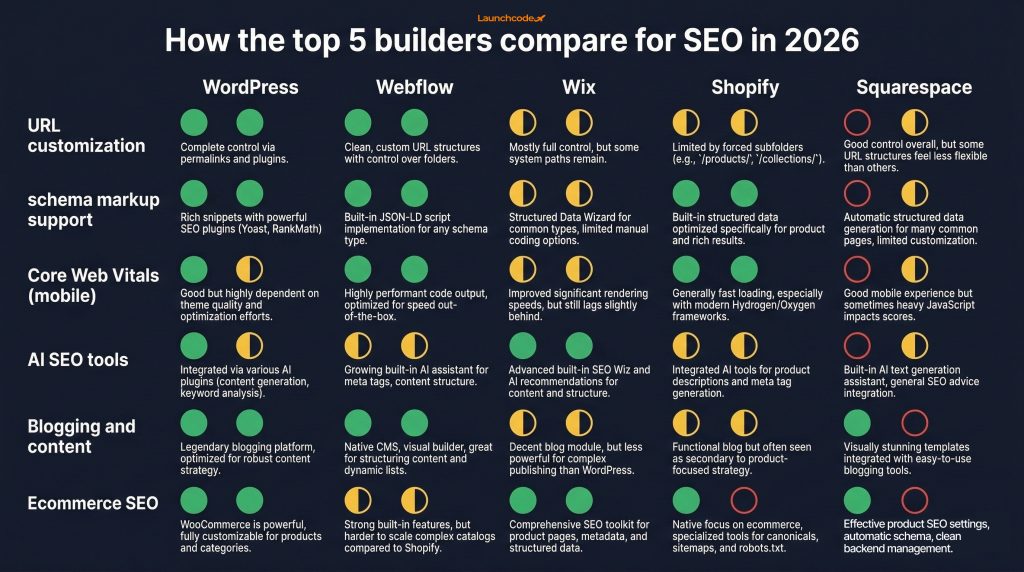
Self-hosted WordPress gives you more SEO control than any other website builder in 2026. You own every line of code, choose your own hosting, and access thousands of plugins for schema, speed, and on-page optimization. It powers roughly 42.6% of all websites globally and remains the default choice for SEO professionals.
WordPress is not a hosted builder like Wix or Squarespace. You install it on your own server, pick your own theme, and configure everything yourself. That flexibility is its greatest strength and its biggest barrier to entry.
Among websites using a known CMS, WordPress holds roughly 60% market share, more than every other content management system combined. Marco Chiesi, Head of WordPress at Hostinger, put it simply: WordPress remains the platform of choice because its scalability and flexibility match the needs of everyone from first-time bloggers to enterprise-grade site owners.
WordPress does not optimize itself. Out of the box, it often lags behind hosted builders on Core Web Vitals. You need to choose a lightweight theme like Bricks or GeneratePress, configure caching with a plugin like WP Rocket, compress images through ShortPixel or EWWW, and limit plugin bloat to match the speed that Wix or Shopify deliver by default.
The EU Cyber Resilience Act, which took effect in December 2024, also adds a new layer of responsibility. By September 2026, all WordPress plugin and theme authors must have processes in place to notify users about vulnerabilities. If you run WordPress, staying current on security updates is now a regulatory requirement, not a best practice.
WordPress fits businesses that need full control over their SEO stack and have the technical resources, either in-house or through an agency, to manage hosting, updates, and optimization. Content-heavy sites, multi-location brands, and companies with complex SEO strategies benefit most from this level of flexibility.
Webflow produces the cleanest code of any visual website builder in 2026. It outputs semantic HTML, hosts on a global CDN through Cloudflare and AWS, and gives marketing teams direct control over SEO settings without needing a developer. Many Webflow sites pass Core Web Vitals with minimal custom optimization, making it a strong choice for brands that want speed and design quality together.
Webflow sits between a hosted builder and a custom-coded site. You design visually, but the platform generates production-ready code that search engines can crawl efficiently.
At Webflow Conf 2025, the platform introduced several updates focused on answer engine optimization, including improved structured data tools and a Model Context Protocol (MCP) server that lets AI tools interact directly with site content.
Webflow is not built for every use case. SEO strategist Sofian Bettayeb, who runs SEO campaigns on Webflow, WordPress, and Wix, notes that tech SEO creates the conditions for other SEO efforts to work, but it does not replace content strategy or link building. He also points out that Webflow lacks native hreflang support, making international SEO harder without workarounds.
For very large sites with thousands of dynamic pages, the Webflow CMS can feel restrictive. Programmatic SEO at scale, multi-language setups, and complex database structures require either custom code or external tools like Jetboost or Finsweet Attributes.
Webflow fits SaaS companies, agencies, and marketing teams that value design quality, fast iteration, and clean technical SEO. It works best for sites with under a few thousand pages where the team wants visual control without sacrificing code quality.
Wix offers the most guided SEO experience of any website builder in 2026. It includes built-in Semrush keyword support, a personalized SEO checklist, and a dedicated SEO Learning Hub with tutorials and podcasts. In 2025 testing by Website Builder Expert, Wix ranked first among 12 hosted builders across 21 SEO functions.
Wix has come a long way from its early reputation as an SEO-weak platform. Today it handles the technical basics well and provides tools that walk beginners through optimization step by step.
Wix also competes at the top of Core Web Vitals pass rates on mobile, matching or beating Shopify depending on the reporting period. For small businesses without a dedicated SEO team, this combination of guided tools and strong default performance is hard to beat.
Wix does not give you the same depth of technical control as WordPress or Webflow. You cannot edit server-level files, access raw code for every page element, or build deeply custom schema implementations without workarounds.
Switching templates after launch requires rebuilding the site from scratch. This is a known limitation that affects businesses whose design needs change over time.
Wix fits small business owners, solo entrepreneurs, and teams without dedicated SEO or development resources. If you need a site that guides you through SEO basics and performs well on speed metrics without technical setup, Wix is the strongest option.
Shopify is the strongest website builder for online stores that need solid SEO foundations with minimal setup. It handles canonical tags, sitemaps, SSL, and mobile responsiveness automatically. Its Dawn theme achieves an 86.7% Core Web Vitals pass rate compared to 65-68% on legacy themes. But Shopify has real SEO limitations that every store owner needs to understand before committing.
Shopify powers over 4 million stores globally. For ecommerce, it balances ease of use with enough built-in SEO to rank product and collection pages effectively.
Shopify enforces mandatory URL prefixes with no option for customization. Products must live at /products/, collections at /collections/, and pages at /pages/. You cannot create hierarchical category structures like /clothing/shirts/blue-tee or place products at the root domain.
This matters because URL structure helps search engines understand site hierarchy. Products assigned to multiple collections generate duplicate URLs that can dilute link equity and confuse crawlers about which page to rank. Shopify adds canonical tags as hints, but fixing this fully requires editing theme code to remove the dynamic collection-based URL filter, specifically the | within: current_collection Liquid filter in files like main-collection-product-grid.liquid.
Your Shopify theme has a bigger impact on SEO than most merchants realize. Dawn, Shopify’s default theme since 2021, loads roughly 35% faster than the legacy Debut theme. It also includes built-in structured data using the Liquid structured_data filter. If you are running an older theme, upgrading to Dawn or a modern alternative like Prestige or Impact is one of the highest-impact SEO changes you can make.
Shopify fits ecommerce businesses that prioritize fast store setup, reliable hosting, and strong default performance. It works best for product-focused stores where the SEO strategy centers on product pages, collection pages, and supporting blog content. If you need deep URL customization or advanced content SEO, consider pairing WooCommerce with WordPress instead.
Squarespace combines strong default design with built-in SEO features that cover the essentials without overwhelming beginners. It includes automatic schema markup, an SEO panel for page-level optimization, clean URL structures, and mobile-responsive templates. It is the easiest builder to use among the five on this list, though it offers less technical depth than WordPress or Webflow.
Squarespace has built its reputation on design quality. For service businesses, creatives, and portfolio sites that need to look polished and rank for local or niche search terms, it delivers a solid foundation.
Squarespace also competes well on desktop Core Web Vitals, pushing close to Shopify and Wix in pass rates on desktop environments. Its closed ecosystem means fewer conflicts between apps or third-party code, which keeps sites more stable over time.
Squarespace does not offer the level of SEO customization that WordPress, Webflow, or even Wix provide. You cannot install third-party SEO plugins, add custom schema beyond what the platform generates, or access server-level configuration.
For businesses with advanced SEO needs, like programmatic content, complex redirect rules, or multi-language sites with hreflang, Squarespace will feel restrictive. Its template system also limits design flexibility compared to Webflow.
Squarespace fits creatives, service-based businesses, and small teams that want a beautiful site with solid SEO basics handled automatically. If your SEO strategy focuses on local search, portfolio visibility, or content marketing through blogging, Squarespace provides everything you need without technical complexity.
| Feature | WordPress | Webflow | Wix | Shopify | Squarespace |
|---|---|---|---|---|---|
| Best for | Full SEO control | Marketing teams, SaaS | Beginners, small business | Ecommerce stores | Creatives, services |
| URL customization | Full control | Full control | Partial | Rigid prefixes | Clean, limited depth |
| Schema markup support | Unlimited via plugins | Native plus custom code | Basic, built-in | Theme-dependent | Automatic, limited |
| Core Web Vitals (mobile) | Requires optimization | Strong by default | Strong by default | Strong on modern themes | Moderate |
| AI SEO tools | Via plugins | Native AI schema, audit | Semrush, AI meta tags | Shopify Magic | Limited |
| Blogging and content | Excellent | Good CMS | Good | Basic | Strong |
| Ecommerce SEO | Via WooCommerce | Limited | Basic | Excellent | Basic |
| International SEO (hreflang) | Full support | Requires workarounds | Supported | Via Shopify Markets | Not natively supported |
| Migration complexity | Low (you own everything) | Moderate | High (proprietary) | Moderate | High (proprietary) |
| Pricing starts at | Free (plus hosting) | $14 per month | $17 per month | $29 per month | $16 per month |
The best website builder for SEO depends on what kind of business you run, not which platform has the longest feature list. A SaaS company has different needs than a local service business or a high-volume ecommerce store. Matching your builder to your business type prevents costly migrations later.
Choose WordPress. No other platform offers the same depth of content management, plugin ecosystem, and SEO control for sites that publish regularly and rely on organic search as a primary channel.
Choose Webflow. Its clean code, visual CMS, and fast deployment cycle let marketing teams ship pages and run experiments without waiting on developers. The design quality also supports the brand credibility that B2B buyers expect.
Choose Wix. The guided SEO tools, strong default speed, and low learning curve make it the fastest path from zero to a site that ranks for local and niche terms.
Choose Shopify. Its ecommerce infrastructure, built-in product schema, and ecosystem of sales tools outweigh the URL limitations for most online stores. For stores that need more SEO flexibility, WooCommerce on WordPress is the alternative.
Choose Squarespace. Design quality matters for portfolios and service sites, and Squarespace delivers it with minimal effort. The built-in blogging and SEO panel cover the basics for local and niche visibility.
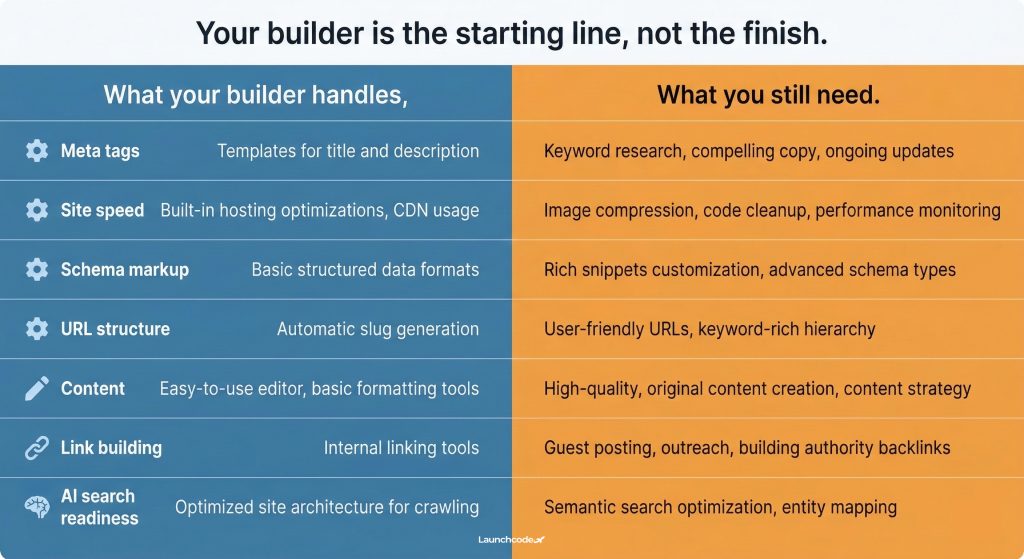
Every website builder on this list gives you a starting point for SEO. None of them give you a complete strategy. Understanding the gap between what the platform handles and what still requires manual work or expert support is critical to setting realistic expectations.
| Task | What the builder handles | What you still need |
|---|---|---|
| Meta tags | Templates or fields for title and description | Keyword research, compelling copy, and ongoing updates |
| Site speed | Default hosting, CDN, and code output | Image optimization, script auditing, and caching configuration (especially WordPress) |
| Schema markup | Basic types auto-generated | Advanced schemas like FAQ, HowTo, and custom product markup |
| URL structure | Platform defaults | Strategic URL planning and redirect management during changes |
| Content | Publishing tools and CMS | Topic research, writing, internal linking strategy, and regular updates |
| Link building | Nothing | Outreach, digital PR, and relationship-based link acquisition |
| AI search readiness | Clean HTML (varies by platform) | Structured data strategy, entity optimization, and content formatting for AEO |
As SEO strategist Phil Frost has noted, successful SEO is about partnering with Google to provide the best results for users. Your builder is the infrastructure for that partnership. The strategy, content, and ongoing optimization are what make the partnership work.
AI-powered search is changing how users find information. In 2026, your website builder needs to support answer engine optimization (AEO) alongside traditional SEO. This means producing clean semantic HTML, supporting structured data at scale, and making your content easy for AI systems to parse, cite, and surface.
More than 72% of newly launched websites now use hosted builders or no-code platforms instead of custom development. That means the platforms in this guide set the AI readiness baseline for most of the web.
WordPress leads here because plugins like Rank Math and AIOSEO let you add any schema type to any page. Webflow’s native AI schema generation and semantic code output make it a strong second. Wix covers the basics with built-in structured data. Shopify handles product-specific schema well but is limited for non-product content. Squarespace generates automatic schema but offers the least customization.
“Most of the AI-readiness conversation focuses on content. But the platform layer matters just as much. If your builder outputs messy HTML or strips your structured data, AI systems have a harder time parsing your pages, no matter how good the writing is.”
Derick Do, Co-Founder and Chief Product Officer at Launchcodex
Barry Schwartz, founder of Search Engine Roundtable, has said that if you are going to build a website, make sure it is a site that Google would be embarrassed not to rank for its main keywords. In 2026, that standard extends beyond Google to include AI answer engines like ChatGPT search, Perplexity, and Google AI Overviews.
Choosing a website builder for SEO is a foundational business decision, not a design preference. The platform you pick determines your technical ceiling for organic growth, your ability to adapt to AI search, and how much ongoing work your team or SEO partner needs to invest to stay competitive.
Here is a five-step process for making the right choice:
No builder alone guarantees rankings. Strategy, content quality, link building, and ongoing technical optimization are what turn a well-built site into a high-ranking one. The builder is the starting line, not the finish.
WordPress offers the most SEO control of any platform, but it requires more technical setup and maintenance than hosted builders. For teams with development resources, it remains the top choice. For small businesses without those resources, Wix or Squarespace may deliver better results with less effort.
Yes. Wix sites rank well for many search terms, especially local and niche queries. The platform handles technical SEO basics effectively and its Core Web Vitals performance competes with Shopify and Squarespace. Rankings depend on content quality, backlinks, and overall SEO strategy, not the platform alone.
Shopify enforces rigid URL prefixes (/products/, /collections/, /pages/) that cannot be changed. Products in multiple collections generate duplicate URLs. Blogging features are basic compared to WordPress or Squarespace. These limitations matter most for content-heavy stores or complex SEO strategies.
Yes. AI systems like Google AI Overviews, ChatGPT search, and Perplexity favor content with clean HTML, structured data, and fast load times. Builders that produce semantic code and support schema markup give your content a better chance of being cited in AI-generated answers.
Check Core Web Vitals monthly using Google Search Console and test individual pages after any major design or content change. Speed and stability can shift when you add new scripts, images, or third-party integrations.
Migrate only if your current platform creates a hard ceiling on your SEO goals. Migrations are risky. They can cause temporary ranking drops, broken redirects, and lost link equity. If you do migrate, plan redirect mapping carefully and monitor Google Search Console closely for several months after the switch.


Real stories from the people we’ve partnered with to modernize and grow their marketing.