


Share:

AI marketing & automation


About 1 in 6 legitimate commercial emails never reaches the inbox. They land in spam, hit a blocked queue, or disappear without a record. Most marketing teams do not know this is happening because their ESP reports a 98% delivery rate, which only measures whether the receiving server accepted the message.
This guide covers everything after acceptance: authentication requirements, how inbox providers score your domain, how to keep your list healthy, and how to monitor placement before open rates start falling. If you have not audited your email infrastructure since February 2024, start here.
Delivery rate and inbox placement rate are not the same metric. Delivery rate records whether a mail server accepted your message. Inbox placement rate records whether it landed in the inbox, not the spam folder, not a promotional tab, not a blocked queue. Email returns an average of $36 for every $1 spent according to Litmus, but only when it arrives where someone can read it.
A 99% delivery rate can coexist with a 60% inbox placement rate. The server accepted the email. The spam filter made its own call after that.
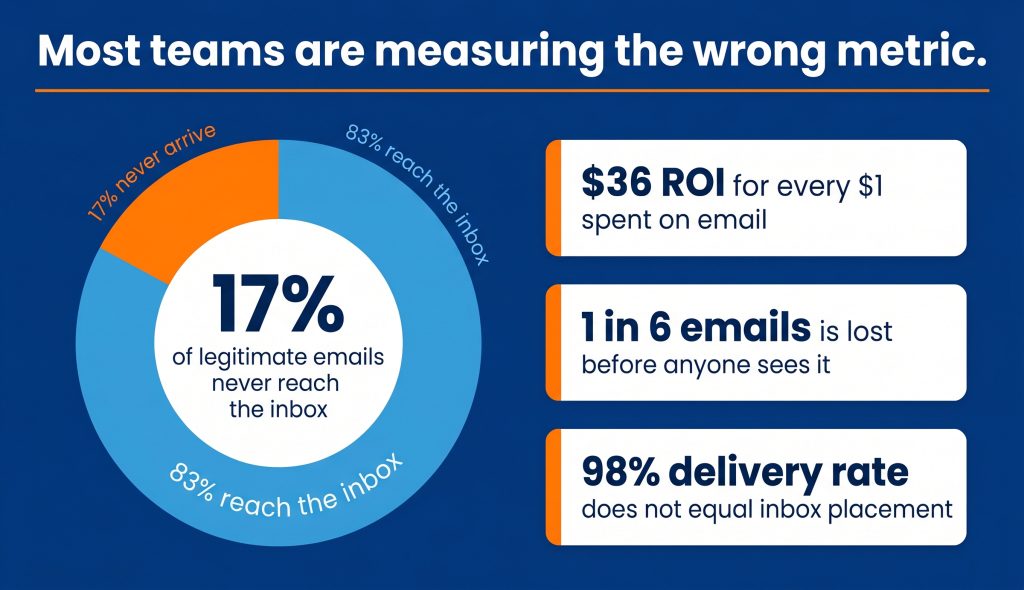
Inbox placement rate reflects how ISPs weigh your sending reputation, authentication records, engagement history, and list quality together. An email report that stops at delivery rate is measuring the wrong outcome.
Validity’s 2023 State of Email report found that approximately 17% of legitimate commercial emails globally never reach the inbox. That represents real revenue gone before a recipient ever had a chance to see the message.
To track inbox placement, you need a tool outside your ESP. GlockApps and Validity Everest both send test messages to seeded inboxes across major providers and report back on actual inbox, spam, or tab placement before you deploy to a live list.
Content-based keyword filtering is largely obsolete. That model describes how filters worked before 2015. Today, Gmail, Yahoo, and Microsoft Outlook evaluate:
Content matters at the margins. Reputation and engagement drive the filtering decision.
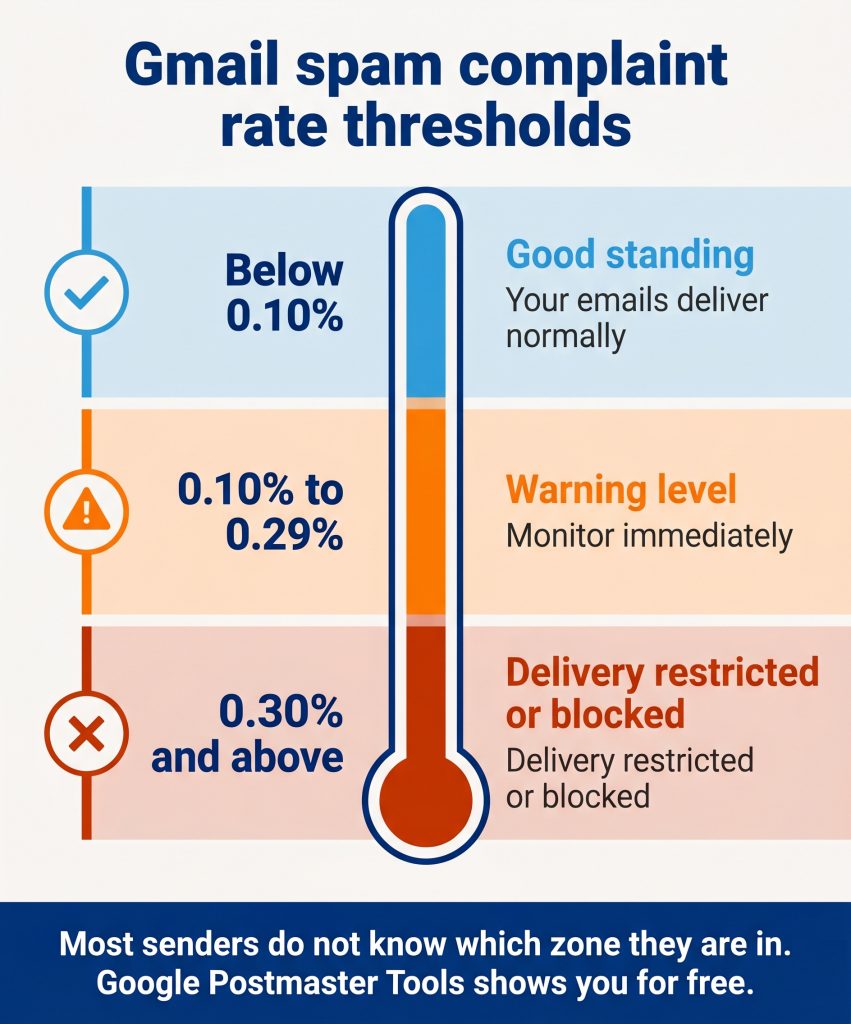
In February 2024, Google and Yahoo introduced mandatory bulk sender requirements. Any sender emailing 5,000 or more recipients per day to Gmail must have SPF, DKIM, and DMARC in place, must support one-click unsubscribe per RFC 8058, and must stay below published complaint rate thresholds. This has been active enforcement for over two years.
Google’s email sender guidelines and Yahoo’s Sender Hub both publish the full specification. Many teams that built their programs before 2024 still have gaps actively hurting their inbox placement.
| Threshold | What happens |
|---|---|
| Below 0.10% | Good standing |
| 0.10% to 0.29% | Warning level, monitor closely |
| 0.30% and above | Google restricts or blocks delivery |
Most senders have no idea where they sit against these numbers because they have never opened Google Postmaster Tools. That is the first gap to close.
Yahoo requires bulk senders to support one-click unsubscribe per RFC 8058 and to process requests within two days. This is technically different from having an unsubscribe link in the message body. The List-Unsubscribe: POST header must be active so inbox providers can surface the option natively inside the email UI.
Most major ESPs handle this automatically. If you send through a CRM-based system or a custom sending setup, verify the header is present. M3AAWG, the primary industry body for email anti-abuse practices, publishes implementation guidance for teams managing their own sending infrastructure.
Marcel Becker, Senior Director of Product at Yahoo, explained the intent behind the shift: “The days of batch-and-blast are over. Inbox providers are increasingly sophisticated. They reward senders who earn engagement and punish those who treat the inbox like a broadcast channel.”
SPF, DKIM, and DMARC are the three DNS-based records that authenticate your sending domain. SPF specifies which servers can send on your behalf. DKIM adds a cryptographic signature that confirms the message was not altered in transit. DMARC ties both together and tells receiving servers what to do when either check fails. All three must be present and aligned.
Laura Atkins, co-founder of Word to the Wise, puts the baseline clearly: “Authentication is not deliverability. It is the price of entry. Without SPF, DKIM, and DMARC, you are not even in the conversation with modern inbox providers.”
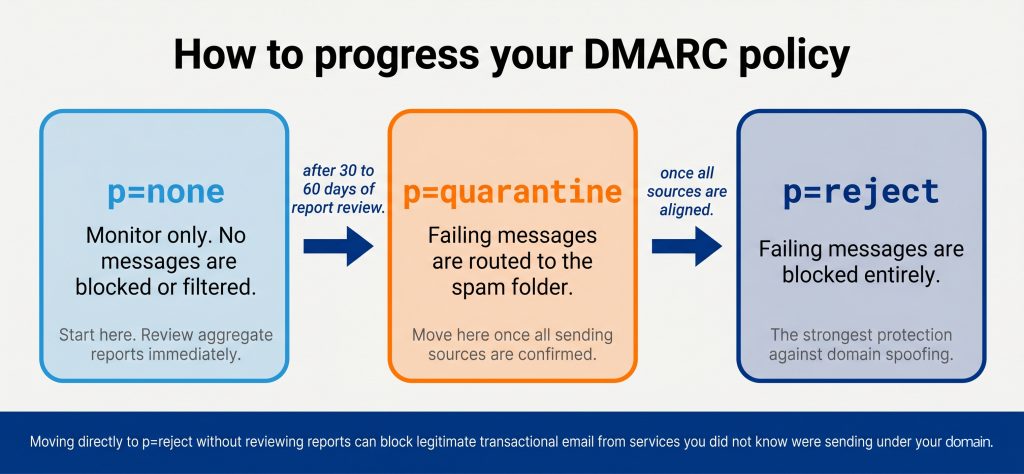
| Policy | What it does | When to use it |
|---|---|---|
| p=none | Monitor only, no enforcement | Start here during initial setup |
| p=quarantine | Failing messages routed to spam | After 30 to 60 days of report review |
| p=reject | Failing messages blocked entirely | Once all legitimate sources are aligned |
Start at p=none, review aggregate reports using a tool like DMARC Analyzer, confirm all sending sources pass alignment, then move to p=quarantine. Moving to p=reject before identifying all legitimate senders can block transactional email from services you did not realize were sending under your domain.
“In almost every audit we run, there is at least one sending source missing from the SPF record. It is usually a CRM or automation tool added after the initial setup. DMARC aggregate reports surface those gaps within the first 24 to 48 hours of monitoring.”
Derick Do, Co-Founder & Chief Product Officer
Once your DMARC policy reaches p=quarantine or p=reject, you become eligible for BIMI (Brand Indicators for Message Identification). BIMI lets verified senders display a brand logo directly in the inbox for Gmail, Apple Mail, and Yahoo. The BIMI Group reports that verified logos improve brand recognition and open rates in supporting clients, turning a compliance step into a visible inbox presence.
By 2023, Valimail’s DMARC adoption data showed roughly 90% of Fortune 500 companies had DMARC in place. SMBs without it are now the exception.
Sender reputation is a trust score attached to your sending domain and IP address. Inbox providers calculate it continuously using complaint rates, bounce rates, engagement history, and volume patterns. A damaged domain reputation overrides good content, strong subject lines, and careful timing. You cannot write your way out of a reputation problem.
Michael Adkins, Email Deliverability Engineer at Google, described the model at an M3AAWG conference: “Engagement is now the currency inbox providers use to measure trust. Your complaint rate, your open rate, whether recipients reply to your mail, all of it feeds the reputation model.”
Google Postmaster Tools is the most important monitoring tool available, and it costs nothing. After verifying your domain, it shows:
Most marketing teams have never logged in. Set it up this week.
For coverage beyond Gmail, GlockApps and Validity Everest show inbox placement across Yahoo, Outlook, and Apple Mail. MXToolbox checks whether your domain or IP appears on any major blocklist, including Spamhaus.
Email lists decay at roughly 22% per year. People change jobs, abandon addresses, and lose interest. Sending to a stale list raises hard bounce rates and complaint rates, both of which damage sender reputation. A clean, engaged list produces better inbox placement, a lower complaint rate, and stronger revenue per send than a large, neglected one.
Kate Nowrouzi, VP of Deliverability and Product Strategy at Sinch Mailgun, put it directly: “List hygiene is the most underrated deliverability lever. A smaller, more engaged list consistently outperforms a large stale one.”
“When clients come to us with deliverability issues, list age is almost always part of the problem. We had one client sitting at a 4% hard bounce rate because their list had not been validated in over a year. One pass through Kickbox brought it below 1% within a week.”
Brittany Charles, SVP Client Services
Mailchimp’s bounce management documentation reflects the thresholds used by most major ESPs:
| Bounce type | What it means | What to do |
|---|---|---|
| Hard bounce | Permanent failure, invalid address | Remove immediately after campaign |
| Soft bounce | Temporary failure, full mailbox or timeout | Suppress after 3 to 5 consecutive failures |
Most ESPs start flagging accounts at a 1.5% hard bounce rate. At 2%, platforms throttle or suspend sending.
Run this process every 90 days and before any major campaign launch or large list import.
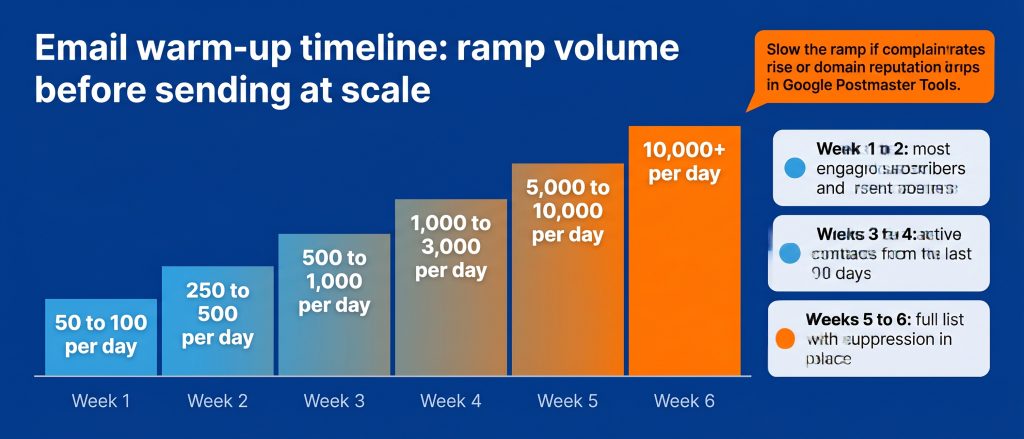
Never send at full volume from a new domain or IP address. Inbox providers have no historical data on new senders. A cold domain sending thousands of emails immediately triggers spam filters and establishes negative reputation before it can be built. Warm-up is a required phase before any high-volume deployment.
Warm-up typically runs 4 to 8 weeks depending on target volume. Send first to your most engaged contacts. Strong engagement from early sends builds positive reputation signals that help later sends reach the inbox as volume increases.
| Week | Daily send volume | Who to send to |
|---|---|---|
| 1 | 50 to 100 | Most engaged subscribers only |
| 2 | 250 to 500 | Recent openers and clickers |
| 3 | 500 to 1,000 | Active contacts from the last 90 days |
| 4 | 1,000 to 3,000 | Broader engaged segment |
| 5 to 6 | 5,000 to 10,000+ | Full list with suppression in place |
Slow the ramp if domain reputation in Google Postmaster Tools drops or complaint rates rise. AI-powered warm-up tools like Mailreach automate this process and generate real engagement signals with actual inboxes, which accelerates reputation building.
Keep transactional email (order confirmations, password resets, account alerts) on a separate sending subdomain from your marketing email. Both streams share domain reputation, but they have different volume patterns and different engagement behaviors. If marketing reputation drops, it should not affect transactional delivery.
A standard architecture sends marketing email from marketing.yourdomain.com and transactional mail from mail.yourdomain.com, each with its own SPF, DKIM, and DMARC records configured independently.
Most teams discover a deliverability problem after open rates have declined across two or three consecutive campaigns. By then, the reputation damage is done. Monitoring inbox placement, complaint rates, and domain reputation on a consistent schedule catches problems when they are still correctable.
Al Iverson, Deliverability Evangelist at Kickbox, frames the risk: “If you’re not monitoring your spam complaint rate, you’re flying blind. By the time your metrics visibly drop, the damage to your domain reputation may already be done.”
“Google Postmaster Tools is the first place we check when a client flags inbox issues. The domain reputation rating tells us within minutes whether we are dealing with an authentication gap, a list quality problem, or a volume pattern that triggered filters.”
Derick Do, Co-Founder & Chief Product Officer
DMARC reports arrive as XML files that are not readable in raw form. Tools like DMARC Analyzer parse them automatically and present alignment pass rates, flagged sources, and sending volume data in a readable dashboard.
When Launchcodex configures email infrastructure for clients, connecting a DMARC reporting tool is part of the initial build so teams have visibility into authentication health from day one.
Inbox providers score your domain on engagement signals across every send you make, including campaigns running outside today’s deployment. Regularly mailing contacts who never open, click, or reply reduces domain reputation for your entire list. Treating segmentation as a deliverability decision, not only a performance one, is one of the most effective changes most teams can make.
Define engagement tiers based on recency of activity:
Do not suppress inactive contacts permanently without first running a re-engagement sequence. Send two to three emails over 30 days. Contacts who still do not engage after that sequence belong in a suppression list.
“We run a three-tier segmentation model with every email client we onboard. Suppressing the inactive tier, contacts with zero engagement in 180 days or more, consistently improves inbox placement within two to three campaign cycles.”
Brittany Charles, SVP Client Services
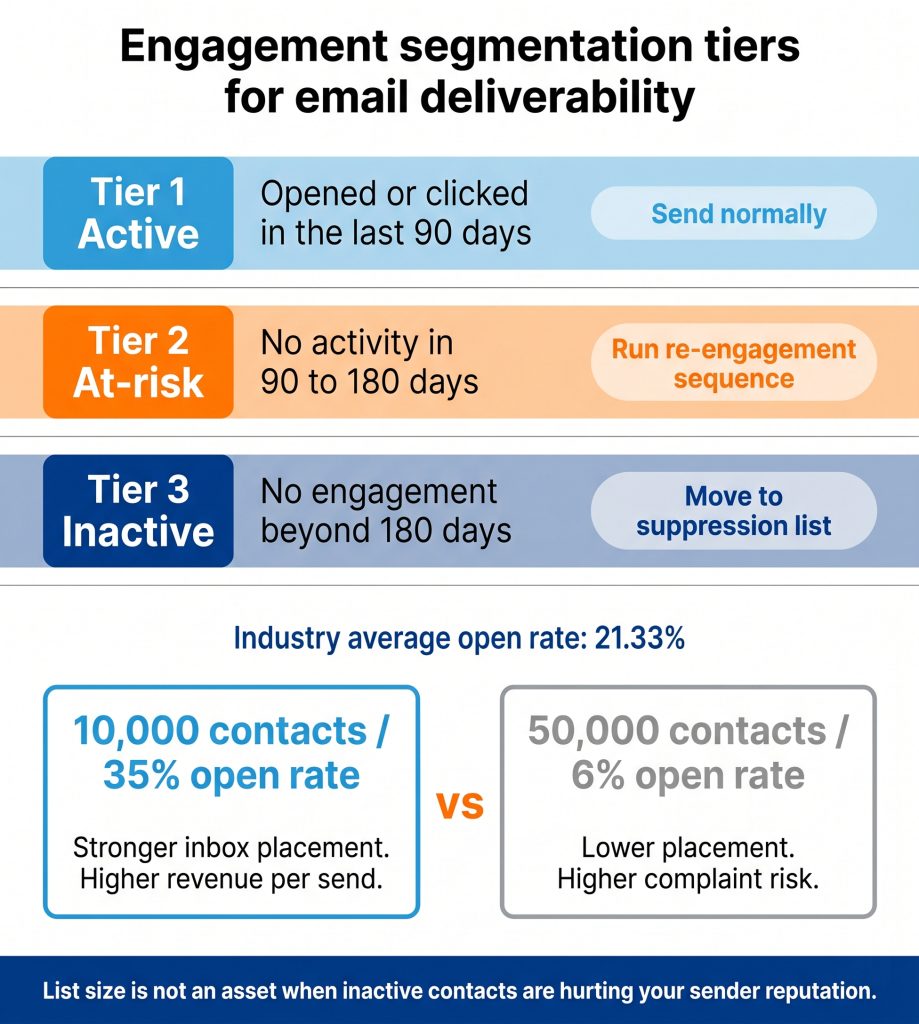
Mailchimp’s benchmark data shows the average open rate across all industries is around 21.33%. If your rate sits well below that, your definition of active is likely too broad.
A list of 10,000 contacts with a 35% open rate will outperform a list of 50,000 with a 6% open rate in every measurable way: better inbox placement, lower complaint rate, and stronger revenue per send.
Use this checklist to assess your current setup. Any item with a gap is an active risk to your inbox placement.
For teams managing email at volume across multiple domains or building deliverability infrastructure from scratch, Launchcodex’s email marketing services cover the full stack from DNS authentication to ongoing campaign-level monitoring.
The technical requirements from Google and Yahoo are built into how email routing works. Teams that treat deliverability as a one-time setup task will keep losing emails they cannot see and revenue they cannot count.
Delivery rate measures whether a mail server accepted your message. Inbox placement rate measures whether it landed in the inbox specifically, not the spam folder. Your ESP reports delivery rate. Tracking inbox placement requires a separate tool such as GlockApps or Validity Everest.
Yes. SPF and DKIM authenticate individual messages. DMARC is the policy layer that ties both together and tells receiving servers what to do when either check fails. Google and Yahoo require DMARC for all bulk senders as of February 2024. Without it, you are out of compliance regardless of whether your SPF and DKIM records are configured correctly.
Most standard marketing programs need 4 to 6 weeks. Higher-volume programs may need 8 weeks or more. Engagement quality during the ramp is the key variable. Strong opens and clicks from early sends build reputation faster and shorten the overall timeline.
Run a search on MXToolbox using your sending domain or IP address. It checks against major blocklists including Spamhaus SBL, Barracuda, and SURBL. If your domain or IP appears on a list, each blocklist has its own delisting request process. Resolution time varies from hours to several days depending on the list.
At minimum every 90 days and before any major send or list import. Lists decay at roughly 22% per year, so a list that has not been validated in 12 months likely has a significant number of invalid addresses actively hurting your bounce rate and sender reputation.
BIMI (Brand Indicators for Message Identification) is a standard that lets verified senders display a brand logo in the inbox for Gmail, Yahoo, and Apple Mail. It requires a DMARC policy at p=quarantine or p=reject. It is not a deliverability requirement, but it adds a visible brand presence once your authentication stack is complete.


Real stories from the people we’ve partnered with to modernize and grow their marketing.