
Share:

AI marketing & automation


Most WordPress site owners know people are buying from their store or filling out their contact form. Turning that activity into a clear report inside WordPress has usually meant hiring a developer for custom Google Analytics event tracking, or digging through raw GA4 reports and guessing which traffic actually converted.
Google’s Site Kit plugin just closed that gap with a feature called Site Goals. This article covers what Site Goals tracks, which plugins it supports, how to get it running on your own site, and how to read the numbers once they appear. You will also see where the feature still falls short, so you know what to expect before you rely on it for real decisions.
Site Goals is a dashboard section inside Site Kit that automatically detects five specific visitor actions, purchase, add to cart, submit lead form, contact, and generate lead, and reports them without any manual tagging. It became fully available when Google removed its feature flag in Site Kit version 1.187.0, the plugin Google built specifically to bring its tools into the WordPress dashboard.
Site Kit is one of the most widely used WordPress plugins Google offers, and this update extends what it already does with Search Console, Analytics, and AdSense data.
Site Kit watches for five specific events across your site.
Once Site Kit detects one of these, along with a connected Analytics account, it builds the matching report on its own.
“Site Goals removes one more manual step from a client’s WordPress setup. When a feature does the event mapping for you, that’s one less integration our team has to configure by hand before we can show a client real conversion data.” Derick Do, Co-Founder and Chief Product Officer
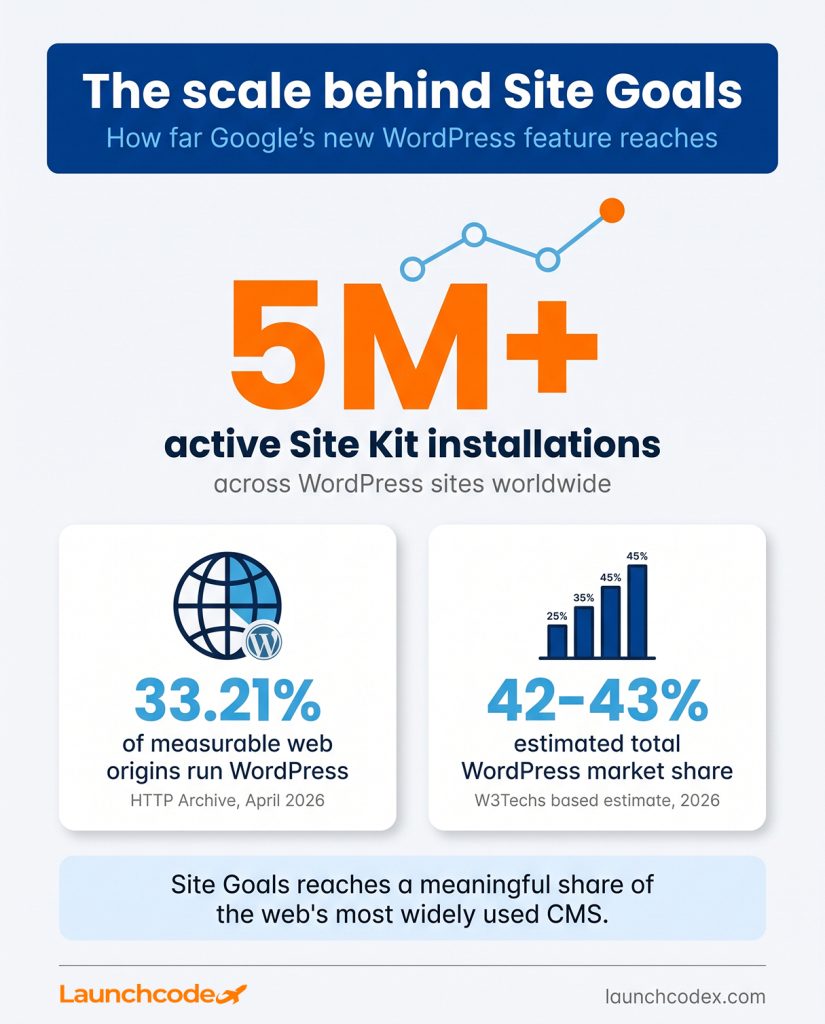
A change like this reaches a large number of site owners at once, since Site Kit currently reports more than five million active installations. Measured by HTTP Archive data, WordPress runs on roughly 33.21 percent of measurable web origins as of April 2026, with W3Techs based counts putting total market share closer to 42 to 43 percent depending on methodology. Either figure points to the same reality. Site Goals will touch a meaningful share of small business websites almost immediately.
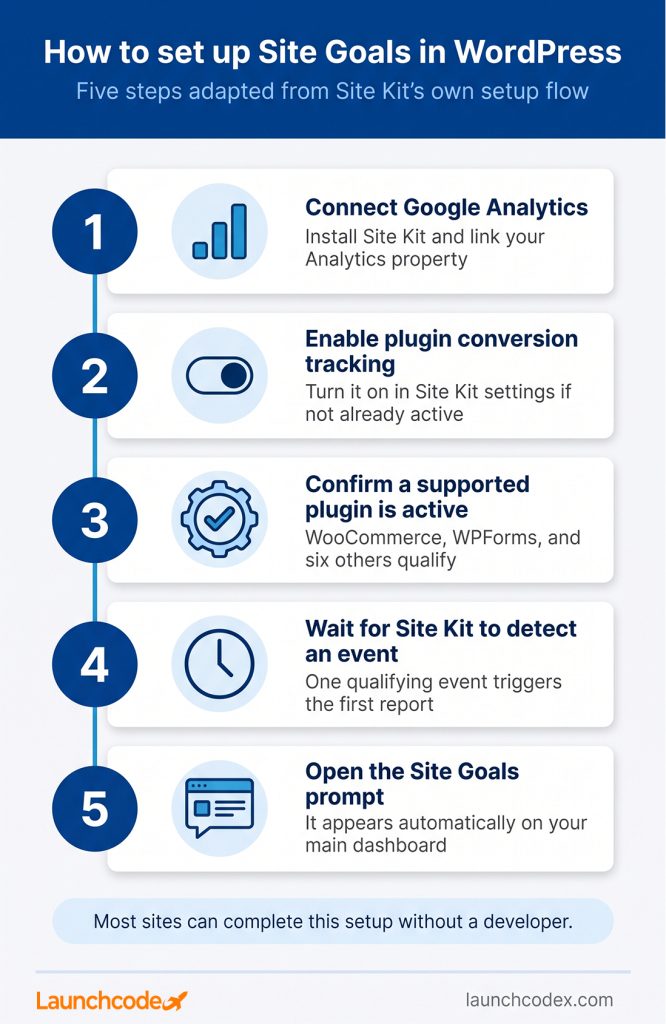
Site Goals appears automatically once three conditions are met. Google Analytics is connected inside Site Kit, plugin conversion tracking is enabled, which is on by default, and Site Kit detects one of the five supported events. If any condition is missing, the Site Goals section will not show up in your dashboard yet.
Getting it running takes a short checklist rather than a full development project.
Three issues cause most delays. Analytics is not connected inside Site Kit. Plugin conversion tracking is turned off. Or the site is running a plugin outside the supported list, so no qualifying event ever fires. Confirm each one before assuming the feature is broken.
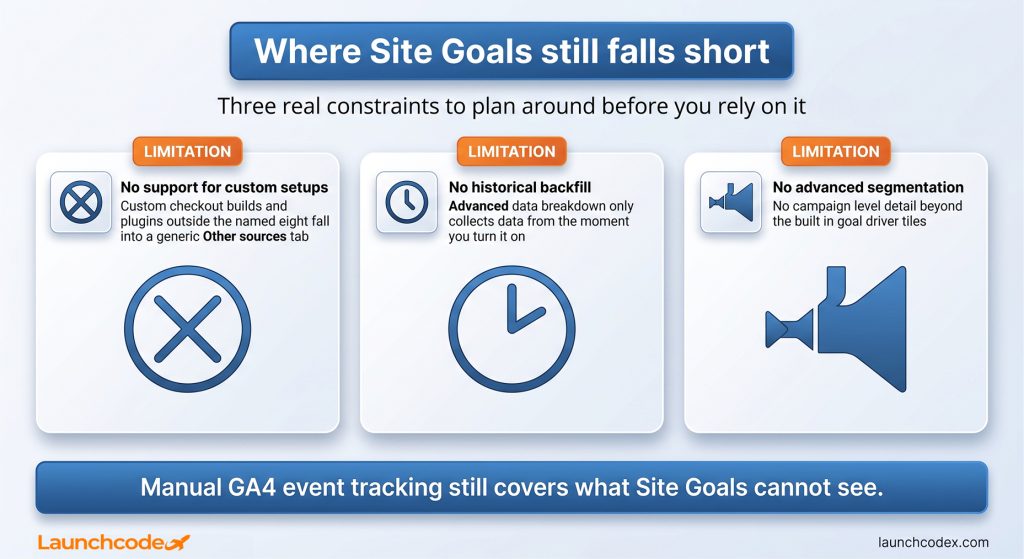
If you run more than one supported plugin, advanced data breakdown splits your report into separate tabs per plugin or form. This is useful for comparing tools directly, but it comes with a real limitation worth planning around. Historical data is not available for these granular breakdowns, so data collection starts from the moment you turn the setting on, not from your site’s full history.
Site Kit shows one of two report types depending on what it detects. Online store performance covers purchase and add to cart events from WooCommerce or Easy Digital Downloads, tracking metrics like sales rate and total sales. Lead generation performance covers form completions from six supported plugins, tracking form completion rate and engagement rate instead.
The table below breaks down how the two report types differ.
| Report type | Triggered by | Primary metric | Supported plugins |
|---|---|---|---|
| Online store performance | purchase, add_to_cart events | Sales rate, total sales | WooCommerce, Easy Digital Downloads |
| Lead generation performance | submit_lead_form, contact, generate_lead events | Form completion rate | Contact Form 7, WPForms, Ninja Forms, Mailchimp, OptinMonster, Popup Maker |
Sales rate and form completion rate are both expressed as a percentage of total sessions, not raw counts. That distinction matters. A store with falling total sales but a steady sales rate has a traffic problem, not a conversion problem. A falling sales rate with steady traffic points to friction in the buying experience itself, such as a checkout issue or a pricing mismatch.
“Clients ask about total sales first, but sales rate is the number that tells you what actually changed. A steady rate with fewer sales means fix the traffic, not the product page.” Tanner Medina, Co-Founder and Chief Growth Officer
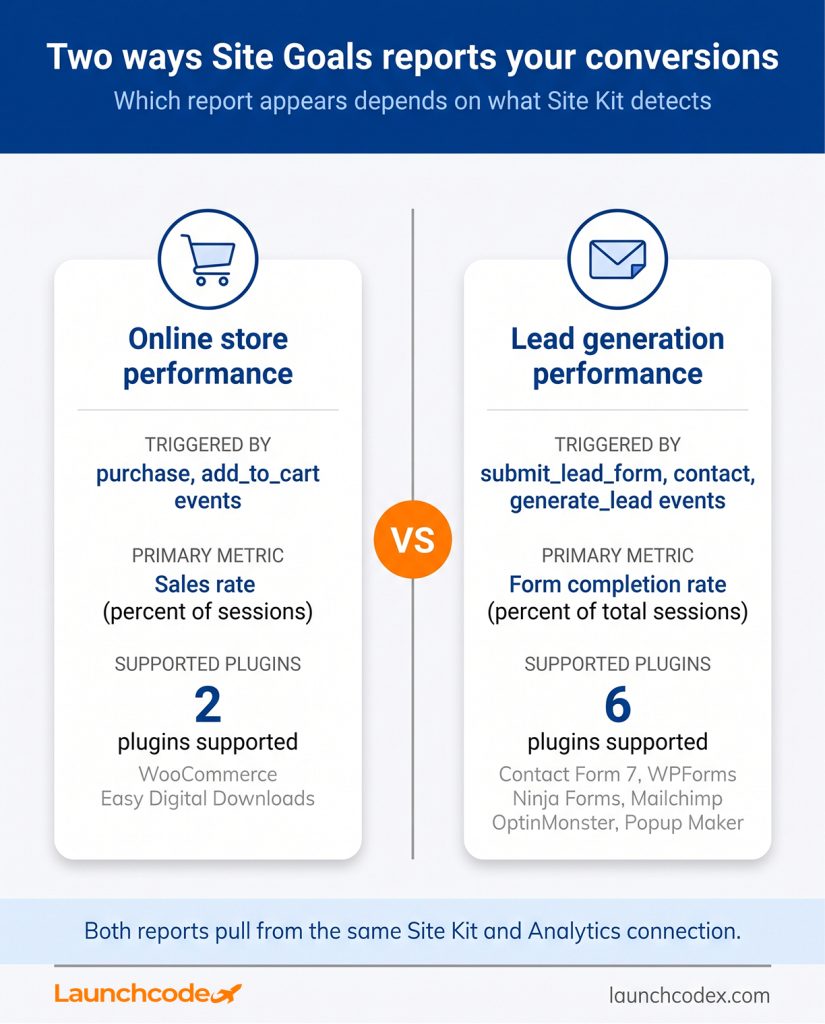
Each report lets you select up to six goal driver tiles from options such as top traffic channels driving sales, sales by device type, or top authors driving leads. An ecommerce store benefits most from tiles like top pages driving sales and sales by device type. A service business generating leads should prioritize top traffic channels by form completion rate and leads by visitor type instead.
Goal drivers are the attribution layer inside Site Goals, showing which traffic channels, landing pages, authors, devices, and locations actually produced a sale or a lead. You can display up to six goal driver tiles at once, chosen to match your specific business model instead of showing generic traffic totals.
This is where Site Goals moves past a basic traffic dashboard into something you can act on.
If your sales rate holds steady while total sales fall, the drop is coming from lower traffic volume, not a weaker offer. If the sales rate itself drops while traffic stays flat, something in the buying path is creating friction, whether that is a slow checkout, a confusing product page, or a pricing change. Reading the two metrics together, rather than one in isolation, is what turns the report into a decision tool.
“The goal driver tiles are the part clients actually act on. Knowing which channel produced the lead changes a budget decision the next week, not the next quarter.” Tanner Medina, Co-Founder and Chief Growth Officer
In Launchcodex’s own WordPress build and migration work, mismatched analytics setups are one of the most common gaps we find when auditing a new client site. Picking the wrong goal driver tiles produces the same problem inside Site Goals. A publisher or lead generation site should track top authors driving leads alongside top pages driving leads, since content performance and page performance do not always move together.
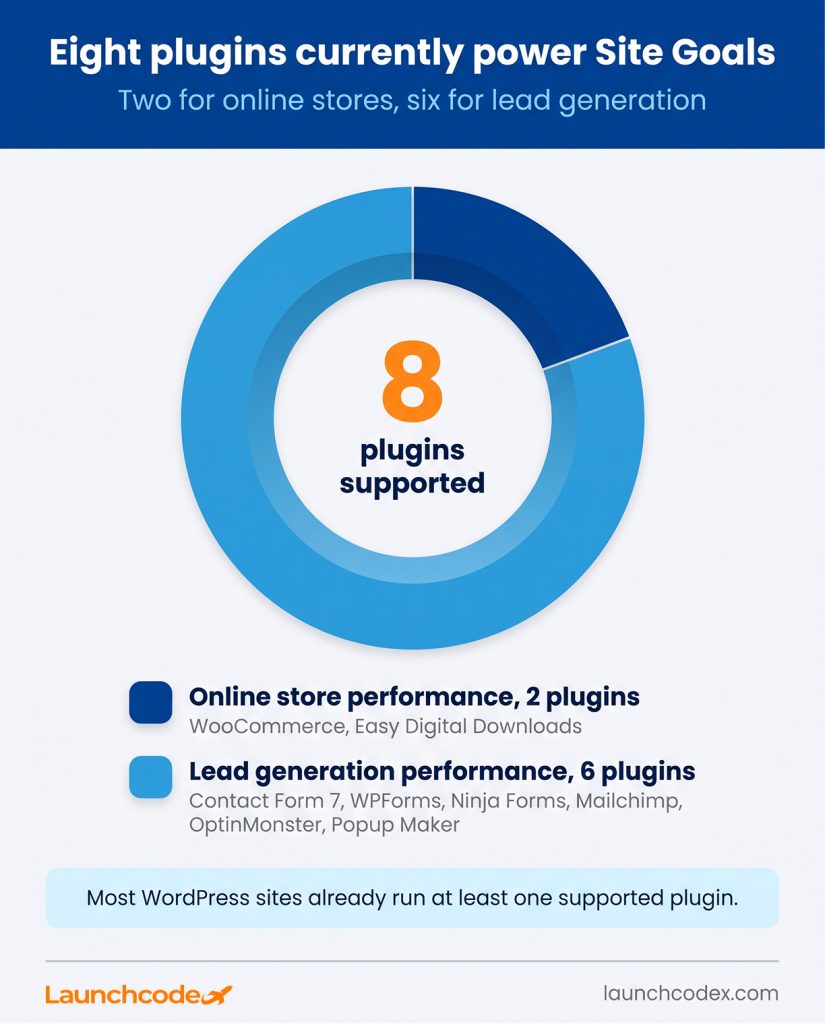
Site Goals only works with eight named plugins right now, two for ecommerce and six for lead generation, so any custom checkout flow or unsupported form plugin falls into a generic Other sources tab instead of a full report. Advanced data breakdown also does not backfill historical data, meaning any plugin by plugin comparison starts from zero on the day you turn it on.
These are real constraints, not minor caveats, and they should shape how much weight you put on the feature early on.
Yoast, the WordPress SEO plugin publisher, has made a similar point about Site Kit generally, noting it works well for basic traffic and performance statistics but was not built for advanced or highly detailed reporting setups. That framing still applies to Site Goals specifically.
Manually configuring GA4 ecommerce or lead events gives more control and can capture custom checkout flows that Site Goals cannot see yet. It also takes more setup time and technical skill. Site Goals trades some of that flexibility for a setup that most site owners can turn on in minutes rather than commissioning a developer sprint.
“We still build manual GA4 events for clients running a custom checkout or a form tool outside the supported list. Site Goals covers the common stack well. It does not cover every stack yet.” Derick Do, Co-Founder and Chief Product Officer
Site Goals gives WordPress site owners a real conversion report without custom development work, but it is not a replacement for a full analytics strategy. Confirm Analytics is connected, check plugin conversion tracking is on, and give the feature a few days to start populating data once it appears. If your site runs a supported plugin, this is a low effort way to see which pages and channels are actually producing sales or leads, rather than relying on traffic volume alone.
No. Site Kit is a free plugin from Google, and Site Goals is included at no extra cost. You can review its full feature set on Site Kit’s official site.
Site Goals requires Site Kit version 1.187.0 or later, when Google removed the feature flag and made it fully available.
No. Site Goals is part of Site Kit, which only runs on WordPress. Sites on other platforms will not see this feature.
Standard reporting can reflect events Site Kit already detected. Advanced data breakdown is different. It starts collecting plugin and form level detail only after you enable it, with no historical backfill.


Real stories from the people we’ve partnered with to modernize and grow their marketing.