Share:

AI marketing & automation


Most teams open Google Search Console to check rankings, spot an error, and then close it. That is a significant missed opportunity. GSC contains more actionable search data than any paid tool on the market, and the teams that use it well consistently find ranking wins, traffic leaks, and technical problems that competitors miss entirely.
This guide covers every report that matters, how to read the data correctly, and what to do with it. You will also learn about the AI-driven changes that are making standard GSC interpretation less reliable, and how to adjust your workflow before the data shifts further.
GSC is a free diagnostic and performance platform built by Google for website owners. It surfaces data on how Google crawls, indexes, and ranks your pages. Crystal Carter, head of SEO communications at Wix, describes it as “the closest thing we have to first-party search truth.” No third-party tool has access to this data. Semrush and Ahrefs estimate. GSC reports what Google actually measured.
Most teams treat GSC as a health check tool, something to open when traffic drops. That approach leaves most of the value unused. GSC also shows you where your content almost ranks but fails to convert impressions to clicks, which pages Google has decided not to index and why, how your Core Web Vitals compare to Google’s thresholds, and which queries are generating visibility without generating traffic.
The platform contains seven core report areas:
In 2025, Google added a branded versus non-branded filter (November 2025), query groups (October 2025), and an experimental AI-powered report configuration tool (December 2025). These additions move GSC closer to a full visibility intelligence platform.
GSC is relevant beyond SEOs. Marketing leads use it to track branded versus non-branded traffic growth. Founders use it to understand which content generates organic reach. Developers use the CWV reports to prioritize performance work. Any person responsible for organic growth should have regular access.
Add your site as a domain property, not a URL prefix. A domain property covers all protocols (http, https) and all subdomains automatically. URL prefix properties only capture data for the exact URL you enter. Most teams with data gaps set up a URL prefix property and miss traffic from their www or non-www variant.
Google offers five ways to verify ownership:
DNS verification is the most stable method. It does not break when themes update, plugins change, or code deploys overwrite a meta tag. It also works across every subdomain automatically.
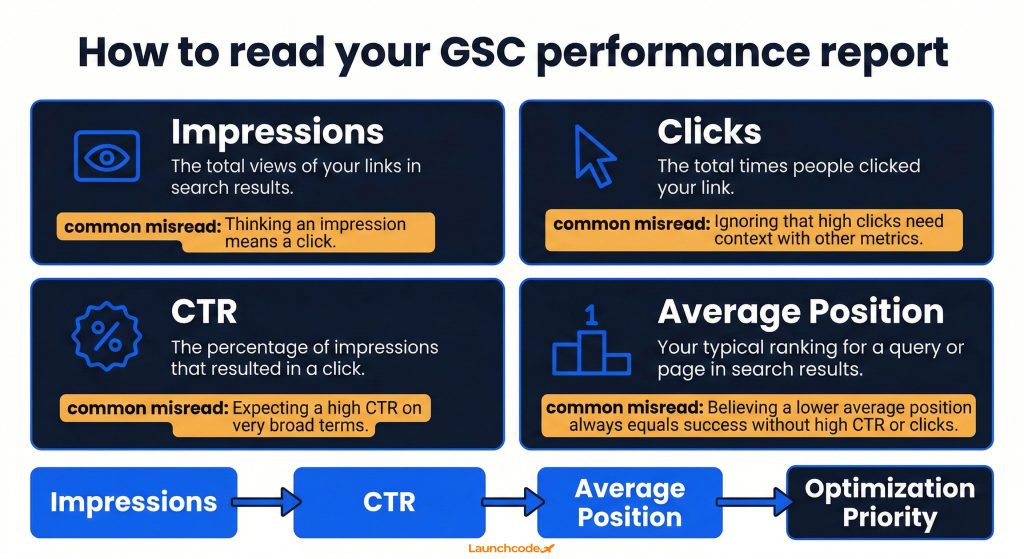
The performance report is the most important screen in GSC. It shows how many times your pages appeared in Google search results (impressions), how many times users clicked through (clicks), your click-through rate as a percentage (CTR), and your average ranking position. These four metrics show you where you are winning, where you are close, and where your content is visible but failing to attract clicks.
| Metric | What it measures | Common misread |
|---|---|---|
| Impressions | Times your page appeared in results for a query | High impressions without clicks signals a title or meta description problem, not a ranking problem |
| Clicks | Times a user clicked your result | Clicks without conversions is a landing page problem, not an SEO problem |
| CTR | Clicks divided by impressions | Low CTR at a high average position usually means a weak title tag or unappealing meta description |
| Average position | Weighted average rank across all impressions for a query | A position of 7 does not mean you are always seventh. It is an average across all ranking events |
The raw overview view is not where you find wins. Apply these filters to surface actionable data:
Pages with high impressions and low CTR are the highest-value optimization targets in any SEO workflow. The ranking work is already done. The fix is a stronger title tag or a more compelling meta description.
“The CTR column in GSC is where I start every content audit. If a page has thousands of impressions and a 0.8 percent CTR, that is a title problem, not a content problem. You can fix that in an afternoon.”
Tanner Medina, Co-Founder and Chief Growth Officer, Launchcodex
CTR benchmarks are shifting fast. A 2025 study by GrowthSRC Media across 200,000 keywords found that organic CTR for the top position dropped from 28 percent in 2024 to 19 percent in 2025, a 32 percent decline attributed largely to AI Overviews pushing traditional results further down the page. In the same study, the number of keywords triggering AI Overviews grew from 10,000 in August 2024 to 172,855 by May 2025.
Flat or declining clicks alongside growing impressions is not always a CTR problem. It may reflect a structural change in how Google presents results for your queries. The AI Overviews section below explains how to diagnose this specifically.
Google launched a native branded versus non-branded filter in November 2025. Use it to separate traffic driven by people searching for your brand from traffic you earned by ranking for competitive, unbranded terms. Unbranded impression growth is the cleaner measure of organic progress.
The Pages report shows every URL Google has discovered, grouped by status: indexed, not indexed, and excluded. Pages that are not indexed cannot rank. Indexing errors are one of the most common causes of invisible traffic loss because they are silent. Rankings simply do not exist for affected pages, and no alert fires.
Google divides page status into four groups:
The Error group needs immediate attention. Common errors include crawl anomalies (server errors returning 5xx codes), redirect errors (chains that loop or point to non-existent URLs), and submitted URLs returning 404 status.
Not every excluded page is a problem. Many legitimate exclusions exist, such as thank-you pages, filtered e-commerce URLs, or pages intentionally set to noindex. Follow this process to separate signal from noise:
The URL Inspection Tool lets you check a single page’s complete crawl and index status. It shows the last crawl date, the rendered HTML Google saw, the canonical Google selected, and any indexing issues it found.
Run a URL inspection whenever:
After fixing an issue, use the “Request indexing” button inside the tool to prompt Google to recrawl the page. This does not guarantee fast reindexing but it signals priority.
The Core Web Vitals report shows field data, real performance measured from actual Chrome users, grouped into good, needs improvement, and poor thresholds across mobile and desktop. Google’s official benchmarks are LCP under 2.5 seconds, INP under 200 milliseconds, and CLS under 0.1. Pages below these thresholds are at a competitive disadvantage in ranking, especially when content quality is comparable across competing pages.
| Metric | What it measures | Good threshold | Why it matters |
|---|---|---|---|
| LCP (Largest Contentful Paint) | Load time of the largest visible element | Under 2.5 seconds | Directly tied to perceived page speed |
| INP (Interaction to Next Paint) | Responsiveness across all user interactions | Under 200ms | Replaced FID as the interactivity signal in March 2024 |
| CLS (Cumulative Layout Shift) | Visual stability during load | Under 0.1 | Unexpected layout shifts increase bounce rate |
As of July 2025, only 44 percent of WordPress sites on mobile pass all three Core Web Vitals tests. That failure rate means most brands are leaving a direct ranking advantage unused.
The CWV report groups URLs into poor, needs improvement, and good status. Use this workflow to move pages from poor to good:
John Mueller, Google’s Search Advocate, has been clear that CWV are real ranking signals but not dominant ones. In his words, CWV are “more than a tiebreaker, but it does not replace relevance of the content.” Fix your worst performers, but do not sacrifice content investment for marginal speed gains.
The business case extends beyond rankings. Research cited by BrightVessel shows a one-second delay in page load time can reduce conversions by up to 7 percent, and 53 percent of mobile users abandon pages that take more than three seconds to load. CWV improvements affect revenue directly.
GSC contains query data no third-party tool can replicate. It shows real impressions, real clicks, and real average positions for every search query that has triggered your pages in the last 16 months. Tools like Semrush and Ahrefs estimate search volume from panel data. GSC reports what actually happened in Google’s index for your specific domain.
The most efficient content strategy workflow starts with queries you already rank for. Follow this process:
Switch the dimension from Queries to Pages and sort by impressions. Click on a specific page and add the Queries filter to see every term that URL ranks for. Pages that rank for 30 or more queries but average below position 15 for most of them are consolidation candidates. They have broad topical relevance but insufficient depth on any single subtopic.
In October 2025, GSC launched query groups, a feature that clusters related queries into topic-level views. Instead of analyzing individual keywords, you can now evaluate performance across a theme. This simplifies content audits for large sites and makes it easier to identify which topic areas are growing versus declining in organic visibility.
AI Overviews are the most significant structural change to Google’s search results since mobile-first indexing. They also create a direct data interpretation problem inside GSC. Impressions triggered by AI Overview appearances are merged with traditional blue-link impressions in the Performance report. There is no native filter that separates them. If your impressions are growing while clicks are flat or declining, AI Overviews may be the reason, and standard CTR analysis will not surface it.

The Wellows research team documented the issue directly: “Google does not treat AI Overviews as a separate visibility layer in Search Console. Impressions generated from AI answers are merged into traditional organic impression data, even though the user experience is fundamentally different.”
The practical consequence is that your CTR can look artificially low without your content performing any worse. A user who sees an AI Overview that fully answers their question may never click any organic result. GSC records your impression. It does not record the zero-click outcome in a way you can isolate.
“When a client sees impression growth with flat clicks, the first question I ask is: are AI Overviews showing for these queries? Nine times out of ten, that explains the gap. The data is not broken. The interpretation is.”
Derick Do, Co-Founder and Chief Product Officer, Launchcodex
GSC does not offer a native AI Overviews filter, but you can use these approaches to isolate impact:
GSC’s API retains 16 months of data. As of early 2026, data from late 2023 and early 2024 is rolling off the platform. That pre-AI baseline, the performance your site achieved before AI Overviews existed at scale, is disappearing. Without it, you cannot measure the true impact of AI Overviews on your organic traffic.
Export your historical GSC data now. Connect your property to Looker Studio and build a dashboard that pulls the full 16-month dataset. Save that export to a Google Sheet or data warehouse. Once that window closes, the comparison is gone.
The Links report shows which external domains link to your site, which pages attract the most external links, and how your internal links are distributed. It is not a replacement for Ahrefs or Semrush on backlink depth, but it is the only link data sourced directly from what Google has discovered. The Rich Results report shows which pages have valid schema markup and which have errors blocking enhanced search appearances.
Focus on three areas inside the Links report:
As former Google engineer Matt Cutts noted, crawl depth is roughly proportional to PageRank. Sites with strong incoming links on root pages will see deeper crawling. The Links report shows exactly which pages Google is treating as authoritative, which should guide both your content investment and your internal linking strategy.
The Rich Results report shows whether your structured data is valid, has warnings, or contains errors. Valid structured data enables enhanced search appearances including review stars, FAQ dropdowns, product prices, and video thumbnails.
ABP News applied GSC structured data recommendations across eight language versions of their site and saw a 30 percent traffic increase. MX Player combined GSC video structured data guidance with proper sitemap submissions and grew traffic threefold. The gains came from acting on what GSC flagged.
To improve structured data coverage:
GSC’s native interface exports up to 1,000 rows. That is insufficient for any site with significant content depth. The Search Console API removes this limit and allows programmatic access to up to 16 months of performance data. Connecting GSC to Looker Studio gives you a scalable reporting layer that any team member can use without touching raw data exports.
Looker Studio (formerly Google Data Studio) has a native GSC connector. The setup takes under ten minutes:
The most valuable Looker Studio configuration combines Page URL, Query, Date, Clicks, Impressions, CTR, and Average Position as base fields, then adds a calculated field for CTR segmented by branded versus non-branded using regex logic.
The GSC API allows you to:
For teams managing large sites or multiple client properties, the API is the difference between reporting on what happened and building a searchable, long-term performance record.
A structured GSC reporting setup connects the API to Looker Studio, archives monthly exports to a data layer, and monitors three trigger conditions: any page with a 20 percent or greater weekly impression drop, any new indexing errors affecting pages in the top 50 by organic traffic, and any CWV degradation from good to needs improvement status. This approach surfaces performance issues before they compound.
Most teams review GSC reactively, when traffic drops or a client asks a question. A structured weekly workflow turns GSC from a diagnostic tool into a proactive growth system. The entire workflow takes 30 to 45 minutes and surfaces one to three concrete actions every week.

Document the output of this review in a shared log with the date, what was found, who owns the fix, and the target resolution date. Patterns across four to eight weeks of logs reveal structural issues that individual checks miss.
GSC is first-party data, which makes it highly accurate for what it covers. But it does not cover everything. Understanding its blind spots is as important as knowing its features. Teams that treat GSC as a complete picture of search performance regularly miss the full story.
GEO (Generative Engine Optimization) is the practice of optimizing content to appear in AI-generated search answers. GSC does not yet provide a dedicated report for AI Overview appearances, AI Mode performance, or visibility in Google’s Gemini-powered experiences. Teams using GEO strategies must use supplemental tools, manual testing, or third-party AI visibility trackers to measure their presence in these surfaces.
Google’s official guidance confirms that standard E-E-A-T best practices govern AI Overview eligibility. No special optimization layer exists. GSC’s performance data still signals which content Google trusts most, and that trust signal applies across both traditional and AI-generated results. Pages that rank well in organic results tend to appear more frequently in AI Overviews.
Google Search Console gives you direct access to how Google sees your website. Every other tool estimates or models that relationship. GSC reports it from the source.
The teams that get the most from GSC connect each report to a clear action, each action to a business outcome, and each business outcome to a reporting layer that keeps the work visible. Set up your domain property, connect it to Looker Studio, export your historical data before the 16-month window closes, and run a weekly review that prioritizes impressions over instinct.
Search in 2026 is more complex than it was two years ago. AI Overviews are reshaping click behavior. Data retention limits are erasing your ability to compare against a pre-AI baseline. GSC still contains more high-value, actionable search data than any other available tool, and it is free. The brands that build a rigorous weekly practice around it will continue to find organic growth where competitors see only noise.
Google Search Console shows website owners how their site performs in Google search. It covers organic clicks, impressions, rankings, indexing status, Core Web Vitals, backlinks, and structured data. It is the primary free tool for diagnosing and improving organic search performance.
Yes. GSC is completely free for any verified website owner. There is no paid tier. All features, including API access, are available at no cost.
Google offers five verification methods: HTML file upload, HTML meta tag, Google Analytics, Google Tag Manager, and DNS TXT record. DNS verification is the most stable option for most sites because it does not break when code or themes change.
Impressions count how many times your page appeared in Google search results. Clicks count how many times a user actually clicked through to your site. The ratio between the two is your CTR. Impressions can grow without clicks increasing, which is common when AI Overviews appear for your target queries.
The native GSC interface shows 16 months of data. The Search Console API also returns up to 16 months. Data does not roll over beyond that window. Export historical data to Looker Studio or a data warehouse to preserve long-term records.
The most likely cause is that AI Overviews are appearing for your target queries, answering the user’s question before they reach your organic result. AI Overview impressions are counted in GSC but the user never clicks. Use the branded versus non-branded filter and compare CTR trends for informational queries to diagnose the issue.
Average position is the weighted average rank at which your page appears across all its ranking events for a given query or time period. If a page ranks third for 100 impressions and tenth for 10 impressions, the average position will be closer to three than ten because the weighting is by impression volume. Treat average position as a directional signal, not a precise rank.
Core Web Vitals are three page experience metrics: LCP (Largest Contentful Paint), INP (Interaction to Next Paint), and CLS (Cumulative Layout Shift). Google uses these as ranking signals. Find them under the “Experience” section in GSC. The report shows which pages are in good, needs improvement, or poor status based on field data from real Chrome users.


Real stories from the people we’ve partnered with to modernize and grow their marketing.