
Share:

AI marketing & automation


You probably already have GA4. Google Analytics runs on 43.7 percent of all websites, according to W3Techs. Now you can ask that data questions from Claude, Gemini, Cursor, and other AI assistants through the Model Context Protocol (MCP). The setup guides online are scattered, and several already list the wrong tools or miss the hosted option.
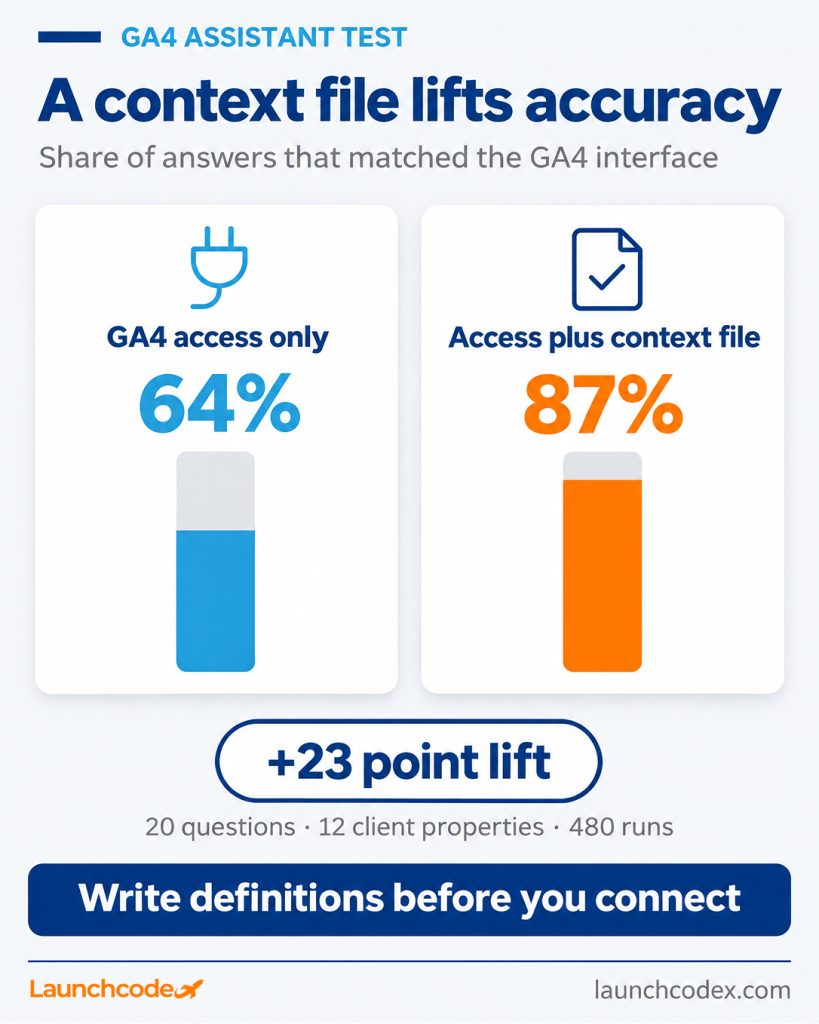
Here is our view: connecting GA4 is now a sub one hour job, so access is no longer the hard part. The teams that get trustworthy answers write down their GA4 definitions before they connect. In a Launchcodex test of 20 recurring reporting questions across 12 client properties, 480 runs in total, assistant answers matched the GA4 interface 64 percent of the time with GA4 access alone and 87 percent of the time once the assistant also had a one page context file. This guide covers what is live, which route to pick, how to set it up, and how to make the numbers hold up in a client report.
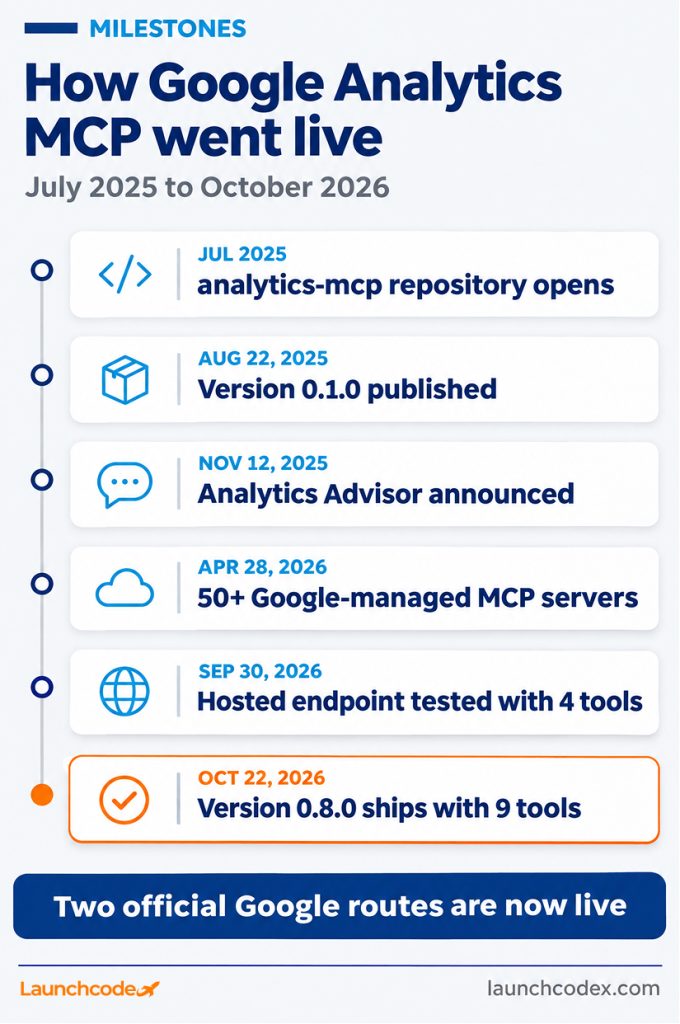
As of November 2026, Google offers two official MCP routes for GA4. The open source analytics-mcp server runs on your computer and exposes nine tools in version 0.8.0. A hosted endpoint at analyticsdata.googleapis.com/mcp/v1 runs on Google’s side and covers reporting. Analytics Advisor, the Gemini assistant inside GA4, is a third option that needs no setup.
Last verified: November 9, 2026. Tool counts and endpoint status change often, so check the links below before you commit to a route.
Google’s Analytics team created the google-analytics-mcp repository on GitHub in July 2025 and published version 0.1.0 on August 22, 2025. Version 0.8.0 shipped on October 22, 2026 with nine tools, including:
Several popular guides still say the server has seven tools. That count is out of date.
Google’s official setup page says the server handles read requests only and cannot modify Analytics settings. The README lists one write tool, create_property_annotation. It only appears when you start the server with the –allow-write flag and credentials that carry the analytics.edit scope.
Google now documents a global, hosted MCP endpoint in its Data API MCP reference. When Windsor.ai tested it on September 30, 2026, it listed four tools: run_report, get_metadata, run_realtime_report, and check_compatibility. All four sit behind Google OAuth.
This matches where Google is heading. At Cloud Next ’26, Google said that more than 50 Google-managed MCP servers are generally available or in preview.
Google announced Analytics Advisor on November 12, 2025, with a rollout to English language accounts in early December 2025. It covers standard and 360 properties. It needs no setup, but it lives inside GA4 and cannot pull your other tools into the same chat.
Pick the route based on where your team works and what data the question needs. Use the local server for Claude Code, Claude Desktop, Gemini CLI, or Cursor. Test the hosted endpoint for remote-capable clients. Use Analytics Advisor for quick GA4-only questions. Use a third-party connector only when you need GA4 and other sources in one chat without managing Google Cloud.
MCP is now a vendor neutral standard. When Anthropic donated MCP to the Linux Foundation’s Agentic AI Foundation, it reported more than 10,000 active public MCP servers and adoption by ChatGPT, Cursor, Gemini, Microsoft Copilot, and Visual Studio Code. One GA4 setup can serve several assistants.
| Option | Who it fits | Key strength | Watch out for |
|---|---|---|---|
| Local analytics-mcp server | Teams using Claude Code, Claude Desktop, Gemini CLI, or Cursor | Google’s own code, nine tools, account and property lookup | Needs a Cloud project, Python, and credentials on each machine |
| Hosted Data API endpoint | Remote-capable MCP clients | No local install, Google OAuth | Four tools only, so you need property IDs on hand |
| Self-hosted remote deployment | Teams that want one shared URL for many users | Works with web based assistants | You own hosting, auth, and updates |
| Analytics Advisor | Quick questions inside GA4 | Zero setup | GA4 only, no cross-tool workflows |
| Third-party hosted connector (Stape, Windsor.ai, Manifold) | Teams that want GA4 plus Search Console or ads data in one chat | Sign in with Google, no Cloud project | Another vendor holds access to your data |
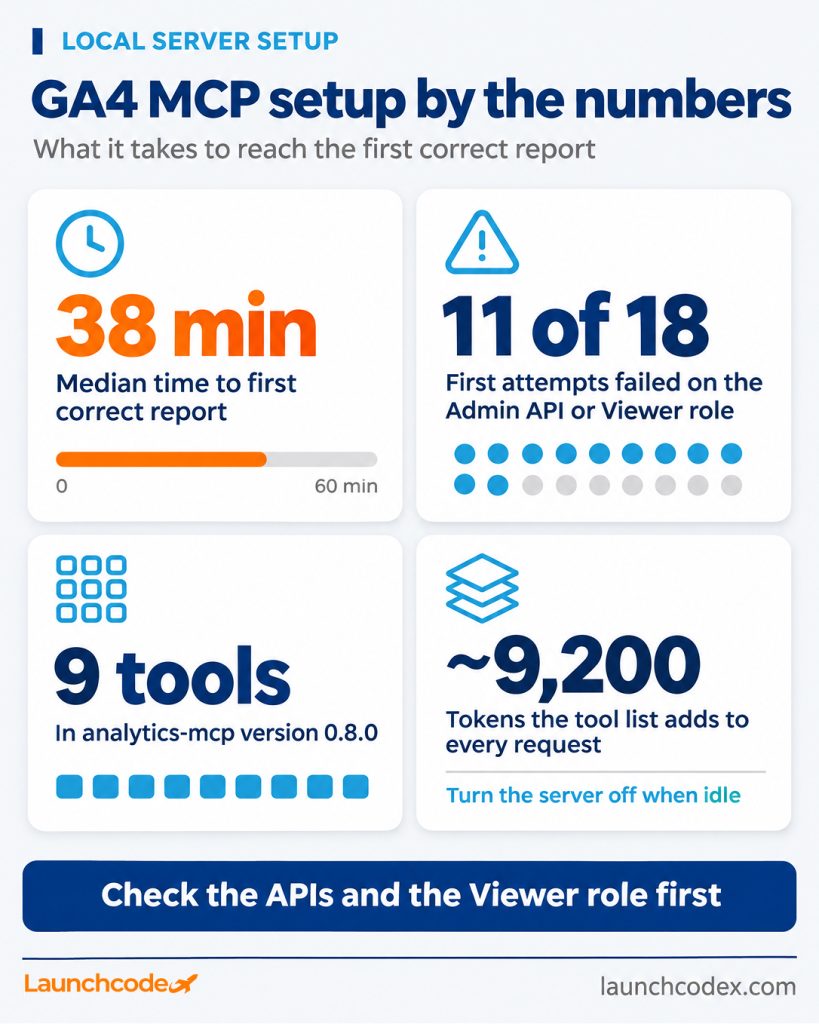
To connect the local server, enable two Google APIs, give an account Viewer access, create read-only credentials, and add one command to your assistant. Most failures come from a disabled API or a missing role, not from the assistant. Check those two items before you start and setup usually takes well under an hour.
Across 18 local server setups the Launchcodex team completed for client properties, the median time from a new Google Cloud project to the first correct report was 38 minutes. Eleven of the 18 first attempts failed on a disabled Admin API or a missing Viewer role.
“We now run a two minute pre-flight before anyone opens a terminal. Confirm both APIs are on in the exact project named in GOOGLE_CLOUD_PROJECT, then confirm the service account email shows up under Property access management. Skipping that check caused most of our failed first attempts.” Derick Do, Co-Founder and Chief Product Officer
The server is free. Reports draw on your property’s Data API quota. Standard properties get 200,000 Core tokens per day and 40,000 per hour. Analytics 360 properties get 2,000,000 per day and 400,000 per hour. Google says most requests charge 10 or fewer tokens.
Context is the cost you will notice first. In ContextBolt’s Claude Code test, the nine tool definitions added about 9,200 tokens to every request. Turn the server off in sessions that do not need GA4.
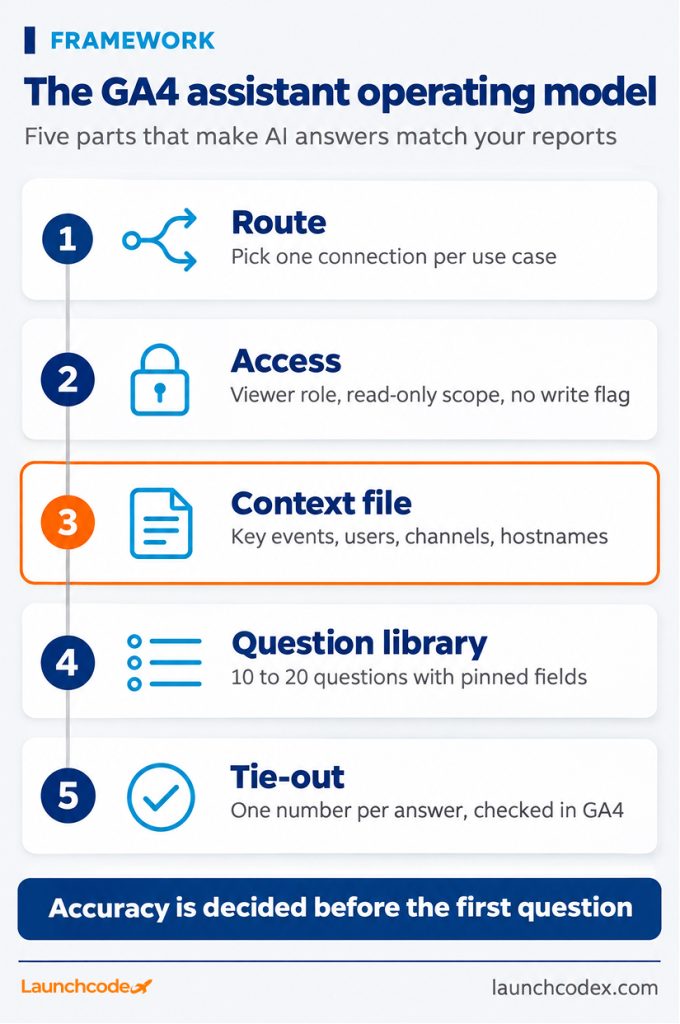
The GA4 assistant operating model has five parts: route, access, context file, question library, and tie-out. It exists because access alone produces confident numbers that do not match your reports. Written definitions and a checking habit fix that, and they keep working after your tracking changes.
The research supports this. Anthropic’s data science team reports that Claude answered no more than 21 percent of its internal analytics evaluations correctly without structured context files. With them, the team says “95% of business analytics queries are automated via Claude, with ~95% accuracy in aggregate,” as InfoQ reported. In a separate Cube benchmark of 100 questions across three frontier models, adding a semantic layer document raised first-shot accuracy by 17 to 23 percentage points. Model choice within the same tier did not explain the difference.
Most marketing teams are not there yet. In the Supermetrics 2026 Marketing Data Report, 80 percent of 435 marketers felt pressure to adopt AI, but only 6 percent had AI fully embedded in their workflow.
Choose one route per use case and write it down. Your weekly reporting analyst might use the local server in Claude Code. A sales lead who needs a quick traffic check might use Analytics Advisor. Keep each recurring report on one route so the same context file and question library apply every time.
Create one dedicated service account per organization. Give it the Viewer role on each property it needs and the analytics.readonly scope. Leave the write flag off. Prefer impersonation over JSON key files.
Credentials are the weak point across MCP. Astrix Security found that 88 percent of MCP servers require credentials and 53 percent rely on long-lived static secrets such as API keys or personal access tokens. A downloaded service account key is exactly that kind of secret.
The context file is a one page document your assistant reads before it queries GA4. It maps your business terms to exact GA4 fields.
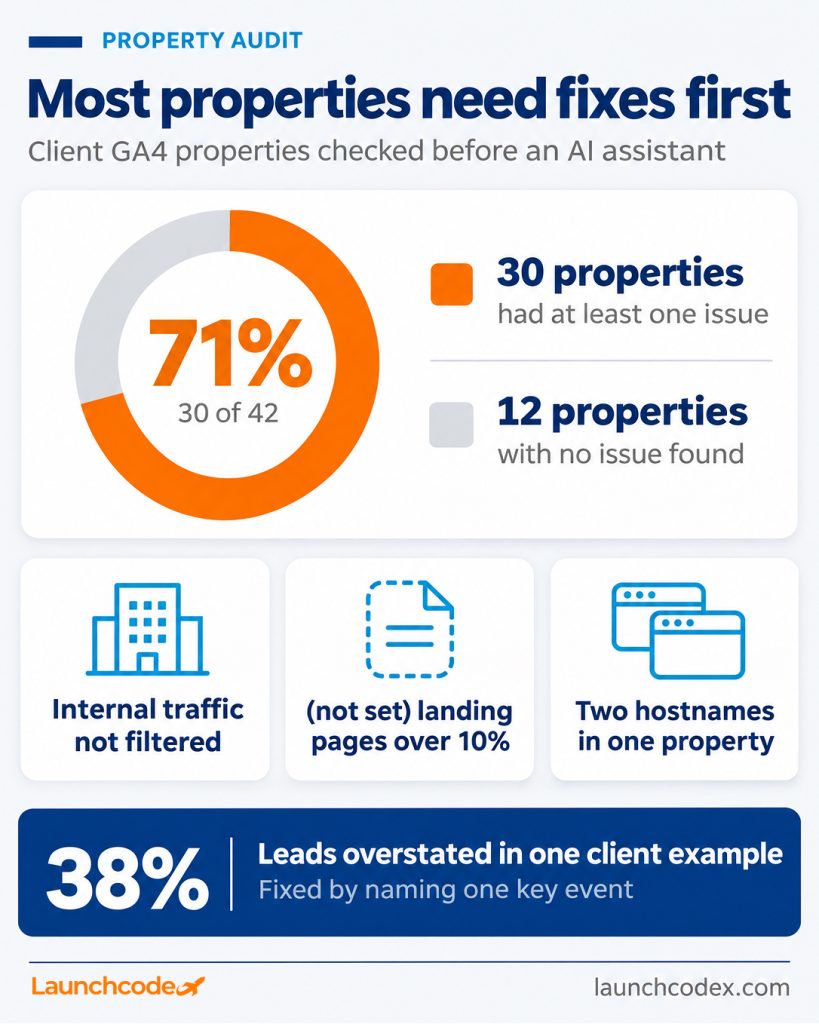
Property configuration causes many wrong answers before the model ever runs. When Launchcodex audited 42 client GA4 properties before connecting them to an AI assistant, 30 of them, or 71 percent, had at least one issue that would skew the assistant’s answers. The issues included unfiltered internal traffic, more than 10 percent of sessions with a (not set) landing page, and two hostnames sharing one property.
Windsor.ai found the same kind of problem on its own property. In its GA4 MCP test, adding the event scoped hostname dimension raised Google organic sessions from 122,285 to about 163,000. About 19 percent of Google organic sessions had a (not set) landing page.
“Keep it short enough to read in two minutes. If your file runs past a page, the assistant starts treating every line as equally important. The two lines we write first are the lead key event and the hostname filter, because those are where we see assistants guess first.” Derick Do, Co-Founder and Chief Product Officer
For one multi-location home services client, the assistant’s first monthly lead count combined form starts with form submissions and overstated leads by 38 percent. Naming the single key event that counts as a lead in the context file fixed it on the next run.
Write 10 to 20 recurring questions with the exact fields, date ranges, and comparison periods written in. Matei Nicolae-Onea, Director of SEO at Windsor.ai, notes that when an assistant splits a question into several requests and joins the results, “that join is where most wrong answers come from.” Pinned questions leave the assistant less to guess.
Two examples:
Check one number per answer against the GA4 interface. Ask the assistant whether the response flagged thresholding, sampling, or an (other) row. Ask which numbers came from a tool and which it calculated. Jesse Sibley, founder of Manifold, warns that “LLMs can make arithmetic mistakes on large numbers.”
“Our rule for client decks is one tied-out number per slide. If the assistant calculated a rate itself, we rebuild that rate from the two raw numbers before it goes in front of a client.” Tanner Medina, Co-Founder and Chief Growth Officer
Then keep the file current. Anthropic’s team watched offline accuracy fall from about 95 percent to about 65 percent within a month before it treated maintenance as an engineering task, according to Anthropic’s write-up. Update your context file every time you change tracking, add a key event, or launch a new hostname.
GA4 only knows about visits that reached your site. It cannot name the organic Google searches behind those visits, show impressions that never turned into clicks, or see revenue that lives in your CRM. For those questions, connect Search Console, the BigQuery export, or your CRM next to GA4.
GA4’s Data API has no dimension for organic Google search queries. In ContextBolt’s test, the agent found the campaign term “(not provided)” on about 93 percent of organic sessions. Search Console metrics in the API were refused without an active Search Console link. ContextBolt founder David describes what GA4 alone can tell you about a winning page: “It can’t tell you why, or what to write next.”
“When a client asks why organic leads dropped, GA4 answers half the question. We pull Search Console queries for the same landing pages and the same date range in the same chat before we say anything about the cause.” Tanner Medina, Co-Founder and Chief Growth Officer
| Question | Best source |
|---|---|
| Which channel drove sessions or key events | GA4 through MCP |
| Which searches and positions drove clicks | Google Search Console |
| Raw events, custom sessions, or joins | GA4 BigQuery export with the BigQuery MCP server |
| Closed revenue and pipeline | Your CRM |
If your question involves AI search, such as how often assistants cite your pages, GA4 is only one input. That work belongs in a broader AI search visibility program.
For franchises, multi-location brands, and agencies, use one service account with Viewer access on every property, one shared context file with a full property map, and one question library. This avoids dozens of credential files and keeps every location’s numbers defined the same way.
Say a franchise runs 30 location properties. Instead of 30 logins, the team adds one service account as a Viewer on each property. The context file lists all 30 property IDs, the shared lead key event, and any location that uses a different hostname. Quota stays per property, so 30 properties means 30 separate daily allowances of 200,000 Core tokens.
The fastest path to trustworthy GA4 answers is small. Connect one property through Google’s local server or hosted endpoint, write a one page context file, run five questions from your library, and tie each answer to the GA4 interface. Expand to more properties and people only after those numbers match.
Google has made access easy. What decides whether AI saves your team time or puts wrong numbers in a client deck is the definitions layer and the checking habit around it. Build those first, and every assistant you connect later follows the same rules.
If you want help building the context file, access model, and reporting workflows across many properties, Launchcodex builds AI systems like this as part of its analytics and automation work.
Yes. Google publishes analytics-mcp, an open source server that runs locally, and documents a hosted endpoint for the Analytics Data API at analyticsdata.googleapis.com/mcp/v1.
Not by default. Google says the server handles read requests only. The one write tool, create_property_annotation, needs the –allow-write flag and the analytics.edit scope.
Not the local server. Web based assistants need a remote MCP connector over HTTPS. Use the hosted endpoint, a self-hosted remote deployment, or a hosted connector.
The server is free. Reports use your property’s Data API quota, which is 200,000 Core tokens per day on standard properties. Most requests charge 10 or fewer tokens.
No. GA4 has no dimension for organic search queries. Connect Search Console for queries, impressions, and positions.
Use Analytics Advisor for quick questions inside GA4. Use MCP when you want GA4 inside the assistant where your other tools, files, and workflows already live.


Real stories from the people we’ve partnered with to modernize and grow their marketing.